
Managed IT Services for Small Business: The Complete Guide
Managed IT services means outsourcing your technology operations to an external team. Instead of hiring full time IT staff or fixing problems as they pop up, you pay a monthly fee to a provider who monitors your systems, handles support requests, manages security, and keeps everything running smoothly. This model gives small businesses access to enterprise level expertise without the enterprise budget.
Below, we’ll walk you through everything you need to evaluate and select a managed IT provider. You’ll learn why this investment matters for your growth, how to spot a quality partner, what services you should actually receive, how pricing structures work, and which red flags to avoid. By the end, you’ll know exactly what questions to ask and what to look for in a provider that fits your business.
Table of Contents
Why Managed IT matter for small business
Your technology infrastructure either enables growth or blocks it. When systems fail, sales stop, customer service stalls, and your team loses productive hours. Traditional IT approaches like hiring a single technician or waiting for problems to break down cost more in lost productivity than most small business owners realize. The difference between reactive fixes and proactive management shows up directly in your bottom line.
The real cost of DIY technology management

Most small businesses lose between $137 to $427 per minute during unplanned downtime, according to industry research. Your accounting software crashes during month end close. Email goes down during a product launch. Your website disappears when customers try to order. Each incident drains revenue while you scramble to find someone who can fix it. Managed IT for small business eliminates these expensive surprises through 24/7 monitoring that catches and resolves issues before they impact operations.

The expertise problem you can’t hire around
Technology now touches every part of your business, from customer relationship management to cybersecurity compliance. You need specialists in network security, cloud infrastructure, backup systems, and regulatory requirements. Hiring one full time IT person costs $60,000 to $80,000 annually plus benefits, yet that person can’t possibly master every area your business needs. A managed provider gives you access to an entire team of specialists for less than the cost of a single employee.
The businesses that survive cyber attacks and system failures are the ones that planned for them before disaster struck.
How to choose the right IT partner
Selecting a managed IT provider determines whether your technology becomes a competitive advantage or a constant headache. You need a partner who understands your business goals, responds quickly to problems, and prevents issues before they affect your operations. The wrong choice leads to missed deadlines, security vulnerabilities, and frustration that costs you more than the service itself.
Evaluate their response time and availability

Your provider should offer 24/7 monitoring and clearly defined response times for different priority levels. Ask how quickly they respond to critical issues like server failures or security breaches versus routine requests like password resets. Quality providers guarantee response times in their service level agreements and track their performance against these commitments. Find out whether they use ticket systems that let you check the status of your requests in real time.
Real availability means more than answering phones. Your provider needs technicians on call who can access your systems remotely and resolve problems without waiting until business hours. Check whether they staff their help desk with actual employees or outsource calls to third party centers where representatives lack direct knowledge of your setup.
Verify their security expertise and certifications
Cybersecurity threats target small businesses because hackers assume you lack enterprise level defenses. Your IT partner must demonstrate current knowledge of security best practices and hold relevant certifications. Look for providers with credentials like CompTIA Security+, Cisco CCNA Security, or industry specific certifications related to HIPAA or PCI compliance if those apply to your business.
Ask specific questions about their security approach. How do they handle data backups? What tools do they use to monitor for suspicious network activity? How often do they test your disaster recovery plan? Providers who give vague answers or promise complete protection from all threats don’t understand the reality of modern cybersecurity.
The best IT partner prevents problems you never knew existed instead of just fixing what breaks.
Understand their client retention and references

Providers who keep clients year after year deliver consistent value. Request references from businesses similar to yours in size and industry. Contact these references and ask direct questions about response times, communication quality, and whether the provider helped them avoid major problems. High turnover among a provider’s clients signals poor service quality or pricing that doesn’t match the value delivered.
Pay attention to how the provider communicates during your evaluation process. Do they explain technical concepts clearly? Do they ask questions about your business operations and goals? Providers who listen first and sell second usually deliver better long term results.
What services small businesses should expect
A comprehensive managed IT setup for small business package covers four core areas that keep your operations running smoothly. These services work together to prevent downtime, protect your data, and help your business grow without technology holding you back. Providers who deliver real value focus on proactive management rather than just responding when problems occur.
1. Proactive monitoring and maintenance
Your provider should monitor your network, servers, and workstations 24/7 to catch problems before they affect your team. This means automated alerts when hard drives run low on space, when backup jobs fail, or when unusual network activity suggests a security threat. Remote monitoring tools track system performance continuously and trigger interventions when metrics fall outside normal ranges.


Maintenance happens on a regular schedule without interrupting your work. Your provider patches software vulnerabilities, updates operating systems, and optimizes system performance during off hours. They replace aging hardware before it fails and test your backup systems to confirm they’ll actually work when you need them. This preventive approach saves you from the emergency expenses and lost productivity that come with reactive IT management.
2. Comprehensive help desk support
Every employee needs fast answers when technology blocks their work. Quality providers offer multiple support channels including phone, email, and online portals where your team can submit tickets and check request status. Response times should match the urgency of each issue, with critical problems addressed within minutes and routine requests handled the same business day.
Support staff should know your systems and business processes well enough to resolve problems quickly. You waste time explaining your setup to different technicians for every call. Consistent service from familiar technicians who understand your environment delivers faster resolutions and better long term improvements to your infrastructure.
The best IT support teams solve problems permanently instead of applying temporary fixes that break again next month.
3. Security and backup management
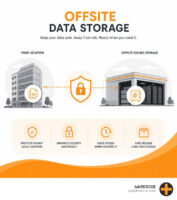
Your provider must implement multiple layers of defense against cyber threats including firewalls, antivirus software, email filtering, and employee security training. They should conduct regular security assessments to identify vulnerabilities and update protection as new threats emerge. This includes monitoring the dark web for compromised credentials and implementing multi-factor authentication across your critical systems.
Backup systems need both local and cloud components that capture your data continuously throughout the day. Your provider should test these backups monthly and maintain a documented disaster recovery plan that gets your business operational again within hours instead of days. They handle everything from configuring backup software to managing storage capacity and retention policies.
4. Strategic planning and consultation
Technology decisions affect your business for years. Your provider should meet with you quarterly to discuss upcoming needs, budget for equipment refreshes, and plan improvements that support your growth goals. They help you evaluate new software options, plan office expansions or relocations, and ensure your IT infrastructure scales with your business instead of holding it back.
How managed IT pricing and contracts work
Most managed IT services use subscription pricing that gives you predictable monthly costs instead of surprise bills when problems occur. Providers structure their fees in different ways, but the goal remains consistent: you pay a fixed rate that covers ongoing support, monitoring, and maintenance. Understanding these pricing models and contract terms helps you compare providers accurately and choose an option that fits your budget without sacrificing service quality.
Per-user pricing explained

The most common pricing structure charges you a monthly fee per employee who uses your technology systems. This rate typically ranges from $75 to $200 per user depending on the service level and your location. Your cost scales naturally as your team grows, and you only pay for active users who need support and system access.
Per-user pricing usually includes basic services like help desk support, system monitoring, security updates, and regular maintenance. Providers who quote significantly lower rates often exclude essential services or limit response times, which defeats the purpose of proactive IT management. Ask exactly what the per-user fee covers and what triggers additional charges before you commit.
What’s typically included vs. extra
Standard managed IT packages cover daily operations including help desk support, network monitoring, backup management, and security updates. You get regular system maintenance, patch management, and access to technicians who handle routine problems without additional fees. These services keep your technology running smoothly under normal conditions.
Projects outside routine maintenance cost extra. Hardware purchases, office relocations, major software implementations, and network expansions typically involve separate project fees because they require additional time and resources beyond standard support. Quality providers give you clear project quotes upfront and separate these costs from your monthly subscription so you can budget accordingly.
Contract terms you should understand

Most providers require annual contracts that lock in your monthly rate and service commitments. These agreements protect both parties by ensuring consistent service and predictable revenue, but you need to understand the cancellation terms and what happens if you outgrow the service level. Look for contracts that allow quarterly reviews and adjustments as your business needs change.
Pay attention to response time guarantees spelled out in the service level agreement. This document should specify how quickly the provider responds to different priority levels and what remedies you receive if they miss these targets. Vague language about “best effort” support signals a provider who won’t commit to measurable service standards. Your contract should also clarify who owns your data, how the provider handles your information when the relationship ends, and whether you can take your systems to another provider without starting from scratch.
Warning signs and myths to watch out for
The managed IT industry includes both excellent providers and companies that deliver poor value. You need to recognize the warning signs that indicate a provider won’t meet your needs and understand the common myths that lead business owners to make expensive mistakes. These insights help you avoid relationships that waste money and leave your systems vulnerable.
Red flags that signal poor service quality
Providers who promise unlimited support for unrealistically low prices either cut corners on service quality or hit you with hidden fees later. Technology support requires skilled technicians and proper tools, which cost money to maintain. Rates significantly below market average mean the provider staffs their help desk with inexperienced technicians, outsources to overseas call centers, or limits what they actually cover under your monthly fee.

Watch out for providers who avoid written service level agreements (SLAs) or refuse to guarantee response times. These companies know they can’t consistently deliver fast support, so they keep terms vague to avoid accountability. You deserve clear commitments about when you’ll receive help for different types of problems and what happens if they miss those targets.
Providers who can’t explain their services clearly in plain language probably don’t understand your business needs either.
Common misconceptions about managed IT
Many business owners believe managed IT only make sense once you reach a certain size. This myth costs you money because waiting until you have problems means you’ve already lost revenue to downtime and security incidents. Professional IT management prevents issues regardless of your company size, and smaller businesses often benefit most from avoiding the expensive mistakes that come with inexperienced technology management.
Another misconception suggests that giving an outside provider access to your systems creates security risks. Reputable providers actually strengthen your security through proper access controls, monitoring tools, and documented procedures that reduce vulnerabilities. They implement better safeguards than most small businesses can afford to build internally.
How to get started
Getting managed IT requires careful planning rather than rushing into the first contract you find. You need to understand your current technology state, identify your specific needs, and select a provider who can deliver measurable improvements. The transition process typically takes 30 to 90 days depending on your infrastructure complexity, but proper preparation ensures you avoid service disruptions and get value from day one.
Assess your current technology situation
Begin by documenting every system your business depends on including servers, workstations, software applications, network equipment, and backup solutions. List any recurring problems your team faces like slow computers, frequent crashes, or security concerns. This inventory helps providers understand your environment and give you accurate pricing instead of estimates that change after they examine your setup.
Identify your budget range and business priorities before contacting providers. You want faster response times to support requests. Your team needs better security to protect customer data. Your systems must handle more users as you grow. Clear priorities help providers recommend the right service level instead of selling you features you don’t need.
Request and compare provider proposals
Contact three to five providers and request detailed proposals that specify exactly what services they include in their monthly fee. Schedule meetings where they can ask questions about your business and see your current setup. Quality providers spend time understanding your operations before they quote prices, while poor providers give generic proposals that don’t address your specific needs.
The proposal comparison process reveals which providers actually understand your business versus those who just want another contract.
Compare proposals on total value rather than just monthly cost. Look at response time guarantees, included services, technician qualifications, and client references. The cheapest option usually delivers the least value, while the most expensive doesn’t always mean the best fit for your business size.
Plan your transition timeline
Work with your chosen provider to create a transition plan that minimizes disruption to your daily operations. They typically start by installing monitoring tools, documenting your systems, and setting up remote access. This onboarding phase runs two to four weeks and happens mostly outside business hours so your team can keep working normally.
Schedule training sessions where your employees learn how to submit support requests and understand what the provider handles versus what stays internal. Your team needs to know who to contact for different problems and how quickly they can expect responses.

Next steps
You now understand what managed IT delivers for small businesses, how to evaluate providers, and what pricing structures to expect. Your next move involves taking action rather than waiting until technology problems force your hand. Start by documenting your current systems and identifying which recurring issues cost you the most time and money.
Contact IT providers who serve businesses your size and request detailed proposals that specify response times, included services, and contract terms. Schedule meetings where they can assess your infrastructure and explain how they would improve it. Ask the tough questions about their security expertise, client retention rates, and what happens when you need help outside business hours.
Small businesses throughout San Marcos and Central Texas trust tekRESCUE to eliminate technology headaches through proactive monitoring, expert support, and strategic planning that aligns IT with business goals. Professional IT management transforms technology from a constant source of frustration into a competitive advantage that helps you grow.
Table of Contents