

Can Your PC Handle the Upgrade to Windows 10?
With Windows 10 coming out at the end of the month, we decided we’d take a few minutes to discuss whether or not your computer can handle it. Current users of Windows 7, 8, and 8.1 are eligible for a free upgrade to Microsoft’s latest operating system. Anyone running an older version Windows will have to purchase a license. But before you make the switch, it’s important to look at your computers technical specifications to ensure the new OS will run smoothly on your machine.
Table of Contents
What Your System Needs
If you’re running windows 8 or 8.1, we have good news: your machine should be good to go! And if your computer runs Windows 7, there’s a good chance it can handle 10 as well. However, you’ll need to look up the following information:
- Processor: 1GHz or faster
- RAM: 1 gigabyte (for 32-bit) or 2 gigabytes (for 64-bit)
How to Check Your Specs
If you aren’t sure about this info, here’s an easy way to check:
- Open your computer’s control panel (via the Start Menu, you may want to type “Control Panel” in the search to avoid hunting for it)
- Type “System” in the Control Panel search bar and click the Green “System” link that pops up in the results (should be the first item in the list)
- Look for a panel that looks similar to this:

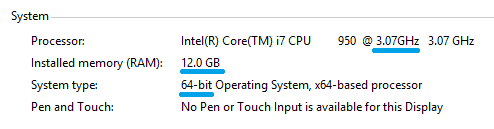
If the Processor is greater than 1GHz, and you have enough ram based on your system type (32-bit or 64bit), congratulations! You shouldn’t have any issues upgrading.
How to Upgrade
In order to reserve your free copy of the upgrade, you should see a little white Microsoft icon in the taskbar (near the clock) that says “Get Windows 10” when you hover over it. If you double click it, you can quickly reserve your copy (if you haven’t already), which should be available to download around the end of July.
Now, just because your system is capable of handling the newest iteration of Windows, it doesn’t mean everything is guaranteed to go off without a hitch. Be sure you backup all of your data in case something goes awry during the upgrade process. If you need help with backing up your machine, or you want to let a pro upgrade your computer to avoid any potential hassles, give tekRESCUE a call! We’d be happy to get your computer upgraded to the newest version so you don’t have to worry about any problems.
Table of Contents