

Content Pruning for SEO: What to Cut, Merge or Keep
Content pruning is the practice of auditing your website and then updating, merging, redirecting or removing pages that no longer earn their place. Done well, it points search engines and visitors toward the pages that matter. Done carelessly, it deletes rankings, backlinks and leads. The difference is the process: audit with data, decide page by page, redirect with care, and measure in batches.
If you run a small business site, here is the uncomfortable truth: every old blog post, thin service page and forgotten landing page is still part of your site. Google still crawls it. Visitors can still land on it. If it carries an outdated price, a retired service or advice that is no longer true, it speaks for your company whether you like it or not.
Table of Contents
TL;DR
- Content pruning means reviewing every page and choosing one of a few actions: keep, improve, merge, redirect, deindex or delete. Deleting is only one option, and often not the best one.
- Start with data, not instinct. Pull search clicks, impressions, backlinks and conversions for each URL before you touch anything.
- Any page with backlinks or traffic that you remove should be 301-redirected to the closest relevant page, and internal links to it should be updated.
- Work in batches, record a baseline first, and give each batch about a month to settle before judging it.
- Pruning is one lever among several. It works best alongside updated content, technical fixes and a clean site structure.
Table of Contents
- What content pruning actually is
- Why it matters for a small business site
- When to prune: the signals
- Step 1: Build the inventory
- Step 2: Flag candidates, then look beyond traffic
- Step 3: Choose the action for each page
- Step 4: Redirect and repair links properly
- Step 5: Prune in batches and record a baseline
- Step 6: Measure whether it helped
- Common mistakes to avoid
- Where pruning fits in your wider SEO
- Let us handle the audit
- Our perspective
- FAQ
- Sources
What content pruning actually is
The name comes from gardening. You cut dead or crowded branches so the plant puts its energy into healthy growth. On a website, the “branches” are pages: old posts, near-duplicate articles, thin pages with a few lines of text, and pages about services you no longer offer.
Search Engine Land describes content pruning as strategically reviewing site content to remove or improve material that no longer meets business and marketing goals. It ties the practice to a set of problems that build up as a site ages: index bloat (too many low-value pages in Google’s index), wasted crawl activity, keyword cannibalization (two of your pages competing for the same search), diluted internal links, and thin or outdated pages linked with declining rankings, traffic and sales.
Notice what pruning is not. It is not a purge to hit a number, and it is not a trick that guarantees a ranking jump. It is maintenance. Think of it as the content version of keeping your books clean.
Why it matters for a small business site
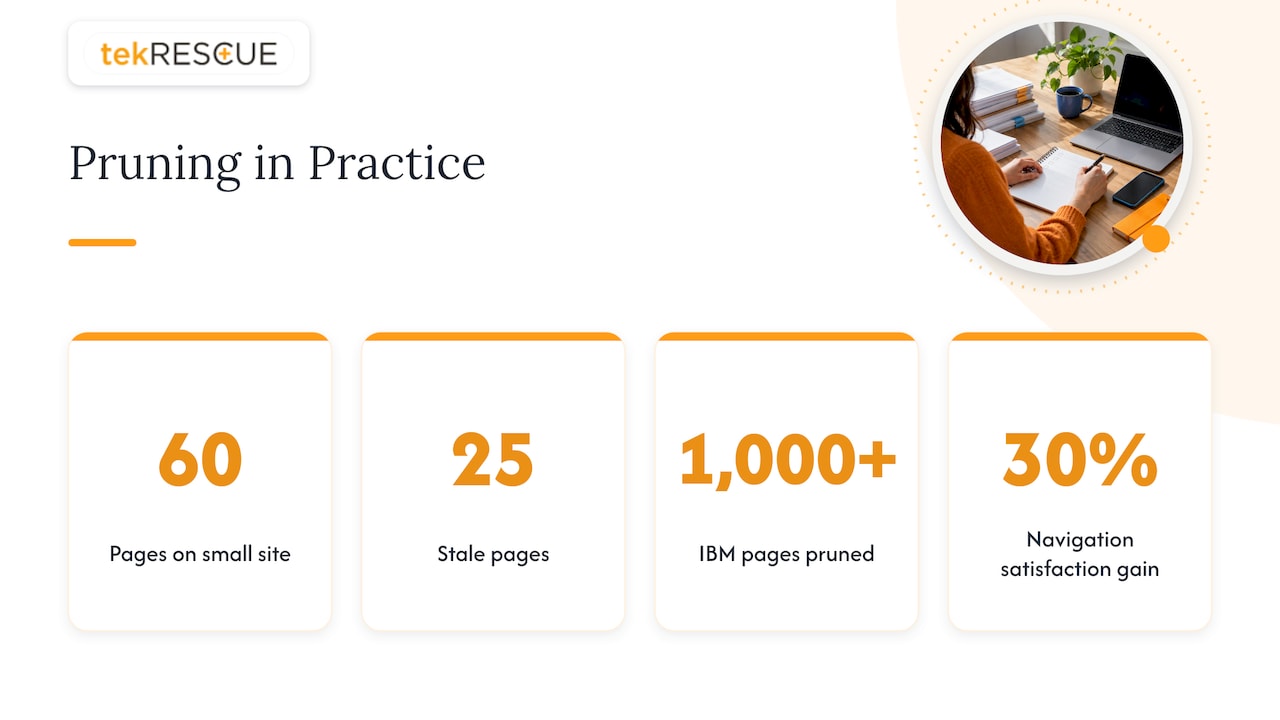
A common myth says pruning is only for publishers with tens of thousands of pages. In practice, smaller sites often feel the problem sharply, because every page has to carry more weight. A 60-page site where 25 pages are stale is a site where almost half of what Google and your customers see is out of date.
There are three practical reasons to care.
Visitors land on wrong information. An old post that still ranks for a service you stopped offering sends the wrong people to you, and it makes the business look neglected. A prospect who finds a retired price or a dead offer rarely calls to ask whether it is still true.
Your pages compete with each other. Over years of publishing, many small businesses write four or five posts on nearly the same topic. Search engines then have to pick one, and they may not pick the one you would. Consolidating those into a single strong page gives you one clear candidate.
Crawl attention gets spread thin. Search Engine Land notes that pruning can reduce wasted bot activity, help stronger content get discovered sooner, and reclaim internal link value, provided internal linking is handled deliberately. On a small site crawl budget is rarely the main issue. Clarity usually is: what is this site about, and which page is the answer?
An outside example shows the scale on which this can work. Ahrefs reported a case where IBM’s team pruned more than 1,000 pages from its main site navigation, pages that were a small share of traffic but a large share of complexity, with navigation satisfaction scores improving by 30% right away. That is a large enterprise. The principle holds for a 60-page site: fewer, better pages are easier for people and search engines to use.
When to prune: the signals
You do not need to prune on a schedule alone. These situations are good triggers:
- Organic traffic has flatlined or declined across a section of the site.
- You have pages with information that is wrong, outdated or legally risky.
- Several posts target the same keyword or question.
- You have rebranded, changed services or changed your voice, and old pages no longer fit.
- You are planning a redesign or migration. This is the best time to decide what comes along and what does not. Our guide on protecting rankings during a site migration covers what to do in the first 48 hours after launch.
For a small site, a sensible rhythm is a full review once or twice a year, with a quick look at your most important pages each quarter. That is a practical guideline rather than a rule, so adjust it to how often your business and services change.
Step 1: Build the inventory
You cannot prune what you cannot see. Start with a spreadsheet that lists every indexable URL on your site. A crawl of your site gives you the list, and your sitemap is a useful cross-check.
For each URL, add:
- Search clicks and impressions over the past 12 months from Google Search Console
- Sessions and engagement from Google Analytics
- Number of referring backlinks
- Number of internal links pointing to the page
- Conversions or form submissions attributed to the page
- Publish date and last update date
- The main topic or keyword the page is meant to serve
Twelve months matters because many small businesses are seasonal. A landscaping page that looks dead in January may be your best performer in April. Pruning a page on a three-month window is how you accidentally delete your busy season.
Search Engine Land’s content audit guide suggests first identifying content that generates zero traffic and zero sales, then evaluating the rest mostly on traffic as an objective measure. That is a good starting filter. It gives you a manageable list of candidates instead of a thousand-row spreadsheet staring back at you.
Step 2: Flag candidates, then look beyond traffic
A page with low traffic is a candidate, not a verdict. Before you decide, check each candidate against these questions:
- Does it have backlinks? A page that few people visit but that other sites link to carries authority you do not want to lose.
- Does it serve a non-search purpose? Sales teams, customer service or compliance staff may rely on a page that gets no organic traffic. Deindexing it keeps it available without asking Google to rank it.
- Does it convert? A page with 20 visits and 4 inquiries beats a page with 2,000 visits and none.
- Is the topic still relevant to what you sell? If yes, the page may need a rewrite rather than removal.
- Does another page of yours cover the same ground better? That points to consolidation.
- Is it recent? A page published six weeks ago has not had time to perform. Leave it alone.
For healthcare practices, add one more filter. Pages that describe how you handle patient information, intake, privacy practices or compliance language should be reviewed for accuracy, not simply for traffic. An outdated statement about how you protect data is a risk, not only an SEO problem.
Step 3: Choose the action for each page
Most guides boil the decision down to a handful of outcomes. Here is a working decision table for a small business site.
| Situation | Best action |
|---|---|
| Useful topic, weak or outdated content, no competing page | Update and republish with fresh information |
| Two or more pages cover the same topic | Merge into the strongest URL, then 301-redirect the others to it |
| Low traffic, has backlinks, content not worth saving | 301-redirect to the closest relevant page |
| Low traffic, no backlinks, content not salvageable | Delete |
| Needed by staff or customers but pointless in search | Noindex (deindex) and keep it live |
| Recent page, not yet had time to perform | Leave it and review next cycle |
This lines up with Search Engine Land’s guidance. When you consolidate duplicate pages, choose the highest-performing URL based on clicks and backlinks, merge the best sections of the other page into it, and redirect the weaker URL. It also advises deleting only content that is irrelevant, outdated and lacks strategic value, and using a 301 redirect to the most relevant remaining page when you do.
Worked example
Imagine a dental practice with a blog that has run for eight years. The audit turns up:
- Four posts about teeth whitening, written in different years. Two get a few clicks a month, one has two backlinks from local sites, and one is outdated and wrong about pricing.
- A post about a holiday closure in 2019 with no traffic and no links.
- A page describing a service the practice dropped two years ago, still ranking for a local search.
The actions: merge the four whitening posts into one thorough page built on the version with the backlinks, and 301-redirect the other three to it. Delete the holiday post, since nothing links to it and it has no value. Redirect the dropped-service page to the main services page, because it still draws search visits and the visitors deserve a live destination. Three of four decisions here were not deletions. That is typical.
Step 4: Redirect and repair links properly
This is where most pruning projects go wrong. When you remove a page without a plan, the old URL returns a 404 error. Google eventually drops 404 pages from its index, and any traffic and link value they had goes with them. Internal links that pointed to the page become broken links.
Search Engine Land also points out that deleting pages removes their links, so you may need replacement links on the pages that stay. Follow this routine for every page you merge or redirect:
- Set a 301 (permanent) redirect from the old URL to the single most relevant live page. Do not send everything to the home page. Search engines treat irrelevant redirects as weak signals, and visitors find them confusing.
- Update internal links so they point straight to the new URL instead of passing through a redirect.
- Check canonical tags and anchor text on the surviving page after a consolidation.
- Update your XML sitemap so it lists only live, indexable URLs.
- Test the redirects before and after launch, including on mobile and for any URL variations such as with and without a trailing slash.
For sites with a lot of redirects, the habits in our guide to SMB website migration with a year of redirects and tested backups apply directly. A redirect is only as good as the maintenance behind it, and redirects you set today should stay in place long enough for search engines and linking sites to catch up. If your content cleanup is part of a redesign, our walkthrough on holding SEO rankings during a redesign shows how to sequence it so one project does not undo the other.
Step 5: Prune in batches and record a baseline
Resist the urge to delete 200 pages on a Friday afternoon. If traffic drops, you will not know which change caused it, and you will not be able to roll back cleanly.
Before the first batch, record a baseline. Search Engine Land recommends capturing organic traffic, the most-clicked keywords, keyword rankings, backlink data, conversions and the internal links pointing to and from each page. Then:
- Group changes by type: one batch of updates, one of merges, one of redirects, one of removals.
- Keep batches small enough that you can reverse them.
- Wait about a month after each batch before assessing, because volatile metrics need time to settle.
That last point matters for your own nerves. Rankings often wobble after structural changes. A dip in week two is not proof the project failed, and a bump in week two is not proof it worked.
Step 6: Measure whether it helped
Track the same metrics you captured in the baseline, and add a few that show whether your site is getting more focused:
- Clicks, impressions and average position in Search Console for the pages that remain
- The number of indexed pages, and any new crawl errors
- Conversions and form submissions
- Whether queries that used to be split across several pages now land on one
Search Engine World’s measurement framework makes a useful point here: if you only watch clicks, pruning can look risky even when it is working. It suggests including signals such as how much of your search impressions are concentrated on your top pages, how queries consolidate toward the surviving pages, and assisted conversions. A smaller site with fewer pages and higher impressions per page is often a healthier site.
Be honest about attribution. Pruning rarely happens alone. If you also publish new content, fix page speed and rewrite titles in the same quarter, you cannot credit the result to one thing. That is fine. The goal is a stronger site, not a tidy experiment.
If you need a broader reporting setup to track all this, see our 90-day SEO reporting metrics plan.
Common mistakes to avoid
Deleting by traffic alone. A page with no visits can still hold backlinks, support sales, or answer a question your customers ask on the phone.
Using a quota. Cutting a fixed percentage of pages is arbitrary. Every page should be decided on its own evidence.
Redirecting everything to the home page. Send each retired URL to the closest relevant live page.
Ignoring internal links. Pruning changes your link structure. Pages that lose inbound links may need new ones, and the links left pointing at removed pages need to be fixed.
Skipping the baseline. Without before-and-after numbers you cannot tell whether you helped or hurt.
Cutting so much the site goes thin. If your site ends up with too little to cover your services and questions, you have removed substance. Pruning should lead into better content, not leave a gap.
Forgetting the security side. Old pages, forgotten subdomains and abandoned plugins are not only an SEO burden. Outdated sites are easier to attack. Removing dead pages is a good moment to confirm what is still hosted and who maintains it.
Where pruning fits in your wider SEO
Pruning clears space. What you do with that space decides the outcome. After a cleanup, the strongest next moves are usually to refresh the pages you kept and make each one clearer about what it answers. Our on-page SEO checklist is a good companion for that second pass.
If you serve more than one city, pruning interacts with your location pages too. Merging near-identical city pages can help, but each location still needs its own distinct page with real local content. See our guide to multi-location SEO before you cut. Healthcare practices have additional considerations about what they can say and how patient-related information is handled, which our piece on HIPAA-aware medical SEO covers.
Let us handle the audit
A content audit takes patience: exporting data, matching it by URL, checking backlinks, deciding on each page, building the redirect map, and watching the results afterward. Our search engine optimization service covers SEO for small and midsize businesses, and our web team can carry out the site changes that come out of an audit, including website maintenance and management. If your site is in Austin, San Marcos, New Braunfels, Kyle or the surrounding area and you want a clear list of what to keep, merge or retire, that is where to start.
Our perspective
Most small business owners we talk to about their websites share one worry: they are afraid to touch anything. The site works, it brings in some calls, and every change feels like a risk. So pages pile up for years.
Our view is that a website is a working asset, and working assets need maintenance. Pruning is a disciplined version of that maintenance. It starts with a question, not with a delete button: what does each page do for the business?
We pair SEO with web development and managed IT, and that matters here. Content decisions touch redirects, hosting, site structure and security at once. A pruned site that is also well maintained and properly hosted is easier to protect, easier to update and easier for customers to trust.
If you take one thing from this article, take this: never remove a page without knowing where its visitors and links will go next.
Randy Bryan
FAQ
Does content pruning really improve SEO?
It can, but it is not guaranteed. Removing or consolidating weak pages helps search engines and visitors find your best content, and it reduces overlap between your own pages. The gains are usually clearest when pruning goes together with updating the pages you keep and fixing technical issues.
How often should a small business prune its content?
A full review once or twice a year suits most small sites, with a quicker check of key pages each quarter. Run an extra audit after a redesign, a move to a new platform, a change in services or a sustained drop in search traffic.
Should I delete or redirect a low-traffic page?
Delete only when the page has no backlinks, no real traffic and nothing worth saving. If it has backlinks or any meaningful search traffic, 301-redirect it to the closest relevant page. If staff or customers still need it but it has no search value, noindex it and keep it live.
How long until I see results from pruning?
Allow about a month after each batch for volatile metrics to settle, and expect a clearer read after a few months. Seasonality and other site changes can blur the picture, so compare against your 12-month baseline rather than the previous week.
Is content pruning only for big websites?
No. Large publishers prune at scale, but small sites benefit too, because each page carries more of the load. A site with a few dozen pages can have outdated, duplicate or thin content that is worth cleaning up.
Sources
- Content Pruning: Boost SEO by Removing Underperformers, Search Engine Land
- Content audit: How to run it in 6 easy steps, Search Engine Land
- Content Pruning Measuring Success, Search Engine World
Recommended
Table of Contents