
IT Documentation Standards: What to Write Down and How
IT documentation standards are the written rules for what your business records about its systems, who writes it, how it is formatted, where it lives, who can read it and how often it is reviewed. If you run a small business, the practical version is simple: keep a current inventory and network diagram, write an SOP for every repeatable process, write a runbook for every task someone must do under pressure, lock the whole set down, and review it on a schedule.
Most small businesses do none of this until something breaks. Then the only person who knew the firewall password has left, the backup has been failing for months, and nobody can say which server holds the patient or client files. That is the moment documentation stops being paperwork and becomes survival.
Table of Contents
TL;DR
- Document four layers: the environment (inventory, network diagrams, data flows), processes (SOPs), technical procedures (runbooks) and security configuration.
- An SOP says what happens, in what order and who is accountable. A runbook says exactly which commands and screens to use in one system.
- Label network diagrams consistently, show VLANs and IP blocks, and update them after every significant change.
- Treat documentation as sensitive. Network maps and configuration notes are a roadmap for an attacker, so restrict who can view and edit them.
- Healthcare practices have a hard rule: HIPAA requires Security Rule documentation to be kept for six years.
Table of Contents
- What IT documentation standards actually are
- What a business should document
- SOPs and runbooks: write both, and keep them different
- Network diagram standards
- Write it so people can follow it
- Keep it accurate, current and locked down
- Healthcare and regulated businesses: documentation is the evidence
- A 30-day plan for a small business
- Perspective
- Get your environment documented and protected
- FAQ
- Sources
What IT documentation standards actually are
A standard is a decision you make once so nobody has to make it again. Which template does every procedure use? What do we call a server? Where does the master copy live? Who approves a change to it? Without those answers, documentation becomes a pile of personal notes, each in a different format, half of them out of date.
There are two kinds of standards worth separating:
- Formal frameworks that tell you what must exist. NIST, the FFIEC handbook, HIPAA and ISO 27001 all expect documentation, and auditors and examiners will ask for it.
- House standards that tell you how your own team writes it: naming conventions, templates, review dates, owners.
You need both. The frameworks set the floor. Your house standards make the documents usable at 2 a.m. when a server is down.
What a business should document
Start with what the frameworks themselves say. The FFIEC IT Examination Handbook says management should document and maintain accurate representations of the IT and business environment, including network diagrams, data flow diagrams, business process flow diagrams and process narratives, and update them after significant changes. That handbook is written for financial institutions, but the logic holds for any business that depends on its systems.
NIST goes further on the security side. Control SA-5 in NIST SP 800-53 Revision 5 calls for administrator documentation covering secure configuration, installation and operation of a system, effective use and maintenance of security functions, and known vulnerabilities in the configuration and use of privileged functions. Those are federal controls, but they describe what good looks like for anyone.
Translated for a 10 to 100 person company, that gives you this working list:
| Layer | What to record | Typical owner |
|---|---|---|
| Asset inventory | Every computer, server, firewall, switch, access point, printer, license and cloud subscription, with owner and purchase or renewal date | IT lead or managed provider |
| Network | Logical and physical diagrams, VLANs, IP ranges, DNS and DHCP settings, ISP circuit details and support numbers | IT lead or managed provider |
| Data | Where sensitive data lives, how it moves, how it is backed up and encrypted, how long it is kept | Owner or compliance officer |
| Accounts and access | Who has admin rights, how accounts are created and removed, multifactor authentication coverage | IT lead |
| Processes | SOPs for onboarding, offboarding, change approval, patching, backups, vendor access | Process owner |
| Technical procedures | Runbooks for restoring a backup, rebuilding a workstation, failing over a server, isolating an infected machine | Technician |
| Security and incident | Incident response plan, contact tree, risk assessment results, policy set | Owner or security lead |
Never store passwords in these documents. Reference where the credential lives, in a password manager or vault, and who can open it.
SOPs and runbooks: write both, and keep them different
People use the terms interchangeably, and that is how you end up with documents that are too vague to follow and too detailed to approve.
A standard operating procedure describes a process: what happens, in what order, who is accountable and what must be recorded. A runbook describes the specific commands, screens and steps to carry out one task in one system and environment. The SOP is for the process owner and the auditor. The runbook is for the technician under time pressure.
Here is an example. The SOP for employee offboarding says that HR notifies IT on the last day, IT disables the account within a set window, the manager confirms equipment return and a ticket records completion. The runbook for the same event lists the exact steps in your identity platform and email system: disable sign-in, revoke sessions, remove from groups, convert the mailbox, wipe the mobile device.
What goes in an SOP
- Purpose, scope and the trigger that starts the process
- Roles that perform, approve and review the work
- The required stages, checks and who has decision rights
- Exceptions and the route for handling them
- The records or evidence that prove it was done
- A named owner, a review date and a clear version number
What goes in a runbook
- Title, ID, owner, last review and next review date
- The symptom or trigger that makes it relevant
- Prerequisites: access, tools and approvals needed before starting
- Numbered steps with the exact commands or menu paths and the output you should see
- Decision points: if you see this, go to step 7, if that, escalate
- Validation: how you confirm it worked
- Rollback steps and stop conditions
- Escalation contacts with phone numbers
- Version history
Write each step as one action. Put expected output after the step. Write for the tired person who has never done this task, because that person will eventually be the one doing it.
Runbooks worth writing first
Do not try to document everything in a month. Begin with the procedures where an error is expensive:
- Restoring from backup, including how to confirm the restore is complete and usable
- Responding to a suspected compromise: isolating a device, resetting credentials, who to call
- Onboarding and offboarding accounts
- Rebuilding a failed workstation or server
- Applying and rolling back critical patches
- Failing over or recovering internet service
If you want a worked starting point for the incident piece, our guide to a HIPAA incident response plan for the first 12 hours shows the sequence a small provider should have written down before it is needed.
Network diagram standards
A network diagram that nobody trusts is worse than none, because people will act on it. Three standards make the difference: show the right detail, label it consistently and keep it current.
Show the right detail
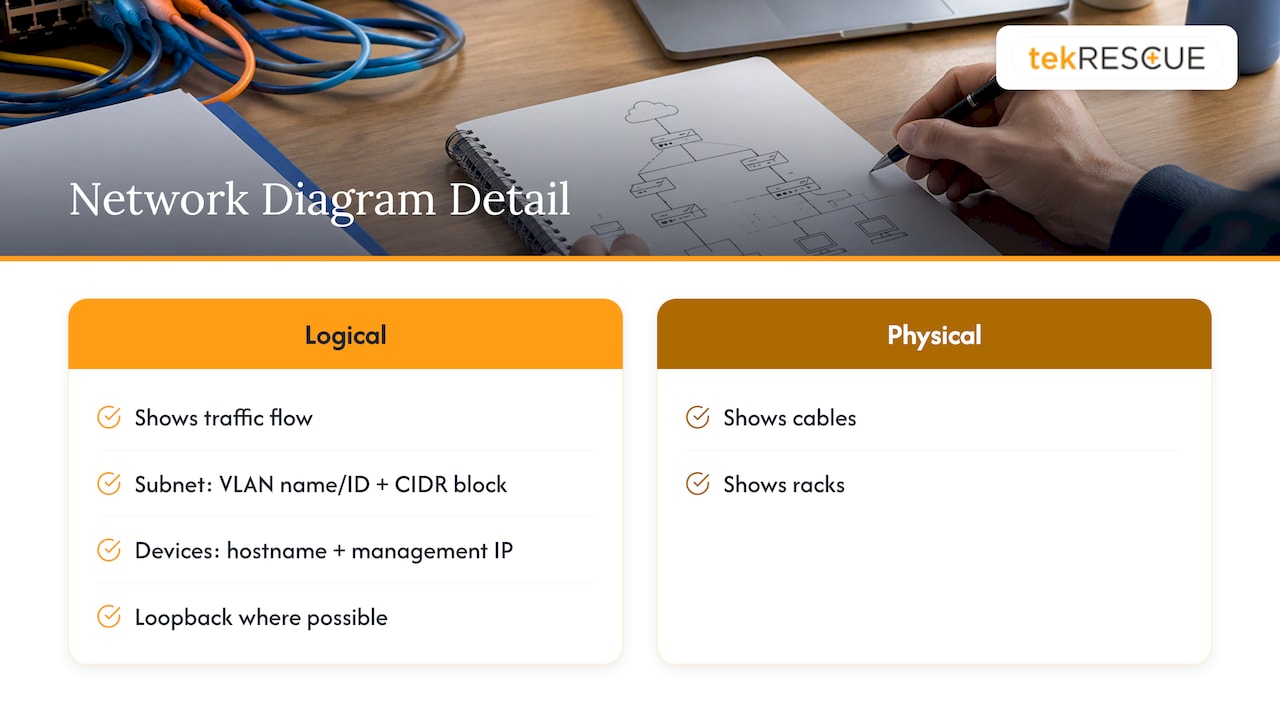
Keep a logical diagram, which shows how traffic flows, separate from a physical one, which shows cables and racks. On the logical diagram, conventions from the networking community suggest that subnet objects capture the VLAN name or ID and the assigned IP block in CIDR notation, and that each router, switch and firewall carries a hostname and management IP, with a loopback address where possible.
Beyond the drawing, keep a companion record of DHCP and DNS configuration, directory services, and ISP details such as circuit IDs and support contacts. Those are the facts you need when the internet is down and the provider asks for a circuit number.
Label consistently
Pick a naming scheme and use it everywhere: diagram, inventory, monitoring and tickets. A hostname that encodes site, role and number (for example, aus-fw-01) tells a stranger what they are looking at. Guidance on diagram conventions also stresses consistent symbols and connector styles, and keeping public, private and admin paths visually distinct, so the diagram stays readable after export or scaling.
Keep it current
The FFIEC handbook ties updates to significant changes. Make that a rule in your change SOP: no change ticket closes until the diagram and inventory are updated. If your environment changes often, add a short monthly check. The same diagram-conventions guidance suggests 15 to 30 minutes for confirming symbols, connectors and path clarity.
Also write the failure scenarios next to the map. A short list of what happens if the primary internet circuit fails, if the main switch dies or if the domain controller is unreachable turns a static picture into a recovery tool.
Write it so people can follow it
The standards that matter most are mundane:
- One template per document type. Every SOP has the same headings in the same order. Every runbook does too.
- Plain words. Short sentences, active voice, defined acronyms. Say “restart the service” rather than describing the concept of a restart.
- One source of truth. A single repository, not a shared drive, a wiki, and someone’s laptop.
- Named owner and review date on every page. A document with no owner is already stale.
- Screenshots and expected output. Show what success looks like.
- Version history. You must be able to tell which version was in effect on a given date.
Keep it accurate, current and locked down
The FFIEC handbook is blunt about the cost of stale records: inaccurate documentation can lead to incorrect decisions, and with them security vulnerabilities, maintenance problems or recovery delays. It also says management should restrict access and editing privileges to these representations because they contain sensitive details such as IP addresses, locations and how network elements connect.
That is the point many small businesses miss. Your network documentation is exactly what an intruder wants after the first foothold, because it shows where to move next. Apply these controls:
- Give read access on a need-to-know basis and limit edit rights to named owners and approved contributors.
- Require multifactor authentication on the documentation system.
- Log who views and changes pages.
- Keep credentials and encryption keys out of documents entirely.
- Keep an offline or separately hosted copy of the recovery runbooks. If ransomware takes your network down, a wiki that lives on that network is no help.
Review cadence
There is no single mandated interval for small businesses, so set one by risk. A sensible pattern that we use as a starting point: backup and recovery procedures and incident contacts get checked most often, operational SOPs quarterly, and general technical references twice a year. Add a trigger on top: any significant change, any incident and any staff departure forces a review of the affected documents. Give each page a status such as draft, in review, published or archived, so retired procedures are never mistaken for live ones.
After every real incident or drill, ask one question: where did the document fail us? Fix that page that week.
Healthcare and regulated businesses: documentation is the evidence
If you handle protected health information, documentation is not optional housekeeping. Under 45 CFR 164.316, covered entities must maintain Security Rule policies and procedures and written records of required actions, activities and assessments. They must retain that documentation for six years from the date of creation or the date it was last in effect, whichever is later. It must be available to the people who implement it, and it must be reviewed and updated when environmental or operational changes affect the security of electronic PHI.
In practice, that means your risk assessment, your policies, your access procedures and your incident records all have to be written, dated and retrievable. Our resources go deeper on each piece:
- The audit-ready HIPAA checklist of six areas practices must document
- A walkthrough of the HIPAA risk assessment for small practices
- An overview of the HIPAA Security Rule requirements
- Guidance on building a data retention policy so you know what to keep and for how long
Financial and professional firms face similar expectations through the FTC Safeguards Rule and examiner handbooks, and a documented environment makes any assessment faster and cheaper.
A 30-day plan for a small business
You do not need a documentation project that lasts a year. Try this:
- Week 1: inventory. List every device, account, license and cloud service. Name an owner for each.
- Week 2: map. Draw the logical network diagram and record DNS, DHCP and ISP details. Mark where sensitive data lives.
- Week 3: top three runbooks. Backup restore, compromise response, offboarding. Have someone who did not write them test each one.
- Week 4: standards and access. Choose the template, the naming scheme, the repository and the review calendar. Lock down access and store an offline copy.
After that, add one SOP or runbook per week from your list of expensive mistakes.
Perspective
We walk into small businesses regularly where the entire IT environment lives in one person’s head. It works until that person is on vacation, gone or unreachable during an attack. At that point the business discovers it cannot defend or recover what it cannot describe.
Here is the uncomfortable truth: attackers are getting faster, and automated tools can probe and move through a network at a pace no human responder matches. The only way to answer that speed is to decide in advance. A tested runbook is a decision you made calmly, so your team does not have to make it in a panic.
We also push back on the idea that documentation is a back-office chore. It is a security control. Current diagrams show you lateral movement paths before an intruder finds them. Access-restricted records keep your own map out of the wrong hands. Dated, retained records are what a regulator asks to see after a HIPAA incident.
That is why our managed IT and cybersecurity work treats documentation as part of the service, not an afterthought. If you run a business, do not wait for the outage to find out what is missing.
Randy Bryan
Get your environment documented and protected
If your records are thin, outdated or locked in one person’s head, we can help. tekRESCUE provides managed IT services for small and midsize businesses in Austin, San Marcos and the surrounding Central Texas communities, along with cybersecurity services and risk assessments and incident response. Healthcare practices can also start from our HIPAA compliance resources. Tell us what you run today and we will talk through what needs to be written down first.
FAQ
What is the difference between an SOP and a runbook?
An SOP describes a process: the steps in order, who is accountable and what has to be recorded. A runbook is narrower and more technical, giving the exact commands or screens for one task in one system. Most businesses need both, with the SOP for the process owner and the runbook for the technician.
How often should IT documentation be reviewed?
Set the interval by risk and add event triggers. Backup, recovery and incident contact documents deserve the most frequent checks, operational SOPs a quarterly review and general references a twice-yearly one. Any significant network change, incident or staff departure should trigger an immediate update of the affected pages.
What should a network diagram include?
Show subnets with VLAN names or IDs and IP blocks in CIDR notation, and label each router, switch and firewall with a hostname and management IP. Keep public, private and admin paths visually distinct. Pair the diagram with DNS, DHCP, directory and ISP circuit details.
How long must HIPAA documentation be kept?
Covered entities must retain Security Rule policies, procedures and required written records for six years from creation or from the date last in effect, whichever is later. Documentation must also be reviewed and updated when changes affect the security of electronic PHI. A compliance officer or qualified advisor can confirm how this applies to your practice.
Is it safe to keep network documentation in a shared wiki?
Only if access is restricted. Network documentation reveals IP addresses, locations and how systems interconnect, so limit viewing to those who need it, limit editing to named owners, require multifactor authentication and keep credentials out entirely. Keep an offline copy of recovery runbooks too.
Sources
- NIST SP 800-53 Revision 5, Security and Privacy Controls for Information Systems and Organizations
- FFIEC IT Examination Handbook: IT and Business Environment Representations
- 45 CFR 164.316, Policies and procedures and documentation requirements
- Network Documentation Series: Logical Diagram
- Network Diagram Symbols and Conventions
Recommended
Table of Contents