
Firewall Rules Best Practices for Small Businesses
Most small business firewalls fail the same way. Someone opens a port to fix a problem on a Friday afternoon, nobody writes down why, and the rule is still there three years later. Attackers do not need to break a firewall like that. They walk through the door it left open.
Good firewall rules come down to five habits: block everything by default, allow only what you can justify, write each allow rule as narrowly as possible, document and log every change, and review the whole set on a schedule. This guide walks through each habit with a sample policy you can adapt. If you would rather have the work done and maintained for you, our network security and firewall services cover exactly this.
Table of Contents
TL;DR
- Start from default deny: block all inbound and outbound traffic that no rule expressly permits, then add allow rules one by one.
- Make every allow rule specific: named protocol, source, destination and port, plus a comment saying who asked for it and why.
- Put narrow rules above broad ones, and keep the deny-all rule last.
- Segment your network into zones and filter outbound traffic as carefully as inbound.
- Log changes and denied traffic, test before you deploy, and review the rule set at least quarterly.
Table of Contents
- Why default deny comes first
- What a good firewall rule specifies
- Rule order decides what actually happens
- Segment the network and filter both directions
- Document, test and log
- Review the rule set on a schedule
- A sample firewall policy for a small office
- Healthcare and regulated businesses
- Let us build and maintain your rules
- Perspective
- FAQ
- Sources
Why default deny comes first
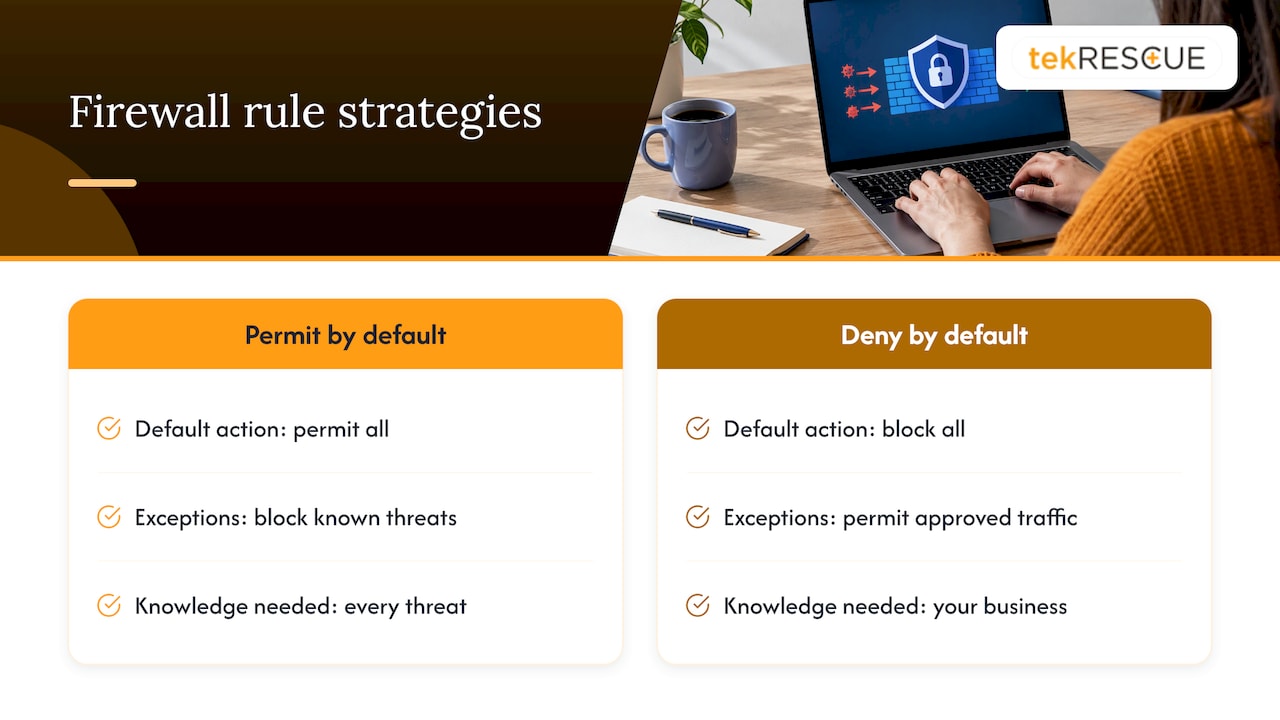
A firewall rule set can be built in two ways. You can permit everything and block the bad things you know about, or you can block everything and permit the good things you have approved. The first approach requires you to know every threat in advance. The second requires you to know your own business. You can do the second.
The U.S. National Institute of Standards and Technology (NIST) is clear on this. Its guidelines on firewalls and firewall policy recommend that a firewall block all inbound and outbound traffic not expressly permitted by policy. NIST says this decreases the risk of attack and is more secure than permitting everything that is not explicitly forbidden. Idaho’s state technology agency says the same in its firewall configuration guidelines: all ports and protocols stay closed unless approved, and only those with a documented business justification get opened.
“Default deny” simply means the last rule in your list says: if nothing above matched, drop it. Many firewalls ship with this behavior built in. The danger is not the default. The danger is what gets added above it.
What this looks like in practice
Imagine a dental office with a front desk, a back office server and a guest Wi-Fi network. Under default deny, the guest network cannot reach the server, because no rule says it can. The front desk can reach the practice management software on one port, because someone wrote that rule and gave a reason. Nothing else crosses without a rule.
Compare that with a permit-by-default setup. The same office needs a new rule every time it discovers something it should have blocked, and it only discovers it after the incident.
What a good firewall rule specifies
A vague rule is a hole. NIST advises that rule sets be as specific as possible, and its examples of policy requirements show what to pin down: the protocol, the source and destination addresses, the particular ports, and in some cases the type of ICMP message (the diagnostic traffic behind ping). Microsoft’s documentation on Windows Firewall rules adds that each rule should record the application, the port range and a note such as the creation date.
Here is the minimum every rule should carry:
| Field | What to write | Weak example | Strong example |
|---|---|---|---|
| Action | Allow or deny | Allow | Allow |
| Source | Exact address or named group | Any | Front desk workstations |
| Destination | Exact server or subnet | Any | Practice software server |
| Protocol and port | The one service needed | All ports | TCP 443 only |
| Comment | Owner, reason, date, expiry if temporary | (blank) | Billing portal, requested by office manager, reviewed each quarter |
NIST specifically recommends filling in the comment field so an auditor, or the person who inherits your network, can tell why a rule was made. It also recommends copying changes to a configuration management log. That sounds like paperwork until the day something breaks and you need to know what changed.
Avoid the any-any rule
The most common bad rule allows any source to reach any destination on any port. It usually starts as a temporary test. Then it stays. A single broad allow rule near the top can quietly cancel your entire default deny posture, because the firewall stops at the first match and never reaches the deny rule below.
If you must create a temporary rule, give it an owner and an expiration date in the comment, and put the date on a calendar.
Rule order decides what actually happens
Most firewalls read rules from the top down and act on the first match. That makes order a security control, not a formatting choice.
- Specific rules go above general ones. A narrow rule that blocks one address must sit above a broad rule that allows the whole subnet, or it never fires.
- The deny-all rule goes last. Nothing should sit below it.
- Frequently matched rules can go higher for performance. NIST notes that on firewalls evaluating rules in sequence, rules with the highest chance of matching can be placed near the top, as long as that does not break rules 1 and 2.
Not every product behaves the same way. Windows Firewall, for instance, does not simply read top to bottom. Microsoft documents a precedence model: explicit allow rules override the default block setting, explicit block rules override conflicting allow rules, and more specific rules override less specific ones. Know which model your device uses before you reorder anything, and check the vendor documentation for your hardware.
Segment the network and filter both directions
A flat network is one where every device can talk to every other device. If a single laptop is compromised, the attacker can look around freely. Segmentation breaks the network into zones, with firewall rules controlling what crosses between them.
For a small business, a practical set of zones looks like this:
- Staff workstations
- Servers and line-of-business systems
- Guest Wi-Fi, with internet access only
- Devices you cannot patch easily, such as cameras, printers and smart displays
- Payment or point-of-sale systems, where you have them
- Management interfaces, reachable only from a small number of admin machines
Rules between zones follow the same least-privilege logic: guests cannot reach servers, cameras cannot reach workstations, and so on.
Do not forget outbound traffic
Many small businesses write careful inbound rules and leave outbound wide open. That is a gift to malware. Once something is running inside your network, it needs to call home to receive instructions or send data out. NIST’s recommendation covers outbound traffic for this reason: block what is not expressly permitted in both directions.
Start simple. Let workstations browse the web, let your mail server send mail, let DNS queries come from your designated resolvers only, and see what the logs say is being denied. Each denied entry is either a mistake in your rules or something you should know about.
Services that should not face the internet
Remote desktop, file sharing, database ports and the administration pages of your firewall and other devices should not be reachable from the open internet. If staff need remote access, put it behind a VPN or a restricted set of trusted addresses. This is one of the most common findings when we look at a small business network, and one of the cheapest to fix.
Document, test and log
A rule you cannot explain is a rule you cannot safely remove. NIST’s guidance covers four connected habits.
Document. Keep the rule set with comments, plus a record of policy decisions and changes. NIST also recommends backing up the rule set regularly, so a failed device does not take your security policy with it.
Test before deploying. NIST suggests testing on a network that resembles production, checking that allowed traffic passes, blocked traffic is blocked, applications still work and logging functions. A rule change pushed straight to a live firewall can take down your phones, your billing software or your remote staff.
Log. NIST calls logging a critical step. Store logs on the device and send them to a central log system where possible. Set real-time alerts for rule modifications, a disabled rule, reboots and low disk space. A silent change to your firewall rules should never be silent.
Retain. Idaho’s guidelines call for logging denied and allowed traffic, configuration changes and administrative access to a central system, keeping at least 90 days online and one year offline. Those figures come from a state government standard, not a universal law, but they make a sensible target for a business that wants to be able to reconstruct what happened after an incident.
Logs are only useful if someone looks at them. Our guide to network visibility explains what to watch and why.
Review the rule set on a schedule
Firewall rules rot. Servers get retired, vendors change, staff leave, and the rules that served them stay behind. Worse, if a new device later takes over an old address, an old allow rule may silently permit traffic to something nobody intended.
Idaho’s guidelines call for reviewing rules at least quarterly to remove obsolete or overly permissive entries. NIST says policy should be based on a risk analysis, kept in your security documentation and updated as new attacks, vulnerabilities and application needs appear. It also recommends outside audits and penetration testing, in addition to routine checks.
A quarterly review can be done in an afternoon if the comments are good:
- Export the rule set and sort by last match, if your firewall tracks it.
- For each allow rule, confirm the owner still needs it. No answer means disable it, wait, and then delete it.
- Hunt for any-any rules, expired temporary rules and duplicates.
- Check that the deny-all rule is still last.
- Check the firmware and software version of the firewall itself. Our patch management policy guide covers how to keep that routine.
The review is also the right time to ask whether your rules still match your actual risks. Our cybersecurity risk assessment checklist gives you the questions to start with.
A sample firewall policy for a small office
This is a starting point, not a drop-in configuration. Your addresses, services and software will differ.
| Order | Action | Source | Destination | Service | Comment |
|---|---|---|---|---|---|
| 1 | Allow | Admin workstations | Firewall management interface | HTTPS | Management access, admin team only |
| 2 | Allow | Staff workstations | Line-of-business server | App port only | Required for daily work, owner: operations |
| 3 | Allow | Staff workstations | Internet | Web browsing | Standard staff access |
| 4 | Allow | Mail server | Internet | Mail delivery | Outbound mail only from this server |
| 5 | Allow | Guest Wi-Fi | Internet | Web browsing | Guests have no internal access |
| 6 | Deny and log | Guest Wi-Fi | Internal zones | Any | Explicit guest block, logged |
| 7 | Deny and log | Any | Any | Any | Default deny, always last |
Notice what is missing: no rule says any to any, no management interface faces the internet, and every line has a reason. Row 6 is technically redundant with row 7, but an explicit logged block for a high-risk zone makes the logs easier to read.
Healthcare and regulated businesses
If you handle patient records, financial data or other regulated information, your firewall rules are part of a bigger obligation. A well-built rule set supports your safeguards, but it does not by itself make you compliant. Regulators and auditors expect documented policies, risk analysis and evidence that you follow them. A firewall configuration with no written policy behind it leaves a gap.
That is why we handle firewall work alongside our HIPAA compliance services, and why the documentation habits above matter so much in healthcare offices.
Let us build and maintain your rules
Writing rules once is easy. Keeping them correct as your staff, software and vendors change is where businesses slip. tekRESCUE offers network security and firewall services, managed IT, risk assessments and incident response for small and mid-sized businesses in the Austin and San Marcos area. If you want a firewall policy that is documented, reviewed and tied to your real risks, start with our cybersecurity services or talk to us about managed IT services.
Perspective
If you run a business, here is the uncomfortable truth: your firewall is only as good as the last person who changed it. Attackers move at machine speed now. They scan for exposed remote access, forgotten test rules and any-any entries automatically, around the clock, and they do not care that your office has ten employees.
We think about firewall rules as a living policy, not a device setting. That means default deny as the foundation, every allow rule tied to a business reason, logs that someone actually reads, and a review on the calendar. It is the unglamorous work, and it is the work that closes the door.
This is why our network security and firewall services sit next to risk assessment and incident response. Knowing what you must protect comes first. Writing rules that enforce it comes second. Keeping them honest over time is the part that most businesses cannot spare the hours to do. Our five essential controls for small business is a good place to see where firewall rules fit in the bigger picture.
Randy Bryan
FAQ
What is a default deny firewall policy?
It is a policy in which the firewall blocks all traffic unless a rule expressly allows it. The deny-all rule sits at the end of the list and catches everything that no earlier rule matched. NIST recommends this approach because it reduces the chance of attack compared with allowing everything not explicitly forbidden.
How often should we review firewall rules?
At least quarterly is a common standard, and Idaho’s state guidelines use that interval. Review sooner after major changes such as a new application, a vendor change, an office move or a security incident. A fast-changing environment benefits from more frequent checks.
Does rule order really matter?
Yes. Most firewalls act on the first rule that matches, so a broad allow rule placed above a narrow block rule will override it. Put specific rules first and the deny-all rule last. Some products, including Windows Firewall, use precedence rules instead of strict top-down order, so confirm how your device evaluates rules.
What should a firewall policy example include?
Each rule should name the action, source, destination, protocol and port, and carry a comment with the owner, the reason and the date. Temporary rules should also have an expiry date. The sample table in this guide shows a simple seven-rule policy for a small office.
Is a firewall enough to meet HIPAA requirements?
No. A firewall supports network protection, but compliance also needs written policies, risk analysis and documented procedures. Healthcare practices should treat the firewall rule set as one documented part of a wider program, and our team can help you build that program.
Sources
- NIST SP 800-41 Revision 1: Guidelines on Firewalls and Firewall Policy
- Idaho ITA Firewall Configuration Guidelines
- Windows Firewall Rules, Microsoft Learn
Recommended
Table of Contents