
Google Business Profile Suspension Recovery: How to Get Reinstated
A suspended Google Business Profile means your business stops showing up where local customers look first. Recovery comes down to three things: finding the exact guideline you broke, fixing it before you touch the appeal button, and filing one clean appeal backed by documents that match your profile. Google lets you appeal only once per decision, so rushing is the most expensive mistake you can make.
If you run a small business, here is the uncomfortable truth: your profile is often the front door of your company. When it goes dark, calls, directions requests and form fills go with it. This guide walks you through the recovery in the order that protects your one appeal.
Table of Contents
TL;DR
- A suspended profile is hidden from the public until the problem is resolved, and the notice goes to the Google Account that manages the profile.
- Fix the cause first: name, address, categories, duplicate profiles, or a restricted account. Then appeal.
- Appeals can be submitted once per decision, so attach evidence whose business name and address match your profile exactly.
- If you are denied, Google may offer an additional review, and you can add evidence you left out the first time.
- After reinstatement, stop editing core fields casually and lock down the accounts that control the profile.
Table of Contents
- How to tell your profile is suspended
- Why profiles get suspended
- Before you appeal: the pre-flight checklist
- How to file the reinstatement appeal
- The evidence that makes an appeal stronger
- If your appeal is denied
- When the account itself is restricted
- How long recovery takes
- After reinstatement: keep it from happening again
- Where tekRESCUE fits
- Our perspective
- FAQ
- Sources
How to tell your profile is suspended
Google says a profile that violates its guidelines becomes disabled or suspended and is not shown to other users until the issue is resolved. The owner gets a notification in the Google Account used to manage the profile. Check that inbox, including spam, and sign in to the profile directly.
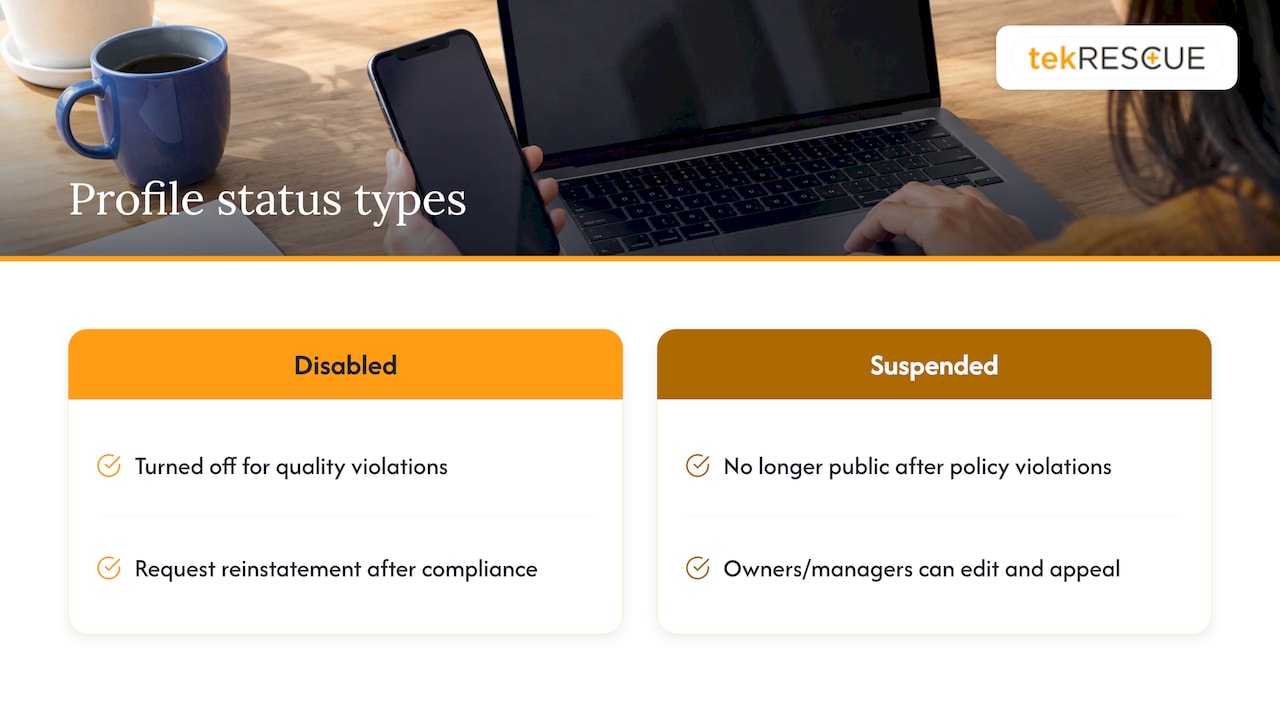
The two labels are not the same thing. According to Google’s status documentation, a disabled profile was turned off for quality violations, and you can request reinstatement after bringing it into compliance. A suspended profile violated policies and is no longer public, but owners and managers can still make edits and appeal. Both paths end at the same place: fix, then appeal.
One warning sign deserves its own mention. If you search your business name and the knowledge panel shows no owner controls, or you see a notice instead of your dashboard, treat it as a suspension until you confirm otherwise.
Why profiles get suspended
You cannot write a good appeal until you know what you are appealing. Google’s guidelines for representing your business are the rulebook. They require the profile to represent the business accurately, and they prohibit unnecessary information in a business name, P.O. boxes or remote mailboxes as addresses, and more than one profile for each business location.
In practice, these are the causes we would check first, and each one maps to something Google or an independent industry publication documents.
Ineligible address
P.O. boxes, UPS-style mailboxes and virtual offices are the classic trigger. Search Engine Land notes that a co-working space only works when you have a dedicated office, permanent signage, visible customers and staffed hours. If you serve customers at their location and have no storefront, Google’s rules let you represent a service area instead of showing a street address. Our guide to service area business SEO covers how to set that up.
A business name that does not match the real world
Google advises representing the business as it is recognized in the real world: on signage, stationery and branding. Adding keywords or a tagline to the name field is the quickest way to draw attention. “Smith Plumbing” is fine if that is your sign. “Smith Plumbing Best Cheap Emergency Plumber Austin” is not.
Edits to core fields
Search Engine Land lists changes to the name, address, phone number or primary category as a common trigger. Edits to those fields can prompt a fresh review. Update them only when something about the real business has changed, and change one thing at a time.
Duplicate profiles and shared contact details
Google’s rules call for one profile per business location. Two businesses sharing an address or phone number can also look like a duplicate, which is the situation Search Engine Land describes. Medical and legal practices that share a suite are especially exposed.
Too many categories
Google’s guidance is to use the fewest categories needed to describe the business. Stacking categories to chase more searches looks like manipulation.
Reports from third parties
Search Engine Land also points out that anyone can flag a listing through “Suggest an Edit” or Google’s redressal form. A competitor, a disgruntled former employee or a well-meaning stranger can start the process.
Account-level restrictions
This is the one owners miss. Google’s policy overview explains that a pattern of policy violations can restrict Business Profile access and suspend every profile tied to that account. A restriction on a related Google product account can also suspend a profile created through it. If more than one profile went dark at once, suspect the account, not the listing.
Before you appeal: the pre-flight checklist
The appeal is a one-shot tool. Spend your time here.
- Compare your profile to your real-world identity. Put your business name, address, phone and website next to your signage, state registration, license and invoices. Every mismatch is a risk.
- Fix the guideline problem Google could cite. Remove keywords from the name, correct the address or switch to a service area, remove extra categories, and merge or remove duplicate listings you control.
- Check the account. Sign in with the account that manages the profile and confirm it is not restricted. If it is, the account comes first (more on that below).
- Make your website tell the same story. Your site should show the same name, address and phone as the profile. A mismatched website is an easy reason for a reviewer to doubt you.
- Gather documents. Collect them before you open the tool, not during.
If your website and listing details have drifted apart over the years, our local SEO checklist and the walkthrough on mapping every profile field help you bring them back into line.
How to file the reinstatement appeal
Google’s official process is straightforward. Here it is with the places where owners go wrong.
- Confirm the profile follows the guidelines. This is step one for a reason. Appealing before fixing the cause is how a recoverable suspension becomes a denial.
- Open the appeals tool while signed in to the associated account. The wrong account means you will not see your profile or decision in the tool.
- Select the profile and the decision you are appealing. If you manage several profiles, make sure you pick the right one.
- Add evidence and an explanation. Both are optional in the form, but treat them as required. An appeal with no documents asks the reviewer to take your word for it.
- Submit. Google reviews the appeal and emails its decision to you.
Keep your explanation short and factual. Say what the business is, where it operates, what you corrected, and what the attached documents show. Skip the emotion and the history of how much revenue you lost. A reviewer needs facts they can verify.
What to put in the explanation
- The legal business name and the address or service area on your profile.
- The specific issue you fixed, such as removing keywords from the name or switching a mailbox address to a service area.
- A statement that the attached documents show the same name and address as the profile.
The evidence that makes an appeal stronger
Google lists official business registration, a business license, tax certificates and utility bills as optional evidence that can strengthen an appeal. The key rule: the business name and address on the documents should match the profile.
That last point is where small businesses stumble. Your license says “Smith Plumbing LLC,” your profile says “Smith Plumbing,” and your utility bill is in the name of the landlord. Before you submit, line up each document against the profile and fix what you can on your side.
A useful way to think about evidence comes from a Google Business Profile community guide. It suggests every document should help answer whether the business is legitimate, exists at the shown location, is represented by an authorized owner, operates as described and matches its web presence. It also says the strongest appeals combine several reinforcing document types.
Here is a simple way to apply that.
| What the reviewer wants to know | Evidence to consider |
|---|---|
| The business is real and registered | Business registration, license, tax certificate |
| It exists at this location | Utility bill, lease, photos of signage and the entrance |
| You are authorized to manage it | Documents showing your role, with matching names |
| It operates as described | Invoices, insurance paperwork, photos of staff and vehicles |
| It matches its online presence | A website showing the same name, address and phone |
Use the documents you actually have. Never submit altered or invented paperwork. Google’s rules rest on accurate representation, and a fabricated document turns a fixable problem into a permanent one.
If your appeal is denied
A denial is not always the end. Google says that when a reinstatement request is denied, it may be able to provide an additional review, and you can submit evidence that was not part of the original appeal.
Before requesting that review:
- Read the decision email closely for the reason given.
- Compare it with what you submitted. The gap is usually a mismatch in name or address, or documents that do not show the business at the profile’s location.
- Add what was missing, rather than resending the same files.
One community thread from a business suspended after moving offices describes about six appeals and a long wait for support after escalation. Treat anecdotes like that as a reminder to build the strongest possible first appeal, not as a schedule.
When the account itself is restricted
If the Google account is restricted for policy violations, Google states that all Business Profiles managed from it are suspended and that you cannot create or claim new profiles. The order matters: appeal the account restriction on the My accounts page, track it there, and only after it is lifted appeal the Business Profile. Skipping ahead wastes your single appeal.
This is also where cybersecurity enters the story. If someone else gained access to your account and changed your name, address or categories, or posted prohibited content, the violations may not have been yours. Securing the account is part of the recovery, and it is part of what stops a repeat.
How long recovery takes
Google does not publish a guaranteed turnaround in the help page we used, and the appeals tool has no countdown. Plan for uncertainty. Plan for your phone number, website and other listings to carry the load while you wait, and avoid editing the profile or filing duplicate appeals, which can muddy the review. Google emails the decision, so keep watching the inbox of the managing account.
After reinstatement: keep it from happening again
Reinstated is not the same as safe. Google also notes there are steps for fixing issues with a reinstated profile, so check the dashboard right away for anything still flagged.
Then build habits:
- Treat core fields as locked. Change the name, address, phone or primary category only when the real business changes, and record the date and reason.
- Keep one profile per location. Audit for old duplicates created by previous staff or agencies.
- Match everything. Your website, directory listings, signage and paperwork should show one identical name and address. Structured data helps your site state those details clearly, and our local business schema patterns show how.
- Post within the rules. Our guide to what to publish and what to avoid in Google Business posts keeps your content from causing trouble.
- Protect the account. Limit who has owner access, remove former employees and contractors, and secure the login for the managing account.
- Understand wider penalties. A profile suspension is separate from organic ranking issues, and our guide to Google penalties explains the difference.
For additional ideas on how your listing appears once it is live again, see our piece on optimizing your Google Business page in search results.
Where tekRESCUE fits
A suspension tends to expose a bigger problem: business details scattered across a website, a listing and a handful of directories, with no one owning them. tekRESCUE works with small and medium-sized businesses on search engine optimization, website design and maintenance, and cybersecurity, including risk assessments and incident response. If your website needs to tell the same story as your profile, or the account behind your listing needs to be locked down, those are the services built for that. You can start from our main site.
Our perspective
Most suspensions we hear about are not dramatic. They are small inconsistencies that pile up: a name with a tagline added by an eager marketer, an address that changed on the website but not on the profile, an old login shared with someone who left the company.
Here is the point we keep coming back to. Your profile is only as trustworthy as the systems behind it. The website, the accounts, the people with access: that is the real weak link. A clean appeal helps, but a business whose digital footprint is consistent and secured rarely needs one.
We build and maintain websites, run SEO, and handle cybersecurity for small businesses because these pieces belong together. If you run a business that depends on being found locally, treat your listing as an asset that needs an owner, not a form you filled out once.
Randy Bryan
FAQ
Can I appeal more than once?
Google says appeals can only be submitted once per decision. If you are denied, Google may be able to provide an additional review, and you can include evidence that was not in your original appeal. That is why the first submission should be complete.
How do I know my profile is suspended and not just hidden in search?
Google notifies the owner in the Google Account used to manage the profile. A suspended profile is also not shown to other users. Sign in to the managing account and look for the notice and the appeal option.
What documents should I send?
Google lists official business registration, a business license, tax certificates and utility bills as optional evidence. Make sure the business name and address on each one match the profile. Choose documents that show the business is real, at that location and run by an authorized owner.
Why were several of my profiles suspended at once?
Google explains that an account restricted for policy violations suspends every profile it manages. In that case, appeal the account restriction on the My accounts page first. Once it is lifted, appeal each Business Profile.
Sources
- Fix suspended or disabled profiles, Google Business Profile Help
- Find your business on Google, Google Business Profile Help
- Understand your Business Profile status, Google Business Profile Help
- Guidelines for representing your business on Google
- Overview of Google Business Profile policies
- 5 reasons your Google Business Profile might get suspended, Search Engine Land
- Required Evidence for a Successful Google Business Profile Suspension Appeal, Google Business Profile Community
Recommended
Table of Contents