
Protect Rankings: SEO for Website Migration in the First 48 Hours
You can migrate a website without losing SEO if you benchmark first, map every URL and test your 301 redirects, remove staging noindex tags the moment you launch, and monitor Search Console closely for the following weeks. Skip any one of those four safeguards and you’re gambling with traffic that took years to build. The single next move, before you touch a line of code, is to export a full URL list and baseline your current analytics.
TL;DR:
- A migration should be carefully planned with a full URL inventory, redirect map, and benchmarks to prevent traffic loss, especially during large or international site moves.
- Technical failures such as missing redirects, broken canonical tags, and leftover noindex tags are the main causes of long-lasting traffic drops, which can last from weeks to over a year if not addressed.
- Testing redirects, canonical tags, and schema markup in staging, along with verifying server capacity and performance, is essential to avoid chain redirects and server errors after launch.
- Keeping redirects in place for at least 180 days, updating hreflang tags properly, and fixing internal links ensures smooth SEO transfer and preserves backlink equity.
- External help is recommended for complex or large-scale migrations involving domain changes or compliance needs, supported by thorough pre-migration prep, staging QA, and vigilant post-launch monitoring.
Table of Contents
Table of Contents
- Why Website Migration Affects SEO (And What’s Normal vs. a Hangover)
- What Type of Migration Are You Running?
- Pre-Migration Checklist: Benchmarking, Inventory, and Planning
- Build and Test: Staging QA, Performance, and Tracking Validation
- URL Mapping and Redirect Strategy: Rules, Timing, and Search Console Actions
- Launch Day: The First 48 Hours
- Post-Migration Monitoring: The First 30 to 90 Days
- Common Migration Mistakes and Quick Fixes
- What Happens to Your Backlink Profile During Migration?
- Handling Hreflang and International SEO During Migration
- Updating Internal Linking Structure After Migration
- Communicating Migration to Users and Stakeholders
- SEO Content Audit and Optimization During Migration
- tekRESCUE’s Take: Which Migration Tasks to Delegate
- Get Migration Support That Protects What You’ve Built
- Sources
- FAQ
Why Website Migration Affects SEO (And What’s Normal vs. a Hangover)
Every migration causes some ranking noise. Google has to recrawl, recompare, and re-index your entire site, and that process is never instant. A dip in organic clicks during the first weeks is typical and usually self-corrects as crawlers process your new URLs and redirects.
What is not normal is a “migration hangover.” This refers to significant traffic losses that drag on for months instead of days. Search Engine Journal’s reporting on migration hangovers documents cases where the damage persisted 12 to 18 months, almost always traced back to the same handful of technical failures: missing or broken redirects, canonical tags pointing at the wrong URLs, noindex tags accidentally left live, content that changed enough to lose keyword relevance, or a slower site that tanked Core Web Vitals scores.
The 50% Threshold: A 10% to 30% dip after launch is normal recalibration. A 50%+ drop that doesn’t recover within a month signals a technical failure, not algorithm noise, according to Search Engine Journal’s migration analysis.
Watch four metrics daily during the transition: organic clicks and impressions in Search Console, the number of indexed pages (compare old count to new), and ranking positions for your top 20 revenue-driving keywords. If indexed pages stall well below your old total two weeks post-launch, something in your technical setup is blocking Google, and that’s your first place to look.
What Type of Migration Are You Running?
Not every migration carries the same risk profile, and knowing which category you’re in tells you where to spend your review time.
- Visual redesign (same URLs, new look): Lowest risk. Watch for content trimmed during the redesign that quietly removes ranking signals.
- CMS or platform change: Medium to high risk. URL structures often change even when nobody intends them to, and old plugins or schema markup rarely carry over cleanly.
- Domain change: Highest risk. This requires the full redirect and Change of Address process, since you’re asking Google to transfer trust to an entirely new address.
- HTTP to HTTPS: Lower risk if done correctly, but still requires a full redirect map since the protocol change technically creates new URLs.
- Hosting or CDN change: Usually invisible to SEO unless it degrades page speed or triggers server errors during the switch.
- Content consolidation: Medium risk. Merging pages means choosing which URL survives and redirecting the rest, with real judgment calls about which page’s rankings to preserve.
For large sites, Google’s own migration guidance recommends moving in sections rather than flipping the entire domain at once. A phased rollout lets you catch a broken redirect pattern on 5,000 pages before it spreads to 50,000.
Pre-Migration Checklist: Benchmarking, Inventory, and Planning
This is the phase most teams rush, and it’s the phase that determines whether your migration is a non-event or a six-month recovery project. Everything downstream depends on the accuracy of what you document here.
Start by pulling a complete picture of where you stand today.
- Export Search Console performance data for the last 12 to 16 months: clicks, impressions, average position, and click-through rate by page and query.
- Pull analytics baselines covering organic sessions, conversion rate, and revenue by landing page, so you have a pre-migration number to compare against later.
- Crawl the entire site with a tool that captures every URL, its status code, title tag, meta description, canonical tag, and internal link count.
- Build a content and URL inventory in a spreadsheet listing every live page, its purpose, and whether it’s staying, merging, or being cut.
- Identify your high-value pages by cross-referencing organic traffic with backlink count. These are the pages where a mapping mistake does the most damage.
- Create a one-to-one redirect map, old URL to new URL, in a shared spreadsheet that both developers and marketers can reference during QA.
- Document current canonical tags and schema markup for every high-value page so you can verify they carried over correctly after launch.
- Set success metrics and rollback criteria in writing: what traffic drop percentage, and over what timeframe, triggers a rollback conversation.
- Assign stakeholder responsibilities so everyone knows who owns redirects, who owns content QA, and who has authority to pull the rollback trigger.
The redirect map deserves special attention because it’s the single artifact most migrations get wrong. A one-to-one map means every old URL points to its direct new equivalent, not a blanket redirect to the homepage. Google has flagged homepage-catchall redirects as one of the fastest ways to lose the ranking signals a page spent years earning.
Backlinks matter just as much as traffic here. A page with modest organic traffic but 40 referring domains pointing to it deserves the same care as your highest-traffic landing page, because losing that link equity in a botched redirect is much harder to rebuild than losing search rankings you can reoptimize your way back to.
Pro Tip: Build your redirect map in a shared spreadsheet with columns for old URL, new URL, redirect type, and a checkbox for “verified live.” It sounds basic, but it’s the single document that saves a migration when three different vendors are touching the site at once.
Before you finalize the plan, run a quick audit of your current site’s technical health using a tool built for the job, such as those leveraging AI for SEO to streamline the process. Auditing your SEO like a pro before migration gives you a clean before-and-after comparison and often surfaces existing problems (orphaned pages, broken internal links, duplicate content) that you’d otherwise blame on the migration itself.
Build and Test: Staging QA, Performance, and Tracking Validation
Your staging environment is where every assumption in your redirect map gets tested against reality, before real traffic and real rankings are on the line.
Run a full technical crawl of the staging site the same way you crawled the live site during benchmarking. Compare title tags, meta descriptions, header structure, and internal linking against your inventory to catch anything that dropped or changed unintentionally during the build.
- Validate structured data on staging using a schema testing tool, since broken schema markup often survives a migration invisibly until rich results disappear weeks later.
- Benchmark Core Web Vitals on staging against your pre-migration scores. Search Engine Journal’s migration guide recommends this comparison specifically because performance regressions are one of the most common causes of ranking loss after a redesign.
- Confirm analytics, tag management, and conversion tracking fire correctly on staging pages, not just the homepage.
- Test your redirect map on staging in a controlled batch before applying it site-wide, checking for redirect chains where one URL bounces through two or three hops before landing.
- Verify canonical tags on staging point to the new URL structure, not leftover references to the old domain or old paths.
Redirect chains deserve a callout of their own. A URL that redirects to another redirect, which redirects again, adds latency and dilutes the signal Google passes through the chain. Google’s site-move documentation is explicit that permanent, direct, one-hop redirects are the standard to test for, and staging is where you catch chains before they go live.
One more thing staging QA often skips: server capacity testing. A launch that triggers a wave of Googlebot crawl activity on an under-provisioned server can produce transient 5xx errors that look like a content problem but are really an infrastructure problem, and those errors actively slow down indexing recovery.
URL Mapping and Redirect Strategy: Rules, Timing, and Search Console Actions
Get four things right here and you eliminate most of the risk in the entire migration.
- One-to-one mapping, always. Every old URL redirects to its closest new equivalent, never to the homepage as a catch-all. A homepage fallback tells Google the specific page’s relevance is gone.
- Use server-side 301 redirects (or 308 where your framework calls for it), and verify each one with the URL Inspection Tool in Search Console rather than trusting a spot check in your browser.
- Keep chains to a single hop. Google explicitly warns against chaining redirects, and it also warns against chaining entire site moves, meaning don’t shift Domain A to Domain B and then Domain B to Domain C within the same project.
- Maintain redirects for at least 180 days, and keep the old domain under your control for a full year if possible, since abandoned domains get repurposed by others in ways that can confuse both users and search engines.
- Only use the Change of Address tool after redirects are live and verified. Search Console’s Change of Address feature forwards ranking signals to the new domain, and its notification window lasts 180 days, but it only works correctly once the underlying redirects are functioning.
- Fix canonical errors immediately. A canonical tag still pointing at an old URL structure actively works against your redirects by telling Google to index the wrong version.
Pro Tip: Even a technically perfect 301 doesn’t guarantee a perfect transfer of ranking authority. Search Engine Journal’s migration research notes that redirected pages still need monitoring and, in some cases, targeted reoptimization after launch to fully recover their previous position.
Launch Day: The First 48 Hours
Launch during a genuinely low-traffic window for your audience, not just a convenient time for your dev team.
- Remove every noindex tag and staging block the moment the new site goes live. This is the single most common launch-day failure and it’s entirely preventable with a checklist item.
- Verify robots.txt on the live domain isn’t still blocking crawlers the way a staging robots.txt file typically does.
- Spot-check status codes on your 20 highest-value pages, confirming each returns a 200 and every corresponding old URL redirects correctly.
- Submit a fresh XML sitemap to Search Console immediately, since Google’s migration documentation notes this speeds up discovery of the new URL structure.
- Confirm analytics is receiving data from the live domain, not still pointed at staging or a canceled property.
- Watch server logs for spikes in 4xx or 5xx errors, which usually mean either a redirect gap or a server capacity problem under increased crawl activity.
- Keep your rollback plan on standby. If critical errors appear (indexing collapse, mass 404s, tracking failure), you want the rollback steps documented and ready, not improvised at midnight.
Post-Migration Monitoring: The First 30 to 90 Days
The work doesn’t end at launch. It shifts into a monitoring cadence that should stay tight for the first week, then settle into a weekly rhythm.
Check daily for the first seven days: Search Console index coverage, Core Web Vitals performance, server logs, and analytics traffic against your pre-migration baseline. After that first week, weekly checks are usually sufficient unless something looks wrong.
When a metric drops, work through triage in order rather than guessing: first confirm no noindex tags or bad canonicals are live, then verify redirects are firing correctly, then check for unintended content changes, then look at performance regressions. This order matters because the first two causes are the most common and the fastest to fix.
- Fix your highest-traffic pages first. A redirect problem on your top 10 landing pages matters more than the same problem on page 40 of your blog archive.
- Resolve any redirect chains you find and resubmit your sitemap as fixes roll out, since a stale sitemap slows Google’s discovery of corrected URLs.
- Consider a rollback only if index coverage collapses or organic traffic drops beyond the threshold you set in your pre-migration planning, not at the first sign of normal volatility.
Recovery timelines vary, but Search Engine Journal’s analysis of migration hangovers found that unresolved technical issues, not algorithm penalties, are what stretch recovery from weeks into 12 to 18 months.
Common Migration Mistakes and Quick Fixes
Most SEO damage from a migration traces back to five repeat offenders.
- Noindex left on live pages. Crawl the live domain immediately post-launch and search for the noindex meta tag; remove it the moment you find it.
- Missing 301s or redirect chains. Audit your redirect map against a fresh crawl of 404s; any old URL returning a 404 needs an immediate redirect added.
- Canonicals pointing to old URLs. Pull a canonical tag report across your top 50 pages and correct any that still reference the previous domain or path.
- Performance regressions after redesign. Rank your slowest pages by traffic value and fix the highest-traffic offenders first, not the easiest ones.
- Content or keyword relevance loss. If a page’s rankings dropped after content changed, restoring the original title tags, headers, and internal links often recovers position faster than a full rewrite.
Pro Tip: Keep a “known good” archive.org snapshot of your top pages before migration. When something looks off, Archive let you compare exactly what changed instead of guessing.
What Happens to Your Backlink Profile During Migration?
Every backlink pointing at an old URL depends entirely on that URL either staying live or redirecting correctly. When a redirect breaks, the link still exists on the linking site, but the authority it was passing has nowhere to go, and that’s link equity lost for good until someone fixes the redirect or the linking site updates its own URL.
Protecting your backlink profile starts with the same inventory work from pre-migration planning: cross-reference your highest-authority pages against your backlink data before launch, not after. Pages with strong referring domain counts should sit at the top of your QA priority list, checked first on launch day and monitored first in the weeks after.
If you’re consolidating multiple pages into one during the migration, choose the surviving URL based partly on which version has the strongest link profile, not just which has the most current design or the most recent content. Redirecting a heavily linked page into a thin, low-authority survivor wastes the equity those links represent.
One thing to watch for after launch: broken links on your own new site that used to point correctly to internal resources. A backlink pointing at an old URL that then chains through your own broken internal redirect compounds the loss twice over, once on your side and once on the linking site’s side.
Handling Hreflang and International SEO During Migration
If your site serves multiple languages or regions, hreflang tags need the same one-to-one mapping treatment as your URLs. Every hreflang annotation on your old site referencing a specific regional or language URL must be updated to reference that page’s new address, not left pointing at a now-redirected page.
A common failure during international migrations is updating the English-language hreflang tags while leaving the alternate-language versions referencing old URLs. Google then sees a mismatch between what the tag claims and where it actually resolves, which can cause the wrong regional version to surface in search results, or none of them to surface correctly.
Audit your hreflang implementation on staging before launch, confirming every tag’s href value matches the new URL structure and that the reciprocal linking between language versions is intact. Each page should reference every other language version, and each of those should reference it back. A one-way hreflang reference is functionally broken even if it looks correct at a glance.
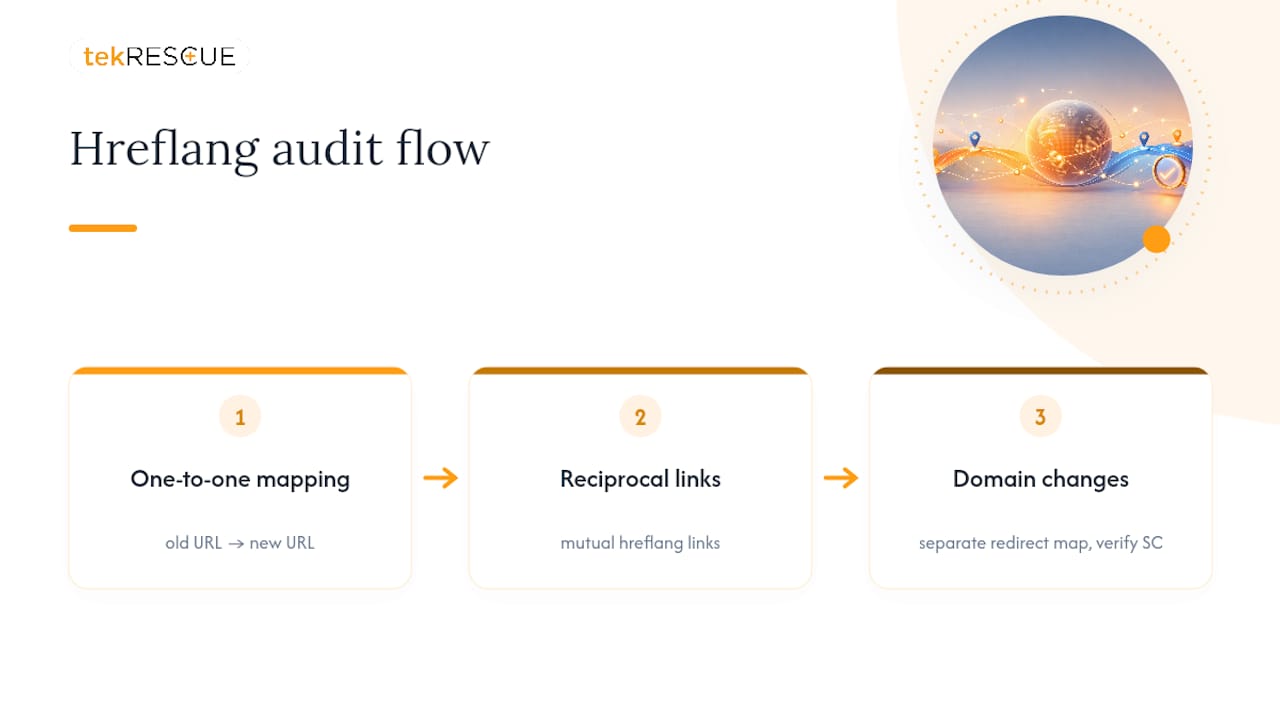
If your migration also changes your domain structure for international markets (moving from subdirectories to country-specific subdomains, for instance), treat that as its own migration inside the migration, with its own redirect map and its own Search Console verification, since the risk of losing regional rankings compounds when hreflang and URL structure change simultaneously.
Updating Internal Linking Structure After Migration
Internal links carry ranking signals just as backlinks do, and a migration is the moment those signals are most likely to get scrambled. Any internal link still pointing at an old URL forces a visitor, and a crawler, through an unnecessary redirect hop instead of landing directly on the current page.
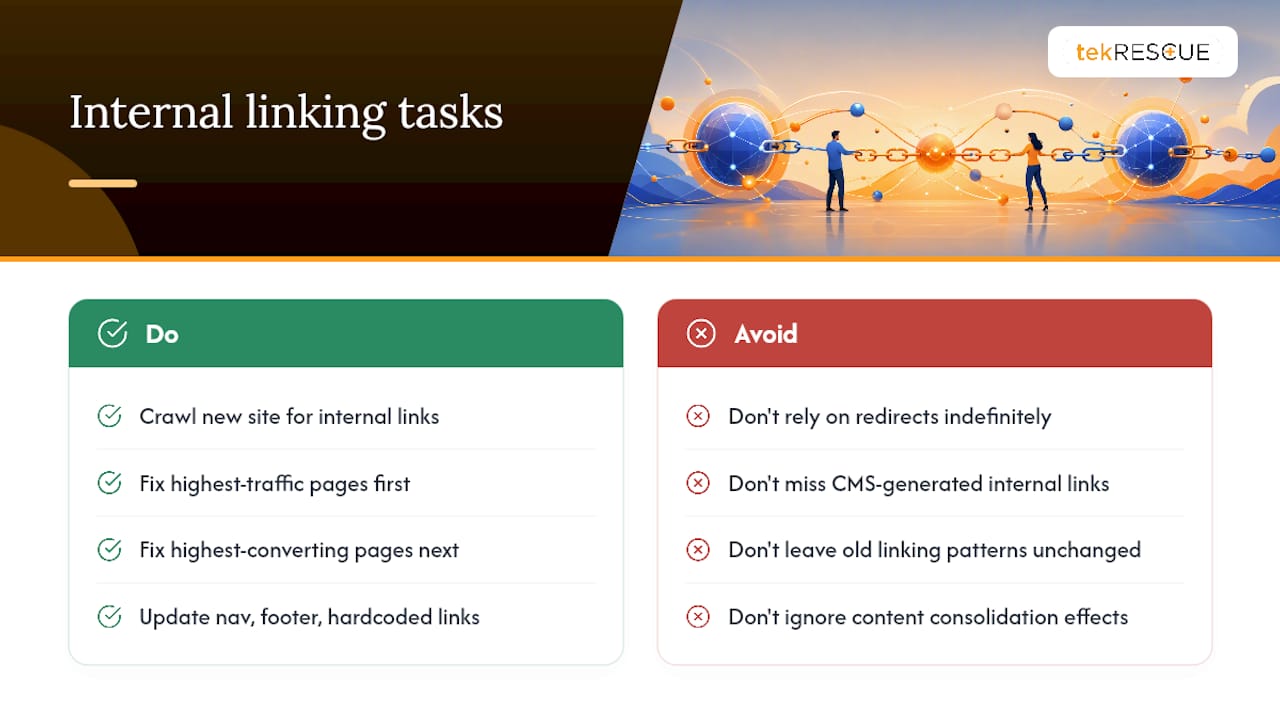
Crawl your new site specifically looking for internal links that still reference the old URL structure. These are easy to miss because they still technically work, thanks to your redirects, but every one of them adds a small amount of friction and dilutes the direct link equity that page should be receiving.
Prioritize fixing internal links on your highest-traffic and highest-converting pages first. Your navigation menu, footer links, and any hardcoded links inside blog content or product pages all need auditing, not just the automated ones your CMS generates. Update them to point directly at the new URLs rather than relying on redirects to carry the weight indefinitely.
This is also the right moment to reassess your internal linking strategy more broadly. If the migration changed your site’s information architecture, whether pages are grouped differently or content was consolidated, your old internal linking patterns may no longer reflect what actually matters most on the new site. Rebuilding those pathways deliberately, rather than just patching broken links, gives Google a clearer signal about which pages you consider most important now.
Communicating Migration to Users and Stakeholders
A migration that catches your own team off guard creates problems that have nothing to do with technical SEO. Marketing teams running campaigns need to know URLs are changing before launch day, not after a campaign lands traffic on a broken link. Customer support needs a heads up before users start calling about a page that “disappeared.”
Internally, set a clear communication cadence before the project starts. Who gets notified when staging is ready for review, who signs off before launch, and who needs a status update in the first 48 hours after the switch goes live. The stakeholder responsibilities you assigned during pre-migration planning should map directly to this communication plan, so nobody is guessing who owns the next step.
Externally, if you’re changing domains or significantly restructuring URLs, a brief notice to your email list or on social channels helps set expectations, especially if bookmarked pages or saved links will redirect to a different-looking page. For B2B relationships where partners or vendors link to specific pages on your site, a short heads-up email before launch can prompt them to update their own links faster, which helps your redirect traffic taper naturally instead of running indefinitely.
SEO Content Audit and Optimization During Migration
A migration is the natural checkpoint to audit content quality, not just technical structure. Before you finalize which pages move, merge, or get cut, review each page’s current performance against its actual content value.
Pages with declining traffic despite stable rankings often signal content that’s gone stale relative to what’s currently ranking for that query. Use the migration as the excuse to refresh those pages rather than porting outdated content forward unchanged. At the same time, resist the urge to rewrite everything. If a page ranks well and converts well, preserve its core structure, its headings, and its internal links exactly, and save your rewriting effort for pages that are actually underperforming.
Optimizing content to match what Google rewards during this phase means checking title tags and meta descriptions for continued relevance, confirming header structure still matches search intent, and verifying that any statistics or claims on the page haven’t gone stale. Pages you’re consolidating deserve special care here: merge the strongest content elements from both source pages into the survivor rather than just picking one version and discarding the other’s value entirely.
tekRESCUE’s Take: Which Migration Tasks to Delegate
Plenty of migration tasks belong in-house. Your team knows the content, the business priorities, and which pages actually drive revenue better than any outside vendor will on day one.
Where outside help earns its cost is on the technical execution that punishes small mistakes disproportionately: large-scale redirect engineering across thousands of URLs, HIPAA-compliant migrations where a data handling misstep carries regulatory weight, and rollback planning complex enough that you need a second set of eyes stress-testing the plan before launch. tekRESCUE’s background in both web development and compliance work means these aren’t separate skill sets bolted together after the fact.
If you do bring in help, arrive with your URL inventory, Search Console and analytics access, your current sitemap, and your redirect map already drafted. That preparation alone cuts weeks off any agency’s timeline.
— Randy Bryan
Get Migration Support That Protects What You’ve Built
Every safeguard in this guide, the URL mapping, the tested redirects, the launch-day monitoring, takes real hours from people who understand both the technical mechanics and the SEO stakes. A specialized service provider offers an alternative to guessing your way through a migration solo: a team handling web development, search engine optimization, and managed launches together, so the redirect map and the SEO strategy get built by the same people instead of getting lost in handoffs between vendors.
For businesses with sensitive data, compliance work covering HIPAA and FTC standards can help ensure a migration doesn’t have to choose between speed and security. We approach a launch the way this guide does: benchmark first, test in staging, verify on launch day, and monitor closely afterward, so risk gets caught before it costs you rankings.
If your migration involves a full rebuild rather than a lift-and-shift, tekRESCUE’s website development services cover the project end to end, from initial planning through post-launch support. Reach out for an estimate and tell us where you are in your planning. We’ll tell you honestly what your migration needs and what it doesn’t.
Sources
- Change of Address tool – Search Console Help
- Site moves and migrations | Google Search Central
- What Is A Migration Hangover Traffic Drop & How Do You Avoid It? – Search Engine Journal
- Essential steps for website migration – Search Engine Journal
FAQ
How Long Does SEO Recovery Take After a Migration?
A well-executed migration typically stabilizes within two to four weeks, while a poorly executed one can develop into a hangover lasting 12 to 18 months, according to Search Engine Journal’s research.
When Should I Use the Search Console Change of Address Tool?
Only after your new site is fully live and every redirect is tested and verified. Google’s Change of Address feature forwards ranking signals for 180 days, but it depends entirely on working redirects being in place first.
How Long Should I Keep My Old Redirects Active?
Keep redirects live for several months, and hold onto the old domain for a longer period if possible to prevent it from being repurposed in ways that confuse users or search engines.
What’s the Biggest SEO Mistake During Website Migration?
Leaving a noindex tag active on live pages after launch is the single most common and most preventable failure, followed closely by redirecting old URLs to the homepage instead of their direct equivalents.
Should I Migrate My Entire Site at Once or in Sections?
For large sites, Google recommends migrating in sections so you can catch and fix problems on a smaller scale before rolling changes out domain-wide. Small to medium sites can typically move all at once with proper testing.
Do I Need Professional Help for a Website Migration?
Straightforward redesigns are often manageable in-house, but domain changes, HIPAA-compliant moves, or migrations involving thousands of URLs benefit from experienced technical execution, which is where a service provider like tekRESCUE typically adds the most value.
Recommended
Table of Contents