
IT Budget for Small Business: How to Plan and Spend
The right IT budget for a small business is not a percentage pulled from a rule of thumb. It is the sum of five lines you can name: support, software, hardware, security and one-time projects. Price each line from real quotes and your own risk, then add a reserve for the day something breaks. If you run a business that handles patient records, customer financial data or an online storefront, the security and compliance lines come first, because that is where an underfunded budget turns into an incident.
We work with small and mid-sized businesses across Austin, San Marcos, Kyle, New Braunfels and the surrounding Hays and Bastrop County area. This guide shows how to build the budget, what each line should cover and where owners tend to spend too little.
Table of Contents
TL;DR
- Build the budget bottom-up from five categories: managed IT support, software and licenses, hardware, security and compliance, and one-time projects.
- Spending varies widely. A CompTIA survey of 650 US companies with fewer than 250 employees found annual technology spending of $10,000 to $250,000 for two-thirds of small and mid-sized businesses, so your own headcount and risk matter more than an average.
- Fund security and compliance before growth tools. Healthcare practices, CPA firms and other businesses that hold customer financial data carry legal duties that are not optional.
- Keep a one-time project line separate from the monthly baseline, so a website rebuild or migration does not wreck your run rate.
- Review the budget every year and after every major change: new hires, a second location, a new system.
Table of Contents
- Why guessing at an IT budget costs more than planning one
- The five lines of a small business IT budget
- How to build your budget in six steps
- Where healthcare, finance and regulated businesses should spend more
- Budgeting for online visibility and your website
- Budgeting for AI without wasting money
- Cutting IT costs without cutting protection
- Our perspective
- Getting a budget you can use
- FAQ
- Sources
Why guessing at an IT budget costs more than planning one
Most small businesses do not have an IT budget. They have a pile of invoices: a laptop here, a software renewal there, an emergency call when the server stops responding. Nobody decides the total, so nobody sees the gaps.
The gaps are where the money goes. A backup nobody tested, an employee account that was never turned off, a firewall that has not been updated in years. Each one is cheap to fix on a calm Tuesday and expensive to fix during an outage or a breach. A budget forces the calm-Tuesday conversation.
It also lets you answer the question owners actually ask, which is “how much should I spend on IT?” The honest answer is that it depends on four things:
- How many people and devices you support. Cost scales with users, not revenue.
- How much your operations depend on technology. A dental office that cannot open its practice management system cannot see patients. A landscaping crew can work a day without email.
- Your regulatory exposure. Healthcare and financial work carry rules that set a floor.
- Where you are going. A second location, an acquisition or a new line of business adds one-time and recurring cost.
The CompTIA range quoted above is wide for exactly these reasons. Use it as a sanity check that you are in the right neighborhood, not as a target.
The five lines of a small business IT budget
Split the budget into these categories. Each one has a different rhythm, and mixing them is how owners lose track of what they are paying for.
1. Managed IT support
This is usually the largest recurring line. It covers help-desk requests, monitoring, patching, user onboarding and offboarding, and someone who owns the whole picture. Providers commonly price it per user per month, or as a flat package for the whole office.
Two things decide whether the number you are quoted is the number you pay. First, how the contract defines a “user”: a seasonal worker, a part-timer or a shared mailbox may or may not count. Second, what sits outside the plan: projects, after-hours calls, on-site visits. Ask for both in writing before you compare quotes.
We publish a plain breakdown of what drives these numbers in Managed IT costs for small businesses, and a regional view in what IT support costs per month in 2026. If you are weighing a salaried hire against an outside team, managed IT versus in-house IT walks through the tradeoffs. And if your current model is calling someone when things break, see managed IT versus break-fix: break-fix looks cheaper until the first serious outage.
2. Software and subscriptions
Microsoft 365 or Google Workspace, your accounting package, line-of-business software, e-signature, password manager, video conferencing. Subscriptions compound quietly. Once a year, list every one, who uses it and what it costs, and cancel what nobody opens.
3. Hardware and infrastructure
Laptops, desktops, phones, printers, switches, access points, servers. Instead of buying when something dies, plan a replacement cycle so you spend a similar amount each year. Many offices plan to replace each computer every three to five years; set your own cycle and divide the fleet by it. Ten computers on a four-year cycle means budgeting for two or three replacements every year.
Cloud hosting can move some of this cost from a one-time purchase to a monthly fee. Whether that saves money depends on the workload, which is a question to put to whoever manages your systems.
4. Security and compliance
This line is not a luxury add-on. It includes endpoint protection, email filtering, multi-factor authentication, backups you have actually restored from, a firewall that is monitored and updated, security awareness training for staff, and a documented plan for when something goes wrong. Cyber insurance premiums belong here too, and insurers increasingly ask whether these controls exist before they quote.
If you want a list of the controls that matter most, start with five cybersecurity controls every small business needs and the common costly mistakes we see small businesses make.
5. One-time projects
A website rebuild, an office move, a server migration, a new phone system, an AI pilot. Budget these separately from the monthly baseline. When projects hide inside the run rate, next year’s budget looks inflated, or worse, you cut the baseline to make the numbers work and the protection goes with it.
How to build your budget in six steps
- Inventory what you have. List every user, device, server, application, website and cloud account. You cannot price what you cannot see. This step alone usually turns up unused licenses and unsupported equipment.
- Rank the systems by what a day of downtime costs. Estimate lost revenue and idle payroll for each critical system. This tells you where reliability spending pays for itself.
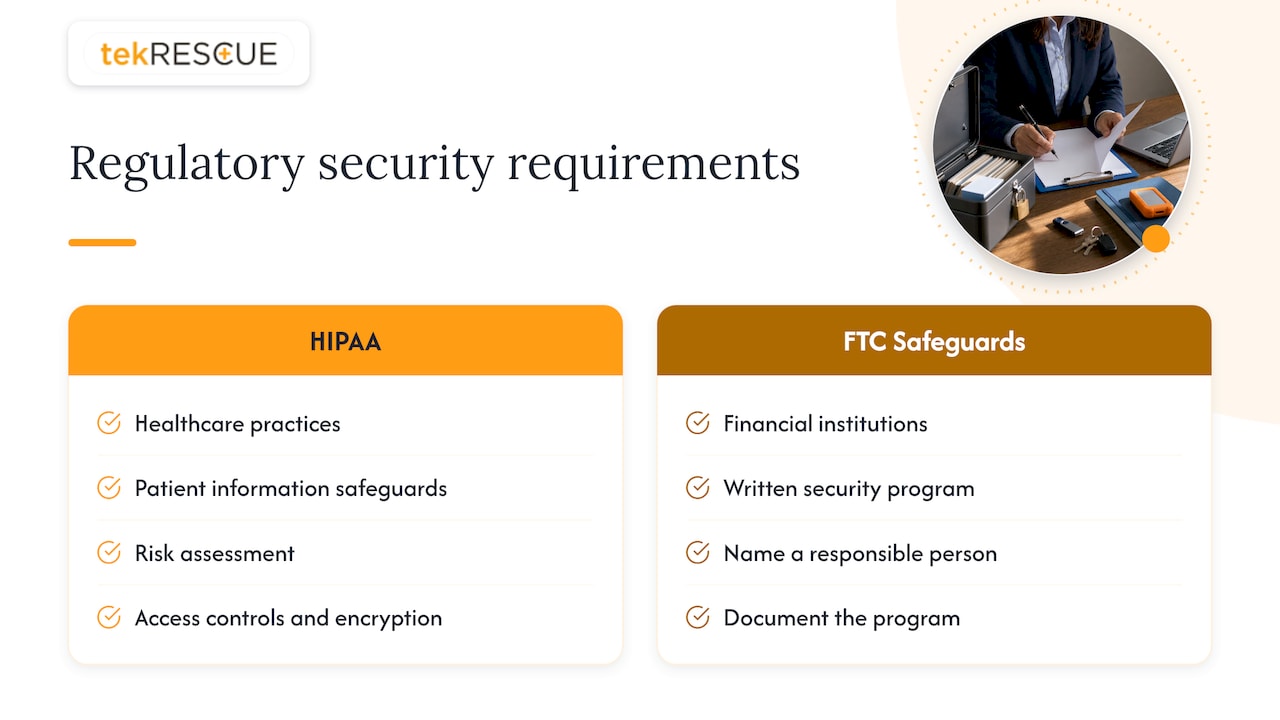
- Identify legal and contractual requirements. HIPAA for patient data, the FTC Safeguards Rule for businesses that handle customer financial information, and any cyber insurance or client contract terms. These set a minimum before any preference does.
- Get quotes for the recurring lines. Support, security tools and licenses. Compare like for like: same user count, same hours, same response commitments.
- Price the one-time projects. Anything you intend to do in the next twelve months, with a quarter attached.
- Add a reserve. Hold back a portion of the total for the unplanned: a failed machine, an urgent patch, a price increase on a renewal. How much depends on how old your equipment is.
Then put a review on the calendar. Revisit the budget every year, and again whenever headcount, locations or regulated data change.
A worked example
Take an illustrative 15-person professional services office with annual revenue of $2 million. The figures below are placeholders, not our prices or a market average.
| Line | How you size it | Placeholder annual cost |
|---|---|---|
| Managed IT support | 15 users x your quoted monthly per-user rate x 12 | Your quote |
| Software | Seats x annual price, after removing unused ones | Your renewals total |
| Hardware | 15 computers / 4-year cycle = about 4 replacements per year | 4 x unit price |
| Security | Tools per user, backup, training, insurance | Your quotes |
| Projects | Website refresh in Q3 | Project quote |
| Reserve | Set aside for the unplanned | Your chosen share |
Add the total, divide by revenue, and you have a percentage. That is the right order. Starting from the percentage and working backward is how critical areas end up underfunded while another line is overspent.
Where healthcare, finance and regulated businesses should spend more
If you are a medical, dental or behavioral health practice, HIPAA’s Security Rule requires you to protect electronic patient information with administrative, physical and technical safeguards. That means a risk assessment, access controls, encryption decisions, staff training and an incident plan. Your budget needs a recurring line for compliance work, not just tools.
The same logic applies to tax preparers, CPA firms, mortgage brokers, auto dealers that arrange financing and others who count as financial institutions under the FTC Safeguards Rule. The rule is part of 16 CFR Part 314, and it requires a written information security program sized to the business and the sensitivity of the customer data it holds. If that describes you, name a responsible person, document the program and budget for the controls it calls for.
We provide HIPAA compliance and FTC Safeguards Rule support, along with risk assessments and incident response, through our cybersecurity services. If you want to know how a first response should go if patient data is exposed, read our HIPAA incident response plan guide.
Budgeting for online visibility and your website
Your website is infrastructure, and it needs its own lines. Plan for the build or refresh as a project, then for the recurring costs: hosting, maintenance and updates, security patching and, if you rely on search for leads, ongoing SEO.
Treat SEO as a monthly commitment, not a launch task. Rankings are earned over time and lost when a site is left alone. If you want the basics of how it works, we explain them in search engine optimization demystified. Our web development and design work covers design, maintenance and hosting, and our SEO service covers the ongoing visibility work.
A practical way to size it: decide what a new customer is worth to you, how many leads the site must produce to matter, and let that set the ceiling for the marketing-technology line.
Budgeting for AI without wasting money
AI tools are showing up in subscriptions you already pay for, and in new ones your staff sign up for on their own. Two budget rules keep this under control.
- Fund a defined pilot, not a general interest. Pick one process, such as drafting proposals or sorting support requests, set a time limit and a measure of success, and put it in the projects line.
- Decide what data the tools may see. Before staff paste client or patient information into a chatbot, set a policy. For regulated businesses this is a compliance question, not just a productivity one.
If you want help choosing where AI makes sense for your business, that is what our strategic AI consulting is for.
Cutting IT costs without cutting protection
There is real money to save, and almost none of it is in the security line. Look here first:
- Unused licenses and duplicate tools. Two file-sharing services, three video platforms, accounts for people who left.
- Equipment run past its useful life. Old machines cost support time and fail at bad moments.
- Reactive support. Paying emergency rates for problems monitoring would have caught.
- Vendor sprawl. Separate providers for internet, phones, hosting and support multiply invoices and finger-pointing.
- Timing. Year-end renewals and purchases are easier to plan if you set them early. Our holiday IT budgeting tips cover the seasonal side.
The cut to refuse is backups, multi-factor authentication, patching and monitoring. These are the controls that keep a bad day from becoming a lost quarter.
Our perspective
We hear the same question from owners every week: what percentage of revenue should I spend on IT? We understand why. A percentage feels safe. But a percentage tells you what other companies spent, not what your risks cost.
Start with what your business cannot afford to lose: customer records, patient data, the ability to invoice and ship. Fund the protection for those first. Then fund the support that keeps your team working, and only then the growth projects.
The threats are changing quickly. Attackers use automation and AI to move faster than any person watching a screen, and small businesses are not too small to be targeted. Your infrastructure is the weak link they look for. That is why we build budgets around monitoring, tested backups, access controls and a response plan, and why we put compliance work for healthcare and financial businesses on the plan from day one, not after an audit letter arrives.
Make a decision this quarter. Inventory what you have, find out what it costs, and put the numbers on one page.
Randy Bryan
Getting a budget you can use
If you would rather not build this alone, our managed IT services cover support, server setup and maintenance, network security and firewalls, data storage and cloud-hosted services for businesses in Austin, San Marcos and nearby communities. Our complete guide to managed IT for small business explains what to expect. When you are ready to put numbers to your own environment, talk to us at tekRESCUE and bring your user count, your systems list and any compliance requirements you carry.
FAQ
How much should a small business spend on IT?
There is no single correct figure. A CompTIA survey found two-thirds of small and mid-sized businesses spend between $10,000 and $250,000 a year on technology, and where you land depends on headcount, how dependent you are on systems and whether you handle regulated data. Build the total from your five lines, then express it as a percentage of revenue to see how it compares.
What should an IT budget include?
Five lines: managed support, software subscriptions, hardware on a replacement cycle, security and compliance, and one-time projects. Add a reserve for surprises and a yearly review date.
Should security be a separate line item?
Yes. Keeping security and compliance visible stops it from being trimmed when other costs rise. For healthcare practices and businesses that hold customer financial data, it also documents that you are meeting HIPAA or FTC Safeguards Rule obligations.
How often should I update my IT budget?
Review it at least once a year, and again when you add staff, open a location, adopt a major new system or change the kind of data you hold. Equipment ages and renewals change price, so last year’s numbers drift out of date.
Sources
Recommended
Table of Contents