
Shadow IT Risks: What They Are and How to Control Them
Shadow IT is any device, software or cloud service your people use for work without the knowledge, approval or control of whoever manages your IT. The FFIEC IT Examination Handbook defines it that way, and the risks follow directly from that definition: if you do not know a tool exists, you cannot patch it, back it up, monitor it or shut it off. If you run a small or midsize business, here is the uncomfortable truth. Your biggest exposure may not be a sophisticated attacker. It may be a free file-sharing account that an employee opened last spring and never mentioned.
Table of Contents
TL;DR
- Shadow IT creates blind spots: unpatched software, unmanaged data, missing backups, weak logins and no logging, all outside your security tools.
- The costs are real: breach response, compliance penalties, unlicensed software fees and, in some cases, a cyber insurance claim that gets complicated.
- Most shadow IT is practical, not malicious. Employees reach for it when approved tools are slow or missing, so fixing the request process matters as much as blocking.
- Control it in four steps: find it, write a short policy, give people approved alternatives, and keep checking.
- Healthcare practices carry extra exposure because patient data in an unapproved tool is a HIPAA problem the day it lands there.
Table of Contents
- What counts as shadow IT in a small business
- Why employees do it
- The main shadow IT risks
- How common is it, and what does it cost
- Shadow IT in healthcare and other regulated practices
- How to find shadow IT
- What a shadow IT policy should cover
- How to control shadow IT without slowing your team down
- Our perspective
- Get help finding and closing the gaps
- FAQ
- Sources
What counts as shadow IT in a small business
Shadow IT is not only rogue software. It covers hardware, services and accounts. Common examples include:
- Personal or free Google Drive and Dropbox accounts used for work documents
- WhatsApp or Slack used for internal communication outside sanctioned channels
- Tools such as Trello or Google Docs adopted by one team without approval
- Personal laptops, tablets and phones used to reach sensitive data with no antivirus or other controls
That list comes from Vertice’s overview of shadow IT. In healthcare settings, CSO Online points to consumer messaging, unapproved storage of medical imaging files, department-run electronic health record environments, unapproved telehealth platforms and AI used to summarize notes.
The FFIEC adds a detail owners miss: shadow IT can also exist inside a third-party service provider’s environment. A vendor’s team using an unvetted tool with your data counts.
Shadow AI is the newest and fastest-growing form. An employee pastes a client contract or a patient note into a public chatbot to save twenty minutes. The data has left your control in seconds. We cover that in depth in The Hidden Leak: Managing “Shadow AI” in Your Business.
Why employees do it
Understanding motive is the first step to control, because a policy that ignores motive gets ignored.
Vertice says employees turn to unsanctioned tools when approved ones make their responsibilities difficult, lack needed functionality, or when the process for requesting new software is ineffective or slow. Spain’s national cybersecurity institute, in a INCIBE-CERT guide, adds that IT teams face budget, resource and time limits that delay new technology, and staff want to solve urgent problems without bureaucratic blockages.
A finance accounting firm’s technology lead, quoted by SLATE Accounting + Technology, put it plainly: most shadow tech is practical, not malicious, and the real problem is missing governance, meaning no transparent way to request, test and roll out new tools.
That matters for how you respond. Punishing a front-desk employee for using a free scheduling app teaches her to hide the next one. Asking why she needed it tells you what your approved stack is missing.
The main shadow IT risks
The FFIEC lists the risks in one place, and the list is a good checklist for any business, not just banks. Here they are, translated into small business terms.
1. Security weaknesses and data loss
Unapproved devices, software and services create openings for breaches and data loss. Attackers do not care whether a system was approved. They care whether it is reachable and weakly protected.
2. Nobody patches what nobody knows about
The FFIEC points out that an organization cannot maintain or patch devices and software it does not know exist, which leaves known vulnerabilities open. CISA’s guidance for small businesses puts patching near the top of its priorities and singles out vulnerabilities in its Known Exploited Vulnerabilities catalog. A forgotten tool is exactly where an old, actively exploited flaw survives.
3. Missing backups and slow recovery
If you cannot back up an asset you do not know about, you cannot recover it. The FFIEC also warns that malware can spread through automatic backups of infected devices or software, so an unmanaged laptop syncing to a managed system is a path in, not just a gap.
4. Weak or no multi-factor authentication
Shadow tools are often set up with default or weak credentials and without MFA, and they typically sit outside your endpoint detection and monitoring. That is how shadow IT widens your attack surface. Our own Microsoft 365 security guidance covers fixing MFA and blocking legacy authentication on the systems you do manage, which only helps if the data actually lives there.
5. Departing employees keep access
When company data sits in a personal account, no one else can see it, and an employee who resigns or is terminated may keep access to it. Offboarding checklists only revoke what you know about. This overlaps heavily with what we describe in insider threats: the risk is often a well-meaning person plus a blind spot.
6. Compliance and legal exposure
The FFIEC names legal risks tied to data use or ownership, and penalties for unlicensed software or services. Regulated data adds more. If you handle protected health information, payment data or customer financial information, an unvetted tool holding that data is a compliance failure whether or not anything ever goes wrong with it.
7. Cost
There is the direct cost of identifying and fixing issues after the fact, plus duplicate subscriptions that nobody is tracking. The FFIEC lists the cost of identifying and mitigating security issues as a risk in its own right.
8. Cyber insurance trouble
The FFIEC notes shadow IT can even lead to nullification of cyber insurance. Insurers ask what controls you have in place, and an incident that begins in an unmanaged tool can complicate a claim. Read Common Reasons Cyber Insurance Claims Are Denied before your next renewal questionnaire.
How common is it, and what does it cost
The numbers are worth knowing, with the right context.
| Finding | Source and year |
|---|---|
| 57% of SMBs had high-impact shadow IT efforts. Among SMBs with shadow IT, 89% reported negative financial consequences and 76% reported a moderate-to-severe cybersecurity threat | Capterra, 2023 |
| 81% of U.S. small businesses surveyed suffered a security or data breach in the past year. 62.5% of those reported a total financial impact above $250,000 | Identity Theft Resource Center, 2025 |
| Median financial impact of a data breach rose from about $60,000 in 2019 to $110,000 in 2025, based on roughly 70,000 U.S. cyber insurance claims. The SMB median was around $38,000 | Verizon’s Breach Impact Study, 2026, as reported by HIPAA Journal |
Two cautions. First, these studies measure breaches and shadow IT in general, not breaches caused only by shadow IT, so treat them as a picture of the environment rather than a price tag for one unapproved app. Second, the Verizon figures show something small business owners should absorb: even a median SMB loss near $38,000 is a bad month for a company with thin margins, and the worst cases hit as high as 3% to 7% of insured revenue.
For older context on what hurts most, an Insurance Information Institute survey from 2019 ranked financial loss (43%) and information breach or theft (38%) as the top concerns, ahead of reputation (13%) and regulatory issues (5%).
Shadow IT in healthcare and other regulated practices
If you run a medical, dental or behavioral health practice, shadow IT is not an efficiency problem. It is a patient data problem. Protected health information in a personal email account, a consumer messaging app or a free cloud folder is outside every safeguard you documented for HIPAA.
A few patterns we see repeatedly in small practices:
- Staff texting patient details from personal phones because the official messaging tool is clunky
- Photos of records or imaging stored in personal cloud albums
- A front-office tool for scheduling or reminders adopted without anyone asking whether patient data flows through it
- AI note-taking or summarizing tools used before anyone has reviewed where the data goes
SAI360’s 2026 HIPAA checklist reports that over 90% of organizations allow personal devices for business use, yet only 37% apply any security controls. It also argues a once-a-year risk assessment no longer keeps pace with how fast threats change. We read that as a reason to treat discovery as ongoing work.
For the practical safeguards, see our pages on improving patient data security in healthcare IT and HIPAA compliant email. CPA firms and legal practices face parallel duties under the FTC Safeguards Rule and professional confidentiality rules, and the same discovery steps apply.
How to find shadow IT
You cannot control what you cannot see, so discovery comes first. Use a mix of methods. None is complete alone.
- Compare your network against your inventory. The FFIEC recommends regularly reviewing network assets against approved inventories and using detection tools to catch unauthorized IoT devices or rogue Wi-Fi connections.
- Look at cloud app usage. The FFIEC suggests cloud access security brokers to discover unknown applications. If you are a Microsoft 365 shop, Microsoft documents how application usage analytics lets admins analyze traffic patterns and see which users reach which apps, to spot shadow IT, generative AI apps and compliance risks.
- Review identity and sign-in data. Check which third-party apps employees have granted access to your work accounts. Unfamiliar OAuth grants are a common tell.
- Read the credit card statements. Recurring charges to software vendors that nobody in IT recognizes are the cheapest discovery tool you have.
- Ask. A short, no-blame survey asking which tools people use to get work done will surface things no scanner can, such as personal phones and messaging apps.
Expect surprises. The point of the first sweep is not to punish anyone. It is to build an honest inventory so your risk assessment starts from reality.
What a shadow IT policy should cover
A policy that fits on two pages and gets read beats a forty-page document that does not. Cover these points:
- Scope and definition. Say plainly what shadow IT means here: devices, software, cloud services, browser extensions, AI tools and personal accounts used for company data.
- What is approved. List sanctioned tools by category (file storage, messaging, video, project management, AI), so people know what to reach for.
- How to request something new. Name a person, a form and a response time. Slow approval is the number one driver of workarounds.
- Data rules. Spell out which data types (client financials, patient information, credentials) may never enter unapproved tools, including public AI chatbots.
- Personal devices. State the minimum controls: screen lock, current updates, security software, and a way to remove company data if the device is lost or the person leaves.
- Reporting without punishment. The FFIEC advises that security awareness training cover the risks of shadow IT and the reasons for preventing it, and notes training can encourage staff to tell management when they use it and show them how to notify. Put the notification procedure in the policy.
- Offboarding. Require handover and deletion of company data from any personal or unapproved account on departure.
- Consequences and review. Define what happens with repeated violations and review the policy at least yearly.
If you have remote staff, pair this with our notes on cybersecurity policies for remote employees.
How to control shadow IT without slowing your team down
Blocking everything makes things worse. The better approach is to make the approved path the easy path and shrink the damage any one unapproved tool can do.
Remove the ability to install freely. CISA’s Cyber Guidance for Small Businesses recommends removing administrator privileges from user laptops so users cannot install unauthorized software. It also recommends MFA on all system administrator accounts, prioritized patching, and performing and testing backups.
Use standard accounts and strong authentication. NIST’s small business cybersecurity guidance for firms without employees recommends phishing-resistant MFA on all accounts, standard user accounts instead of administrative ones for daily work, and passphrases of at least 15 characters. It also recommends inventorying your most important business assets and services, setting a backup strategy, keeping software updated on every device, and listing the legal, regulatory and contractual requirements that affect your cyber risk. That inventory step is the same discovery work described above.
Fix the reason people go around you. Capterra’s research found that among SMBs that had shadow IT teams, 98% reported long-term positive impacts, including time savings (51%) and increased employee satisfaction (54%). Its takeaway is education and embracing the need behind the workaround: employee education, updated policies and a collaborative culture. Read that as a signal. People adopt these tools because they solve real problems. Give the problem an approved solution and the shadow tool loses its reason to exist.
Put a named owner on requests. Someone, whether an internal lead or your managed IT provider, should answer new tool requests within days, not weeks.
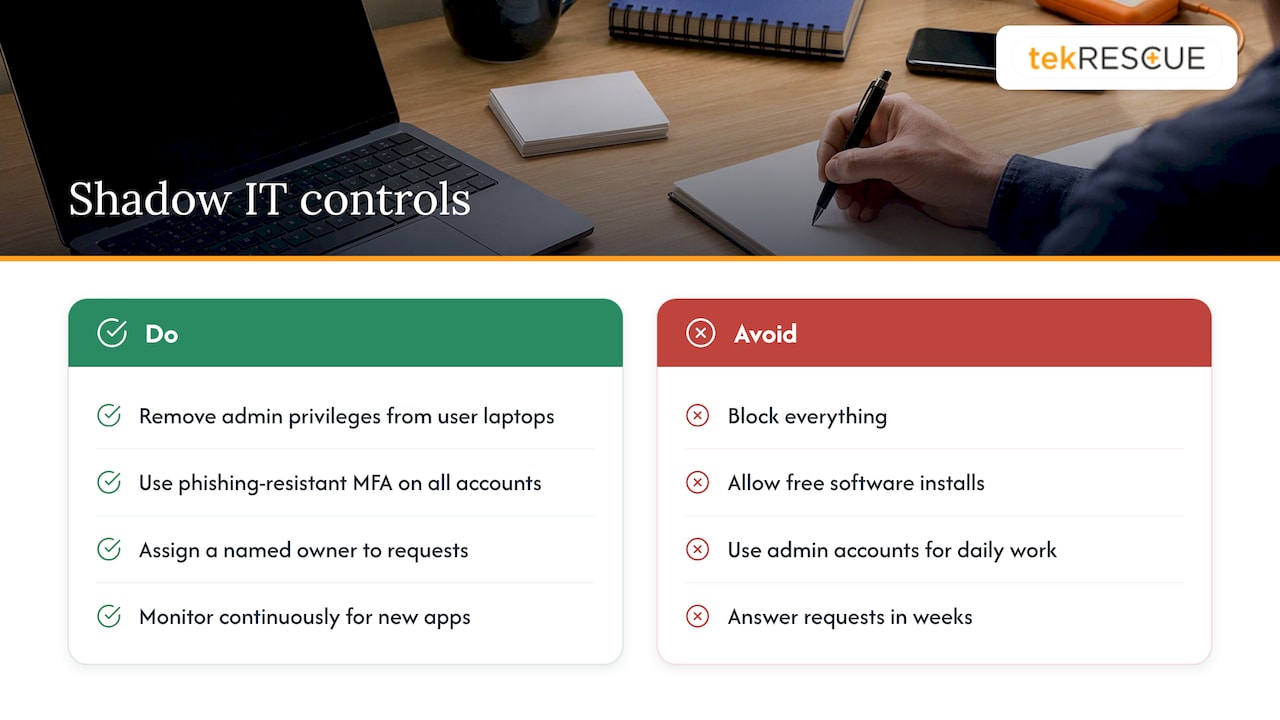
Monitor continuously. Discovery is not a one-time project. New apps and AI features appear monthly. Our five cybersecurity controls every small business needs is a good baseline to check against.
Our perspective
Randy Bryan here. When a client calls us after an incident, the cause is rarely exotic. It is a tool nobody told IT about, a login nobody rotated, or a laptop nobody patched because nobody knew it was on the network.
We build our approach around that reality. Visibility comes first: you cannot defend an environment you have not mapped. A risk assessment, an inventory of devices, accounts and cloud services, and clear ownership of each, is where we start. From there we lock down what can be locked down, set up MFA and patching, and make sure backups cover what actually matters.
We also believe in the human side. Our view is that a policy works when people can follow it, so we help clients set up approved tools that are easy enough to use that employees do not need to look elsewhere, and a simple way to ask for something new.
For healthcare practices and CPA firms, where one stray file in a personal account can become a compliance event, we pair that technical work with HIPAA and FTC Safeguards Rule guidance. And if something does slip through, incident response should already be a plan on paper, not a scramble.
Shadow IT is manageable. It just is not going to manage itself.
Randy Bryan
Get help finding and closing the gaps
If you would rather not run a discovery project on top of your day job, our team can help. tekRESCUE provides cybersecurity services and risk assessments and managed IT services for small and midsize businesses in Austin, San Marcos, Kyle, New Braunfels and the surrounding Texas communities, plus HIPAA compliance support for healthcare providers. If an unapproved tool is already involved in a suspected incident, our incident response team can help you contain it.
FAQ
What is the biggest risk of shadow IT?
Loss of visibility. Everything else follows from not knowing a tool exists: no patching, no backups, no monitoring, no access removal when someone leaves. For regulated data such as patient records, the compliance exposure starts the moment the data lands in an unapproved tool.
Is shadow IT always bad?
Not in intent. Most of it begins as a practical fix for a real work problem. The risk is that it operates without oversight. The goal is to bring useful tools into the approved stack, with proper security, rather than to punish the people who found them.
How do I find out what shadow IT my business has?
Combine methods: compare your network against an asset inventory, review cloud app and sign-in data, check recurring software charges, and ask employees what they use. Microsoft 365 administrators can also use usage analytics to see which apps people reach. A managed IT provider can run this sweep for you.
Does shadow AI count as shadow IT?
Yes. Employees using unapproved public AI tools with company or client data is shadow IT, and it is one of the faster-growing forms. Your policy should name AI tools explicitly and say which data may never be entered into them.
What should a small business do first?
Build an inventory of devices, accounts and cloud services, then turn on MFA and remove local admin rights from everyday user accounts. Write a short policy and a simple request process. Those steps lower risk quickly and make later controls easier.
Sources
- FFIEC IT Examination Handbook: Shadow IT
- Vertice: Shadow IT and How to Tackle It
- CSO Online: How shadow IT leaves every industry in the dark
- INCIBE-CERT: Shadow IT exposed
- SLATE Accounting + Technology: Understanding Shadow IT Risks and Solutions
- Capterra: Shadow IT Teams Cost Your SMB Time and Money
- Identity Theft Resource Center: 2025 Business Impact Report
- HIPAA Journal: Verizon 2026 Breach Impact Study
- SAI360: 2026 HIPAA Compliance Checklist
- Microsoft Learn: Application usage analytics
- CISA: Cyber Guidance for Small Businesses
- NIST: Small Business Cybersecurity, Non-Employer Firms
Recommended
Table of Contents