
Website Security Monitoring: What to Watch and Who Acts
Website security monitoring is the continuous watching of your site, its software and its logs for signs of attack, followed by a defined process to fix what turns up. A scanner that emails you a report is only the first piece. If nobody owns the alert, nobody sets a deadline and nobody rescans, you have a dashboard, not security.
If you run a business, here is the uncomfortable truth: your website is public, always on and reachable by automated tools that never sleep. Attackers do not need to know your name. They need one outdated plugin.
Table of Contents
TL;DR
- Real monitoring has five parts: discovery, detection, prioritization, remediation and verification. A malware scanner covers one or two of them.
- CISA recommends patching critical vulnerabilities on internet-accessible systems within 15 days and high vulnerabilities within 30 days. That is guidance, not a legal deadline for every business.
- Fewer, higher-value alerts with a named owner beat a flood of notifications nobody reads.
- Healthcare practices and financial firms have extra duties under HIPAA and the FTC Safeguards Rule. Monitoring helps, but it does not make you compliant on its own.
- Before you buy any tool, decide who responds at 2 a.m. and what they are allowed to do.
Table of Contents
- What website security monitoring actually covers
- The signals worth watching
- Scanning your web application for vulnerabilities
- Set deadlines, not just alerts
- Fewer alerts, more action
- What to ask your host and web provider
- If you handle health or financial data
- A perspective from our team
- A starter checklist you can finish this month
- Where tekRESCUE fits
- FAQ
- Sources
What website security monitoring actually covers
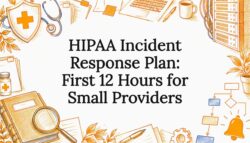
Most people searching this topic want one of three things: to know whether their site is infected right now, to catch problems before customers do, or to satisfy an insurer, regulator or client questionnaire. Each needs a slightly different setup, but the same building blocks sit underneath.
Discovery. You cannot watch what you do not know exists. Forgotten staging sites, old subdomains, abandoned landing pages and test installs are favorite entry points. CISA’s Cyber Hygiene guidance describes vulnerability scanning as a continuous assessment of internet-accessible assets, which starts with knowing what those assets are.
Detection. This is where the tools people search for live: malware scanners, file integrity checks, blacklist checks, uptime monitors, web application firewalls and log analysis.
Prioritization. Not every finding matters equally. A critical flaw in a plugin that handles payments is not the same as a missing header on a brochure page.

Remediation. Someone patches, removes or reconfigures. This is the step most small businesses skip, because the scanner does not do it for them.
Verification. Someone rescans and confirms the fix worked. Without this you are trusting, not monitoring.
The signals worth watching
The CISA guidance on logging for business systems makes a point we repeat to clients constantly: logging establishes what normal looks like, and monitoring flags meaningful deviations. The most useful telemetry is often ordinary activity.
| Signal | What it can reveal |
|---|---|
| Repeated failed logins | Credential stuffing or brute-force attempts against your admin login |
| New admin accounts or privilege changes | An attacker creating persistence, or an insider mistake |
| Unexpected file changes | Injected code, web shells, defacement |
| New outbound connections from the web server | Malware calling home, data leaving the building |
| Blacklist or search warning status | A compromise customers will see before you do |
| Sudden traffic or error spikes | Scraping, denial-of-service attempts, broken deployments |
| Plugin, theme and core version drift | Known vulnerabilities waiting to be exploited |

Notice that only some of these are “malware.” Many modern attacks are quiet. An attacker with a stolen admin password can live off the land, using your own tools and normal-looking sessions. A malware scanner will find nothing because nothing malicious was installed. Only log review and login monitoring catch that.
Malware detection is necessary, not sufficient
Searches for website malware detection far outnumber searches for monitoring, and that makes sense: malware is the visible symptom. Scanners that check public pages for known malicious code, spam injections and blacklist status are useful, and some are free. But they see what a visitor sees. They typically cannot see a compromised account, a vulnerable plugin that has not been exploited yet, or a database exposure behind the scenes.
Treat a clean scan as “no known infection on public pages today.” That is useful. It is not “secure.”
Scanning your web application for vulnerabilities
CISA separates network-level vulnerability scanning from web-application scanning, which examines publicly accessible applications for vulnerabilities and misconfigurations, including risks in the OWASP Top Ten. The OWASP Top 10:2025 lists categories such as broken access control, security misconfiguration and software supply chain failures. For a small business running WordPress or another CMS, supply chain and misconfiguration translate to a plain reality: your plugins, themes and hosting settings are your attack surface.
CISA’s website security guidance combines several measures into one picture:
- Continuous scanning and remediation of critical and high vulnerabilities
- Securing web applications against the OWASP Top Ten
- Logging and regular log audits
- Multi-factor authentication
- Static and dynamic scans
- Protective controls such as a web application firewall and a content delivery network
Note that this is a stack, not a product. No single tool on a vendor’s pricing page replaces it.
If you want a practical rhythm for the scanning piece, our walkthrough on running a vulnerability scanning program in about two hours a week lays out a schedule a small team can sustain. For the difference between a scan and a deeper review, see our explainer on vulnerability assessments.
Set deadlines, not just alerts
An alert without a clock attached is a suggestion. CISA’s published targets are a sensible starting point: critical vulnerabilities on internet-accessible systems within 15 days, high vulnerabilities within 30 days. These are CISA recommendations, and your own risk, contracts or regulators may demand faster.

A simple response table for a small business:
| Severity | Owner | Target |
|---|---|---|
| Critical (exploitable, internet-facing) | Named IT lead or provider | Within 15 days, sooner if actively exploited |
| High | Named IT lead or provider | Within 30 days |
| Medium and low | Batched into monthly maintenance | Next maintenance window |
| Confirmed compromise | Incident response contact | Immediately |
The last row matters most. Decide before the bad day who you call. If you do not have a plan, our incident response service exists for exactly that moment, and it is far cheaper to set the contact up in advance than to search for one mid-breach.
Fewer alerts, more action
The instinct after a scare is to turn on every notification. Resist it. CISA’s logging guidance is built around meaningful deviations from normal behavior, not volume. A small business drowning in low-priority emails will start ignoring all of them, including the one that matters.
A workable approach:
- Pick the handful of events that would change your behavior if they fired: a new admin user, a file change in core directories, a critical vulnerability on a public page, a blacklist hit.
- Assign each a named responder and a backup.
- Write down what the responder is authorized to do, such as disabling an account or taking a page offline.
- Review the rules quarterly and after any site change.
Before relying on any provider, confirm which logs your host, CMS, firewall and managed provider retain, for how long, and who reviews high-risk alerts. That is a ten-minute question that many owners have never asked.
What to ask your host and web provider
HTTPS is table stakes, and the FTC is explicit that it is not a complete security program. In its small business cybersecurity guidance on hiring a web host, the agency lists what to verify before you choose a provider: TLS, current security patches, who is responsible for updates, administrative access, availability of multi-factor authentication, how data is stored and encrypted, access permissions, and how suspicious activity is reported.
Turn that into questions you can ask today:
- Who updates the CMS, plugins and server software after launch, and how fast?
- Do I get administrator access, and is MFA enforced for it?
- What logs do you keep, and for how long?
- What happens, step by step, if you see suspicious activity on my site?
- Who restores from backup, and when was the last test restore?
If the answer to “who manages the site after launch” is a shrug, you have found your biggest risk. Our website maintenance and hosting work is built around closing that gap, so the people who build the site are also accountable for keeping it patched.
If you handle health or financial data

Monitoring becomes a compliance conversation when your site or connected systems touch regulated data.
Healthcare and HIPAA
The HHS summary of the HIPAA Security Rule requires regulated entities to regularly review records that track access to electronic protected health information, detect security incidents, evaluate the effectiveness of safeguards and reevaluate risks as the environment changes. HIPAA applies to covered entities and business associates that handle ePHI. If that is you, website monitoring supports the work, particularly if your site hosts patient forms or portals.
It does not establish compliance by itself. HHS treats risk analysis as foundational, and a web scan does not cover access controls, administrative safeguards, vendors, backups or the full flow of data. If you are a practice administrator, the person to bring in is a qualified HIPAA compliance advisor or your security officer, not a scanner vendor. Our HIPAA compliance page explains how we approach it.
Financial firms and the FTC Safeguards Rule
The FTC Safeguards Rule applies to financial institutions under FTC jurisdiction, which can include entities such as tax preparers and some other non-bank businesses. It is not a rule for every small business, so check with your attorney or compliance advisor whether it covers you. If it does, the rule calls for regular testing or monitoring of safeguards. Without continuous monitoring, it describes annual penetration testing and vulnerability assessments, including system-wide scans every six months, plus testing after material changes.
The lesson: monitoring is one control inside an information-security program, next to inventory, risk assessment, service-provider oversight and adjustment after testing. Buying a product does not transfer your responsibility.
A perspective from our team
We see the same pattern in Central Texas offices again and again. A business buys a scanner, gets a green checkmark and stops thinking about it. Six months later, an admin account with a reused password is the way in, and the scanner never blinked, because the attacker never needed malware.
Our view is simple. Monitoring has to be tied to a person, a deadline and a rescan. It has to follow your actual data flows, not a vendor’s compliance badge. And it works best when the same team that manages your network, your site and your backups sees the alerts, because the context is what turns a notification into a decision.
The threat is also shifting. Automated and AI-assisted tooling lets attackers probe thousands of sites at speeds no human defender can match. That is not a reason for panic. It is a reason to stop treating security as an annual task and start treating it as a routine, like payroll.
— Randy Bryan
A starter checklist you can finish this month
- Inventory. List every domain, subdomain, plugin, theme and third-party script. Retire what you do not use.
- Lock down access. Turn on multi-factor authentication for every admin, hosting and domain account. Remove accounts for people who left.
- Turn on logging. Confirm that login and admin activity is recorded and retained.
- Scan weekly. Use a vulnerability scanner plus a malware and blacklist checker. Our website security audit quick wins are a good first pass.
- Set patch deadlines. Use the 15-day and 30-day targets above as a baseline.
- Name the responder. One person, one backup, one written authority.
- Test the restore. A backup you have never restored is a hope.
- Assess the whole business. A site is one door. Our risk assessment checklist covers the rest of the building.
Where tekRESCUE fits
We build, host, maintain and secure websites for small and mid-sized businesses, and we run cybersecurity and managed IT services for offices around Austin, San Marcos, Kyle, New Braunfels and the surrounding counties. If you want monitoring that ends in fixes rather than a pile of reports, start with our cybersecurity services, or talk to us about managed IT if you want one team accountable for the site, network and backups together. We do not publish prices, so contact us for a scoped conversation about your setup.
FAQ
How do I monitor my website’s security without a full-time IT person?
Start with MFA on every admin account, automatic or scheduled updates, weekly scans and a short list of high-value alerts sent to a named person. Then decide who acts on them. Many small businesses hand this to a managed provider so the scanning, patching and rescanning happen as one service.
Is a free online security check enough?
A free checker is a useful snapshot of what is visible from outside, such as known malware or blacklist status. It will not see compromised accounts, server logs or vulnerabilities behind login pages. Use it as a spot check, not as your program.
How often should I run a vulnerability scan?
CISA describes its own service as continuous, with weekly reports for eligible organizations, according to its Cyber Hygiene page. Weekly scanning is a reasonable target for most small businesses, plus a scan after any significant site change. Regulated entities should follow the specific testing requirements that apply to them.
Does website monitoring make me HIPAA compliant?
No. It can support the requirement to review activity and detect incidents, but HIPAA also requires a thorough risk analysis, administrative safeguards, vendor oversight and more. Ask your compliance advisor to confirm what applies to your practice.
What should I do if monitoring shows my site is compromised?
Do not start deleting files, because you may destroy evidence and miss the entry point. Change administrator credentials from a clean device, take the affected pages offline if customer data may be exposed, and call your incident response contact. If regulated data may be involved, involve your attorney or compliance officer promptly.
Sources
- CISA: Website Security
- CISA: Cyber Hygiene Services
- CISA: Use Logging on Business Systems
- FTC: Cybersecurity for Small Business
- HHS: Summary of the HIPAA Security Rule
- HHS: Guidance on Risk Analysis
- FTC: Safeguards Rule, What Your Business Needs to Know
- OWASP Top 10:2025 Introduction
Recommended
Table of Contents