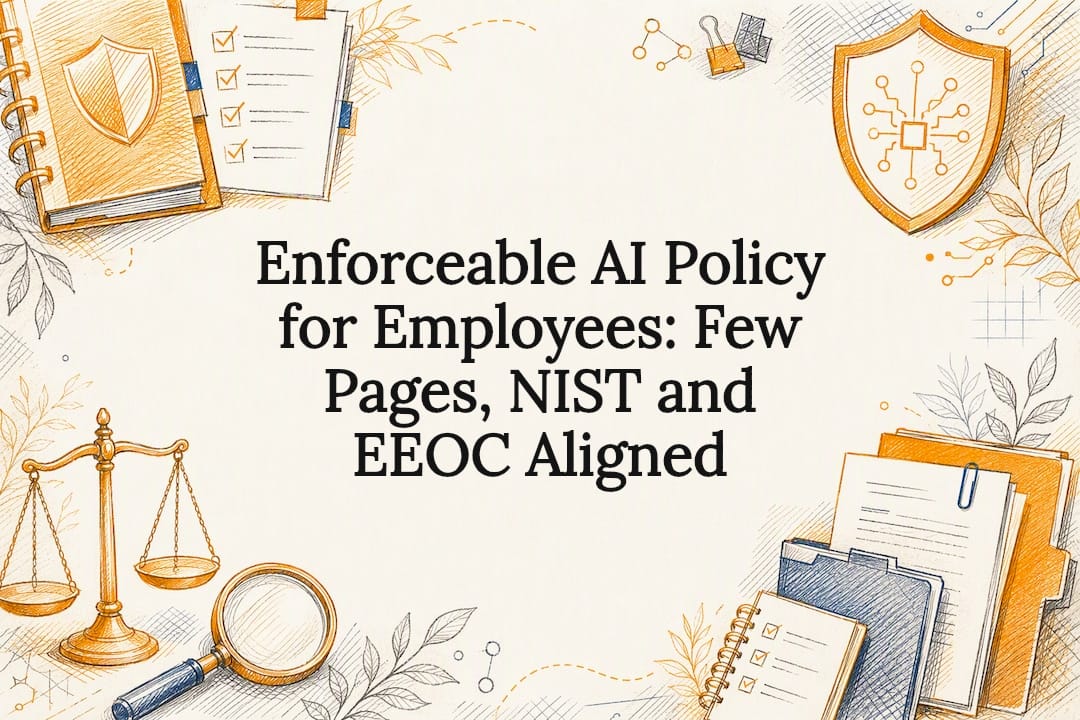

Enforceable AI Policy for Employees: Few Pages, NIST and EEOC Aligned
Adopt a concise acceptable-use AI policy that mandates disclosure of AI use, meaningful human oversight for consequential decisions, strict data-handling rules, and a regular audit cadence. That is the whole rule. Everything else, the templates, the legal nuance, the training design, exists to help you put that rule into practice before an incident or a regulator forces your hand.
TL;DR:
- Ensure the AI policy clearly defines acceptable and prohibited uses with concrete examples, such as no sharing PII or confidential data in public prompts.
- Build a documented approval process for new AI tools, with exceptions logged and reviewed regularly, to prevent shadow AI and unauthorized adoption.
- Enforce strict data security controls, including no PII in prompts and vendor vetting on data retention and incident response policies.
- Assign a policy owner responsible for enforcement, set clear human oversight requirements, and provide role-specific training for managers and staff.
- Review and update the policy every six to twelve months, incorporating impact assessments, audits, and changes in regulations to stay current.
Table of Contents
Table of Contents
- What to include in an employee AI policy
- Legal compliance and risk: federal baseline and state patchwork
- Governance and implementation: roles, human review, and training
- Operational controls: data security and vendor evaluation
- Policy lifecycle: testing, audits, and updates
- Employee responsibilities and accountability for AI use
- Impact of AI policy on remote and hybrid work settings
- Addressing ethical considerations and bias mitigation in AI applications
- Processes for requesting exceptions or approvals for AI tool usage
- Integration with existing workplace policies
- What HR gets wrong about AI policy
- Where tekRESCUE fits into your AI policy rollout
- Sources
- FAQ
What to include in an employee AI policy
A workable AI policy fits on a few pages, not a binder. It names what it covers, draws a clear line between acceptable and prohibited use, and tells employees exactly when a human has to check the machine’s work.
Start with scope. Define which tools count as “AI” for policy purposes (chatbots, coding assistants, image generators, embedded AI features inside existing software), which roles are covered, and whether contractors and vendors fall under the same rules. Vague scope language is the fastest way to create a loophole an employee will find by accident.
Then separate acceptable use from prohibited use with real examples, not abstractions. “Do not paste PII into public AI tools” is a rule. An employee needs to know that means no customer names, health details, Social Security numbers, or financial data in a public chatbot prompt, full stop.
Your checklist should include:
- Scope and definitions: which tools, formats, and job roles the policy applies to.
- Acceptable use examples: drafting internal emails, summarizing public documents, brainstorming, coding assistance with reviewed output.
- Prohibited use examples: no PII or confidential data in public prompts, no unreviewed AI content published externally, no AI-only hiring or disciplinary decisions.
- Disclosure and labeling rules: when AI-generated content must be flagged internally or to customers.
- Human oversight thresholds: which decisions (hiring, termination, discipline, credit, promotion) always require a human reviewer before action.
- Records and acknowledgement: a signed employee acknowledgement, version history for the policy, and a log of approved tools.
Sample templates and policy frameworks from organizations like SHRM are a reasonable starting point, but they are built for a generic employer. Adapt the language to your actual tool stack and have legal counsel review it before rollout.
Legal compliance and risk: federal baseline and state patchwork

Federal anti-discrimination law does not care whether a human or an algorithm made the decision. Title VII, the ADA, and the ADEA all apply when AI tools screen resumes, score interviews, or flag performance issues, and the employer stays on the hook for the outcome. The EEOC’s guidance on employment tests and selection procedures is explicit that federal laws prohibiting discrimination based on race, sex, national origin, age, disability, and other protected categories apply fully to AI-assisted employment practices.
A vendor’s marketing claims do not transfer legal responsibility. Even when a hiring platform is sold as bias-tested, you remain the deployer of record if it produces a discriminatory outcome. Build vendor contracts that require validation evidence, documented testing, and audit rights, not just a sales deck.
State law adds another layer. For example, Illinois requires notice and consent for AI-driven video interview analysis, and Colorado regulates algorithmic discrimination in consequential decisions, according to university HR guidance tracking these state rules. More states are expected to follow, and a policy written only for federal compliance will fall behind quickly.
Practical mitigation steps:
- Document an impact assessment before deploying any AI tool in hiring or performance management.
- Offer an alternative, non-AI process path for applicants or employees who request one.
- Preserve your existing reasonable-accommodation process; AI tools do not replace it.
Regulatory bodies including the DOL and FTC recommend training, audits, and human oversight as core defenses against AI-driven discrimination claims, per the FTC’s own AI use policy, which frames governance boards and independent evaluation as standard practice for higher-risk uses.
Governance and implementation: roles, human review, and training
A policy without an owner is a document nobody enforces. Assign it clearly, then build the review habits that keep it alive.
- Name the owner: HR typically drafts and enforces the policy, with legal reviewing compliance language, IT controlling which tools are technically permitted, and an executive sponsor accountable for adoption.
- Define “meaningful human oversight” in plain terms: who reviews AI-assisted output, what they check for, and how long they have to do it before a decision is finalized.
- Set the decision threshold: any action affecting hiring, pay, discipline, or termination requires documented human sign-off, never an AI recommendation acted on alone.
- Design role-based training: managers need to understand oversight duties and how to spot AI errors or bias; general staff need to understand what tools are approved and what data never goes into a prompt.
- Log everything: approvals, exceptions, and signed employee acknowledgements belong in a single record, not scattered across emails.
NIST’s resources on AI risk management note that meaningful human oversight is inexpensive to define on paper but easy to skip in practice unless the policy specifies exactly what “review” means for your business.
Pro Tip: Give managers a one-page decision flowchart, not a policy binder. If they cannot find the rule in ten seconds, they will not follow it.
Operational controls: data security and vendor evaluation

The policy is only as strong as the technical guardrails behind it. Most AI-related data leaks happen because an employee pasted something sensitive into a public tool, not because of a sophisticated attack.
Core controls:
- No PII or PHI in public prompts, ever, regardless of how urgent the task feels.
- Route sensitive work through an enterprise API or isolated environment rather than a consumer chatbot account.
- Require authentication and least-privilege access for any AI tool touching business systems, with logging and a defined retention period for interaction records.
- Vet vendors on five questions: data retention policy, whether prompts train the vendor’s model, explainability of outputs, contractual audit rights, and incident notification timelines.
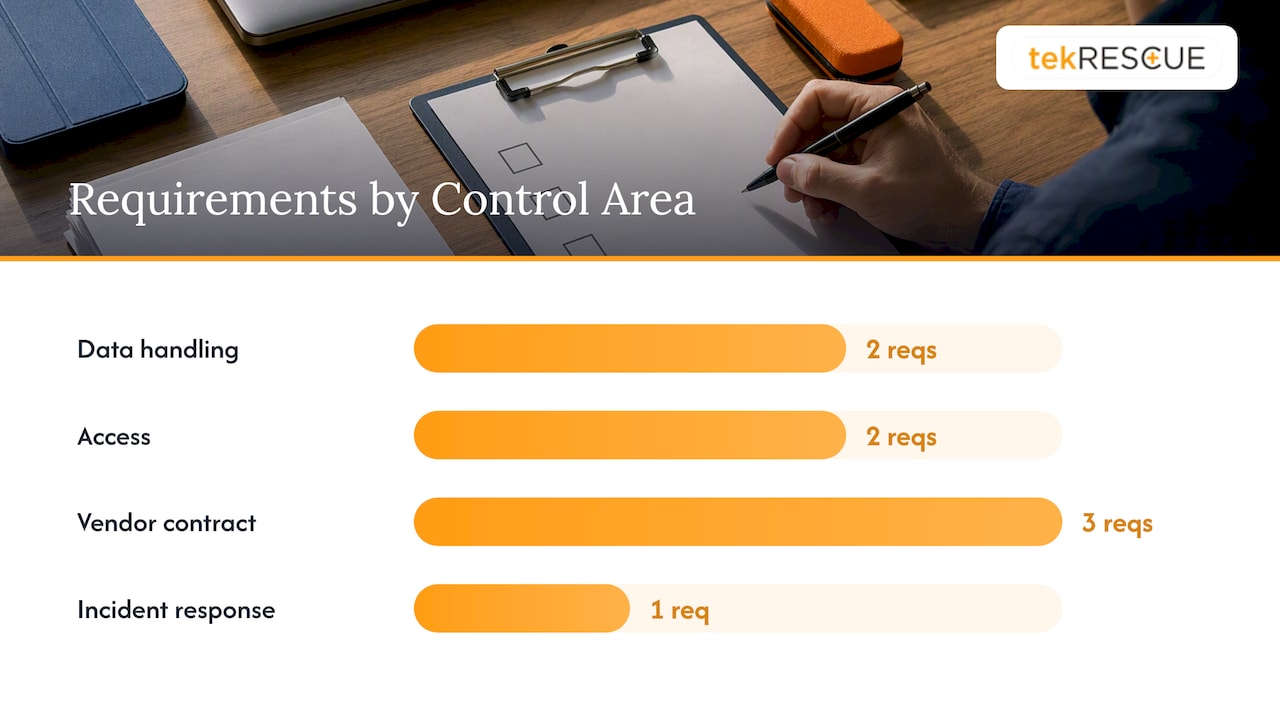
| Control area | What to require |
|---|---|
| Data handling | No PII/PHI in public prompts; enterprise-hosted tools for sensitive data |
| Access | Least-privilege authentication, logged sessions |
| Vendor contract | Audit rights, no training on customer prompts, breach notification SLA |
| Incident response | AI incidents routed into existing cybersecurity response plan |
The risk here is what security teams call shadow AI: employees adopting tools IT never approved, often to solve a real workflow problem the company hasn’t addressed yet. Our breakdown of shadow AI risk covers how that gap typically opens up. Whatever controls you set here should plug directly into your existing cybersecurity and incident response plan, not sit as a separate, forgotten document.
Policy lifecycle: testing, audits, and updates

An AI policy written once and filed away is already out of date. Treat it as a living document with a defined heartbeat.
- Set a review cadence, typically every six to twelve months, with out-of-cycle triggers for new tools, a security incident, or a regulatory change.
- Run bias and impact audits proportional to risk: a tool screening resumes needs more scrutiny than one drafting internal memos. NIST’s Generative AI Profile recommends documenting training data provenance, risk tiering, and testing results as standard practice.
- Red-team higher-risk deployments before they touch consequential decisions, and keep the evidence for compliance purposes.
- Log every after-action review: what broke, what changed, and who signed off on the fix.
Keep a simple change log next to the policy itself. When a regulator or plaintiff’s attorney asks how the policy evolved, “we don’t know” is the worst possible answer.
Employee responsibilities and accountability for AI use
Employees are not passive users of AI tools. Every employee using an approved AI tool bears responsibility for verifying the output before acting on it, whether that means fact-checking a drafted email or reviewing code an assistant generated.
Accountability works in layers. The employee who used the tool is responsible for reviewing its output. The manager who approved the workflow is responsible for confirming the oversight happened. HR is responsible for tracking whether the acknowledgement and training requirements were met in the first place.

Make clear in writing that “the AI made the mistake” is not a defense against a policy violation, in the same way “the spreadsheet was wrong” never excused a miscalculated invoice. The tool is an input, not a decision-maker, and the policy should say so directly.
Practical accountability measures include a signed acknowledgement at onboarding and after each major policy update, a clear escalation path when an employee is unsure whether a use case is permitted, and periodic spot checks on AI-assisted work in higher-risk functions like hiring or finance. None of this needs to feel punitive. It works best framed as a shared standard: the company sets guardrails, and employees are trusted to work within them, with clear consequences when they don’t.
Impact of AI policy on remote and hybrid work settings
Remote and hybrid employees use AI tools with less direct oversight, which raises the stakes on every control described above. Nobody is glancing over a remote employee’s shoulder when they paste a client’s contract into a public chatbot to “summarize it quickly.”
Your policy needs to be enforceable through technical controls, not just trust, when a meaningful share of your workforce is off-site. That means the enterprise API and isolated-environment requirements from the operational controls section matter more, not less, for distributed teams. It also means training has to work asynchronously: recorded modules, written acknowledgements, and clear documentation employees can reference without asking a colleague in the next cubicle.
Home network security compounds the risk. An employee accessing an AI tool over an unsecured home network or personal device introduces a data exposure point your office network never had. Managed IT and network security controls, applied consistently across remote endpoints, close a gap that a policy document alone cannot.
Hybrid teams also face a subtler issue: inconsistent enforcement. An employee who splits time between office and home may follow strict data-handling rules on-site and looser habits remotely, simply because the reminders (posted signage, IT presence, a manager nearby) disappear. Build the policy assuming no physical cues will reinforce it, and you will design better guardrails for everyone.
Addressing ethical considerations and bias mitigation in AI applications
Bias in AI tools is not a hypothetical risk HR can defer to the IT department. It shows up directly in hiring, performance scoring, and any tool that ranks or filters people, which is exactly why the EEOC’s guidance treats AI-assisted decisions the same as any other employment practice.
Bias mitigation starts with knowing what a tool was trained on and testing it on your own population before trusting it with real decisions. NIST’s AI Risk Management Framework frames fairness and accountability as core trustworthiness characteristics, alongside validity, reliability, and security, and recommends independent evaluation rather than taking a vendor’s fairness claims at face value.
Practically, that means running any AI tool touching hiring or performance decisions through a documented impact assessment before deployment, checking outcomes across demographic groups where legally permissible, and keeping a human reviewer in the loop who is trained to spot skewed patterns rather than rubber-stamp the tool’s output.
Ethics extends past bias, too. Transparency with employees about when AI is being used to evaluate them, and giving them a way to contest or appeal an AI-influenced decision, are not just good practice. They are the difference between a policy that holds up under scrutiny and one that becomes exhibit A in a complaint.
Processes for requesting exceptions or approvals for AI tool usage
Employees will find new AI tools faster than HR can vet them. A policy without a clear approval path just pushes that discovery into the shadows.
Build a simple intake process: an employee or manager submits the tool name, intended use case, and what data it would touch, and IT or the policy owner reviews it against the vendor checklist before granting approval. This does not need to be slow. A tool used only for internal brainstorming with no sensitive data involved can be approved quickly; a tool touching customer records or hiring decisions needs the full vendor evaluation described earlier.
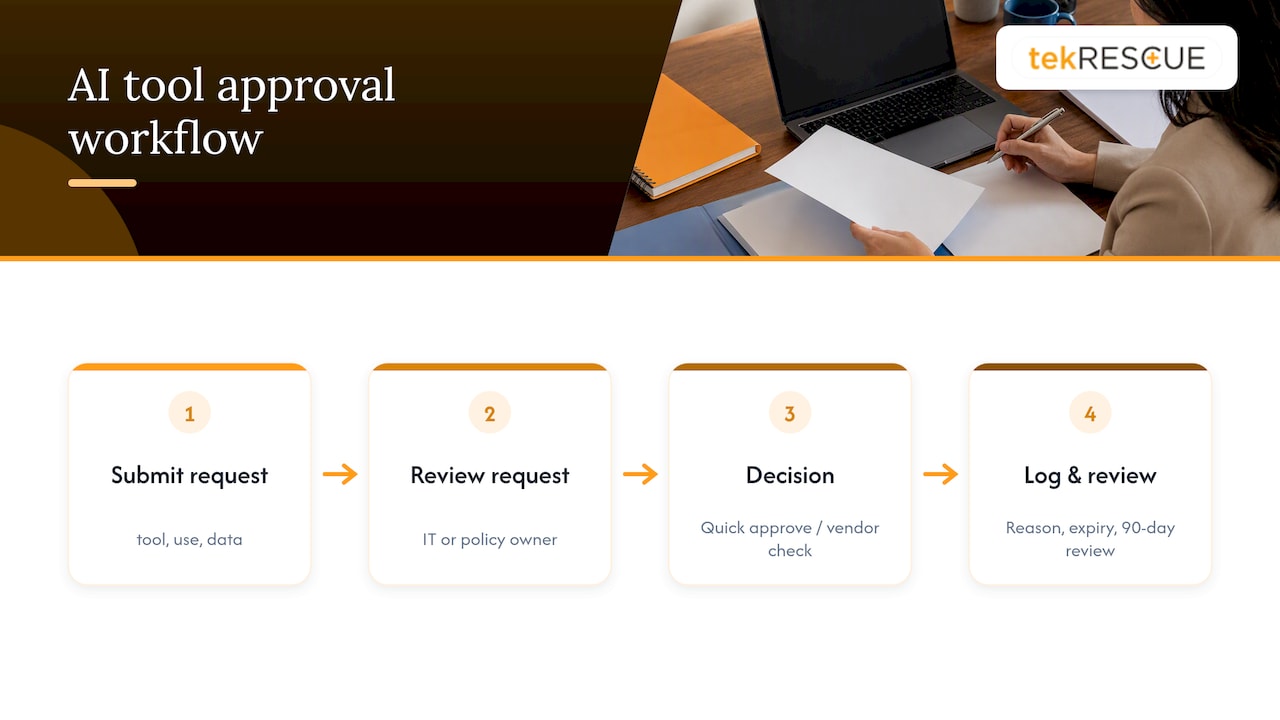
Exceptions should be logged the same way as approvals, with a reason and an expiration date. A temporary exception granted for a one-off project should not quietly become permanent because nobody revisited it. Set a default review point, such as ninety days, so exceptions do not outlive their original justification.
Make the request process genuinely easy to find. If submitting a tool for approval requires hunting through a shared drive or emailing three different people, employees will skip it and use the tool anyway. A single form, routed to one owner, with a stated turnaround time, removes the excuse.
Integration with existing workplace policies
An AI policy that lives in isolation from your other workplace rules creates contradictions employees will notice and exploit. It needs to sit alongside, and reference, your existing IT acceptable-use policy, your data privacy policy, and your code of conduct.
Cross-reference explicitly. Your IT acceptable-use policy likely already covers device security and access controls, the AI policy should point to it rather than duplicate or contradict it. Your data privacy policy governs how customer and employee data is handled, and the AI policy’s prompt-hygiene rules should use the same definitions of sensitive data, not a competing set.
Your code of conduct is where accountability language belongs. Rather than writing a standalone disciplinary section into the AI policy, tie violations back to the existing conduct framework so enforcement is consistent with how you handle every other policy breach.
This integration matters most in HIPAA-covered environments. Any policy allowing generative AI near clinical or patient information needs specific prohibitions on protected health information in free-text prompts, and should require enterprise-hosted tools covered by a business associate agreement rather than public consumer tools. That requirement should be written directly into both the AI policy and your existing HIPAA compliance documentation, not treated as a separate afterthought.
What HR gets wrong about AI policy
The conventional advice treats an AI policy as a one-time compliance document, something you draft, get signed, and file. That is the wrong model, and it is why so many policies stop reflecting how employees actually use these tools within months of being written.
The bigger miss is treating this as a legal problem first and an operational one second. A policy that lists prohibited behaviors but gives employees no approved alternative just pushes usage underground. If your team needs a faster way to draft reports or summarize documents, give them a sanctioned tool with real guardrails, or they will find their own, unmonitored, off the books.
Prioritize three things in order: a working approval process for new tools, a human review threshold that managers actually understand, and a review cadence you will genuinely keep. Skip the elaborate ethics language until those three are solid. A short, enforced policy beats a comprehensive one nobody reads.
— Randy Bryan
Where tekRESCUE fits into your AI policy rollout
Writing the policy is the easy part. Making it stick, technically and legally, is where most employers stall out. That is the gap tekRESCUE’s strategic AI consulting work is built to close: turning the policy language in this article into actual access controls, logging, and vendor vetting.
If your policy touches patient or client health data, our HIPAA compliance work aligns your AI controls with existing safeguards rather than bolting on a second, conflicting standard. If you are worried about shadow AI or data exposure through employee prompts, our cybersecurity services build the logging, access restrictions, and audit trail your policy promises on paper. And when something does go wrong, our incident response planning means you are not improvising a response while a regulator is watching.
For employers ready to move past the draft stage, the next step is a scoped assessment: what tools are already in use, where the gaps are, and what a working rollout looks like for your team. Get in touch with tekRESCUE to start that conversation.
Sources
- EEOC guidance on employment tests and selection procedures
- NIST AI Risk Management Framework
- Generative AI Profile, NIST AI RMF
FAQ
What is the 30% rule in AI?
There is no single, universally recognized “30% rule” tied to workplace AI policy or federal guidance. If you encountered this term in a specific context, it likely refers to an internal benchmark or a claim from a particular vendor or article rather than an established regulatory standard, so it’s worth checking the original source before applying it to your policy.
What should be included in an AI policy?
A workable AI policy defines its scope, separates acceptable from prohibited use with concrete examples, requires disclosure and labeling of AI-generated content, and sets clear thresholds for human review on consequential decisions. It should also cover data handling rules, vendor evaluation criteria, and a defined review cadence, ideally built on frameworks like the NIST AI Risk Management Framework.
Which 3 jobs will not survive AI?
No credible source can name three specific jobs that will disappear entirely because of AI, and claims that do are not backed by verifiable data. What’s better documented is that certain tasks within many roles, particularly repetitive drafting, data entry, and basic customer response, are increasingly assisted or partially automated by AI tools, which is a different claim than a job vanishing outright.
Do small businesses need a formal AI policy?
Yes. Federal anti-discrimination laws enforced by the EEOC apply to any employer using AI-assisted employment practices, regardless of company size, and a written policy is the clearest way to document good-faith compliance efforts.
How often should an employee AI policy be updated?
Most employers should review their AI policy every six to twelve months, with immediate out-of-cycle updates whenever a new tool is adopted, an incident occurs, or relevant state or federal guidance changes. Treating the policy as a living document, rather than a one-time draft, keeps it aligned with how employees actually use these tools.
Recommended
Table of Contents