
Avoid Six Figure Surprises: Ecommerce Website Cost for SMBs in 2026
Most small ecommerce stores launch with first-year costs typically starting in the low thousands, growing multi-SKU operations have higher costs in the mid-range, and enterprise or high-volume builds incur substantially larger expenses. The single biggest factor isn’t the platform you pick. It depends largely on your build approach combined with feature scope and catalog size. Skim the summary table below, then find the scenario that matches your business.
TL;DR:
- Building an ecommerce store costs between $5,000 and $75,000 in the first year, depending on business size and complexity.
- Ongoing annual expenses can range from $6,000 to over $500,000, influenced by features, integrations, and catalog size.
- The main cost drivers are site design, hosting, extensions, payment processing, and security compliance, not just platform fees.
- Prioritizing security and core purchase flows from the start reduces overall costs and prevents expensive rebuilds after incidents.
- Budgeting should include costs for security, maintenance, and compliance, which often comprise 15% to 20% of initial build costs annually.
Table of Contents
Table of Contents
- What Does an Ecommerce Website Cost by Business Size?
- How Much Does Each Cost Line Item Actually Run?
- SaaS, WordPress, or Custom Build: Which Costs Less Over Time?
- What Do Real Ecommerce Budgets Look Like?
- How Do You Budget for and Reduce Ecommerce Costs?
- What Security and Compliance Costs Belong in Your Budget?
- How Does tekrescue Approach Ecommerce Project Costs?
- The Real Cost Problem Isn’t the Platform, It’s the Blind Spots
- Get a Realistic Ecommerce Quote From tekrescue
- Sources
- FAQ
What Does an Ecommerce Website Cost by Business Size?
Every quote you get will land somewhere on a spectrum defined by three variables: how much of the build is templated versus custom, how many integrations you need, and how many products you’re managing. Here’s how those variables translate into real dollars.
| Merchant Profile | First-Year Total | Ongoing Annual Cost | What’s Typically Included |
|---|---|---|---|
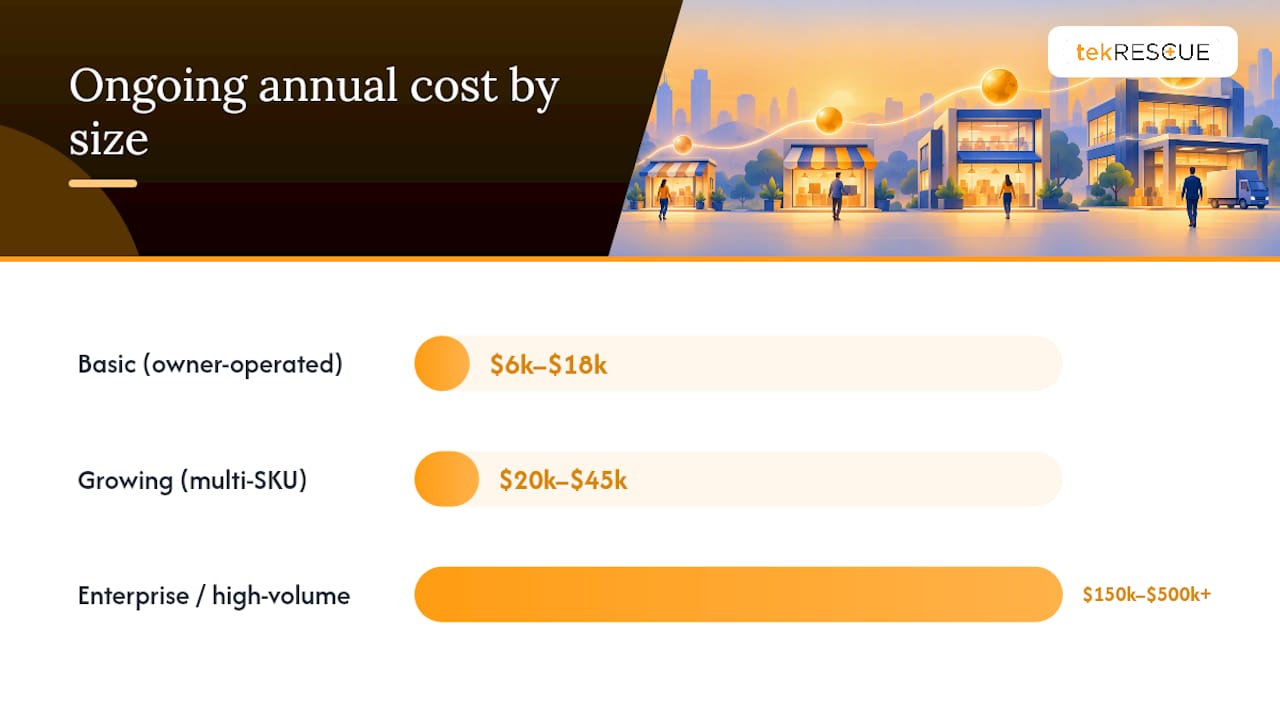
| Basic (owner-operated) | $5,000 to $25,000 | $6,000 to $18,000 | Platform subscription, template theme, domain, basic apps, SSL |
| Growing (multi-SKU) | $25,000 to $75,000 | $20,000 to $45,000 | Custom design work, integrations, extended apps, dedicated hosting |
| Enterprise/high-volume | $100,000 to $500,000+ | $150,000 to $500,000+ | Custom development, ERP/CRM integrations, advanced search, compliance staffing |
These figures cover the site itself: platform or licensing fees, design and development labor, hosting, extensions, SSL, and basic maintenance. They generally exclude three things founders forget to budget for: paid marketing spend, inventory and fulfillment costs, and dedicated customer support staffing. Those live in a separate operating budget, not the website line item.
The variance inside each band comes down to a handful of decisions. A basic store that sticks with a stock theme and skips custom checkout logic stays near the floor of its range. Add a custom checkout flow, a headless search integration, or multi-currency localization, and that same “basic” store can quietly cross into growing-store pricing. Shopify’s own tiered subscription pricing illustrates this well: the base plan is affordable, but stacking apps, higher-tier plans, and payment processing fees on top can double or triple the sticker price by year’s end.
WooCommerce tells a similar story from the open-source side. The core platform costs nothing to license, but total cost of ownership depends entirely on hosting, extensions, and development hours you pour into it. A WooCommerce store with a $0 platform fee can still cost more than a Shopify store once you tally custom plugin development and managed hosting.
Pro Tip: Build your budget backward from the annual operating cost, not the launch cost. A store that’s cheap to build but expensive to run for three years often costs more overall than one with a higher upfront price and lower ongoing fees.
How Much Does Each Cost Line Item Actually Run?
Every ecommerce budget breaks down into the same categories regardless of platform. Understanding what drives price within each one is what separates a realistic estimate from a guess.
Domain name. Expect $10 to $20 per year for a standard .com, with renewal pricing sometimes higher than the first-year promotional rate. Premium or short domains can run into the hundreds or thousands.
Hosting. Shared hosting starts near $5 to $15 monthly but rarely handles ecommerce traffic well. Managed ecommerce hosting or cloud infrastructure (AWS, Google Cloud) typically runs $50 to $500 monthly depending on traffic and uptime requirements. Performance becomes a cost driver the moment your catalog or traffic scales, since slow page loads directly hurt conversion.
Platform fees. SaaS platforms charge a recurring subscription. Open-source platforms like WooCommerce charge nothing for the core software but shift cost into hosting and extensions instead, a tradeoff worth understanding before you commit.
Design and development. A template-based build with light customization runs $2,000 to $10,000 in labor. A fully custom design and build, the kind covered in web design best practices for ecommerce stores, typically runs $15,000 to $80,000 or more. Freelance developer rates commonly fall between $50 and $150 per hour in the U.S., while agency rates run higher but include project management and quality assurance.
Apps, plugins, and extensions. Budget $50 to $500 monthly once you’re running email marketing, reviews, upsell tools, and inventory sync apps together. These costs compound quietly. A store running eight or nine third-party apps can spend more on extensions annually than on hosting.
Payment processing. Most processors charge roughly 2.6% to 3.5% plus a per-transaction fee of $0.10 to $0.30. On $50,000 in monthly sales, that’s $1,300 to $1,750 monthly in processing fees alone, a cost that scales directly with revenue rather than staying fixed.
Maintenance and support. Plan for 15% to 20% of your original build cost annually to cover updates, security patching, and bug fixes. On a $30,000 build, that’s $4,500 to $6,000 a year, separate from hosting.
Key line items to include in any TCO spreadsheet:
- Domain registration and annual renewal
- Hosting or cloud infrastructure fees
- Platform subscription or open-source hosting costs
- Design and development labor, one-time or phased
- Recurring app and extension subscriptions
- Payment processing percentage plus per-transaction fees
- SSL certificate (often bundled free with hosting or platform)
- Annual maintenance and security patching budget
SaaS, WordPress, or Custom Build: Which Costs Less Over Time?
The three main build approaches split cost risk differently. SaaS builders front-load predictability, WordPress and WooCommerce trade platform fees for infrastructure control, and custom or agency builds cost more upfront in exchange for clearer accountability.
-
SaaS builders run on subscription pricing, which makes budgeting simple. You know your monthly platform fee in advance, and time to market is fast, often two to six weeks for a basic store. The tradeoff shows up in the app ecosystem: as you add functionality, recurring app fees can eventually exceed what an open-source alternative would cost for a high-volume merchant. Costs concentrate in checkout customization limits and app stacking.
-
WordPress plus WooCommerce eliminates platform licensing fees entirely, since the core software is free. That savings shifts cost control into hosting quality and extension selection instead, which increases operational complexity even as it lowers the long-term subscription line. Maintenance falls either to an in-house person or an outside developer, and costs concentrate in hosting performance and plugin compatibility as the catalog grows.
-
Custom or agency builds carry the highest upfront cost but deliver the clearest service level agreements and the most control over performance at scale. This route makes sense once your catalog, integration needs, or compliance requirements outgrow what a templated platform handles well. Costs here concentrate in integration work, custom search, and checkout logic built to your exact specifications, which is also why a documented project process matters more than it does for a DIY build.
What Do Real Ecommerce Budgets Look Like?
Numbers on a chart are easy to skim past. Here’s what three actual budgets look like once you itemize them.
Scenario A: The owner-operated small store. A single founder selling 40 SKUs of handmade goods, running the business solo with no dedicated developer.
- Platform subscription typically ranges from low to moderate monthly fees
- Template theme: $0 to $350 one-time
- Domain: $15 annually
- Basic apps (email, reviews): $40 monthly
- Payment processing: roughly 2.9% plus $0.30 per transaction
- First-year total: $6,000 to $18,000
- Ongoing annual: $1,500 to $4,500
Scenario B: The growing store with integrations. A team of three running 400 SKUs, syncing inventory with a warehouse system, running email automation, and offering multi-currency checkout for international customers.
- Custom design and development: $20,000 to $45,000
- Platform or hosting fees: $200 to $600 monthly
- Integrations (inventory sync, ERP connector): $150 to $800 monthly
- Extended app stack: $200 to $500 monthly
- First-year total: $35,000 to $70,000
- Ongoing annual: $10,000 to $22,000
Scenario C: The enterprise or high-volume store. A company running 10,000+ SKUs with custom ERP integration, advanced faceted search, and dedicated compliance staffing for payment data.
- Custom development and platform architecture: $100,000 to $300,000
- Advanced search infrastructure (a service like Algolia at scale can run hundreds to thousands of dollars monthly)
- ERP and CRM integrations: $20,000 to $80,000
- Dedicated hosting and CDN: $2,000 to $10,000 monthly
- First-year total: $150,000 to $500,000+
- Ongoing annual: $50,000 to $150,000+
To map your own business onto these scenarios, look at three numbers: your SKU count, the number of third-party systems you need to connect, and your expected monthly order volume. WooCommerce partner case studies of real store total cost of ownership show first-year totals ranging from tens of thousands into the millions, and the split almost always traces back to those same three variables.
How Do You Budget for and Reduce Ecommerce Costs?
A tight budget isn’t about picking the cheapest option at every step. It’s about sequencing spend so you pay for what drives revenue first and defer everything else.
- Build an MVP feature list tied to revenue outcomes. List every proposed feature next to the revenue or conversion impact it’s expected to have. Cut anything that doesn’t tie back to a number.
- Phase the work. Launch core purchase flows first: browse, cart, checkout, payment. Save personalization, loyalty programs, and advanced search for a second phase once you have real sales data.
- Start on a predictable subscription plan. A SaaS platform gets you live fast with fixed monthly costs. You can migrate to a custom build later once volume justifies the investment.
- Negotiate developer scope against clear acceptance criteria. Vague statements of work are where budgets balloon. Define exactly what “done” looks like for each deliverable before signing.
- Build in contingency. Add 15% to 20% on top of your development quote for scope adjustments discovered mid-build. Almost every project finds something that wasn’t in the original spec.
- Know when to accept platform limits versus build custom. If a SaaS builder’s checkout restrictions cost you conversions, that’s when custom development pays for itself. If the limitation is cosmetic, live with it.
Pro Tip: Ask any developer or agency for a fixed-scope quote with change-order pricing spelled out in advance. That single request prevents more budget overruns than any negotiation tactic.
What Security and Compliance Costs Belong in Your Budget?
Security gets treated as an afterthought in most ecommerce quotes, and that’s exactly how budgets blow up six months post-launch. The FTC’s small business cybersecurity guidance recommends TLS encryption, regular software patching, and email authentication protocols like SPF, DKIM, and DMARC as baseline requirements, not upgrades.
Statistic to budget around: the FTC’s guidance on protecting personal information instructs businesses to collect only the customer data they need, protect it, retain it deliberately, and dispose of it securely. That’s a data-handling policy, and writing one costs staff time even before you spend a dollar on tools.
Line items that belong in your compliance budget:
- TLS certificate and secure hosting configuration
- Ongoing patching and vulnerability monitoring
- PCI-aligned payment processing, guided by PCI Security Standards baselines
- Data retention and disposal policy documentation
- Annual security testing or penetration testing
- Incident response retainer for breach scenarios
Sellers operating on third-party marketplaces face an added layer: the INFORM Consumers Act requires certain marketplaces to collect and disclose seller identity information, with penalties for noncompliance. Who owns each of these controls, you or your hosting provider, changes how a vendor quotes the work, so clarify ownership before you sign anything.
How Does tekrescue Approach Ecommerce Project Costs?
tekrescue starts every ecommerce engagement with discovery, mapping security and compliance needs before a single line of code gets written. That sequencing matters: catching a PCI or data-handling requirement during scoping costs a conversation, catching it after launch costs a rebuild.
Maintenance packages typically cover patching, backup verification, and uptime monitoring, the same categories the FTC’s cybersecurity guidance flags as commonly skipped. Project management practices, including fixed scope documents and change-order pricing, keep budgets from drifting mid-build.
A managed engagement makes the most sense once your store handles regulated data, multiple integrations, or growth that a DIY setup can’t keep pace with. If your team is stretched thin managing inventory sync, payment compliance, and security patching simultaneously, that’s usually the signal to bring in outside help.
The Real Cost Problem Isn’t the Platform, It’s the Blind Spots
Most cost guides obsess over platform fees because they’re the easiest number to compare. That’s the wrong fight. Shopify versus WooCommerce is a rounding error next to what security negligence or scope creep will cost you eighteen months in.
Here’s what the research actually supports: businesses that treat security and compliance as a line item from day one spend less overall than those that bolt it on after an incident. The FTC’s own framing backs this up, treating security as a responsibility spread across the business, not an IT afterthought. Conventional advice tells founders to “pick the cheapest platform and iterate.” That advice ignores that the cheapest platform with the weakest compliance posture is the most expensive choice if a data incident forces a rebuild under pressure.
If you’re budgeting for 2026, prioritize in this order: security fundamentals first, core purchase flow second, and everything else, personalization, loyalty programs, advanced search, only after you have revenue data to justify it. Skipping straight to feature-rich because a demo looked impressive is how six-figure budgets happen by accident.
— Randy Bryan
Get a Realistic Ecommerce Quote From tekrescue
Most ecommerce quotes are optimistic by design. They price the build and leave security, maintenance, and compliance as change orders you discover later. These categories should be priced into the scope from the first conversation, because a store handling customer payment data carries the same compliance stakes whether you’re a small retailer or a growing regional brand.
tekrescue works with small to medium businesses, startups, and regulated practices that need HIPAA-capable compliance support alongside standard web design and development. That includes hosting, ongoing maintenance, and cybersecurity services built around the same FTC and PCI baselines covered above.
If you’re planning a 2026 build and want a scope document instead of a guess, request a discovery call and get a written quote before you commit to a platform.
Sources
- Cybersecurity for Small Business | Federal Trade Commission
- Shopify Pricing: Find the Right Plan for Your Business – Shopify
- WooCommerce Pricing Puts You In Control – WooCommerce
- PCI Security Standards
FAQ
How much does a good ecommerce website cost?
A solidly built ecommerce site typically costs $5,000 to $25,000 for a basic store and $25,000 to $75,000 for a growing multi-SKU operation in the first year. Enterprise builds with custom integrations often exceed $100,000, with the exact figure driven by build approach, catalog size, and how many systems you’re integrating.
What is the 80/20 rule in ecommerce?
The 80/20 rule, also called the Pareto principle, generally suggests that roughly 80% of your revenue comes from around 20% of your products or customers. In a budgeting context, it means prioritizing development and marketing spend around your best-performing SKUs rather than spreading resources evenly across your entire catalog.
What is the cheapest way to build an ecommerce site?
A SaaS builder on an entry-level subscription plan is generally the lowest upfront-cost route, often launching for a few hundred dollars in setup plus a monthly fee. WooCommerce is free at the platform level too, but factor in hosting and extension costs, which can add up even without a subscription fee attached.
How much does tekrescue charge to build an ecommerce website?
Pricing depends on scope, catalog size, and compliance requirements, so tekrescue doesn’t publish a flat rate for ecommerce builds. Request a discovery call through tekrescue’s web development page for a scoped quote based on your specific project.
What ongoing costs should I budget for after launch?
Beyond hosting and platform fees, plan for marketing spend, customer support staffing, inventory management tools, and a maintenance budget of roughly 15% to 20% of your original build cost annually. Security patching and monitoring belong in that maintenance line too, not as a separate surprise expense.
Recommended
Table of Contents