
Map Every Google Business Profile Field to Google’s 3 Pillars for SMBs
A verified, fully complete profile with the correct primary category and a steady stream of reviews and engagement is the single most effective lever for local visibility on Google. Every action beyond that verification, accurate hours, current photos, prompt review replies, and a real website feeds one of three signals Google uses to rank local results: relevance, distance, and prominence.
TL;DR:
- Verification through video is increasingly common and requires continuous, unedited footage showing your storefront, interior, and proof of management; errors in filming lead to delays.
- Completing all profile fields accurately, especially business name, hours, and service area, significantly boosts relevance signals, but avoid keyword stuffing or broad categories.
- Primary category selection and review velocity have the greatest influence on ranking in 2026, while photos and posts have a secondary, engagement-driven role.
- Manual management of Q&A and review responses on a weekly basis is crucial, as Google now favors human attention over automated tools, and inactivity signals neglect.
- Integrating your Google Business Profile with a well-built, localized website enhances prominence and relevance, especially after Google’s API deprecation and discontinuation of the website builder.
Table of Contents
Table of Contents
- What Is Google Business Profile Optimization?
- Verify Your Business: Methods, Video Verification, and Avoiding Delays
- Complete Every Profile Field: Names, Hours, and Descriptions Done Right
- Choose Categories and Attributes: Specificity Over Breadth
- Photos and Video: What to Post and How Often
- Reviews and Responses: Building Steady Velocity Without Breaking the Rules
- Posts, Products, and Services: Turning Views Into Clicks
- Website, Citations, and NAP Consistency
- Analytics and Monitoring: Which Metrics Actually Matter
- Troubleshooting: Fixing Common Problems Before They Become Suspensions
- Why tekrescue’s Approach to Local Visibility Works
- Utilize the Q&A Section Effectively
- Use the Google Business Profile Messaging Feature
- Manage Multiple Locations Properly
- The Editorial Take: What Actually Moves the Needle in 2026
- Get Help Optimizing Your Profile and Your Website Together
- Sources
- FAQ
What Is Google Business Profile Optimization?
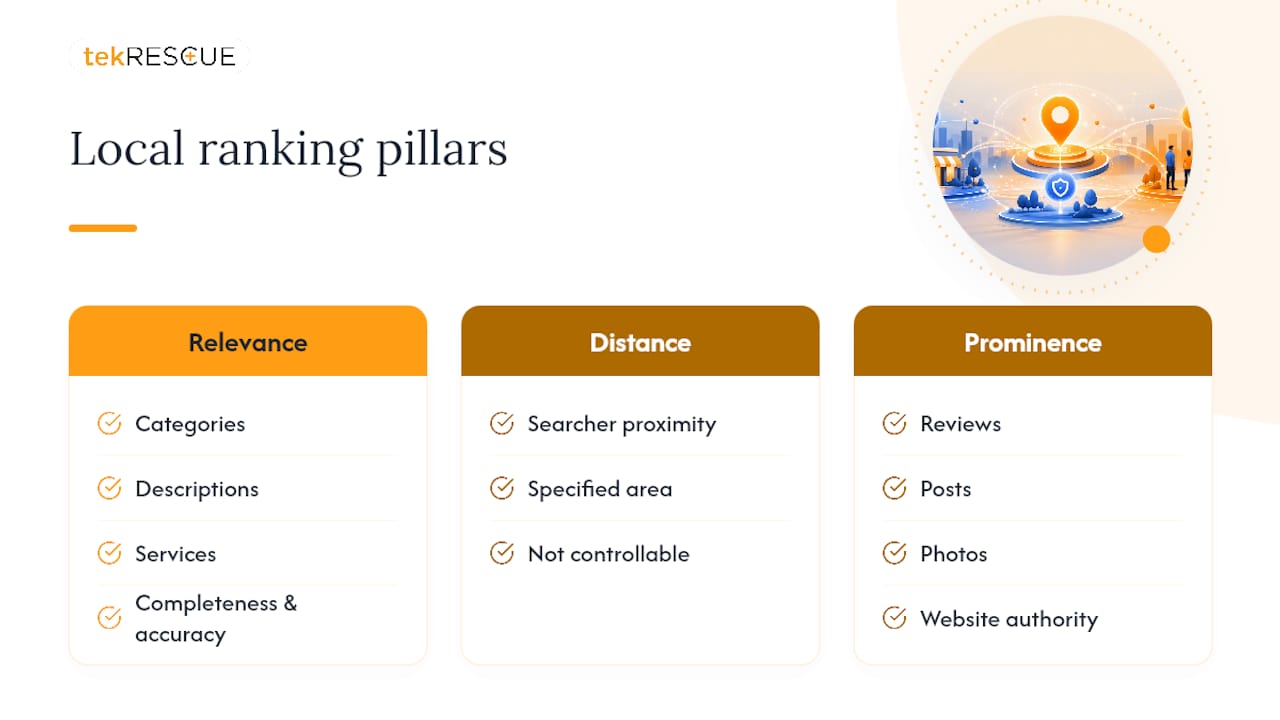
Google Business Profile optimization is the process of completing, verifying, and actively maintaining your listing so it satisfies the three factors Google’s own ranking guidance names as the basis for local search: relevance, distance, and prominence. Relevance measures how well your profile matches what someone searched for. Distance measures proximity to the searcher or the area they specified. Prominence measures how well known and trusted your business appears, based on reviews, links, and general online presence.
Here’s what most guides skip: these three pillars aren’t equally within your control. You can’t change distance. You have real influence over relevance (through categories, descriptions, and services). You have significant, compounding influence over prominence (through reviews, posts, photos, and website authority). That’s why the tactics below weight so heavily toward the two pillars you can actually move.
Google states plainly that there’s no way to pay for a better local ranking. Completeness and accuracy are what make you eligible to rank well in the first place, not a paid placement or a trick.
Verify Your Business: Methods, Video Verification, and Avoiding Delays
Nothing else on this list works until verification is complete. An unverified profile can’t fully control its listing, run posts reliably, or respond to messages in some categories.
Google assigns your verification method based on your business category and history; you don’t get to pick. Options include a postcard by mail, phone, email, and increasingly, video. Video verification has become the default for many service-area and home-based businesses. It requires an unedited, unique recording of at least 30 seconds showing proof of your storefront or service activity, and Google’s review can take up to 5 business days.
A successful verification video needs a few specific things on camera:
- Your business signage or storefront, filmed continuously (no cuts or edits)
- Interior shots showing equipment, inventory, or a workspace that matches your category
- Proof you manage the business, such as pulling up an invoice, a point-of-sale system, or business mail with your address
- A walk from the exterior to the interior in one continuous shot, not stitched clips
If verification fails, Google will tell you why in most cases. Common reasons include shaky or edited footage, a location that doesn’t match the listed address, or insufficient proof of management. You can usually resubmit immediately once you fix the specific issue flagged.
Pro Tip: Storyboard your video before filming. Walk the exact route once without the camera, note where you’ll show signage, interior, and proof of management, then film it in a single unbroken take. Rejected videos almost always come from editing or missing continuity, not from the business itself being ineligible.
Complete Every Profile Field: Names, Hours, and Descriptions Done Right
An incomplete profile is invisible to a meaningful share of searchers. Every field you leave blank is a missed relevance signal, and industry analysis shows fully filled listings earn noticeably higher engagement than sparse ones.
Start with the fields that create the most friction when done wrong:
- Business name: use your exact legal or storefront name. Do not append keywords like “Best Plumber Austin” to your name; Google’s guidelines treat this as a violation that can trigger suspension.
- Phone and address: match these exactly to your website footer and any directory listing. Even small formatting differences confuse Google’s matching algorithm.
- Hours: update regular hours immediately when they change, and set special hours ahead of holidays. A profile showing “open” when you’re closed generates frustrated searchers and bad reviews.
- Service area: toggle this on if you serve customers at their location rather than a storefront, and list every city or region you genuinely cover, not an aspirational list.
- Website: link to a real, hosted site. Google shut down its own Business Profile website builder in 2024, so if you were relying on that, you need a proper website on a stable platform now.
- Business description: write 250 to 750 characters that explain what you do, who you serve, and where, using natural language rather than a keyword list. Lead with the benefit, not a slogan.
Choose Categories and Attributes: Specificity Over Breadth
Your primary category is the single most powerful on-profile lever you control, more influential than photos, posts, or even your description. Industry surveys tracking local search ranking factors consistently rank it above nearly every other on-profile signal.
The mistake most owners make is choosing a broad category because it sounds safe. “Restaurant” is broad. “Vietnamese Restaurant” is specific and matches more search intent. “Contractor” is broad. “Roofing Contractor” or “Deck Builder” tells Google exactly which searches you should surface for.
- Search your exact category name in the dropdown before settling; Google often has a narrower option than the first one that comes to mind.
- Add two or three secondary categories that genuinely apply, not every category remotely related to your business.
- Review your attributes (wheelchair accessible, women-owned, outdoor seating, online estimates) and check every one that’s factually true. These feed filtered searches directly.
Pro Tip: Search Google as a customer would, using the phrase you most want to rank for, then check which category the top three local results use. That’s usually a stronger signal than guessing from the dropdown list alone.
Photos and Video: What to Post and How Often
Photos and fresh posts function as engagement drivers that feed prominence, rather than acting as standalone ranking factors on their own. A profile that looks abandoned reads as less trustworthy to both searchers and Google’s own signals.
Prioritize these shots first, in this order:
- Exterior storefront, shot in daylight from the angle a customer would actually approach
- Interior shots showing the space customers experience, not a stock-style empty room
- Staff at work, which builds trust faster than product shots alone
- Products or completed jobs, especially before-and-after pairs for service businesses
- A short behind-the-scenes video, 30 to 60 seconds, showing your process
Upload images at a minimum of 720 by 720 pixels in JPG or PNG format, and keep file sizes under 5MB for faster loading. Refresh your photo set at least monthly, even if it’s a single new shot; profiles with recent activity outperform static ones on engagement signals over time.
Reviews and Responses: Building Steady Velocity Without Breaking the Rules
A steady drip of reviews outperforms one large batch, because Google weighs recency alongside volume. A business that earned 40 reviews two years ago and none since looks less active than one earning three or four a month, even at a lower total count.
Build review velocity with a repeatable system:
- Ask at the moment of highest satisfaction, right after a completed job or checkout, not days later by email when the experience has faded.
- Simplify the path: send a direct review link via text or a printed QR code on the receipt, not a request that requires searching for your business first.
- Send one reminder, never more, to customers who haven’t responded within a week. Repeated nagging violates Google’s policies and annoys customers.
Never offer discounts or incentives in exchange for reviews, and never write or solicit fake reviews from friends or family with no real transaction; both violate Google’s policies and risk profile suspension.
Reply to every review within 48 hours where possible. For a positive review, thank the customer by name and mention a specific detail from their visit. For a neutral review, acknowledge the feedback and invite them to reach out directly to resolve any gap. For a negative review, stay factual, apologize for the specific experience, and move the conversation off the public thread by offering a phone number or email.
Pro Tip: Reply to reviews in your customer’s own language when they didn’t write in English. It signals attentiveness that generic template replies never do, and it often gets noticed and shared.
Posts, Products, and Services: Turning Views Into Clicks
Posts, product listings, and service menus are the parts of your profile most owners set up once and never touch again, which is exactly why using them consistently creates an advantage. Consistent activity can let a newer, more active profile outperform an older, static one on engagement.
Post at least weekly, rotating between three types: offers with a clear expiration date, upcoming events, and general updates about new products or seasonal changes. Google’s own posting interface makes this fast, so there’s little excuse to skip it.
For products or services, add a clear name, a price when applicable, and a short description that leads with the outcome rather than the feature. “Same-day AC repair, $89 diagnostic” converts better than “HVAC Services.”
Short post copy works better than long copy here. The first gets clicked; the second gets skipped.
Website, Citations, and NAP Consistency
Your Google Business Profile and your website should reinforce each other, not operate as separate systems. A local landing page dedicated to your service area strengthens both relevance and prominence at once.
That landing page needs a few non-negotiable elements:
- Your name, address, and phone number (NAP) formatted identically to your Google Business Profile listing
- A clear statement of your service area, especially if you don’t have walk-in customers
- Basic local business schema markup so search engines can parse your NAP programmatically
- A single, obvious contact call to action, whether that’s a phone number, a booking form, or a click-to-text link
Directory citations matter less in volume than in consistency. A handful of accurate listings on major directories beats dozens with mismatched phone numbers or old addresses. If you’re rebuilding a site after losing the discontinued Google Business Profile website builder, this is the right moment to build something more durable; a service focused on SEO for property managers and service businesses or broader local content optimization can guide the structure.
Analytics and Monitoring: Which Metrics Actually Matter
Google Business Profile insights show a handful of metrics worth checking regularly: profile views, search queries that surfaced your listing, phone calls, and direction requests.
Each tells you something different. A spike in views with flat calls suggests your listing is showing up but not converting, often a categories or photos problem. A rise in direction requests without matching foot traffic might mean your hours or service area needs correcting.
Cross-reference these against Google Search Console and your site analytics monthly to see whether website traffic and profile activity move together. With several Business Profile APIs deprecated, automated dashboards that once pulled this data directly are less reliable now, so manual monthly checks matter more than they did a year or two ago.
Troubleshooting: Fixing Common Problems Before They Become Suspensions
Most verification failures trace back to a mismatch between what’s on camera and what’s on file: a business name that doesn’t match your video, an address that doesn’t line up, or footage that looks edited.
Avoid making major edits, your business name, address, or primary category, while a verification review is pending, since it can reset the review clock or invalidate a pending code entirely.
- If a competitor or malicious edit changes your listing, use the “suggest an edit” report function immediately and document the change with a screenshot.
- Keep a personal record of every field value (hours, category, description) so you can quickly identify and reverse an unauthorized edit.
- If a suspension happens, appeal through Google’s official reinstatement form rather than creating a duplicate listing, which violates policy and can compound the problem.
- For businesses managing this across a large footprint or with limited internal bandwidth, working with a managed provider reduces the odds of a self-inflicted suspension from a rushed edit.
Why tekrescue’s Approach to Local Visibility Works
tekrescue works with small and medium-sized businesses across Austin, San Marcos, New Braunfels, Kyle, Schertz, and surrounding Texas communities on the same problem this article covers: turning a neglected or partially built profile into one that actually earns local visibility. That work sits inside a broader practice covering web development, SEO, cybersecurity and compliance, and managed IT, which matters because a Google Business Profile is only as strong as the website and infrastructure behind it.
Utilize the Q&A Section Effectively
The Q&A section sits on your profile whether you use it or not, and an unattended one invites strangers to answer questions about your own business, often incorrectly.
Seed it yourself. Write three or four questions real customers actually ask, “Do you offer weekend appointments?” or “Is parking available on-site?”, and answer them yourself as the business owner. This preempts confusion and gives Google more indexed, relevant text tied to your listing.
Check the section weekly. Anyone can post a question, and anyone can post an answer, including competitors or bad actors. An unanswered or incorrectly answered question sitting at the top of your profile for weeks looks like neglect to a browsing customer.
One limitation worth knowing: Google’s own Q&A API has been discontinued, so automated tools that once monitored and answered questions on your behalf no longer work the way they used to. That pushes this back into a manual, recurring task rather than something you can fully hand off to software.
Upvote helpful answers, including your own, since Google surfaces the most upvoted answers first. A quick internal habit, checking Q&A every Monday alongside reviews, keeps this from becoming another abandoned corner of your profile.
Use the Google Business Profile Messaging Feature
Messaging lets customers text your business directly from the search results or Maps listing, and it’s one of the most underused features on the platform. Many owners never turn it on, then wonder why calls are their only inbound channel.
Turn it on through the profile’s messaging settings and set a welcome message that sets expectations, something like “Thanks for reaching out. We typically reply within an hour during business hours.” That single line reduces the drop-off from customers who message and then leave when they don’t hear back fast enough.
Respond quickly. A messaging feature that takes three days to answer trains customers to stop using it, and a visibly slow response pattern undercuts the trust signal the feature is supposed to build. Set a phone notification for new messages if you’re managing this yourself, or assign it to whoever handles your phone during business hours.
Messaging works especially well for quick, low-commitment questions, availability, pricing ranges, whether you serve a specific neighborhood, that a customer might otherwise abandon rather than call about. Treat it as a lightweight extension of your existing customer service, not a separate system requiring new staff or software.
Manage Multiple Locations Properly
Each physical location needs its own separate, fully verified profile. Do not create one profile and list multiple addresses, and do not let a single set of hours or photos representing locations that actually operate differently.
Use Google’s bulk location management tools if you’re running more than ten locations; entering each one manually at scale invites inconsistency, and inconsistency is exactly what damages the prominence signal you’re trying to build.
Keep category and attribute selections synchronized when locations genuinely offer the same services, but let hours, photos, and local descriptions vary to reflect each location’s real character. A location description copy pasted across twelve profiles with only the city name swapped reads as thin, low-effort content to both customers and Google.
Assign clear ownership for review responses per location. A regional manager or local staff member responding to reviews with specific, location relevant detail outperforms a corporate account replying with the same generic template across every city. If your business is scaling past a handful of locations, this is often the point where manual management starts breaking down and a structured process, or outside help, becomes worth the cost.
The Editorial Take: What Actually Moves the Needle in 2026
Most advice on this topic treats every field on a Google Business Profile as equally important, and that’s the biggest thing wrong with the conventional wisdom. It isn’t. Primary category selection and review velocity do more work than photo count or post frequency, yet most guides spend three paragraphs on photos for every one on category strategy.
The deprecation of Google’s own APIs, including the Q&A tool, is a signal worth taking seriously beyond the inconvenience. Google is pushing businesses toward manual, human-attended profile management rather than fully automated dashboards. That favors owners and agencies willing to do the weekly work: checking Q&A, replying to reviews inside 48 hours, posting something real instead of recycled copy.
If you’re prioritizing one thing first, make it verification and category accuracy before touching photos or posts. A gorgeous, active profile in the wrong category is invisible to the searches that actually convert.
— Randy Bryan
Get Help Optimizing Your Profile and Your Website Together
A Google Business Profile can only carry a business so far without a real website behind it, and that’s the gap tekrescue is built to close. Where most local SEO advice stops at the profile itself, tekrescue treats your listing and your website as one system: building the local landing pages, schema, and NAP consistency your profile needs to earn prominence, backed by the search engine optimization work that keeps both moving together instead of drifting apart.
If your current site was built through Google’s now-discontinued website builder, or if it hasn’t been touched since your profile was created, that’s the practical starting point. tekrescue’s web development and hosting services cover exactly that rebuild, on a platform you actually own and control. Reach out through the site to scope what your profile and website need together, not as two separate projects.
Sources
- Tips to improve your local ranking on Google
- Deprecation schedule | Google Business Profile APIs | Google for Developers
- Google to Shut Down Business Profile Websites: What to Do Next?
FAQ
How Do I Optimize My Google Business Profile?
Verify your business, choose the most specific primary category available, complete every field including hours and description, add current photos monthly, and reply to reviews within 48 hours. These actions map directly to the relevance, distance, and prominence signals Google uses for local ranking.
How Much Does Google Business Profile Optimization Cost?
The profile itself is free to claim, verify, and update directly through Google. Costs come from time or from hiring outside help; tekrescue’s SEO and web development pricing is available on request through its SEO services page.
How Do I Optimize My Google Business Profile in 2026?
Focus first on verification and category accuracy, then build steady review velocity and weekly posting habits, since Google’s shift toward manual Q&A management and behavioral engagement signals rewards consistent, active profiles over static ones.
Is Google Business Profile Being Discontinued?
No, the profile platform itself remains active. Google discontinued the built-in website builder feature in 2024 and has sunset several developer APIs, but the core profile, verification, reviews, and posting features remain in place.
Why Isn’t My Business Showing Up in Local Search Results?
The most common causes are an unverified profile, a mismatched or overly broad primary category, incomplete fields like hours or service area, or a lack of recent reviews and posts, all of which weaken the relevance and prominence signals Google uses to rank listings.
Recommended
Table of Contents