
Private LLM for Business: A Practical Guide for Small Companies
A private LLM is a large language model that runs in an environment your business controls, so prompts, documents and logs never become someone else’s training data or someone else’s liability. For a small business, the hard part is not downloading a model. It is deciding where it runs, who can touch it, and what happens to the sensitive data you feed it. If you handle patient records, client financials or contracts, that decision is a security and compliance project first and an AI project second. That is the work we do at tekRESCUE through Strategic AI Consulting and our cybersecurity and managed IT services.
Here is the uncomfortable truth. Employees are already pasting customer data into public chatbots. A private deployment fixes that only if it is built with the same discipline you would apply to a file server holding your most sensitive records.
Table of Contents
TL;DR
- A private LLM runs in infrastructure you control (your own hardware, a colocation rack, or an isolated cloud environment), so your data stays inside a boundary you can defend.
- “Self-hosted,” “on-premises” and “private cloud” are different places to run the same idea, with different control, cost and upkeep.
- Private is a matter of configuration and contract. You must know where inference runs, where logs live, and who at any provider can reach the environment.
- If protected health information (PHI) touches the model, HIPAA rules apply to the vendor, the logs and your risk analysis.
- The model is the easy part. Access control, monitoring, patching and incident response decide whether it stays private.
Table of Contents
- What a private LLM is, and how it differs from a public one
- Self-hosted, on-premises and private cloud: the real differences
- Which businesses should consider one
- HIPAA: where a private LLM stops being optional thinking
- What a safe private deployment needs
- Questions to answer before you buy hardware
- Start small and narrow
- Our perspective
- Plan your private AI with a team that handles the whole stack
- FAQ
- Sources
What a private LLM is, and how it differs from a public one
A public LLM is a vendor-managed service. You send a prompt over the internet, the vendor runs it on its systems, and depending on the plan and the contract, your data may be used to train future models. A comparison of public and private models describes private LLMs as deployed inside your own virtual private cloud or private environment, with data isolation, no training on your data, optional fine-tuning on your own content, and more consistent latency for enterprise workflows.
That last point matters less to a 25-person firm than the first. What you buy with a private model is a boundary. Your prompts, the documents the model reads, and the answers it produces stay inside systems you can monitor, restrict and audit.
One caution from the field keeps the term honest. A glossary of private AI defines it as running models in an environment your organization controls: your own data center, colocation, dedicated GPU servers, or an isolated private environment inside a public cloud. It also says buyers should verify where inference runs, where prompts and logs are stored, whether any data leaves for telemetry or support, and who at the provider can access the environment. In its words, private is a matter of configuration and contract, not a label.
So “private” is not a product feature you tick. It is a set of answers you can write down and defend.
Self-hosted, on-premises and private cloud: the real differences
Searchers use these three phrases almost interchangeably. They describe different arrangements.
| Approach | Where the model runs | Control | What you carry |
|---|---|---|---|
| On-premises | Servers in your own office or server room | Highest physical control | Hardware, power, cooling, patching, backups, physical security |
| Self-hosted (general) | Any infrastructure you operate, on-site, colocated or rented | High, depends on where | Everything above the hardware layer: the model server, updates, access control |
| Private cloud | An isolated, dedicated environment in a cloud or hosted data center | High logically, shared physically | Configuration, network isolation, contracts, monitoring |
Self-hosted describes who operates the software, not where the machine sits. If your team (or your IT provider) installs and runs the model server, it is self-hosted, whether the GPU is under a desk or in a rented rack.
On-premises means the hardware is physically yours and on your property. It gives the strongest answer to “where is my data,” and the heaviest maintenance load.
Private cloud keeps the model in an isolated environment that only you can reach. It avoids buying and cooling GPU hardware, but you are now relying on a contract and on correct configuration, which is exactly where the glossary above says to look hard.
For most small businesses and medical or professional practices, the right answer is not the most extreme one. It is the arrangement whose risks you can actually manage with the staff and IT support you have.
Which businesses should consider one
A private model earns its place when the information going in is the kind you would never email unencrypted:
- Healthcare providers and their business associates, where prompts may contain PHI.
- CPA and financial firms, where client tax and account data is covered by the FTC Safeguards Rule. Our guide to FTC and data privacy compliance for SMBs covers what to audit.
- Legal practices handling privileged files and, in some cases, health information.
- Any company with contracts, pricing, source code or customer lists that employees want to summarize or search with AI.
If your use is drafting marketing copy from public information, a private deployment is probably more than you need. The value rises with the sensitivity of the data.
HIPAA: where a private LLM stops being optional thinking
If you are a covered entity or a business associate, putting PHI in front of a model brings the HIPAA rules with it. The details below come from a legal reading of the regulation as codified in September 2026, published by a healthcare AI analysis.
A vendor that processes PHI to run a model is a business associate. The “conduit” exception is narrow and reaches only mere couriers such as internet service providers. A hosted model is not a courier.
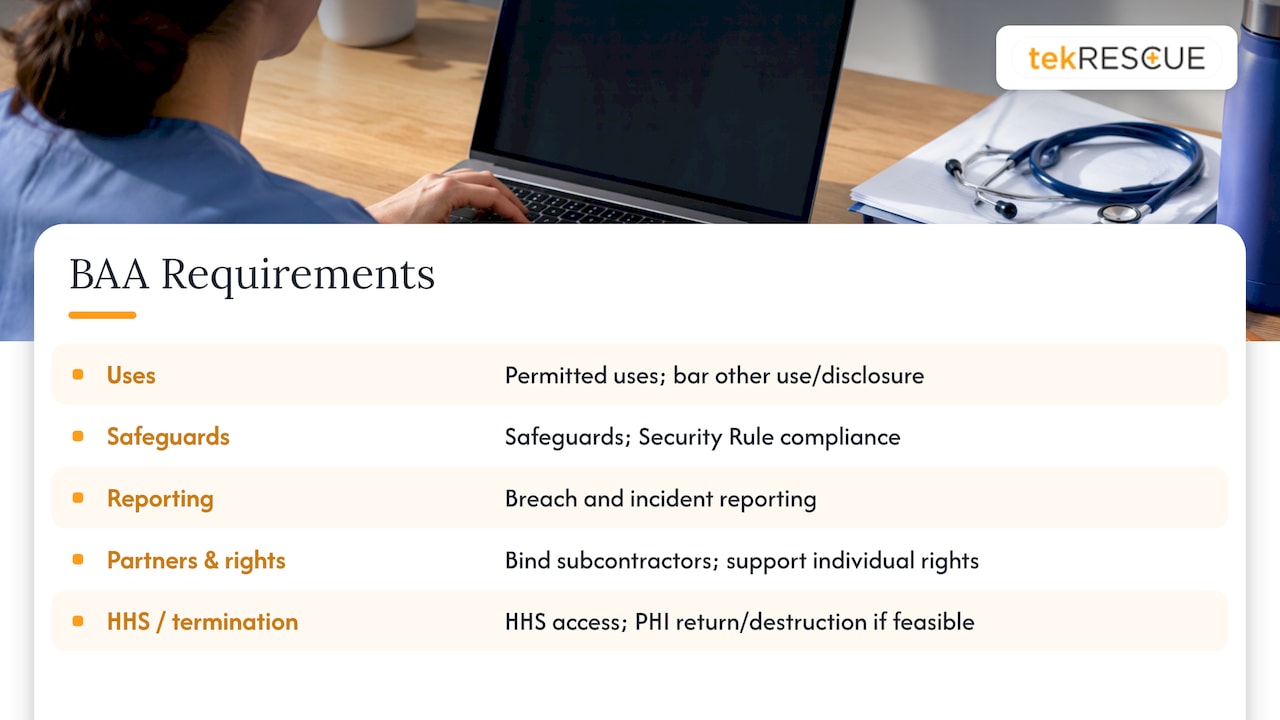
A business associate agreement (BAA) has required contents. Under 45 C.F.R. §164.504(e)(2), it must state permitted uses, bar other use or disclosure, require safeguards and Security Rule compliance, require breach and incident reporting, bind subcontractors, support individual rights, open books to the Secretary of HHS, and require return or destruction of PHI at termination if feasible. We break the clauses down in what a business associate agreement must cover.
Training is decided by the contract. The same analysis notes that §164.504(e) says nothing specific about training a model. The permitted-uses clause in your BAA is what decides whether a vendor may use your data that way.
Minimum necessary applies to what you feed the model. If a workflow sends a whole chart where a medication list would do, you have a minimum-necessary question to answer. Design retrieval so the model sees only the records the task needs.
Your risk analysis must include the model. The Security Rule requires an accurate and thorough assessment of risks to electronic PHI. A flow to a model vendor, and into that vendor’s logs, belongs in it.
No product is “HIPAA certified.” The analysis states that HHS and its Office for Civil Rights do not certify any persons or products as HIPAA compliant. Compliance is something your organization demonstrates through its safeguards, agreements and documentation. It also notes that HIPAA does not require domestic hosting, but where data sits belongs in your risk analysis.
If you are a healthcare provider, bring your compliance lead and your IT provider into the design before the first pilot, and have your attorney review the BAA language. Our HIPAA compliance work covers the safeguards side.
What a safe private deployment needs
The model server is one component. The surrounding controls are what keep it private. Treat it like any system that holds regulated data.
1. Decide the data boundary first
Write down which data classes may enter the model: public, internal, confidential, regulated. Anything regulated gets its own rules. Decide this before you pick hardware or a model, because it determines whether on-premises, private cloud or no AI use at all fits the workflow.
2. Lock down identity and access
Every user should sign in with their own account and multi-factor authentication. The model should respect the same permissions as the underlying documents. If an intern cannot open payroll files, the assistant must not be able to quote them either. This is the most common failure in document-connected assistants: the model gets broad read access and quietly becomes a way around your permissions.
3. Encrypt data in transit and at rest
Prompts, vector indexes built from your documents, logs and backups all contain your data. Each needs encryption. Our guides on PHI encryption for small practices and encrypting data and backups under a managed IT plan walk through the controls.
4. Segment the network
A model server should sit behind a firewall with only the paths it needs. It should not be able to browse the open internet freely, and a compromised laptop should not be able to reach it directly. Network security and firewalls are part of what we manage for clients through our managed IT services.
5. Log, monitor and review
You need to know who asked what, which documents were retrieved, and when something unusual happens. Logs that hold prompts are themselves sensitive data, so they get the same protection and a retention rule you chose on purpose.
6. Patch relentlessly
Model servers, containers, drivers and libraries all carry vulnerabilities. A private deployment that is never updated is a private target. Assign an owner and a schedule.
7. Plan for the day it goes wrong
Decide in advance who isolates the system, who preserves evidence and who notifies whom. A written HIPAA incident response plan is a good model for the first hours, even if your data is not health related.
8. Verify what your AI tools do with data
The same discipline applies to every AI tool in the company, not only the private one. This overview of privacy in AI training is a useful checklist of questions about how data is used once it enters an AI system.
Questions to answer before you buy hardware
Before any purchase, a business owner should be able to answer these in plain language:
- What problem is the model solving? Searching internal documents, summarizing calls, drafting replies, extracting data from forms. Each has different data and accuracy needs.
- What data will it see, and who owns that data? Name the systems and the sensitivity.
- Who runs it? A model server needs an operator with time set aside, not a task added to someone’s spare hours.
- Where do prompts, outputs and logs live, and for how long?
- Who at any outside provider can reach the environment? This is the question from the private AI glossary above, and it applies to hosting providers too.
- How will you measure success? Time saved per task, errors caught, tickets closed. Without a measure, the project drifts.
- What is your exit plan? If you leave a provider, how is your data returned or destroyed?
Cost deserves its own honest line. Beyond the hardware or cloud bill, a private deployment carries ongoing engineering time for updates, monitoring and access reviews. Budget for the people and the process, not only the GPU. That is usually where small-business estimates come up short.
Start small and narrow
The businesses that get value fastest do not begin with a company-wide assistant. They pick one workflow with clear inputs, such as searching a policy library or summarizing intake notes, and prove it inside the data boundary they have defined. Then they widen access.
A sensible first phase looks like this:
- Inventory the data the workflow touches and classify it.
- Run a risk assessment that includes the model, the retrieval layer, the logs and any vendor.
- Choose the hosting arrangement that matches your risk and your staffing.
- Configure access, encryption, segmentation and monitoring before real data goes in.
- Pilot with a small group, review the logs, then expand.
Our cybersecurity and risk assessment services are built around exactly this kind of review.
Our perspective
We approach private AI as an infrastructure and security problem that happens to involve a language model. The model gets the headlines. Identity, network design, encryption, logging and incident response decide whether your data stays yours.
Small businesses and healthcare practices do not have a security team in the next room. That is why we pair AI consulting with the managed IT, cybersecurity and compliance work we already do for businesses in Austin, San Marcos and the surrounding Texas communities. One team that understands your servers, your firewall, your HIPAA obligations and your AI plans can design a deployment that fits all of them at once.
AI-driven threats are moving faster than most small-company defenses. Employees will use AI tools whether or not you approve them. The strongest move you can make is to give them a sanctioned, controlled option built on a foundation you can defend, and to document it before an auditor or an attacker asks.
Randy Bryan
Plan your private AI with a team that handles the whole stack
If you want a private LLM without hiring a security and infrastructure team, start with Strategic AI Consulting. We offer it alongside managed IT services, server setup and maintenance, network security and firewalls, risk assessment, HIPAA compliance and incident response. That means the deployment, the surrounding security and the compliance paperwork can come from one provider.
FAQ
Is a self-hosted LLM the same as a private LLM?
Not exactly. Self-hosted describes who operates the software. Private describes the boundary around your data. A self-hosted model on a poorly secured server is not private in any meaningful sense, and a well-isolated private cloud environment can be.
Does running an LLM on premises make us HIPAA compliant?
No. HHS and OCR do not certify products as HIPAA compliant, so compliance comes from your safeguards, risk analysis and agreements. On-premises hosting can simplify the question of where PHI goes, but you still need access controls, encryption, logging and documentation.
Do we need a BAA for a private LLM?
If an outside vendor processes PHI to run the model, including hosting it, that vendor is a business associate and a BAA is required. If you run everything on your own equipment with your own staff, no outside vendor touches the PHI, though your risk analysis still has to cover the system. Have your attorney review the agreement either way.
Can a private LLM read our internal documents safely?
Yes, if it is built to respect the same permissions as the source files and to retrieve only what each task needs. Access control, encryption of the document index and logging are what make that safe.
Is a private LLM worth it for a small business?
It is worth considering when employees work with regulated or confidential data and you want AI benefits without sending that data to a public service. Start with one narrow workflow and a clear security design, then expand.
Sources
- Private LLMs vs. Public Models: Putting Enterprise Security first
- What Is Private AI?
- PHI and the model: what HIPAA requires when a language model touches patient data
- Privacy in AI Training: What Teams Need to Know
Recommended
Table of Contents