

Hold SEO Rankings During a Redesign: Google Backed Playbook for Devs
Preserve every high-value URL you can, build a one-to-one 301 redirect map before launch, QA staging for indexability and template errors, then monitor Search Console daily for the first few weeks. Follow that order and most redesigns hold their rankings within days. Skip any one of those four moves and you’re gambling with traffic that took years to earn.
TL;DR:
- Building a comprehensive 301 redirect map, verified in staging and live environments, is essential to prevent link equity loss and ranking drops during a redesign.
- Maintaining or expanding content depth, metadata, internal links, and structured data on high-value and ranking pages preserves their SEO authority after the site refresh.
- QA checks must confirm staging environments are properly blocked from indexing and that all schema and key elements are correctly rendered before launch.
- Monitoring Search Console data, redirects, and crawl errors continuously for 30 to 90 days post-launch helps catch issues early before traffic declines become severe.
- A migration audit from a managed service provider can identify and safeguard critical URLs, backlinks, and technical elements, reducing the risk of losing rankings during the transition.
Table of Contents
Table of Contents
- How Do You Redesign Without Losing SEO Rankings?
- Building the URL Mapping and Redirect Plan
- What Content and Metadata Should You Keep?
- How Do You QA a Staging Site Before Launch?
- Setting Core Web Vitals Targets for the New Site
- What Should You Check in the First 48 Hours After Launch?
- What’s a Realistic Recovery Timeline After a Redesign?
- Lessons From the Field: What Actually Breaks
- Get a Migration Audit Before You Launch
- Sources
- FAQ
How Do You Redesign Without Losing SEO Rankings?
Redesigning a website without losing SEO comes down to protecting what already works before you touch anything else. Google’s own guidance on site moves and migrations confirms that URL changes trigger ranking fluctuations, and recommends close monitoring of indexing and crawl data for 30 to 90 days after launch. The teams that come out ahead treat a redesign as a data project first and a design project second.

That starts with benchmarking. You need a clear picture of what’s currently driving traffic before a single page changes.
Export your Search Console data. Pull over a year of queries, clicks, and impressions for every URL. This window matters because it captures seasonal swings that a 90-day snapshot would miss entirely.
Crawl the existing site. Tools like Screaming Frog give you a full export of URL, status code, title tag, meta description, H1, word count, and internal links per page. This becomes your baseline for comparison after launch.
Document backlinks and revenue pages. Identify which URLs carry the most external links and which pages actually convert. A blog post with modest traffic but strong backlink equity deserves the same protection as your top landing page.

Record page experience metrics. Capture Core Web Vitals at the template level, not just the homepage, since most sites run a handful of templates across hundreds of pages.
| Data to Collect | Tool | Why It Matters |
|---|---|---|
| Queries, clicks, impressions | Google Search Console | Establishes traffic baseline per URL |
| URL, status, title, H1, word count | Screaming Frog or equivalent crawler | Flags content and structure to preserve |
| Backlink count per URL | Ahrefs, Moz, or Search Console links report | Identifies pages with external authority |
| Core Web Vitals by template | PageSpeed Insights, CrUX | Sets performance baseline pre-launch |
Building the URL Mapping and Redirect Plan
Every URL that changes needs a documented, one-to-one destination. This is not optional, and it’s the single step most redesign disasters trace back to. Search Engine Land’s migration checklist puts redirect mapping at the center of a safe migration for exactly this reason.
Build a spreadsheet with these columns:
- Old URL and new URL, side by side
- Redirect type (301, almost always, never 302 for permanent moves)
- Backlink count for that URL, pulled from your benchmarking phase
- An owner responsible for verifying that specific redirect
- Notes on any special handling, like parameter stripping or consolidated pages
Bulk redirecting everything to the homepage feels faster during a rushed launch. It also throws away the specific relevance signal Google built for that page over months or years. Redirect chains, where old URL A points to B which points to C, dilute link equity at every hop and slow crawling.

Test every redirect in staging before launch, then verify the live versions again once the site goes public. Practitioner audits from SEO Brothers point to missing or broken redirects as one of the most common causes of severe ranking loss during a redesign.
Pro Tip: Keep redirects live for an extended period, ideally a year or more, and update your internal links to point directly at the new URLs instead of relying on the redirect long term. Internal links routed through a redirect chain waste crawl budget and slow down how fast Google discovers your new structure.
What Content and Metadata Should You Keep?
Content thinning is one of the fastest ways to tank a page that used to rank. If a page currently ranks on the strength of 1,800 words covering a topic thoroughly, your redesign should not ship with 600 words of marketing copy replacing it.
- Preserve or expand body content depth on ranking pages. Add to it if anything, never strip it down for a cleaner visual layout.
- Keep title tags, meta descriptions, H1 placement, and alt text intact on pages that already drive organic traffic, unless you have a specific, tested reason to change them.
- Maintain the internal link context around a page. If your blog links to a service page using the anchor text “HIPAA compliance audit,” don’t let the redesign quietly drop that link or swap the anchor for something generic.
- Recreate structured data. Any schema present on the old templates, FAQPage, BreadcrumbList, Organization, or Product markup, needs to exist on the new templates too.
Google’s SEO Starter Guide recommends organizing content clearly and using canonical tags when restructuring a site, particularly when old and new URLs might briefly coexist during a phased rollout. Once your new templates are built, validate every schema type with the Rich Results Test before you consider the page done. A JSON-LD syntax error that goes unnoticed can quietly strip a rich snippet that took months to earn.
How Do You QA a Staging Site Before Launch?

Staging environments cause more launch-day disasters than almost anything else in this process, mostly because the safeguards meant to protect staging accidentally ship to production. Threads on the Google Search Central community repeatedly point to leaked staging robots.txt files and stray noindex tags as a frequent cause of sites vanishing from search results overnight.
- Confirm staging is blocked from indexing, then confirm separately that those specific blocks are configured to not deploy with the production release.
- Crawl and render staging as Googlebot would, then compare that export field by field against your pre-launch baseline: titles, H1s, canonical tags, word counts.
- Verify meta robots tags, the XML sitemap, hreflang attributes if you run multiple language versions, and analytics tracking codes.
- Run the Rich Results Test against representative templates, not just the homepage, since schema errors often hide on category or product pages.
Miss step one and you might launch a site Google can’t crawl at all. It happens more often than most teams expect.
Setting Core Web Vitals Targets for the New Site
Page experience is a real factor in how well a redesigned site performs, and it’s also where a lot of “clean, modern” redesigns quietly regress. Industry benchmarks for Core Web Vitals set practical field targets: Largest Contentful Paint under 2.5 seconds, Interaction to Next Paint under 200 milliseconds, and Cumulative Layout Shift under 0.1, all measured at the 75th percentile of real user data.
- Pull field data from PageSpeed Insights and the Chrome UX Report before and after launch.
- If your new site runs on a single-page application framework, avoid client-side-only rendering for any copy that needs to rank. Use server-side rendering or prerendering instead.
- Compress and serve responsive images, put a CDN in front of static assets, enable caching, minify code, and inline critical CSS for above-the-fold content.
Pro Tip: Run your new homepage template through PageSpeed Insights while it’s still on staging. Fixing a layout shift caused by a lazy-loaded hero image is a five-minute job before launch and a multi-day fire drill after.

Mobile performance deserves its own pass here too, since mobile-first indexing means Google evaluates your site primarily on how it performs on a phone, not a desktop monitor.
What Should You Check in the First 48 Hours After Launch?
The first few days after launch are critical to catch small mistakes before they turn into extended traffic loss. Search Engine Journal’s migration guidance frames this window as the last real chance to catch a launch defect before it compounds.
- Check the production robots.txt file directly. Confirm no noindex tags shipped by accident anywhere on the live site.
- Submit your updated XML sitemap in Search Console and use URL inspection on your highest-priority pages to confirm they’re indexed.
- Spot-check a sample of 50 high-value redirects manually, confirm analytics events and conversion tracking are firing, and watch your 404 and index coverage reports closely.
- Set up alerts for coverage errors and unusual crawl spikes so you’re not discovering problems by accident three weeks later.
This is tedious work. It’s also the difference between a redesign that holds its rankings and one that quietly bleeds traffic for a quarter.
What’s a Realistic Recovery Timeline After a Redesign?
Some ranking volatility in the initial weeks after a redesign is normal, even on a well-executed redesign. Google’s own migration documentation treats this as expected, not a red flag, and notes that crawl speed depends heavily on your site’s size and server response time.
- Use weeks one through four to confirm redirects are resolving correctly and new URLs are getting indexed.
- If drops persist past four weeks, run a full crawl comparison between your pre-launch and post-launch exports. This is the fastest way to isolate template regressions, missing content, or broken redirects causing the slide.
- Prioritize fixes by traffic and revenue impact first, then request a recrawl of each fixed page through Search Console.
- Build out a 6 to 12 month optimization plan once the site stabilizes, since a redesign is a good moment to also fix thin content and outdated pages you’ve been putting off.
Lessons From the Field: What Actually Breaks

The mistake I see most often is not a bad redirect map. It’s a staging noindex tag that got copied into the production deploy script and nobody checked it until traffic cratered a week later. Some providers use mandatory staging QA on mobile-first, HIPAA-aware projects, and employ crawl comparison methods to recover from launch-week drops.
— Randy Bryan
Get a Migration Audit Before You Launch
A managed service provider that integrates redirect mapping, staging QA, and Search Console monitoring into the project plan from day one can help prevent traffic loss after a redesign launch. A migration audit reviews your current URL inventory, backlink profile, and technical baseline, then flags exactly what needs protecting before your developers touch a template.
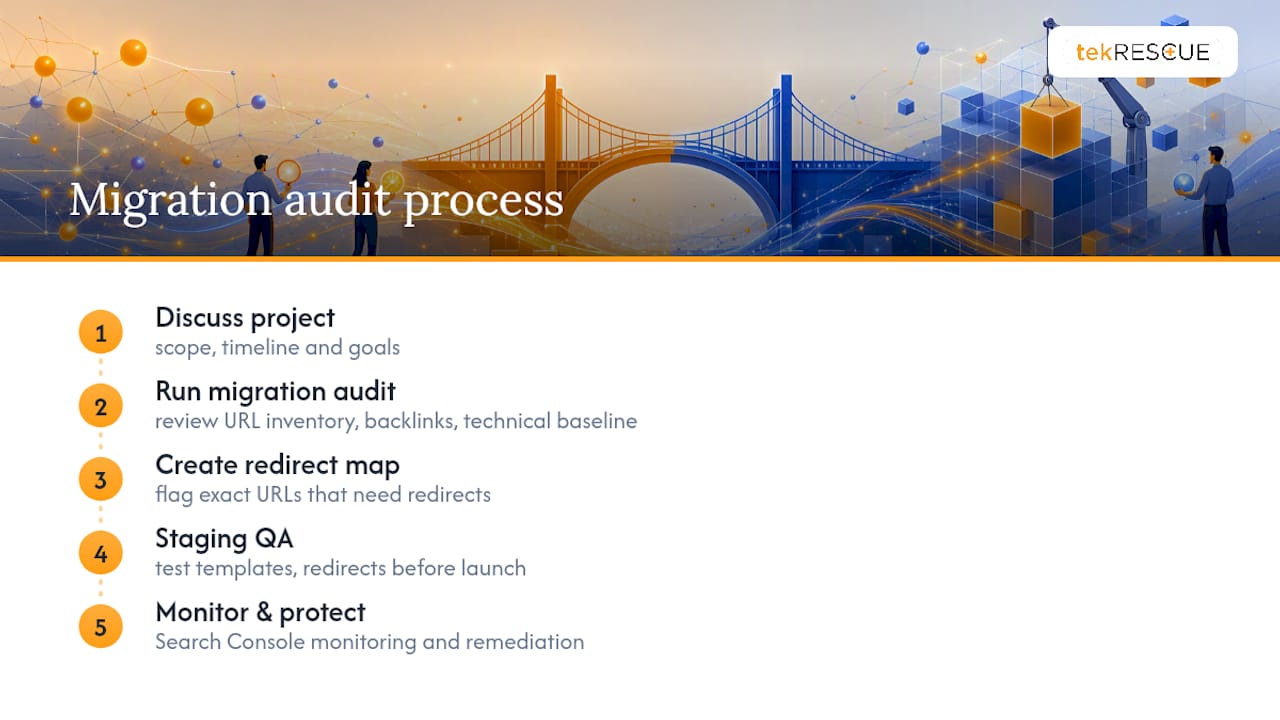
If you’re planning a redesign in the next few months, or if you’re currently watching a recent launch bleed traffic, start with a conversation about your project and get a clear picture of what a managed migration actually looks like from idea to launch.
Sources
- Site Moves and Migrations | Google Search Central | Documentation | Google for Developers
- Ultimate site migration SEO checklist | Search Engine Land
- Website Redesign SEO: A Nine-Step Process to Preserve Rankings Through a Migration | SEO Brothers
- Essential steps for website migration | Search Engine Journal
FAQ
How Do You Redesign a Website Without Losing SEO?

Benchmark current performance in Search Console, build a one-to-one 301 redirect map for every changed URL, preserve high-value content and metadata, QA staging for indexability, then monitor Search Console closely for 30 to 90 days after launch.
What Is the 80/20 Rule in SEO?
In an SEO context, this generally means roughly 20% of your pages, usually your highest-traffic and highest-backlink URLs, drive around 80% of your organic results. During a redesign, that 20% is exactly what your redirect map and content preservation efforts should prioritize first.
Can AI Redesign My Existing Website?
AI tools can speed up parts of a redesign, like drafting page copy or generating layout variations, but the redirect mapping, staging QA, and Search Console monitoring still need deliberate human oversight to avoid the launch mistakes covered above.
How Often Should a Website Be Redesigned?
Most sites benefit from a redesign every two to four years, though a site with severe technical debt, poor mobile performance, or heavy Core Web Vitals issues may need one sooner regardless of age.
What Causes the Most SEO Loss During a Redesign?
Missing or broken redirects, staging noindex tags that ship to production by accident, and template regressions that drop content depth or metadata are the most common causes of significant ranking loss.
Recommended
Table of Contents