
10-Step On-Page SEO Checklist for 2026: AI-Ready Pages
This article gives you a complete, actionable on-page SEO checklist you can run through for every page on your site. Pick your target keyword, work through the checklist below, and fix the technical gaps that block both search engines and AI systems from reading your content. This guide was built around what actually moves rankings now, not what worked five years ago.
TL;DR:
- Focusing on one primary keyword and supporting terms aligned with search intent ensures relevance and avoids diluting ranking signals.
- Placing a direct, concise answer below the H1 and optimizing content for AI systems improves chances of being cited in automated summaries.
- Technical factors like clean URLs, correct status codes, and fast load times are crucial for crawlers and AI to access and interpret your pages effectively.
- Adding schema markup, internal links with clear intent, and verifying with tools like Google Search Console enhances discoverability and structured data accuracy.
- Prioritize updating high-traffic pages quarterly, and target foundational on-page elements first if resources are limited for comprehensive SEO improvements.
Table of Contents
Table of Contents
- The Complete On-Page SEO Checklist
- Technical On-Page Checklist: Crawlability, Speed, and Mobile
- How Do You Optimize a Page for AI and Agentic Search?
- What E-E-A-T Signals Actually Belong on the Page?
- Content Freshness and Update Frequency
- User Engagement Optimization: CTR and Dwell Time
- Outbound Linking to Authoritative Sources
- Social Sharing Integration
- tekrescue’s Prioritization Advice for Small Teams
- Let tekrescue Run the Checklist While You Run Your Business
- Sources
- FAQ
The Complete On-Page SEO Checklist
An on-page SEO checklist only works if it forces you to check something, not just read about it. Every item below includes the task and the way to confirm you actually did it right. Run this on one page at a time. Trying to fix your whole site in one sitting is how checklists get abandoned halfway through.
1. Lock in one target keyword and its supporting terms
Every page needs exactly one primary keyword and no more than three to five supporting terms that share its search intent. If you are optimizing a service page for “on page seo checklist,” your supporting terms might be “on page seo factors,” “on page optimization steps,” and “seo content optimization checklist.” Trying to rank one page for a dozen unrelated terms dilutes relevance signals and confuses both crawlers and readers about what the page is actually for.
How to check it: Search your target keyword in an incognito browser and look at the top five results. If your planned content doesn’t match the intent those pages are satisfying (informational versus transactional versus navigational), pick a different keyword or rewrite your angle.
2. Write a title tag that earns the click
Your title tag should sit between 50 and 60 characters, include the primary keyword near the front, and give the searcher a reason to click over the other nine results. “SEO Checklist” is a title. “On-Page SEO Checklist: 15 Steps to Rank Higher” is a click.
How to check it: Paste your title into a SERP preview tool or just count characters in a word processor. If it truncates in the Google results with an ellipsis, shorten it.
3. Write a meta description that sells the click, not just describes the page

Google doesn’t use your meta description as a ranking factor directly, but it heavily influences whether someone clicks your result over a competitor’s. Keep it between 140 and 160 characters, lead with the benefit the reader gets, and end with a soft call to action like “See the full checklist” or “Get the steps.”
How to check it: Read it out loud. If it sounds like a dictionary definition instead of an invitation, rewrite it.
4. Build one clean heading structure
Use exactly one H1 per page. Below it, structure your H2s as questions where it feels natural, since question-style headings tend to get pulled into AI answer boxes more often than flat descriptive labels. “What Is the Best On-Page SEO Checklist for 2026?” performs differently than “On-Page SEO Overview” in how AI systems extract and cite it.
How to check it: Run your page through a heading outline extension or your browser’s inspector. You should see a single H1, then a logical H2 to H3 hierarchy with no skipped levels.
5. Place your keyword and answer in the first 100 words
Your opening paragraph needs to state the core answer or claim of the page before you explain anything else. This isn’t just an SEO habit. It matches how Elementor’s research on AI search optimization shows that a 40 to 60 word direct answer positioned right under the H1 measurably increases the odds an AI system will extract and cite the page.
How to check it: Cover everything below your first paragraph. Does that paragraph alone answer the reader’s question? If not, rewrite it.
6. Clean up your URL slug
Keep slugs short, lowercase, hyphenated, and free of stop words like “the,” “and,” or “a.” A slug like /on-page-seo-checklist beats /2026/blog/the-complete-on-page-seo-checklist-for-marketers on every metric that matters, including how cleanly it displays in search results.
How to check it: If your slug has more than five or six words, or contains dates and category folders you don’t need, trim it. Set a canonical tag pointing to the version you want indexed if the page exists at multiple URLs.
7. Write content that adds information, not just words

Search engines and AI crawlers both reward pages that add something readers can’t get from the ten other articles on the same topic. That means original examples, specific numbers, a genuine opinion, or a process you’ve actually walked through. Google’s own generative AI optimization guidance is blunt about this: unique, people-first content combined with clear technical structure remains the foundation for visibility, even as AI features change how results get displayed.
How to check it: Ask yourself what a reader learns from your page that they wouldn’t learn from a competitor’s. If the honest answer is “nothing,” you have a rewrite ahead of you, not a publish button to click.
8. Optimize every image on the page
Rename image files before upload so they describe the content (“on-page-seo-checklist-example.jpg” instead of “IMG_4471.jpg”). Compress images so they load fast without visible quality loss, and write alt text that describes what’s actually in the image for screen readers and image search alike. Add captions where they clarify context, especially for charts or screenshots.
How to check it: Right click any image and inspect its alt attribute. If it’s blank or just repeats the filename, fix it.
9. Link internally with intent, not just habit

Every page should link to two or three related pages using anchor text that describes what the linked page covers, not generic phrases like “click here.” If you’re writing about page speed, a natural internal link might point to a piece like tekrescue’s breakdown of why Google penalizes slow, outdated sites. Internal links pass authority between pages and help both users and crawlers understand how your content fits together.
How to check it: Count your internal links. Fewer than two is a missed opportunity; more than five on a short page starts to look spammy.
10. Add the right schema markup
Structured data doesn’t directly boost rankings, but it clarifies what your content actually is to machines that parse it. Schema covers the types you’ll use most: Article schema for blog content, FAQPage for question and answer sections, and HowTo for step-by-step processes. This matters even more now, since FAQPage schema helps structure question and answer content for retrieval systems that AI tools use to pull cited answers.
How to check it: Use Google’s Rich Results Test or a schema validator to confirm your markup is valid and matches the visible content on the page. Mismatched schema (claiming a FAQPage when there’s no visible Q&A) can get flagged as a spam signal.

Pro Tip: Don’t wait until a page is “finished” to add schema. Build it into your content template from the start, so every new page ships with Article and FAQPage markup baked in instead of bolted on later.
Here’s the short version of the sequence, if you want it as a punch list:
- Confirm keyword and search intent
- Write title tag and meta description
- Build heading structure with one H1
- Draft opening answer paragraph
- Clean URL slug and set canonical
- Write body content with real information gain
- Optimize images and alt text
- Add internal links
- Apply schema markup
- Validate everything before you publish
Technical On-Page Checklist: Crawlability, Speed, and Mobile
None of the content work above matters if a crawler can’t reach or read the page. Google Search Essentials lays out the technical baseline for eligibility in both traditional Search and generative AI features, and it starts with a simple question: can Google’s crawlers actually access your page? If the answer is no, better formatting won’t save you.
- Robots.txt: Check that you haven’t accidentally disallowed the page or its resources. A single misplaced
Disallow: /in a staging environment that leaked into production can deindex an entire site. - The llms.txt question: Some sites have started adding an llms.txt file to signal preferences to AI crawlers, but treat it cautiously. It has no formal standard backing it the way robots.txt does. and it won’t override actual crawl and indexing controls.
- Status codes: Confirm the page returns a 200 status, not a soft 404 or an unexpected redirect chain. Redirect chains longer than one or two hops waste crawl budget and slow every visitor down.
- Canonical tags: Every page should point to itself as canonical unless it’s intentionally a duplicate of another URL, in which case point to the original.
- Core Web Vitals: Google measures Largest Contentful Paint, Interaction to Next Paint, and Cumulative Layout Shift as the core signals for page experience. Aim for an LCP under 2.5 seconds, an INP under 200 milliseconds, and a CLS score under 0.1.
- Mobile rendering: If your page relies heavily on client-side JavaScript to render main content, confirm that server-side rendering or pre-rendering delivers the same content to crawlers that a browser would show a human. A page that looks complete in your browser but returns an empty shell to a crawler is invisible no matter how good the content is.
- Semantic HTML: Use actual heading tags, list tags, and paragraph tags rather than styled
<div>soup. This helps both crawlers and assistive technology parse structure correctly.
Verification tools that take five minutes each:
- Google Search Console to check indexing status, mobile usability, and Core Web Vitals reports for the actual page.
- Lighthouse (built into Chrome DevTools) to test performance, accessibility, and best practices scores in one pass.
- The W3C Markup Validation Service to catch HTML errors that can quietly break parsing, especially on older templates that have been patched by multiple developers over the years.
Pro Tip: Run Lighthouse on mobile settings, not desktop. Most sites score noticeably worse on mobile, and that’s the version Google actually uses to evaluate your page under mobile-first indexing.
How Do You Optimize a Page for AI and Agentic Search?
You optimize for AI search by giving every section a self-contained answer that doesn’t depend on the reader having scrolled past three paragraphs of setup first. This is the single biggest shift in on-page SEO for 2026: search results now include AI-generated summaries and agent-driven answers pulled from specific chunks of a page, not just the page as a whole.
That changes how you write. A few concrete moves:
- Place a 40 to 60 word direct answer immediately below your H1, before any throat-clearing intro. Elementor’s research found this single change materially increases citation likelihood.
- Write H2s and H3s as direct questions, then answer them in the first sentence or two that follows, not three paragraphs later.
- Write each section so it stands alone. Avoid pronouns like “this” or “that” that only make sense if the reader just finished the previous section, since AI systems often extract individual chunks out of order.
- Add FAQPage schema to your question-and-answer sections even though the visual “People Also Ask” snippet has changed shape over the past few years. The schema still functions as a machine-readable translation layer for retrieval systems.
- Favor short paragraphs and bullet lists over dense tables for core facts. Elementor’s guidance specifically recommends bullet lists or key-value formatting over complex tables, since parsers read linear text more reliably than table grids.
Combining these AI-specific tactics with traditional fundamentals like clean titles and quality content is what actually moves the needle. Semrush’s research on AI search optimization found that pages layering AI-focused formatting on top of solid on-page basics see a measurably higher rate of AI citation than pages that only do one or the other. Neither approach alone gets you there.
What E-E-A-T Signals Actually Belong on the Page?
E-E-A-T (Experience, Expertise, Authoritativeness, Trustworthiness) isn’t a checkbox Google scores directly, but it shapes how algorithms and AI systems weigh your content against competing pages. The signals that actually count are visible ones a reader (or a crawler) can verify.
- A real author bio page with credentials, a photo, and outbound links to other published work. Elementor’s research notes that author pages with verifiable, linked credentials help AI systems assign expertise to content, which raises the odds of citation.
- Person and Organization schema connected to your Article schema, so the authorship claim is machine-readable, not just visually displayed.
- Visible, specific evidence in the body text, meaning real dates, real numbers, and case-study detail instead of vague claims like “many businesses see results.”
- Clear publisher signals: a working About page, a real contact method, and public business information that matches what a reader would expect from an established company.
Content Freshness and Update Frequency
Stale content doesn’t just look outdated to readers. It signals to crawlers that a page may no longer reflect current information, which matters more for topics tied to tools, pricing, or best practices that shift year to year, like SEO itself.
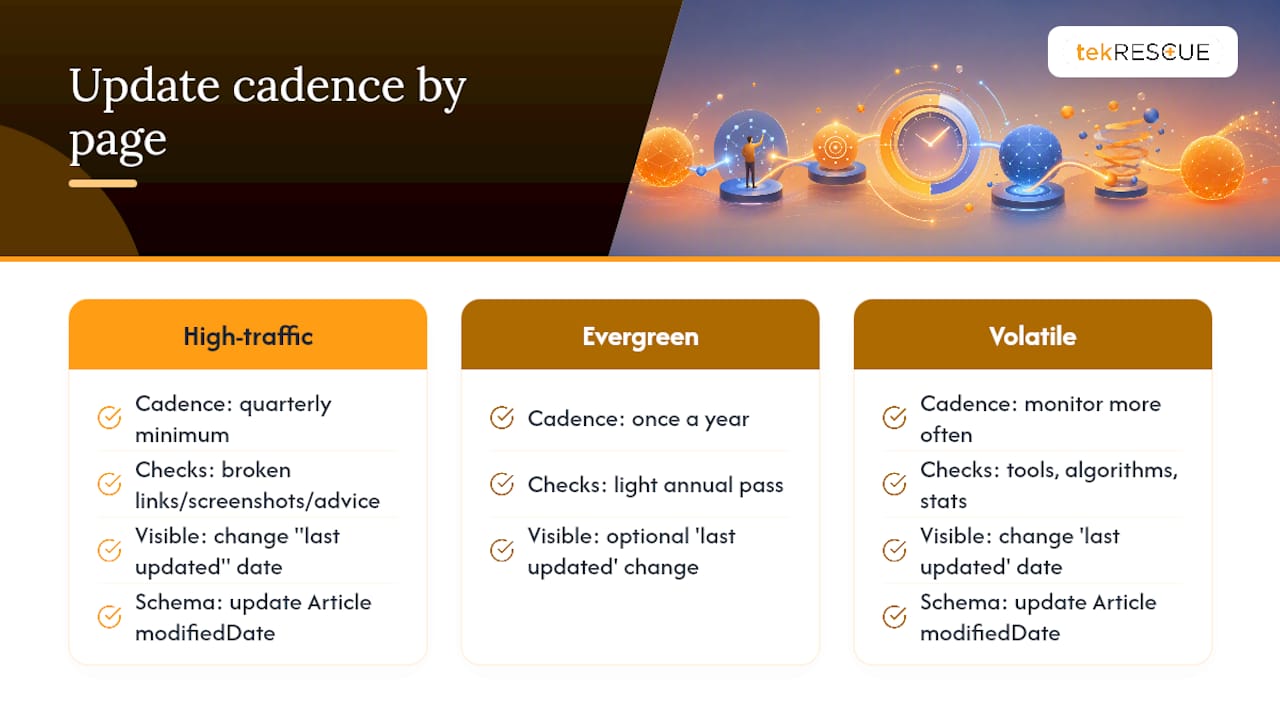
Update your highest-traffic pages on a quarterly review cycle at minimum. Check for broken links, outdated screenshots, and any advice that no longer matches how search engines or AI systems currently behave. When you make a substantive update, change the visible “last updated” date and, if your CMS supports it, update the dateModified field in your Article schema so the change is machine-readable too.
Not every page needs constant rewriting. A well-researched, evergreen explainer might only need a light pass once a year, while anything referencing specific tools, algorithm behavior, or statistics needs closer attention. The mistake most small teams make is updating everything on the same schedule regardless of how fast that particular topic actually changes. Match your update cadence to how quickly the underlying facts move, not to a blanket calendar rule.
User Engagement Optimization: CTR and Dwell Time
Click-through rate and dwell time aren’t confirmed direct ranking factors Google has ever fully detailed, but they correlate strongly with the on-page elements that do influence rankings, and they matter on their own merits as business metrics.
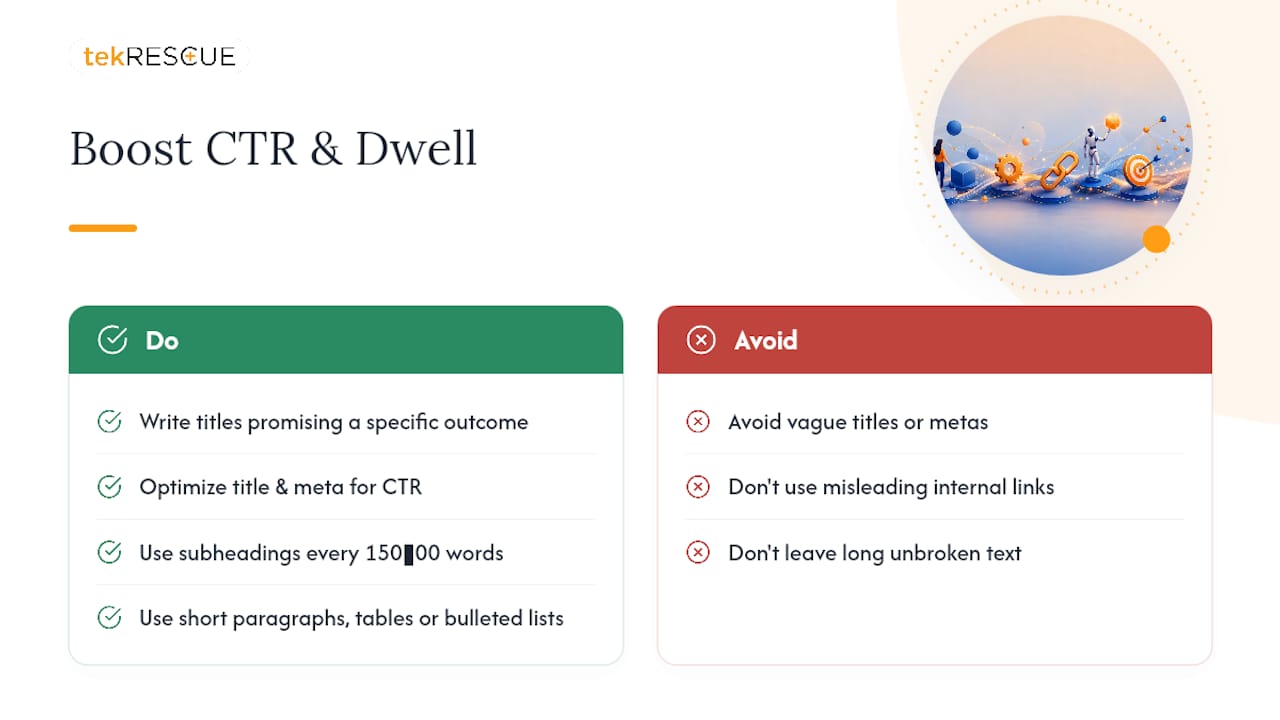
Your title tag and meta description control CTR more than almost anything else you can adjust after publishing. A title that promises a specific outcome (a number, a timeframe, a concrete result) consistently outperforms a vague one in search results.
Dwell time responds to how quickly you deliver value and how easy the page is to keep reading. Break up long blocks of text with subheadings every 150 to 300 words. Use short paragraphs. Add a table or bulleted list when you’re presenting anything comparative, since a wall of prose describing five options is harder to scan than five short entries. Internal links to genuinely related content also extend session time, but only if the linked page delivers on what the anchor text promised. A misleading internal link that dead-ends in irrelevant content trains readers to bounce faster next time.
Outbound Linking to Authoritative Sources
Linking out to credible, authoritative sources isn’t a ranking risk, and treating it as one is an outdated habit from an earlier era of SEO advice. Citing primary sources like Google Search Essentials or Schema.org’s documentation when you make a technical claim signals that your content is grounded in something verifiable rather than repeated secondhand from other blogs.
The practical rule: link out when a specific claim, statistic, or standard needs backing, and link to the source that actually defines or measures it, not to a random article that mentions it in passing. Avoid linking to competitor product pages when discussing your own category, and never link to a source just to pad your page with outbound links for their own sake. Two or three well-placed outbound links on a comprehensive page read as thorough. Ten scattered links to unrelated domains read as either lazy research or an attempt to game an outdated signal that search engines stopped rewarding years ago.
Social Sharing Integration
Social shares don’t directly influence rankings, but they extend a page’s reach and can generate the kind of external links and mentions that do carry weight over time. Add visible, functional share buttons for the platforms your actual audience uses rather than every platform that exists. A B2B services page probably needs a LinkedIn share option more than it needs five icons nobody clicks.
Open Graph tags and Twitter Card markup control how your page displays when someone does share it, including the title, description, and image that appear in the preview. A page with no Open Graph tags often displays a broken or generic preview when shared, which quietly kills click-through even when the underlying content is strong. Test your Open Graph output with a social debugging tool before publishing, since a stale cached preview can undercut a page that’s otherwise ready to go.
tekrescue’s Prioritization Advice for Small Teams
If you’re a small business or a one-person marketing team, don’t try to fix everything on every page at once. Start with title tags, meta descriptions, the first paragraph, and page speed. Those four items touch both what humans decide to click and what AI systems extract first, and Semrush’s research points to exactly this combination as the highest-leverage set of edits for visibility.
Fix template-level issues (site-wide speed, mobile rendering, schema templates) once across your whole site rather than page by page. Save page-level edits for content and headline work that has to be judged individually. And resist the urge to scale out a dozen thin pages targeting slight keyword variations. One thoroughly researched, well-structured page beats ten shallow ones, both for rankings and for the AI systems now deciding what gets cited.
Let tekrescue Run the Checklist While You Run Your Business
Working through this checklist properly, page by page, takes real time, and most small business owners don’t have a spare ten hours a week to run technical audits and rewrite title tags. This service gap is closed by a full on-page SEO audit that identifies exactly which items from this checklist your site is failing, followed by prioritized fixes instead of a generic report you have to interpret yourself.
A typical engagement starts with a technical and content audit against the items above, moves into prioritized fixes ranked by effort versus impact, and ends with measurement against actual search visibility, not vanity metrics. Whether you need a full site rebuild or targeted page-level optimization, a professional team can handle the implementation so your existing pages start working the way this checklist describes.
If your site’s foundation needs more than a content fix, start with how tekrescue builds websites designed to convert visitors into customers and get a sense of where your pages currently stand.
Sources
Verify checklist items against primary sources: Google Search Essentials for technical eligibility, Schema.org for structured data types, and guidance from Elementor and Semrush on AI-ready content formatting. For a deeper look at AI-specific tactics, see AmmarAI’s guide to using AI correctly for SEO.
- Google Search Essentials (formerly Webmaster Guidelines) | Google Search Central | Documentation | Google for Developers
- How to Optimize Content for AI Search Engines | Elementor
- Google’s Guide to Optimizing for Generative AI Features on Google Search | Google Search Central
- Schema
- How to Optimize Content for AI Search Engines | Semrush
FAQ
What Does On-Page SEO Include?
On-page SEO covers everything you control directly on a page: title tags, meta descriptions, heading structure, URL slugs, content quality, internal links, image optimization, and schema markup. It also now includes AI-readiness elements like answer-first paragraphs and modular section structure.
How Do You Do Proper On-Page SEO?
Work through each element systematically starting with keyword and intent, then title and meta description, then heading structure and content quality, then technical checks like crawlability and page speed. The checklist above walks through each step with a verification method attached.
Which Tool Is Best for On-Page SEO?
No single tool covers everything. Google Search Console verifies indexing and Core Web Vitals, Lighthouse audits performance and accessibility, and the W3C Markup Validation Service checks for HTML errors that hurt machine readability. For sites that need a full audit and fix, working with a service like tekrescue covers the parts individual tools can’t automate.
What Are the Three Most Important On-Page SEO Factors?
Based on what most consistently influences both human clicks and AI extraction, the highest-priority factors are the title tag, the first paragraph’s direct answer, and page speed as measured by Core Web Vitals. These three touch the decision to click, the decision to keep reading, and technical eligibility all at once.
Recommended
Table of Contents