
Headless CMS for 3+ Channels: Benefits and 4 Tradeoffs Devs and IT Must Plan
A headless CMS gives developers full control over the frontend, lets marketers reuse content across every channel, and cuts long-term operational costs by decoupling how content is stored from how it’s displayed. The biggest winners are development teams that want modern frameworks, marketers running omnichannel campaigns, and enterprises that need to scale content across dozens of properties without rebuilding the backend each time.
TL;DR:
- Headless CMSs require extensive planning of content models and depend heavily on developers for initial setup and ongoing maintenance.
- Content reuse across multiple channels is highly efficient, but proper governance and disciplined content management are essential to avoid inconsistencies.
- Integration complexity increases as each channel connects via its own API, making monitoring, cache invalidation, and security critical operational concerns.
- A headless approach offers performance advantages through static-site generation and edge caching, especially when optimizing images and assets at the delivery edge.
- It is most suitable for organizations serving three or more channels, with a dedicated frontend team, and willing to invest in designing a robust, scalable architecture.
Table of Contents
Table of Contents
- What Is a Headless CMS, and How Does It Differ From Traditional or Decoupled Systems?
- How Does a Headless CMS Improve Developer Speed and Performance?
- What Do Marketers and Content Teams Gain From Going Headless?
- Why Do Enterprises Choose Headless CMS at Scale?
- What Are the Trade-Offs of Adopting a Headless CMS?
- When Should You Choose Headless, Hybrid, or Traditional CMS?
- How Do You Plan Implementation and Measure ROI?
- What Should You Know Before Rolling Out Headless CMS?
- Is Headless CMS Worth the Trade-Offs?
- Sources
- FAQ
What Is a Headless CMS, and How Does It Differ From Traditional or Decoupled Systems?
A headless CMS is a content repository with no built-in frontend. It stores structured content, typically as JSON, and exposes it through REST or GraphQL APIs. Developers pull that content into whatever frontend they choose: a React app, a mobile client, a smart display in a retail store, or all three at once. There’s no templating engine bolted on, no theme layer, no presentation logic baked into the backend at all.
That’s a meaningful departure from a traditional CMS like a standard WordPress install, where content and presentation live in the same system. Templates render pages directly from the database, which is fast to set up but brittle the moment you need the same content to appear somewhere WordPress wasn’t built for, like a native app or a kiosk.
A decoupled CMS sits in between. It separates the frontend and backend but still ships a default presentation layer and often a built-in preview experience. Pantheon’s explainer on decoupled architecture frames this as intentional: teams get API access for custom frontends while keeping familiar editing and preview tools rather than losing them entirely. A hybrid CMS, headless WordPress being the most common example, adds a REST or GraphQL layer onto a traditional platform so editors keep their familiar dashboard while developers get API access.
Going headless means your team now owns work the old CMS used to handle automatically:
- Content previews, since there’s no built-in rendering to show editors what a page will look like
- Caching strategy, because API responses need their own invalidation logic
- Deployment coordination between the frontend and the content backend, which now ship independently
- Routing and URL structure, previously handled by CMS templating
That shift is the entire trade-off in one sentence: you gain architectural freedom, and you take on the responsibilities the old system used to absorb for you.
How Does a Headless CMS Improve Developer Speed and Performance?
Ask a frontend developer what they hate about traditional CMS platforms, and the answer is almost always the same: the templating language gets in the way. A headless CMS removes that constraint entirely, and the performance gains that follow are well documented.
Developers get to build with whatever framework fits the project, whether that’s Next.js, Astro, SvelteKit, or a native mobile stack, instead of being boxed into a CMS’s proprietary templating system. That freedom compounds with a few specific technical advantages:
- Static-site generation and edge caching. Pages can be pre-built at deploy time and served from a content delivery network close to the user, which shaves meaningful time off load. One widely cited developer account of decoupling a CMS backend from a static frontend found that separating content from presentation cut both build complexity and page weight significantly, because the frontend no longer has to query a database on every request.
- API-first performance. Content arrives as lean JSON instead of a fully rendered HTML page bloated with theme assets, so the frontend controls exactly what loads and when.
- Independent deployments. Content editors can publish updates without triggering a frontend rebuild, and developers can ship frontend changes without touching the content layer. That decoupling reduces the blast radius of any single deployment.
- Better developer experience. Structured content models function like a schema, which means type safety, predictable data shapes, and fewer surprises when a content field changes shape mid-project. Automated preview environments, when a team invests in setting them up, let editors see draft content rendered in the real frontend before anything goes live.
The Jamstack Community Survey backs this up at scale: performance and developer experience consistently rank as the top reasons teams adopt API-driven, decoupled architectures over monolithic CMS platforms. That’s not a marginal preference. It’s the dominant reason cited across thousands of respondents.
Pro Tip: Don’t skip the preview environment when scoping a headless build. Teams that treat preview as an afterthought end up with content editors publishing blind, which turns every campaign launch into a guessing game about how it will actually look.
If your team is weighing framework choices for a rebuild, the performance math tends to favor whichever stack lets you optimize images and asset delivery at the edge, since that’s usually where headless architectures pull furthest ahead of traditional CMS rendering.
What Do Marketers and Content Teams Gain From Going Headless?
Marketers don’t care about API architecture. They care about getting a campaign live across the website, the app, and an email footer without asking three different teams to rebuild the same banner three different ways. That’s the actual pitch a headless CMS makes to content teams: one source of truth, published everywhere at once.
Structured content stored centrally means a single product description, pricing update, or promotional headline can flow to the website, a mobile app, digital signage in a physical store, and a third-party marketplace feed simultaneously. Update it once, and every channel reflects the change. With the number of connected devices worldwide climbing into the billions, that omnichannel reach isn’t a nice-to-have anymore. It’s the baseline expectation for any content operation with more than one surface.
The practical gains break down as follows:
- Reusable content components cut the time it takes to launch a campaign, since teams assemble from existing blocks instead of building each channel’s version from scratch
- Translation and localization work drops sharply when a single content model feeds every market instead of maintaining separate content trees
- Tagging and metadata structures make personalization possible, since the CMS can serve different content blocks based on audience segment, location, or behavior
- Consistent messaging across channels becomes the default rather than something a QA pass has to catch after the fact
None of that works without governance, though. Reuse only holds up when content models are disciplined, which means defined field types, required metadata, and a review workflow that catches a broken content block before it propagates to five channels at once instead of one. Teams that skip that step usually end up with the opposite of consistency: five slightly different versions of the same message, all technically “reused” from the same source.
Why Do Enterprises Choose Headless CMS at Scale?
Enterprises pick headless architecture for a reason that’s rarely stated plainly: it lets them stop betting the entire content operation on one vendor. A componentized, structured content approach reduces production and translation costs once the upfront modeling work is done, and that efficiency compounds across dozens of properties in a way a single monolithic CMS instance can’t match.
Security is part of the pitch too. A headless backend has no public-facing rendering layer, which shrinks the attack surface considerably. There’s no theme engine to exploit, no plugin ecosystem full of unpatched vulnerabilities, and content delivery happens through edge networks rather than a single origin server that traditional attacks tend to target directly.
The enterprise case rests on a few structural advantages:
- Scalability and SLAs. High-traffic properties can scale the delivery layer independently from the content management layer, so a traffic spike on one storefront doesn’t threaten the CMS backend serving twenty other properties.
- Composable architecture. Best-of-breed tools for search, personalization, and commerce plug into the same content API, and any single piece can be swapped out without a full platform migration.
- Vendor flexibility. Because content lives in a structured, API-accessible format, switching the frontend framework or even the CMS vendor itself doesn’t require re-architecting everything downstream.
- Cross-region governance. Role-based permissions and localization workflows can be enforced centrally while still letting regional teams publish independently within defined guardrails.
None of that happens automatically. It requires the same discipline enterprises already apply to network architecture: defined contracts between systems, monitoring on every integration point, and a security posture that treats the API layer with the same seriousness as network security and firewall configuration anywhere else in the stack.
What Are the Trade-Offs of Adopting a Headless CMS?
Every benefit above comes with a corresponding cost, and skipping this section is how teams end up surprised six months into a project. The honest version of the pitch includes these four risks.
- The integration surface expands. Every channel now talks to the CMS through its own API contract, webhook, or third-party service, and each of those connections is a potential point of failure. ClearPath Consultants’ review of real-world headless implementations found that most failures trace back to weak integration architecture rather than any flaw in the CMS itself, which means the problem is almost always planning, not the platform.
- Previewing gets harder. Without a built-in rendering layer, editors can’t just hit “preview” and see the page. Teams either build custom preview tooling or accept a hybrid approach, where a decoupled CMS keeps some presentation layer specifically to preserve that editing experience.
- Developer dependency increases. Marketing teams that could once tweak a page layout themselves in a traditional CMS now need a developer involved for structural changes, since the frontend is custom code rather than a drag-and-drop template.
- Hosting and build costs shift. Static-site generation and edge delivery are efficient, but someone has to own the build pipeline, monitor deployment failures, and budget for the infrastructure running it.
Failure modes deserve specific attention here. Stale caches after a content update, API outages that take down every channel at once instead of just one page, and webhook failures that silently stop propagating updates are the three most common operational headaches. All three are solvable with proper monitoring and cache invalidation logic, but none of them are solved by default the way they would be in a traditional CMS with server-side rendering.
When Should You Choose Headless, Hybrid, or Traditional CMS?
The right architecture depends less on what’s trendy and more on how many channels you’re actually serving and how much control your team needs over the frontend. A few signals make the decision fairly clear.
Choose headless when:
- You’re delivering content to three or more channels (web, app, kiosk, partner API) and need one source of truth
- Your team wants a specific modern frontend framework and doesn’t want CMS templating constraints
- You’re planning for scale that a single monolithic instance can’t reasonably handle
Choose hybrid or traditional when:
- You’re launching a marketing microsite with a short lifespan and a single channel
- Your team has no dedicated frontend developer to own a custom build
- Speed-to-market this quarter matters more than architectural flexibility three years from now
A greenfield multi-channel product, say a retail brand launching an app alongside its website, almost always favors headless from day one, since retrofitting omnichannel delivery onto a traditional CMS later is far more expensive than building for it upfront. An enterprise migrating off a legacy platform, by contrast, often benefits from a hybrid approach first, keeping familiar editing tools while gradually decoupling channel by channel rather than attempting a single risky cutover.
How Do You Plan Implementation and Measure ROI?
Content modeling comes before anything else. Define your content types, field structures, and relationships before writing a single line of frontend code, and pilot the model on one channel before committing to a full migration. Skipping this step is the single most common cause of expensive rework later.
Operational best practices that keep a headless setup healthy over time:
- Define webhook contracts explicitly, including what triggers them and what happens if delivery fails
- Build cache invalidation logic that fires automatically on content updates, not manually after someone remembers
- Instrument observability across every API integration point, not just the CMS itself
- Keep a documented rollback plan for both the frontend and the content model
Cost drivers to estimate up front include developer time for the initial build, hosting and CDN costs for the delivery layer, and the ongoing maintenance load of managing multiple integration points instead of one monolithic system.
Statistic to watch: the Jamstack Community Survey consistently finds performance and developer experience cited as the top adoption drivers, which lines up with the real ROI signal teams should track: time-to-publish, reduction in cross-channel rework, and measurable lift from personalization once structured content makes segmentation possible.
What Should You Know Before Rolling Out Headless CMS?
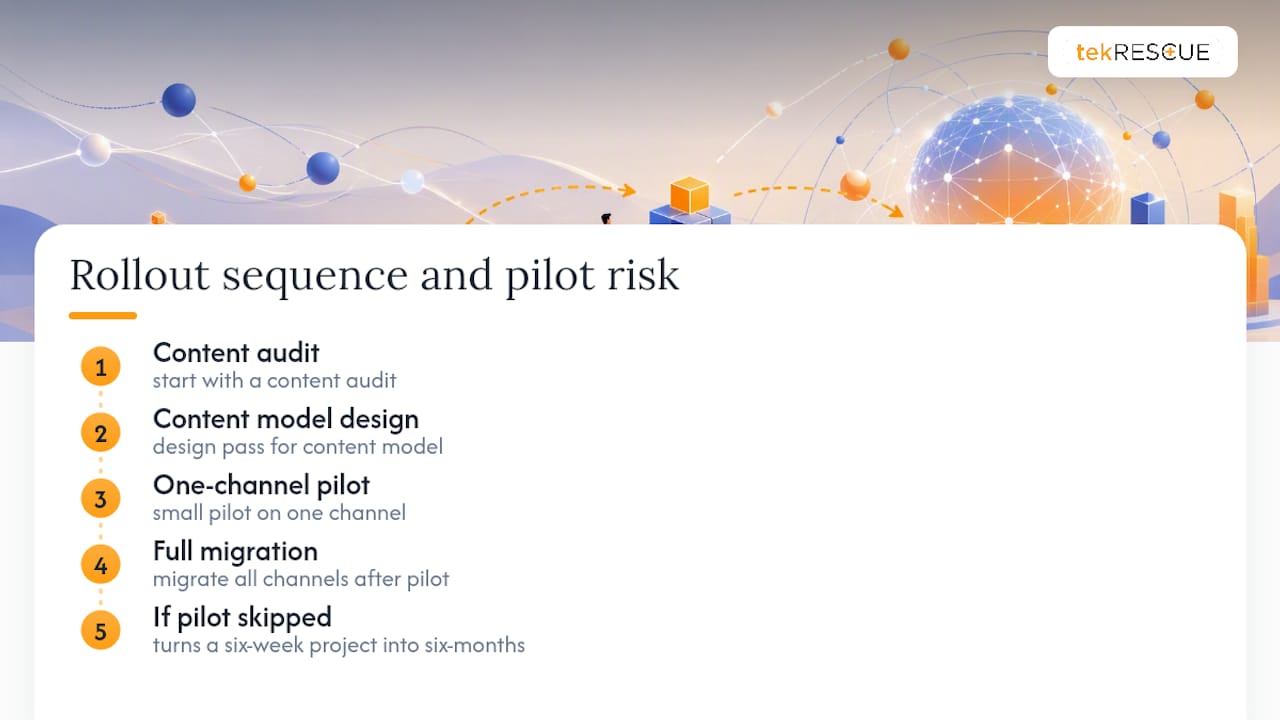
A successful headless CMS rollout sequence starts with a content audit, followed by a content model design pass, a small pilot on one channel, and only then a full migration. Skipping the pilot is the most common mistake we see, and it’s the one that turns a six-week project into a six-month one.
Security deserves the same attention as the architecture itself. API tokens need rotation policies, access should be scoped per integration rather than granted broadly, and any healthcare or financial client handling protected data needs HIPAA-aware design patterns baked into the API layer from day one, not retrofitted after launch.
Pro Tip: If your organization handles patient or financial data, treat your headless CMS’s API layer with the same scrutiny you’d apply to a database, because that’s functionally what it is.
For teams that want a managed rollout rather than an in-house build, tekrescue’s web development services cover implementation and ongoing maintenance, and our cybersecurity services address the API-layer hardening that a headless architecture demands.
Is Headless CMS Worth the Trade-Offs?
The pattern I keep coming back to is that headless doesn’t eliminate complexity, it relocates it. Teams that treat that relocation as a planning exercise, mapping out who owns previews, caching, and API contracts before writing code, get the flexibility without the operational chaos. Teams that skip that step get both the complexity and the chaos.
Before committing, check three things: how many channels you’re actually serving today and in eighteen months, whether you have a developer who can own the frontend build long term, and whether your content team is disciplined enough to make a structured content model hold up under real editorial pressure.
— Randy Bryan
Sources
- Number of connected devices worldwide | Statista
- Jamstack
- Building a super-fast and secure website with a CMS — freeCodeCamp (Medium)
- Pantheon
- Headless CMS in the real world: 8 integration pitfalls | ClearPath Consultants
FAQ
What Are the Cons of a Headless CMS?
The biggest drawbacks are increased integration complexity, since every channel needs its own API connection, and the loss of built-in preview functionality that traditional CMS platforms offer by default. Teams also take on more developer dependency, because marketing staff can no longer make structural page changes without engineering help.
How Is a Headless CMS Different From a Traditional CMS?
A traditional CMS bundles content storage with a built-in presentation layer, so templates render pages directly. A headless CMS stores content as structured data and delivers it through APIs, leaving the frontend entirely up to the development team, which is the core distinction covered in Pantheon’s decoupled CMS guide.
Is a Headless CMS Worth It for a Small Business?
It depends on channel count. A small business running only a single website with no app or third-party integrations usually gets more value from a traditional or hybrid CMS, while one distributing content across a site, an app, and a partner feed benefits from the reuse and flexibility headless provides.
Do I Need a Developer to Use a Headless CMS?
Yes, at least for the initial build and ongoing frontend maintenance, since there’s no built-in templating for non-technical staff to edit directly. Content editors can still manage and publish content independently once the frontend and content models are in place.
When Should a Company Choose Hybrid Instead of Fully Headless?
Hybrid fits best when a team wants API flexibility but still needs the built-in preview and editing experience a decoupled CMS preserves. It’s also the more practical choice for organizations migrating off a legacy platform gradually rather than in one large cutover.
Recommended
Table of Contents