
SMB IT Leaders: 5 Questions to Decide Cloud vs On Premises Servers
Choose cloud when demand swings and speed matter, choose on-premises when workloads run hot and steady and you need full control over the hardware, and choose hybrid when you have both patterns in the same business. That rule will not fit every edge case, which is why the decision checklist later in this guide breaks the choice down into the five questions that actually move the needle for small and midsize operations.
TL;DR:
- Cloud infrastructure suits variable demand and rapid provisioning, but can lead to vendor lock-in and unforeseen egress costs if not carefully managed.
- On-premises provides full control and steady performance for high-utilization workloads, yet involves significant capital expenditures and ongoing operational costs.
- Hybrid deployment allows combining steady, sensitive workloads on-premises with scalable cloud resources for variable demands, requiring thorough workload assessment upfront.
- Long-term cost comparisons must include staff, licensing, power, and potential exit costs, as underused on-premises capacity and data egress fees can erode perceived savings.
- Proper security and compliance in cloud environments depend on shared responsibility, rigorous planning, and verified agreements, especially when handling regulated data like ePHI.
Table of Contents
Table of Contents
- Cloud vs on-premises: a side-by-side comparison
- Why organizations pick on-premises: benefits and the operational costs to expect
- Why organizations pick cloud: advantages and common operational trade-offs
- How to compare total cost of ownership between cloud and on-premises
- Security, governance, and compliance: what changes between the two models
- Performance and latency: when location still matters
- Practical migration approaches and hybrid deployment patterns
- Actionable checklist: map your workload to cloud, on-premises, or hybrid
- How tekRESCUE applies this framework for SMBs
- Author perspective: procurement and vendor lock-in pitfalls to avoid
- How tekRESCUE helps with migration, managed cloud, and HIPAA-compliant hosting
- Sources
- FAQ
Cloud vs on-premises: a side-by-side comparison
On-premises infrastructure is hardware you own, house, and run inside your own facility or a data center you control. Cloud infrastructure is compute, storage, and networking rented from a provider like AWS, Microsoft Azure, or Google Cloud, billed by usage rather than ownership.
The two models diverge the fastest on five practical axes:
- Control: on-premises gives you full command over hardware, configuration, and physical access; cloud hands infrastructure control to the provider while you manage what sits on top of it.
- Cost type: on-premises is largely capital expense, big purchases up front; cloud is operating expense, a recurring bill tied to what you actually consume.
- Scalability: cloud scales in minutes through self-service provisioning; on-premises scaling means buying, shipping, and racking new hardware.
- Speed to provision: a new cloud server can be live in minutes; a new on-premises server often takes weeks once procurement and installation are counted.
- Staffing needs: on-premises requires in-house or contracted hands-on expertise for hardware, patching, and facilities; cloud shifts much of that labor to the provider’s operations team.
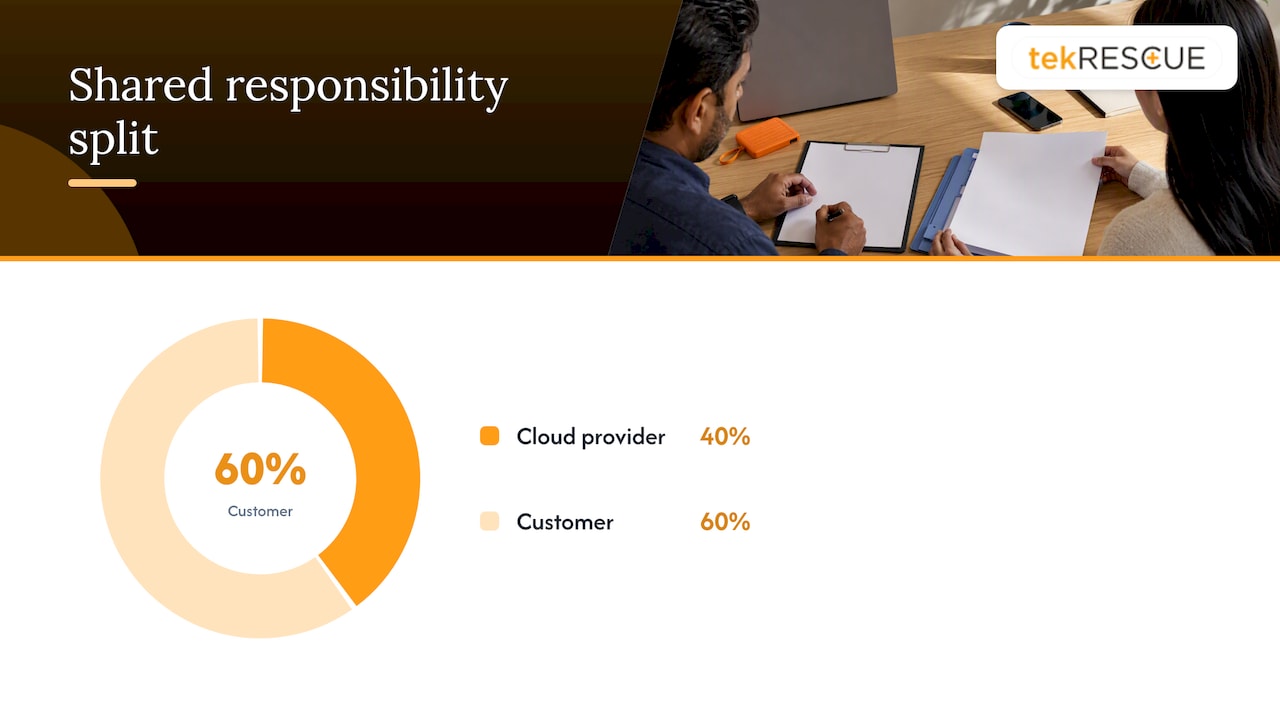
Security is where the comparison gets misunderstood most often. Cloud providers operate under a shared responsibility model: the provider secures the physical infrastructure and the virtualization layer, but the customer remains responsible for identity management, data classification, and configuration. Get that split wrong and a misconfigured storage bucket becomes a breach, regardless of which provider you picked.
Why organizations pick on-premises: benefits and the operational costs to expect
On-premises infrastructure wins when control matters more than convenience. You decide who touches the hardware, how it is physically secured, and exactly where your data lives, which is often the deciding factor for firms with strict data residency or audit requirements.
That control comes with a bill most teams underestimate. Standing up a data center means capital spending on servers, storage, and networking gear, plus ongoing costs for power, cooling, physical security, and the staff needed to keep it all running around the clock.
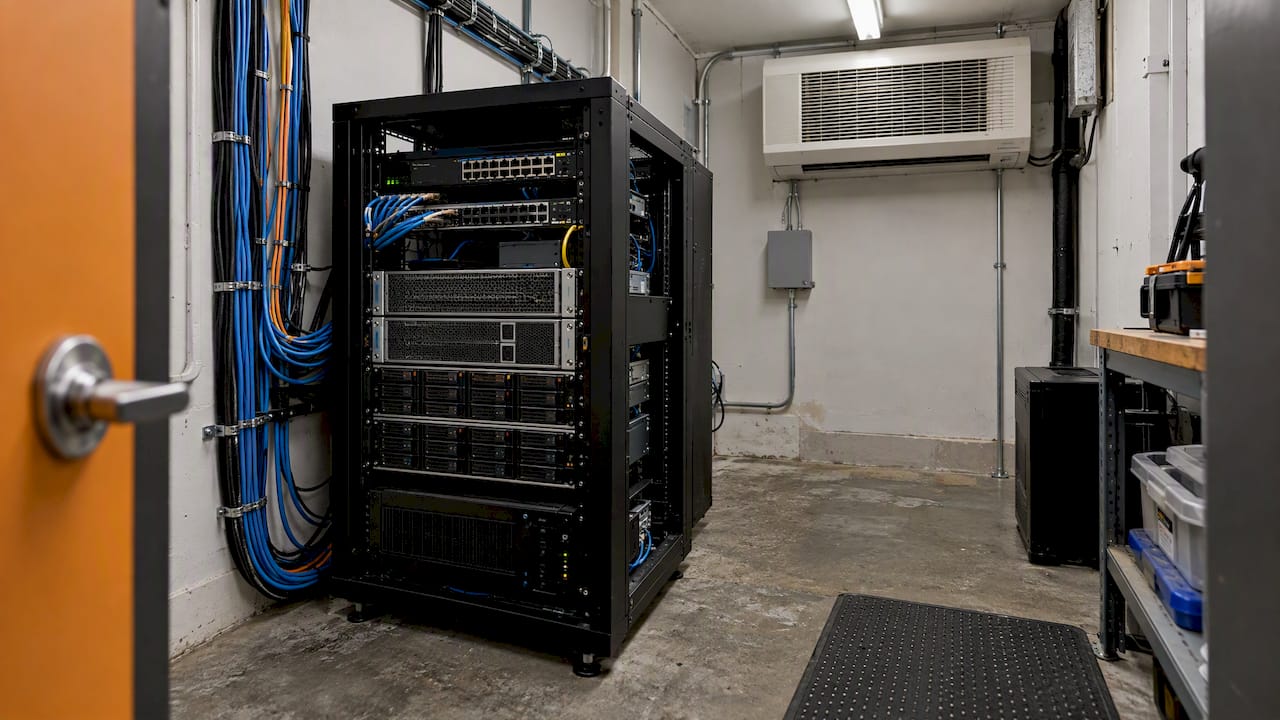
The U.S. Department of Energy’s data center design guidance notes that small on-prem facilities often lack the redundancy and around-the-clock expert staffing that colocation or cloud providers build at scale, which is one reason the economics tilt toward cloud or colocation for many smaller operators (Department of Energy).
A few realities tend to surprise first-time buyers:
- Capacity planning has to anticipate peak demand for years out, since adding capacity later is slow and expensive.
- Redundancy and disaster recovery require duplicate hardware, often in a second location, not just a backup tape.
- Keeping specialized staff on call for patching, hardware failures, and security monitoring is a recurring cost, not a one-time hire; leveraging a lean compliance collaboration platform can help manage compliance controls and verify third-party compliance posture more efficiently.
On-premises tends to be the stronger financial choice when utilization is high and steady, such as a manufacturing line running specialized control systems, or when regulatory or latency demands rule out a shared environment.
Why organizations pick cloud: advantages and common operational trade-offs
Cloud infrastructure earns its popularity through elasticity. You can spin up capacity for a product launch, a seasonal spike, or a new location, then scale it back down without owning a single rack of idle hardware. Providers also offer geographic distribution that would take years and significant capital to replicate on your own.
The operational offload is real: patching the hypervisor, maintaining power and cooling, and replacing failed drives become the provider’s job, not yours. That frees IT staff to focus on applications and security rather than facilities management, and it typically shortens time to market for new projects.
The trade-offs are less visible until the bill or the contract renewal arrives.
- Proprietary managed services and licensing terms can make switching providers expensive, not just technically, but contractually.
- Data egress fees, the cost of moving your own data out of a provider’s environment, can turn a planned migration into a budget problem.
- Resilience is not automatic. A workload deployed in a single availability zone can still go down when that zone fails.
The Government Accountability Office has found that restrictive vendor licensing terms and data egress fees are primary drivers of cloud vendor lock-in, and recommends evaluating exit costs and interoperability before signing (GAO). Service level agreements typically cover uptime credits, not the downstream business losses from an outage, so read the remedy clause before you assume you are covered.
Pro Tip: Architect for at least two availability zones or regions for anything customer-facing, since SLA credits rarely cover the cost of an outage to your business.
How to compare total cost of ownership between cloud and on-premises
A fair total cost of ownership comparison has to include every bucket on both sides, not just the obvious ones. Skipping staff time or egress fees is the most common way these comparisons end up misleading.
On the on-premises side, count hardware purchase, facility costs, power and cooling, networking equipment, software licenses, and the staff hours needed to run it all. On the cloud side, count compute and storage charges, data transfer and egress fees, reserved versus on-demand pricing gaps, and the licensing costs for software that still runs per-seat or per-core even in the cloud.
- Hardware and facilities: capital spend versus a recurring provider bill.
- Power, cooling, and physical security: fixed on-premises costs versus a cost baked into cloud pricing.
- Staffing: ops and facilities staff versus cloud architecture and FinOps skills.
- Licensing and egress: software terms and the cost of moving data back out.
Utilization changes the math substantially. The Department of Energy’s efficiency guidance points to exactly this pattern: underused on-premises capacity quietly erodes the cost advantage that ownership is supposed to deliver (Department of Energy).
Model the comparison over three to five years, and build in exit costs and migration labor on both sides. A buyer’s guide to offsite data storage is a useful companion when you are pricing out storage specifically.
Security, governance, and compliance: what changes between the two models
Shared responsibility does not disappear once you move to the cloud, it just shifts. The provider typically secures the physical data center and the underlying infrastructure, while access control, identity management, and data protection configuration stay with you. Misreading that split is one of the most common and most expensive mistakes in a cloud migration.
HHS guidance is explicit: a cloud service provider that creates, receives, maintains, or transmits electronic protected health information is a HIPAA business associate, and a compliant business associate agreement is required even if the provider only stores encrypted data without the decryption key (Hhs). Skipping the BAA is a violation on its own, regardless of whether a breach ever occurs.
Before moving regulated data to any cloud environment, verify:
- A signed business associate agreement is in place with the provider.
- Encryption is enforced both at rest and in transit.
- You control or can audit the key management system rather than relying solely on the provider’s defaults.
- Logging and audit trails are retained and reviewed on a schedule.
- Incident response plans account for the provider’s trust zone, not just your own network.
CISA’s cloud security guidance notes that moving to the cloud changes visibility and control, which means incident response plans need to be adapted for multi-vendor environments and different trust zones (CISA). On-premises environments carry their own compliance burden: physical safeguards, local audit logging, and documented proof that staff are trained to handle sensitive data all have to be maintained in-house. A detailed HIPAA compliance checklist walks through the administrative side of these requirements.
Performance and latency: when location still matters
Some workloads do not tolerate distance well. Real-time trading systems, industrial control systems, and high-frequency manufacturing sensors often need processing measured in single-digit milliseconds, which favors on-premises or edge placement over a distant cloud region.
Cloud providers have narrowed that gap with edge zones, dedicated interconnects, and bare-metal offerings that place compute closer to the workload, but those options add cost and architectural complexity compared to standard cloud regions. They are a mitigation, not a full substitute for physical proximity in the most latency-sensitive cases.
Before committing either way, benchmark the actual workload under realistic load rather than relying on vendor specifications. Run a pilot that mirrors peak traffic, measure latency end to end, and test failover behavior, not just steady-state performance. A workload that looks fine in a demo can behave very differently once real users and real data volumes hit it.
Practical migration approaches and hybrid deployment patterns
Most migrations fall into one of four patterns: rehost (move as-is, fastest but least optimized), replatform (small adjustments to fit the cloud), refactor (rebuild for cloud-native services, slowest but most efficient long term), or retire (shut down what nobody uses anymore). Few organizations use only one pattern across their whole environment.
Hybrid deployment, keeping some workloads on-premises and others in the cloud, is the pragmatic choice when you have a mix of steady, sensitive workloads and variable, customer-facing ones. It is also a sensible stepping stone while you test cloud performance before a full commitment.
- Inventory workloads by sensitivity, latency need, and usage pattern before choosing a strategy.
- Pilot the least risky workload first, then expand based on real results.
- Review licensing and egress terms before signing, since the GAO has flagged both as major drivers of vendor lock-in (GAO).
- Keep data in open, portable formats wherever possible to avoid a forced rebuild during a future exit.
Pro Tip: Write your exit plan before you migrate, not after; include a rough egress cost estimate and a rollback window in case the new environment underperforms.
Actionable checklist: map your workload to cloud, on-premises, or hybrid
Five questions settle most cloud versus on-premises decisions faster than a lengthy cost model.
- Does the workload involve regulated data such as ePHI, and does the provider offer a signed BAA?
- Does the workload need single-digit-millisecond latency or specialized hardware?
- What is the three-to-five-year cost outlook once staffing, egress, and licensing are included?
- Does your team have the skills to run the chosen environment, or will you need outside help?
- How much outage risk can the business actually tolerate?
| Answer pattern | Likely fit |
|---|---|
| Regulated data, BAA available, steady usage | Cloud with signed BAA, or hybrid |
| Ultra-low latency or specialized hardware required | On-premises or edge deployment |
| Highly variable demand, limited ops staff | Cloud |
| High, steady utilization, strong ops team in place | On-premises |
| Mixed sensitivity and demand patterns | Hybrid |
Once the pattern points you toward an option, the next steps are the same regardless of which model you pick: scope a pilot, negotiate SLA remedies in writing, and set a security baseline before production data moves anywhere.
How tekRESCUE applies this framework for SMBs
A small healthcare practice weighing this decision typically needs a BAA-backed cloud environment for patient records, on-premises or locally hosted systems for practice-management hardware with real-time demands, and a documented security baseline tying it together. tekRESCUE’s managed IT and hosted or cloud managed services cover that assessment, migration planning, and ongoing support, alongside dedicated HIPAA compliance work for practices handling ePHI.
Author perspective: procurement and vendor lock-in pitfalls to avoid
The costliest mistakes happen before the first server is even provisioned: teams sign cloud contracts without reading the egress clause, or they lean on provider-proprietary services that feel convenient until the exit bill arrives. Negotiate egress terms, SLA remedies, and data portability before signing anything, not after. If you want a second set of eyes on a pending contract, reach out for an assessment.
— Randy Bryan
How tekRESCUE helps with migration, managed cloud, and HIPAA-compliant hosting
Choosing between cloud and on-premises is only step one. Implementing that choice, without a surprise bill, a compliance gap, or a botched migration, is the harder part, and it is where tekRESCUE focuses its work with small and midsize businesses.
- Assessment and migration planning that map your workloads to the right environment before you spend anything.
- Managed hosting and IT hosted/cloud managed services for teams that want day-to-day operations handled by someone else.
- HIPAA compliance and FTC Safeguards Rule support for practices and firms handling regulated data.
- Ongoing cybersecurity services to keep whichever environment you choose configured correctly.
A discovery engagement typically starts with a workload assessment, moves into a roadmap and pricing discussion, and ends with a plan you can act on immediately. Reach out through tekRESCUE’s managed IT services page to get the conversation started.
Sources
- Hhs
- Best Practice Guide for Energy-Efficient Data Center Design | U.S. Department of Energy
- GAO report on cloud vendor lock-in and related risks
- Cloud Security Technical Reference Architecture v2 | CISA
FAQ
What are the four types of servers?
Common server categories include file servers, application servers, database servers, and web servers, each defined by the role they perform rather than the hardware itself. Any of these can run on-premises, in the cloud, or in a hybrid mix.
Is cloud actually cheaper than on-premises?
It depends on utilization and workload pattern. Cloud tends to cost less for variable or bursty demand, while steady, high-utilization workloads often favor on-premises once staffing and facilities are factored into a full total cost of ownership comparison.
What is the difference between a server and a cloud?
A server is a physical or virtual machine that runs applications and stores data; the cloud is a delivery model where that server capacity is rented from a provider and accessed over the internet. On-premises servers are owned and housed by the business using them.
What are the main types of cloud services?
Cloud services are generally grouped into infrastructure as a service, platform as a service, and software as a service, with deployment models including public, private, community, and hybrid cloud (HHS.gov). Definitions vary slightly by source, but these categories cover most commercial offerings.
Recommended
Table of Contents