
Disaster Recovery Testing: A Practical Guide for Small Business
Disaster recovery testing is the controlled practice of running your recovery plan to prove you can restore data, systems and operations after an outage, ransomware attack or physical loss. A plan that has never been run is a guess. If you run a business, here is the uncomfortable truth: the first time you learn whether your backups restore should not be the day you need them.
This guide covers the types of tests, what a test plan must contain, a before, during and after checklist, how to run a tabletop exercise, which scenarios to rehearse, how often to test, and what HIPAA expects if you handle patient data.
Table of Contents
TL;DR
- A DR test examines each step of your recovery plan to confirm you can restore data and critical systems within your recovery targets (TechTarget).
- Start with a tabletop, then move to restoring real backups. A discussion alone is not enough to prove recovery works.
- Test at least once a year, more often for critical systems, and after any major change.
- Write down start and end times, failures and fixes. That record is your evidence for auditors and insurers, and your to-do list.
- If you handle electronic protected health information, HIPAA requires procedures for periodic testing and revision of contingency plans.
Table of Contents
- What disaster recovery testing actually checks
- The five types of DR tests, from cheapest to riskiest
- Run a tabletop exercise first
- What a DR test plan should include
- Disaster recovery test checklist
- Which scenarios to test
- How often to test
- Document everything: evidence, fixes and HIPAA
- Common reasons tests fail, and how to avoid them
- Our perspective
- Get help building and testing your recovery plan
- FAQ
- Sources
What disaster recovery testing actually checks
A test examines every step of your DR plan to see whether you can recover data and restore business-critical functions. It answers three practical questions:
- Do the backups restore, and is the restored data usable?
- Does recovery fit inside the time you can afford to be down (your RTO) and the amount of data you can afford to lose (your RPO)?
- Do the people responsible know what to do, in what order, and who decides?
Testing moves you past assumptions. Without validation, recovery may be incomplete, too slow, or fail altogether when a crisis hits. Many organizations skip testing because planning ties up resources and can be expensive, but an untested plan may fail exactly when it is needed (TechTarget).
For a small business, the stakes are concrete. A dental office that cannot pull up patient charts, a CPA firm locked out of client files during tax season, a contractor whose scheduling system is encrypted: each loses revenue by the hour. Testing finds the gaps while the cost of finding them is a few hours of staff time.
The five types of DR tests, from cheapest to riskiest
Tests sit on a ladder. Cost and disruption rise with each rung, and so does the confidence you get. Scality’s breakdown describes the levels this way:
| Test type | What you do | What it tends to reveal | Risk to production |
|---|---|---|---|
| Plan review | Read the plan line by line | Outdated contacts, missing systems | None |
| Tabletop | Talk through a scenario as a team | Unclear authority, missing steps, shared dependencies | None |
| Component test | Restore one system or backup set | Backup defects, wrong credentials, slow restores | Low |
| Parallel test | Recover systems at an alternate site while production keeps running | Capacity, ordering, network and DNS problems | Low to moderate |
| Full interruption | Switch production to the recovery site | Everything, at the risk of a real outage | High |
EDUCAUSE describes a similar progression: plan reviews, role-playing tabletops, scenario simulations in a non-production environment, and full simulations that attempt to recover everything and can be burdensome and expensive.
Most small and midsize businesses get the best return from the middle three: a yearly tabletop, plus regular component restores of the systems that keep the doors open. Full interruption tests are rarely necessary at that size.
Run a tabletop exercise first
A tabletop is a discussion in which personnel review the roles defined in the continuity plan and talk through their responses during a simulated adverse event. No systems are touched. According to the FFIEC IT Examination Handbook, it can assess whether the plan is reasonable, whether people understand their responsibilities, and whether departmental plans fit together. The same handbook notes a tabletop is likely insufficient by itself to validate recovery capabilities.
That is the right way to use it: as the cheap first pass that exposes the obvious problems before you spend time on technical restores.
How to run a 90-minute tabletop
- Pick one realistic scenario. For example: it is Monday at 7 a.m., ransomware has encrypted the file server, and the phones are down.
- Gather the right people. Owner or administrator, whoever manages IT, someone from operations, and anyone who talks to customers.
- Walk the timeline. Ask who notices, who is called first, who declares an incident, who decides to restore, and who tells customers.
- Introduce a complication. The most recent backup is two days old. The IT lead is on vacation. The password manager is on the affected server.
- Record every hesitation. Each “I think Sam has that” is a gap in your plan.
- Assign fixes. Every gap gets an owner and a due date before the meeting ends.
What a DR test plan should include
A test plan is the document you write before the test. The FFIEC handbook says plans should address objectives, expectations, scenarios, assumptions and constraints. They should also identify roles, schedules, methods, decision makers, locations, escalation procedures and contacts, and include success or failure metrics.
For a small business, that translates into a one- or two-page document with these parts:
- Scope. Which systems are in this test: email, line-of-business software, file shares, the website, phones.
- Objectives and success criteria. “Restore the accounting database and confirm last Friday’s transactions are present within four hours” is testable. “Make sure backups work” is not.
- Recovery targets. Map each critical service to an approved RTO and RPO, and document its dependencies: systems, identity, network, people and vendors (ONES).
- Roles. Who runs the test, who observes and takes notes, who approves, who is the backup for each.
- Method and environment. Tabletop, component restore or parallel test, and where it happens so production is not affected.
- Rollback steps. How you stop and return to normal if the test goes wrong.
- Communication. Who is told before, during and after.
Disaster recovery test checklist
Use this as a working checklist. It follows the structure Acronis lays out for before, during and after, with recommendations from TechTarget folded in.
Before the test
- Confirm which systems are in scope.
- Review the plan and fix anything you already know is stale.
- Define RTO and RPO targets for each system.
- Confirm recent backups exist and are accessible.
- Prepare a test environment that cannot affect production.
- Confirm rollback procedures.
- Assemble the test team and document scripts.
- Notify stakeholders and IT managers of the schedule.
- Do a dry run.
During the test
- Follow the documented recovery steps exactly as written, not from memory.
- Track start and end times for each step.
- Record every issue and delay as it happens.
- Validate restored data and application functionality, not just that the server boots.
- Confirm that users can actually log in and reach what they need.
- Monitor performance on the restored systems.
After the test
- Compare results with your success criteria.
- Analyze audit logs and other data to see what worked and what did not.
- Document lessons learned and update the plan.
- Create remediation items with specific owners and due dates, and schedule follow-up validations to confirm the fixes work (Harness).
- Schedule the next test and share results with the relevant teams.
Which scenarios to test
Do not rehearse the same failure every year. Rotate through the events your business is realistically exposed to, and make sure at least one is a cyberattack, because that is where recovery plans most often break: backups can be encrypted or deleted along with production data, and the same credentials that run the business may be the ones the attacker holds.
Good scenarios for a small Texas business include:
- Ransomware on file servers or a cloud account. Can you restore clean data, and do you know how far back the clean copy goes?
- Failed hardware. A dead server or a failed drive in the machine that hosts your practice software.
- Accidental or malicious deletion. A folder, mailbox or database wiped by an employee.
- Loss of the office. Flood, fire, or a severe storm that takes out power and internet for days. Can staff work remotely and reach everything they need?
- Loss of a key vendor or cloud service. If your hosted application is down, what is the workaround?
- Loss of a key person. The one employee who knows the admin passwords is unreachable.
Each scenario should end with the same question: how long did recovery take, and how much data did we lose compared with what we said we could tolerate?
How often to test
A common baseline is to test at least once a year, quarterly for mission-critical systems, and again after any major IT change or incident (Cutover). Regulated industries may face stricter expectations, so check what applies to you.
A practical rhythm for a small business:
| Activity | Suggested frequency |
|---|---|
| Backup restore spot check (a few files or one database) | Monthly or quarterly |
| Component restore of critical systems | Quarterly |
| Tabletop exercise | At least yearly |
| Plan review and contact update | Yearly, and whenever staff or vendors change |
| Extra test | After a migration, new software, new office or a security incident |
Every new application, cloud move or staffing change can quietly invalidate a recovery step. A calendar reminder is the cheapest control you will ever buy.
Document everything: evidence, fixes and HIPAA
A test you cannot prove happened is a test that did not happen. Auditors and post-incident reviews depend on time-stamped evidence of what occurred during the test. Keep a folder for each test with the plan, scripts, attendee list, logs or screenshots, the findings report, the actions assigned, and the approval of any revised plan.
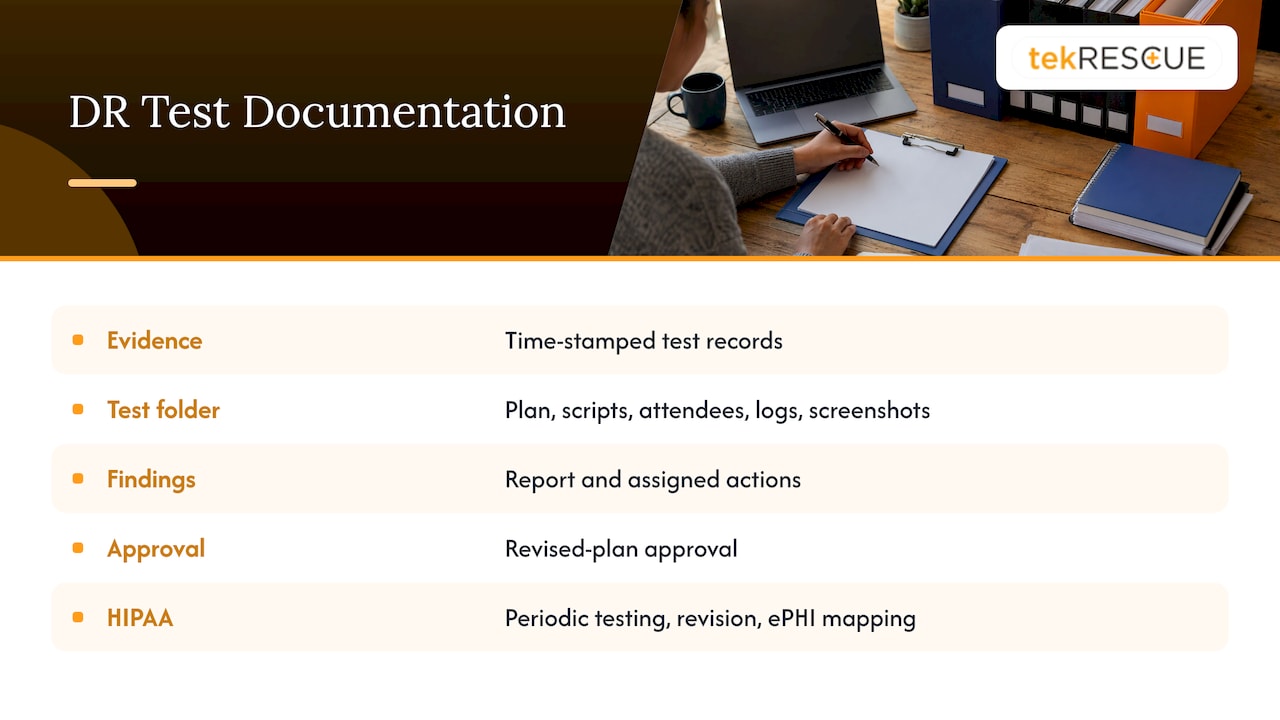
If you are a healthcare provider or a business associate, this is not optional. The HIPAA Security Rule requires procedures for periodic testing and revision of contingency plans. Practical guidance on that requirement recommends retaining test scripts, attendance, logs or screenshots, reports, findings and actions, revised-plan approvals and communications, and mapping your plans to the systems that handle ePHI (Daydream). For the wider compliance picture, see our guide to becoming a HIPAA compliant facility and how encrypting data and backups fits into a managed IT plan.
Common reasons tests fail, and how to avoid them
- Backups exist but nobody has restored one. Restore a real file or database every quarter.
- The plan lives on the server that is down. Keep a printed or offline copy, with contact numbers.
- Credentials are stored in one place. If your password vault is on the failed system, recovery stalls.
- Nobody owns the plan. Name one person responsible and one backup.
- Findings go nowhere. Every issue gets an owner and a due date, then a retest.
- Only IT is in the room. Recovery is a business decision too: who approves downtime, who calls customers.
Our own write-ups on backup and continuity drills and a practical IT business continuity plan go deeper on building the plan these tests exercise. If you want to understand how recovery proceeds once something has gone wrong, read about the four phases of data recovery.
Our perspective
Most small businesses we talk to have a backup. Far fewer can tell us how long a restore would take, or whether the restored data would be usable. That gap is where the damage happens.
Attackers know it too. Modern ransomware does not just encrypt your files. It goes after backups, moves laterally through the network, and counts on you having never practiced a recovery. A recovery plan that has only been read, never run, is a hope, not a defense.
That is why we treat testing as part of security, not paperwork. Our approach is to tie recovery targets to what the business actually needs, rehearse the ugly scenarios, and document the results so the plan gets better every cycle. For healthcare practices and CPA firms, that record also supports compliance.
If you run a business, schedule the tabletop this quarter. It costs you an afternoon. Finding out during a real incident costs far more.
Randy Bryan
Get help building and testing your recovery plan
If you would rather not do this alone, tekRESCUE works with small and midsize businesses on managed IT, cybersecurity, risk assessment and incident response, including HIPAA and FTC Safeguards compliance work. We can help you define recovery targets, review your backups and walk your team through a scenario. Explore our managed IT services or talk to us about incident response before you need it.
FAQ
What is the difference between a DR test and a tabletop exercise?
A tabletop is one kind of DR test: a discussion where people walk through a scenario and their roles, with no systems affected. Other tests, such as component restores and parallel recoveries, actually exercise the technology. Use both, because a tabletop alone is unlikely to validate recovery capability.
How long does a DR test take?
It depends on scope. A tabletop can take about 90 minutes, and a single-system restore may take a few hours. Parallel and full-interruption tests need planning, a defined window and a rollback plan, so schedule them well ahead.
Can testing disrupt my business?
Tabletops and plan reviews cannot, since nothing is touched. Component and parallel tests should run in an environment that will not affect production, with rollback procedures confirmed beforehand. Full-interruption tests carry the risk of a real outage, which is why most small businesses do not need them.
Does HIPAA require disaster recovery testing?
HIPAA requires procedures for periodic testing and revision of contingency plans, so if you handle ePHI you need a documented testing routine. Keep scripts, logs, findings and plan updates as evidence. Ask your compliance advisor how this applies to your specific practice.
What should I do first if I have never tested?
List your critical systems, set a recovery time and data-loss target for each, then run a tabletop with one realistic scenario. Fix the gaps it reveals, then restore a real backup of your most important system and time it.
Sources
- What is a disaster recovery (DR) test? (TechTarget)
- Disaster recovery (DR) test checklist guidance (TechTarget)
- What is disaster recovery testing? (Datto)
- Disaster recovery testing, from tabletop to full failover (Scality)
- Testing and Training (EDUCAUSE)
- FFIEC IT Examination Handbook: Tabletop Exercise
- FFIEC IT Examination Handbook: Exercise and Test Plans
- How to Define Objectives for a Disaster Recovery Testing Initiative (ONES)
- How to Test Your Disaster Recovery Plan Without Disrupting Operations (Acronis)
- Disaster Recovery Testing: A Practical Step-by-Step Guide (Harness)
- HIPAA Testing and Revision Procedures: Implementation Guide (Daydream)
- How often should a disaster recovery plan be tested? (Cutover)
Recommended
Table of Contents