
3 Phases to an Audit Ready HIPAA Compliant Website for US Practices
A website must be HIPAA compliant only if it creates, receives, stores, or transmits protected health information (PHI), whether through patient intake forms, appointment schedulers, or tracking tools that tie a visitor’s identity to health data. If your site does any of that, HIPAA applies, full stop. The immediate next step is a scoped inventory of every page and form on your site that touches patient data, before you touch a single line of code.
TL;DR:
- Only websites that create, receive, maintain, or transmit protected health information are subject to HIPAA compliance, particularly through forms, trackers, or analytics linking visitors to health data.
- Conducting a comprehensive risk analysis before choosing hosting or analytics services is crucial because it determines necessary safeguards and vendor requirements.
- A Business Associate Agreement is mandatory with any cloud or analytics vendor that processes or stores ePHI, and hesitating to sign one is a red flag.
- Tracking pixels, chat widgets, or analytics tools on patient-related pages can unintentionally expose PHI unless they are removed, routed through a de-identifying process, or covered by a BAA.
- Prioritize performing a tracker inventory and disabling non-essential trackers immediately, then complete a risk analysis and establish vendor BAAs within 30 to 90 days.
Table of Contents
Table of Contents
- Does Your Website Need to Be HIPAA Compliant?
- Core HIPAA Requirements for a Website Under the Security Rule
- Do You Need a BAA With Your Web Host or Analytics Vendor?
- How Tracking Pixels and Analytics Create HIPAA Risk
- A Prioritized Checklist for Getting Your Site Compliant
- How tekrescue Handles Ongoing Compliance Audits
- Why Most HIPAA Website Guides Get the Priorities Backwards
- Get a Website Built for HIPAA From the Ground Up
- Where to Find the Official HIPAA Website Guidance
- Sources
- FAQ
Does Your Website Need to Be HIPAA Compliant?
The test is simple: does your site create, receive, maintain, or transmit PHI? HHS/OCR guidance confirms that intake forms, appointment schedulers, and even analytics tools that connect a website visit to health status all count. Individually identifiable health information (IIHI) becomes PHI the moment it’s tied to a covered entity’s operations, whether the page requires a login or not.
Sites that commonly trigger HIPAA coverage include:
- Patient portals and secure messaging tools
- Online appointment or intake forms that ask about symptoms, insurance, or conditions
- Chatbots or symptom checkers tied to a patient record
- Analytics or advertising pixels placed on pages where a visitor’s health interest is inferable
A pure brochure site, one listing office hours, provider bios, and a phone number with no forms or trackers, generally falls outside HIPAA’s reach. The line gets blurry fast once you add a “request an appointment” button.
Core HIPAA Requirements for a Website Under the Security Rule
The Security Rule doesn’t distinguish between a hospital’s internal network and its public-facing website. If ePHI touches it, safeguards apply. HHS’s risk analysis guidance requires a documented, ongoing risk analysis as the foundation for everything else.
For a web environment, that breaks down into three categories:
- Administrative safeguards — written policies, staff training on PHI handling, and a “minimum necessary” standard limiting what data forms actually collect.
- Physical safeguards — controls over servers and workstations, relevant even when hosting is outsourced, since you’re still responsible for vendor oversight.
- Technical safeguards — encryption in transit and at rest, unique user IDs, audit logging, automatic session timeouts, and integrity controls that flag unauthorized data changes.
OCR’s compliance examples show that enforcement actions repeatedly cite missing or outdated risk analyses as the root failure, not a single technical gap. A hardened server behind an unaudited process still leaves you exposed.
Pro Tip: Run your risk analysis before you pick a hosting platform or analytics tool, not after. The analysis tells you which safeguards you actually need, so retrofitting a locked-down platform later almost always costs more than building it in from day one.
For technical baselines like multifactor authentication and logging, tekrescue’s guide on essential cybersecurity controls maps directly onto what the Security Rule expects from a web-facing system.
Do You Need a BAA With Your Web Host or Analytics Vendor?
Yes, if that vendor creates, receives, maintains, or transmits ePHI on your behalf. HHS’s cloud computing guidance states that cloud service providers are business associates even when they only store encrypted data they cannot read. “No-view” encryption does not exempt a vendor from BAA obligations.
A compliant BAA, per HHS’s sample provisions, needs to spell out:
- Permitted and prohibited uses of PHI
- Required safeguards the vendor must maintain
- Breach notification timelines and procedures
- Subcontractor flow-down, so any vendor the vendor uses is bound by the same terms
- Termination and data-return or destruction obligations
Before signing anything, request the vendor’s SOC 2 report and ask directly whether they’ll sign a BAA. If a hosting provider hesitates or claims they “don’t need one” because data is encrypted, that’s a red flag worth walking away from. Practices evaluating cloud infrastructure should read tekrescue’s breakdown of cloud computing options before committing to a provider.
How Tracking Pixels and Analytics Create HIPAA Risk
This is where most healthcare websites get exposed without realizing it. A Facebook pixel or Google Analytics tag on an appointment page can transmit a visitor’s IP address alongside the specific service page they viewed, which OCR treats as IIHI once it’s connected to a health condition. The Revised Bulletin OCR issued in March 2024 clarified that even unauthenticated pages, like a “Conditions We Treat” page, can create IIHI depending on context.
Scenarios that commonly cross the line:
- Third-party ad pixels on symptom or condition pages
- Chat widgets that log conversation content to a vendor with no BAA
- Analytics scripts capturing form field data before submission
Your realistic options: remove trackers from any page tied to patient care, negotiate a BAA with the vendor, or route data through a compliant intermediary that strips identifiers before it reaches a third party.
Pro Tip: Server-side analytics or a de-identifying customer data platform lets you keep marketing insight without exposing raw visitor data to a vendor, but document exactly how de-identification works in your risk analysis. “We think it’s anonymized” isn’t a defense OCR accepts.

A Prioritized Checklist for Getting Your Site Compliant
Trying to fix everything at once is how projects stall. Work in three phases.
Immediate (this week):
- Inventory every page, form, and tracker that touches patient data
- Disable analytics and ad pixels on any page collecting or displaying PHI
- Force HTTPS across the entire domain, not just checkout or login pages
Near-term (30 to 90 days):
4. Complete a documented risk analysis covering the website specifically
5. Execute BAAs with your host, analytics provider, and any patient-facing tool vendor
6. Enable multifactor authentication and audit logging on portals and admin accounts
7. Confirm encryption at rest and in transit for any database storing patient submissions
Ongoing:
8. Audit vendor BAAs and SOC reports annually
9. Reassess risk after any major site change, new plugin, or vendor swap
10. Train staff who manage the website on PHI handling and breach reporting
11. Maintain a written incident response plan specific to web-based breaches
tekrescue’s risk assessment checklist walks through the documentation OCR expects to see if you’re ever audited.
| Phase | Timeframe | Key Actions |
|---|---|---|
| Triage | This week | Inventory PHI touchpoints, disable trackers, force HTTPS |
| Build-out | 30 to 90 days | Risk analysis, BAAs, MFA, encryption |
| Maintenance | Ongoing | Vendor audits, reassessment, staff training, incident plan |
How tekrescue Handles Ongoing Compliance Audits
Risk analysis has to come first because it determines everything downstream, which safeguards matter, which vendors need BAAs, and where your actual exposure sits. Skipping straight to “buy encrypted hosting” without that analysis is how practices end up compliant on paper and exposed in practice.
Our audit process covers:
- Reviewing existing BAAs against current vendor relationships to catch scope gaps
- Requesting SOC 2 reports and testing whether access logs actually capture what they claim to
- Running tabletop breach exercises so staff know the reporting chain before a real incident
Pro Tip: Set a maintenance cadence and stick to it: quarterly reviews of every tracker and plugin on the site, an annual full risk reassessment, and a compliance check every time you change hosts, forms, or add a new vendor. Compliance drift, not a single catastrophic failure, is what usually gets practices in trouble with OCR.
Why Most HIPAA Website Guides Get the Priorities Backwards
Most compliance checklists lead with encryption and SSL certificates because they’re easy to verify and easy to sell. That’s backwards. Encryption is table stakes, not the finish line. HHS’s own guidance makes clear that a cloud vendor storing your data in an encrypted vault is still a business associate requiring a signed BAA, and no amount of technical hardening substitutes for that contract.
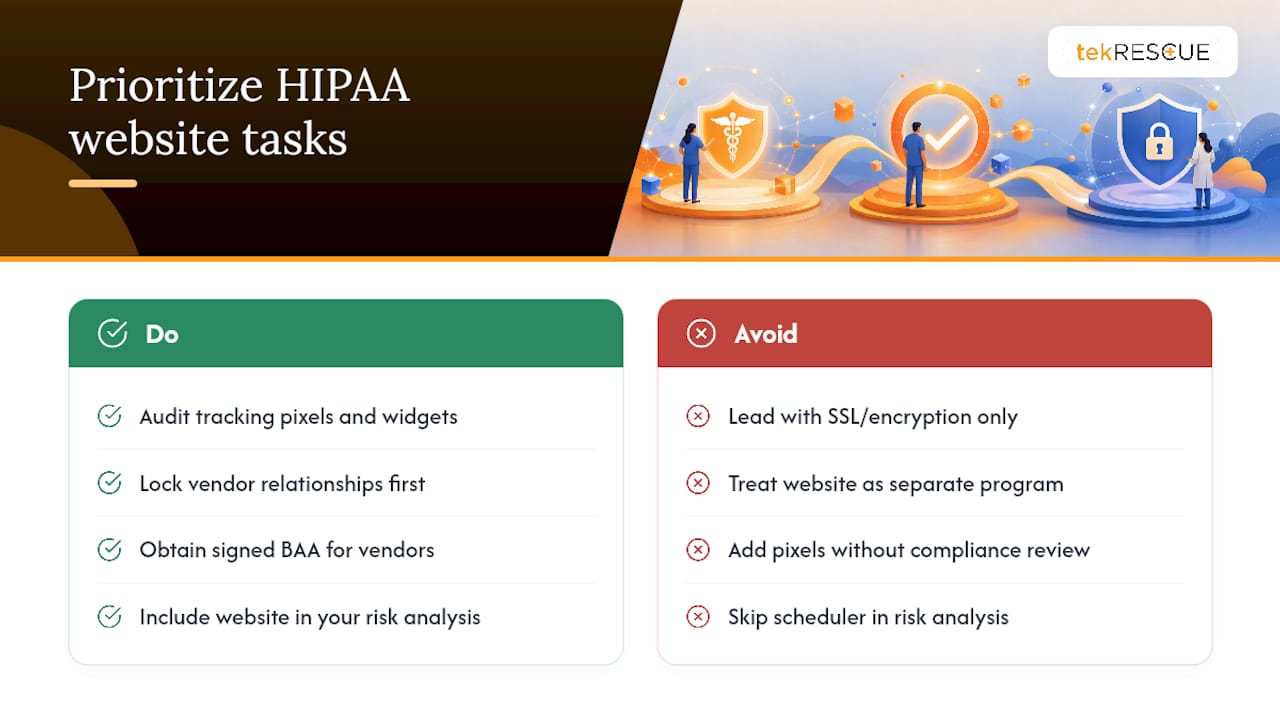
The bigger failure I see in practice management is treating the website as separate from the rest of the compliance program. It isn’t. A risk analysis that covers your EHR and skips your appointment scheduler is an incomplete risk analysis, and OCR’s enforcement history bears that out repeatedly.
What administrators should prioritize first isn’t a fancier privacy policy. It’s the tracker audit. Marketing teams add pixels and chat widgets without looping in compliance, and that gap is where most avoidable exposure lives today. Fix the vendor relationships and the tracking stack before you worry about anything else on this list. Everything downstream gets easier once those two things are locked down.
— Randy Bryan
Get a Website Built for HIPAA From the Ground Up
tekrescue is the practical alternative to hiring a generic web developer who treats HIPAA as an afterthought. We build healthcare websites with the risk analysis, BAA coordination, and secure architecture baked into the process from day one, not bolted on after a near-miss with an unvetted tracking pixel. Our team runs the vendor audits, sets up encrypted forms and portals, and configures the logging and access controls OCR expects to see documented.
If your current site was built before anyone asked whether it needed a BAA, that’s worth fixing now rather than after an incident. Start with a scoped website audit to find out exactly where your site stands and what it would take to close the gaps.
Where to Find the Official HIPAA Website Guidance
- Use of Online Tracking Technologies by HIPAA Covered Entities
- Guidance on Risk Analysis
- Guidance on HIPAA & Cloud Computing
- Business Associate Contracts and Sample Provisions
- Consent and HIPAA Notice guidance for patient authorization language
This article is general information, not a substitute for advice from a qualified doctor. Consult a qualified healthcare professional about your own circumstances before acting on anything here.
Sources
FAQ
What Websites Are HIPAA Compliant?
No website is automatically HIPAA compliant simply because it’s built by a certain company. Compliance depends on whether the site’s forms, portals, and vendors follow the Security Rule’s safeguards and have proper BAAs in place, verified through a documented risk analysis.
How Do I Know If a Website Is HIPAA Compliant?
Check for encrypted connections (HTTPS), the absence of unvetted tracking pixels on patient-facing pages, secure login for any portal, and confirm the organization behind the site has signed BAAs with its hosting and analytics vendors.
What Online Platforms Are HIPAA Compliant?
Platform compliance depends on configuration and a signed BAA, not the platform name alone. A hosting provider or form tool only supports HIPAA compliance when you’ve executed a BAA and configured encryption, access controls, and logging correctly.
What Makes a Website HIPAA Compliant?
A HIPAA compliant website combines a documented risk analysis, encryption in transit and at rest, access controls with audit logging, signed BAAs with every vendor touching PHI, and the removal or gating of tracking technologies on pages tied to patient care, as outlined in OCR’s guidance.
Recommended
Table of Contents