
AI for Customer Support: 5 KPIs Before SMBs Automate
Yes, adopt AI for customer support now, but only if you start with the right foundation. Expect faster first responses, a higher automation rate on routine questions, and more productive agents. Two things are non-negotiable: clean, integrated data, and a human handover plan governed under the NIST AI Risk Management Framework. At tekRESCUE, we recommend starting with both.
TL;DR:
- Track first response time, deflection, handle time, CSAT, and cost per contact; faster chats can still earn lower ratings, so pair efficiency with satisfaction.
- Start with repetitive tasks such as knowledge retrieval and routing; add drafts for agent review next, then autonomous actions after monitoring works.
- A pilot needs clean knowledge, connected CRM and ticketing systems, access limits, handover rules, and named owners for AI, data, support operations, and compliance.
- Measure pilots over weeks or months, set KPI thresholds before launch, and expand if accuracy and CSAT hold; otherwise, tighten controls and repair knowledge content.
- Give customers a visible route to a person, escalate early when the bot fails, and send agents a summary so customers do not repeat details.
Table of Contents
Table of Contents
- What does AI actually deliver for a support team?
- Which use cases belong in your support stack first?
- How do you move from pilot to production?
- How should AI hand a customer to a human?
- What governance and security controls do you need?
- How do you measure whether it is working?
- When should you bring in a strategic AI consulting partner?
- How we help you put AI to work in customer support
- FAQ
- Sources
What does AI actually deliver for a support team?
The business case rests on two kinds of gains. Operationally, AI shortens first response time and frees agents from repetitive work. For customers, it can mean faster resolution and answers overnight without a night shift. Those gains are real, but they are not automatic.
Your ROI depends on four things: how well your systems integrate, how clean your data is, which tasks you automate first, and how you change your staffing model around the new workflow. A bot bolted onto a messy knowledge base just gives wrong answers faster.

Put these KPIs in every proposal:
- First response time: how quickly a customer hears back
- Deflection rate: the share of questions resolved without an agent
- Average handle time: how long agents spend per ticket
- CSAT: customer satisfaction after the interaction
- Cost per contact: total support cost divided by contacts handled
Treat vendor claims with suspicion until you see them against these five numbers. A 2026 field experiment on agentic AI at Alibaba found that it reduced average chat duration but lowered customer ratings for AI-eligible chats. Speed alone does not prove value; pair every efficiency metric with a satisfaction metric.
Which use cases belong in your support stack first?
Not every task deserves automation on day one. Start where the risk is low and the volume is high, then move toward more autonomy as your controls mature.
Here are the use cases worth considering:
- Chat self-service and knowledge retrieval: answers to routine questions pulled from your knowledge base
- Ticket triage and routing: classifying incoming requests and sending them to the right queue
- Agent assist and response drafting: suggested replies that a human reviews before sending
- Workflow automation: order lookups, status updates, password resets
- Proactive outreach: notifying customers about delays or outages before they write in

Sequence matters. Begin with repetitive, fact-based tasks. Research on hybrid service recovery shows conversational agents handle fact-based and repetitive requests well but struggle with complex or ambiguous ones. Move to agent assist second, because a human stays in the loop. Autonomous, agentic features come last, once you have monitoring and handover rules proven in production.
Match channels to data. Chat self-service needs a clean knowledge base. Order-status automation needs a live connection to your order system. Triage needs your CRM and ticketing history. If a use case requires data you cannot reach yet, it is not a pilot candidate. Our AI customer service guide covers the business context in more depth.
How do you move from pilot to production?
Work the roadmap in order. Skipping steps can turn a pilot into a long cleanup.
- Unify your knowledge sources. Consolidate scattered documents, macros, and FAQs into one maintained knowledge base.
- Clean and map your data. Fix duplicate records, outdated articles, and inconsistent labels before any model touches them.
- Integrate with your CRM and ticketing system. The assistant needs context to be useful and a way to log what it did.
- Set access controls. Decide exactly which systems and customer fields the AI can read or write.
- Scope a narrow pilot. Pick one channel and one or two use cases, with written success criteria tied to your KPIs.
- Define fallback and handover rules. Decide in advance when the AI stops and a person takes over.
- Train agents and monitor. Set alerts for failures, review transcripts weekly, and adjust.
- Expand on a cadence. Add use cases only after the previous ones hit their thresholds.
You need four roles: an AI owner who is accountable for outcomes, a data engineer, a support operations lead, and a compliance owner. In a small business one person may wear two hats, but every role needs a name next to it. Our AI readiness assessment can help you assess AI readiness before you commit budget.

Plan on a pilot measured in weeks to a few months, depending on ticket volume. You need enough conversations to see patterns, not just anecdotes.
Pro Tip: Run the AI in “shadow mode” first, drafting answers that agents compare against their own before anything reaches a customer.
How should AI hand a customer to a human?
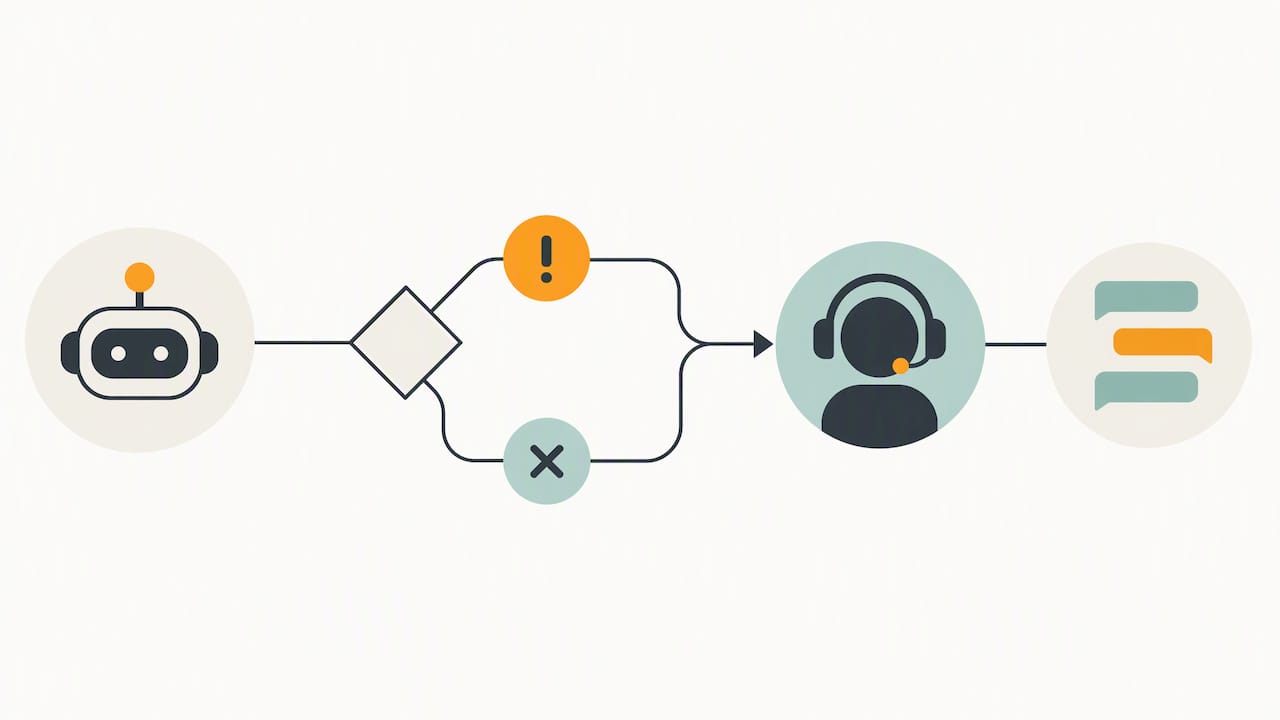
Handover design decides whether customers forgive automation or abandon you. Research on handover initiation methods tested four approaches: passive, text prompt, button prompt, and automatic. It found significant differences in recovery satisfaction among them. Early intervention mattered, and customers’ perceptions of why the organization handed them off shaped how satisfied they were.
In practice, each method sends a different message:
- Passive: the customer must ask for a person, which can feel like the system is hiding its agents
- Text prompt: the bot offers a human in the conversation, which feels polite but easy to miss
- Button prompt: a visible “talk to a person” option puts control in the customer’s hands
- Automatic: the system escalates on its own signals, which works when triggers are accurate and feels intrusive when they are not

Whichever you choose, the human must receive a concise summary: the customer’s issue, what the AI already tried, and relevant account details. Making someone repeat their story after a handoff is the fastest way to turn a small problem into a complaint.
Escalate early for emotional situations. A frustrated or distressed customer should reach a person promptly, especially if the bot has already failed. Train agents for the shift, too. People often change their language and expectations once they know a human has joined, so agents should open by acknowledging what already happened rather than starting from scratch.
Pro Tip: Log every handover reason, then review the top three weekly and fix the underlying bot gap.
What governance and security controls do you need?
Treat governance as part of the build, not a review at the end. Start with the NIST AI Risk Management Framework, which recommends voluntary risk management approaches to evaluate privacy, bias, and security risks before and during deployment. For generative AI, the Generative AI Profile suggests actions across governance, content provenance, and pre-deployment testing.
Your working checklist:
- Minimize data: give the model only the fields it needs to answer
- Anonymize where possible: strip names and identifiers from training and logging data
- Limit access to personal information: the AI should not read payment or health data unless the use case demands it
- Document data flows: know where every customer record travels, including to third-party vendors
- Monitor for drift: watch for answer quality sliding as products and policies change
- Test for adversarial inputs: customers, and attackers, will try to manipulate your bot
- Fold AI into incident response: a leaked prompt or poisoned knowledge base is a security incident, so your plan must cover it
On the privacy side, the NIST Privacy Framework offers practical questions for managing privacy risk tied to AI deployments. NIST’s Cybersecurity Framework Profile for AI recommends measures including adversarial-input training, data integrity practices, and continuous monitoring.
NIST’s AI cybersecurity profile calls for continuous monitoring, which means an AI support system is never “done” after launch. Our guides on AI data privacy and implementing AI without exposing confidential business data go deeper on controls, and our AI policy for employees covers the staff side.
How do you measure whether it is working?

Split your metrics into leading and lagging indicators. Leading indicators show up in days: deflection rate, first response time, and accuracy or error rates from transcript reviews. Lagging indicators take weeks or months: average handle time, CSAT, and cost per contact.
- Deflection rate: rising is good only if CSAT holds steady
- First response time: should drop quickly after launch
- Average handle time: watch for agents spending longer on the hard cases the AI passes along, which is normal
- CSAT: compare AI-handled and human-handled conversations side by side
- Accuracy and error rate: sample conversations weekly and score them
Judge a pilot over weeks to months, not days. Set your own thresholds before launch, in writing. If accuracy and CSAT hold, expand automation to the next use case. If errors climb or satisfaction slips, tighten controls, add human review, and fix the knowledge base before you grow the scope. Expanding on a bad week of data is how small problems become public ones.
When should you bring in a strategic AI consulting partner?
Our view is simple: build internally when you already have clean data, integrated systems, and someone who owns AI governance. Bring in a partner when any of those are missing. If your CRM, ticketing, and knowledge base do not talk to each other, if nobody on staff can assess security and compliance risk, or if no one owns AI policy, you are asking a support manager to run an infrastructure project.
A good engagement is pilot-first, aligned to NIST guidance, and ends with your team trained to run the system without us. Evaluate any partner on data hygiene, secure integrations, and experience with regulated environments such as HIPAA. Be wary of anyone who wants to start with a full rollout.
— Randy Bryan
How we help you put AI to work in customer support
Our Strategic AI Consulting team helps small and mid-sized businesses plan pilots, connect systems securely, and set up governance. Our Managed IT Services and Cybersecurity Services keep the underlying infrastructure healthy and protected. We build compliance-aware deployments and support you after launch. Schedule a consultation and we will map your first pilot together.
FAQ
Is AI customer support worth it for a small business?
It can be, if you start with a narrow, high-volume use case and clean data. Measure it against first response time, deflection rate, and CSAT rather than assuming savings.
Will AI replace my support agents?
Not in a well-designed system. Research on hybrid service recovery shows conversational agents struggle with complex or ambiguous queries, so human agents handle the hard cases and take over when the AI fails.
What is the best way to hand a chat from AI to a human?
Offer a clear, easy path to a person and send the agent a short summary so the customer does not repeat themselves. Research on handover initiation methods found significant differences in recovery satisfaction, and that early intervention matters.
How do we keep customer data safe with AI support tools?
Limit what the model can access, document your data flows, and monitor continuously. Aligning your program to the NIST AI Risk Management Framework gives you a structured way to assess privacy and security risk.
Sources
- AI Risk Management Framework | NIST
- 2605.14830 Agentic AI and Human-in-the-Loop Interventions: Field Experimental Evidence from Alibaba’s Customer Service Operations
- How to initiate human-agent intervention for recovery when chatbots fail: : A social information processing perspective: Decision Support Systems: Vol 208, No C
Recommended
Table of Contents