
Managed IT Costs for Small Businesses: Stop Guessing From Rate Cards
Managed IT pricing varies by user or device, with the final cost depending on security requirements, compliance obligations, and service-level agreements. The immediate move is simple: count your users and devices, then request a scoped quote instead of guessing from a rate card. Scope drives price far more than any flat number can.
TL;DR:
- Per user pricing suits businesses whose support needs track headcount, while per device pricing can favor firms with few employees and many shared terminals.
- Regulated data, audit trails, encrypted backups, around the clock monitoring, and response times measured in minutes can raise quotes above basic support.
- Compare written scopes for licenses, onboarding, patch schedules, backup restore tests, and response commitments, since monthly fees may exclude pass through costs.
- Budget separately for onboarding, migration, license transfers, hardware replacement, and emergency work; ask about phased setup and capped after hours rates.
Table of Contents
Table of Contents
- Benchmarks: Per-User, Per-Device, and Monthly Totals
- Pricing Models: Per-User, Per-Device, Tiered, and Flat-Rate
- What Actually Drives Price: Scope, Security, and SLAs
- Build a Budget Worksheet and a Worked Example
- Onboarding, Setup, and Fees to Ask About Upfront
- Decision Checklist: Questions to Ask Before You Sign
- How We Frame Managed IT Pricing for Small Businesses
- Get a Scoped Managed IT Quote From tekRESCUE
- FAQ
- Sources
Benchmarks: Per-User, Per-Device, and Monthly Totals
Vendors quote managed IT in different units, and that makes comparison shopping harder than it should be. Per-user pricing can cover help desk access, patching, and baseline security monitoring for an employee’s devices and accounts. Ask providers what their quoted rate includes. Standard office workers with minimal compliance needs may need less extensive services. Providers may bundle advanced endpoint detection, encrypted backups, and faster response windows into the same seat.
Per-device pricing can suit businesses with shared workstations or kiosk-style setups. Ask providers for a quote based on the devices and services in scope. Per-server management may cost more depending on the server and the services included. Ask providers to explain how they price server support.
Two quick reference points can help with real-world budgeting:
- An office with light compliance needs can request a scoped quote based on its users, devices, and required services.
- An office running tighter security controls or handling regulated data can request a scoped quote that accounts for those requirements.
Security and compliance work pushes every range upward. Businesses handling protected health information or financial records should expect quotes nearer the top of each band, since providers price in the extra monitoring, documentation, and audit support those obligations demand. High-availability SLAs, where downtime windows are measured in minutes rather than hours, carry the same effect.
Pricing Models: Per-User, Per-Device, Tiered, and Flat-Rate
The pricing structure a provider uses shapes your budget predictability as much as the dollar figure does. Each model creates different incentives for both sides.
- Per-user pricing charges a flat monthly rate per employee regardless of how many devices they touch. It scales cleanly as headcount changes and works well for knowledge-worker businesses where most costs track people, not hardware.
- Per-device and per-server pricing charges based on endpoints managed. This favors companies with few employees but heavy infrastructure, like a logistics firm running dozens of unmanned terminals, and can get expensive fast for businesses issuing multiple devices per person.
- Tiered plans bundle a fixed set of services at each level, often labeled something like Essential, Standard, and Premium, with higher tiers adding 24/7 coverage, advanced threat detection, or faster response times.
- Flat-rate plans cover unlimited support within a defined scope for one steady monthly fee, which simplifies budgeting but requires reading the fine print on what counts as in-scope work.
- A la carte and hybrid models let you pick individual services, such as backup management or security monitoring, without committing to a full package, shifting more budgeting responsibility onto you to track what you actually need.

Matching the model to your business profile matters more than chasing the lowest headline rate; businesses looking for effective staffing solutions can explore MSP staffing and recruiter resources to optimize their hiring strategies. A staffing-heavy business usually does better under per-user pricing, while an infrastructure-heavy one often saves under per-device terms.
What Actually Drives Price: Scope, Security, and SLAs
Two businesses with the same headcount can receive wildly different quotes, and the gap almost always traces back to scope rather than markup. Headcount and device counts set the baseline, but server and cloud footprint add real weight. A business running an on-premises file server with daily backups costs more to support than one running fully in the cloud with vendor-managed redundancy.
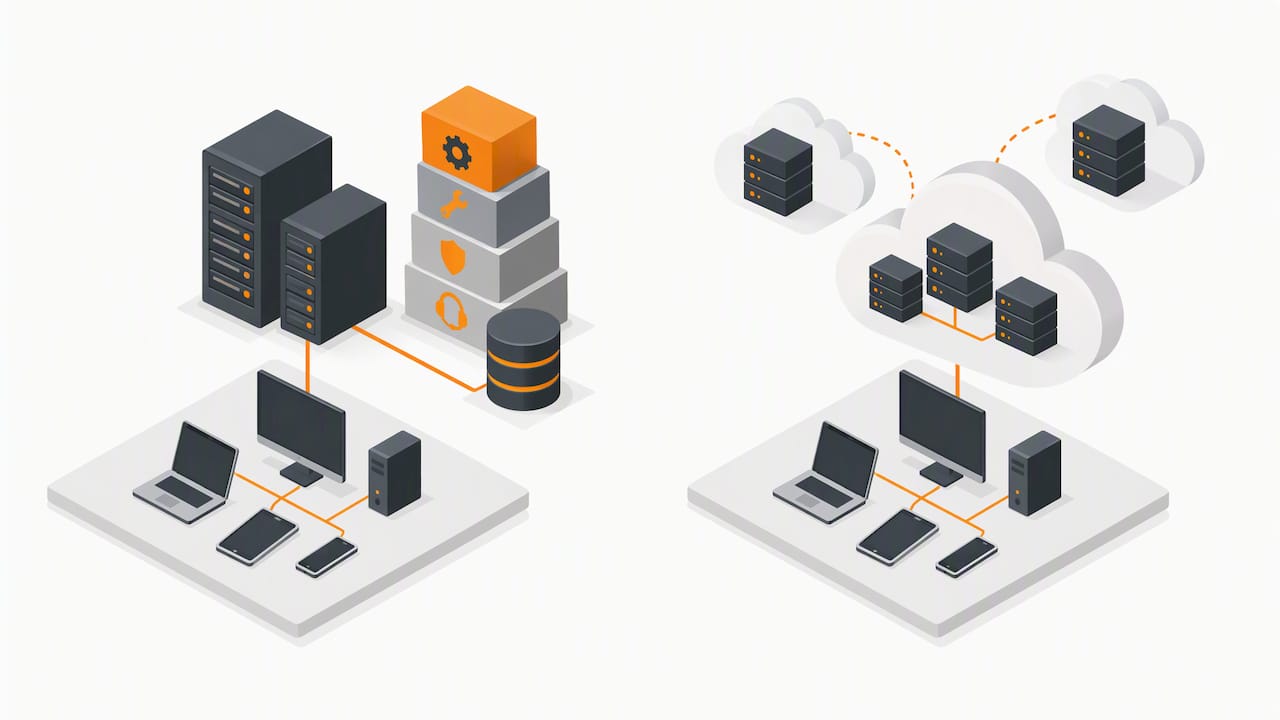
Regulatory requirements change the math significantly. A healthcare practice handling protected health information needs documented safeguards, access controls, and audit trails that go well beyond a standard office setup, which is exactly the kind of scope NIST’s guidance on outsourcing accountability addresses: outsourcing IT does not transfer responsibility for protecting your systems and data, so providers with real regulatory experience tend to cost more than generalists, and for good reason.
Several service elements consistently add material cost:
- Managed, encrypted backups with regular restore testing.
- Around-the-clock monitoring and after-hours response.
- Dedicated account or security resources rather than shared support queues.
- Advanced threat detection and response tooling layered on top of basic antivirus.
Third-party software and cloud licensing fees often get passed through at or near cost, so ask whether quoted prices already include them.
Pro Tip: Ask every vendor to itemize which security and compliance services are included versus billed separately, so you can compare quotes on equal footing.
Build a Budget Worksheet and a Worked Example
Estimating managed IT costs before you call a vendor keeps negotiations grounded in your actual numbers instead of theirs. Five steps get you a workable monthly figure.
- Inventory your environment. Count users, workstations, laptops, and servers, including anything remote employees use.
- Select a pricing model. Match your profile, people-heavy or infrastructure-heavy, to per-user, per-device, or a hybrid approach.
- Request pricing. Ask providers to quote per-user or per-device services that fit your risk profile.
- Add cloud, license, and one-time costs. Layer in software subscriptions and any setup fees separately from the recurring base.
- Build in a contingency line. Add a buffer for scope changes, emergency work, or growth mid-contract.

A worked example: a company with users, workstations, and an on-premises server should ask providers to price each part of the environment, including monitoring and patching. The total depends on the services and licensing included.
Higher security or compliance needs can increase the quoted cost when documented access controls and audit support are added to the scope. NIST’s Cybersecurity Framework supplement recommends starting with an asset inventory and multi-factor authentication when building out SMB security plans, both of which are common line items in compliance-driven quotes.
Consider whether your budget needs a contingency for unplanned incidents or scope changes. For more worked examples at different headcounts, our managed IT services pricing breakdown walks through additional scenarios.
Onboarding, Setup, and Fees to Ask About Upfront
Most managed IT contracts carry a one-time onboarding fee separate from the monthly rate, usually covering network documentation, asset tagging, and baseline security configuration. The onboarding fee varies by provider and scope, so ask what work it covers and how it is calculated.

Common one-time or pass-through charges to watch for include:
- Data migration from legacy systems or a previous provider.
- Software license transfers or reissues.
- Hardware replacement when aging equipment fails inspection.
- Emergency or after-hours work billed time-and-materials instead of flat-rate.
Ask whether onboarding can be phased to ease cash flow, and request contract language that caps time-and-materials rates for emergency work so unexpected costs are easier to manage.
Decision Checklist: Questions to Ask Before You Sign
Price comparisons without context lead to bad decisions. Weigh proposals against compliance experience, SLA clarity, reporting transparency, and verifiable references, not just the bottom-line number.
Bring these questions to every vendor conversation:
- What is your guaranteed response time for critical outages versus routine tickets?
- What exactly is included during onboarding, and how long does it typically take?
- How often do you apply security patches, and is that cadence documented in the contract?
- What is your escalation process when an issue isn’t resolved at the first tier?
- How are backups tested, and how often do you run restore drills?
- Do you carry cyber liability insurance, and at what coverage level?
- Can you provide references from businesses in our industry or compliance category?
Treat vague SLA language, no documented onboarding scope, and an inability to produce references as red flags worth walking away from.
Pro Tip: Request the SLA document itself, not just a verbal summary, before signing anything.
How We Frame Managed IT Pricing for Small Businesses
We build managed IT quotes around documented scope first, price second, because unclear onboarding is where hidden costs hide. Transparent scoping protects your budget more than any discount ever will.
— Randy Bryan
Get a Scoped Managed IT Quote From tekRESCUE
We offer managed IT services, hosted and cloud managed IT services, and cybersecurity services built around documented onboarding. Ask us about support for your business’s compliance needs. A scoped quote starts with the same inventory steps covered above: users, devices, servers, and current security posture, so the number you receive actually matches your environment.
What a scoped quote process typically includes:
- A short discovery call covering headcount, infrastructure, and compliance needs.
- A written scope document before any pricing is finalized.
- A recommendation on pricing model (per-user, tiered, or hybrid) based on your profile.
Ready to see where your numbers land? Request a managed IT quote and get a scope-based estimate instead of a rate-card guess.
FAQ
How much does IT support cost for a small business?
Small business IT support costs vary by provider, service scope, and pricing model. Request a quote based on your users, devices, and requirements. The exact figure depends heavily on security requirements, server count, and whether compliance work like HIPAA documentation is part of the scope.
What drives the difference between in-house IT and managed IT costs?
In-house IT requires a full-time salary, benefits, and training for each hire, while managed IT spreads specialized expertise across a flat monthly fee. Many small businesses find managed IT more predictable for budgeting since it avoids the hiring, turnover, and skill-gap risks tied to a single in-house employee; our in-house versus managed IT comparison breaks down the tradeoffs in more detail.
What should a managed IT contract include to avoid surprise fees?
A solid contract spells out onboarding scope, patch cadence, backup testing frequency, and SLA response times in writing rather than leaving them implied. It should also cap time-and-materials rates for emergency work so after-hours incidents don’t create open-ended bills.
How long does onboarding take and when does ROI show up?
Onboarding for a small business environment commonly takes several weeks to document assets, configure monitoring, and standardize security settings before steady-state support begins. Whether outages decrease or resolution improves depends on the provider, the services in scope, and the business’s starting conditions.
Do compliance requirements like HIPAA raise managed IT costs?
Yes, compliance obligations typically push monthly costs toward the higher end of standard ranges because they require documented access controls, audit trails, and more frequent security reviews. The NIST Cybersecurity Framework guide for small businesses recommends starting compliance work with an asset inventory and multi-factor authentication, both of which add scope and cost compared to a standard, non-regulated setup.
Sources
- Building Your Small Business’s Cybersecurity Team: From In-House to Outsourcing | NIST
- NIST Cybersecurity Framework 2.0: Small Business Quick-Start Guide
Recommended
Table of Contents