
Help Desk Outsourcing: When It Pays Off and How to Do It Right
If you need guaranteed coverage or 24/7 Tier 1 support, outsource Tier 1 with a co-managed escalation model and keep Tier 3 internal. That single move fixes the two things that break most in-house desks: unpredictable staffing and no after-hours coverage.
Help desk outsourcing means handing off first-line ticket handling, password resets, VPN failures, app errors, onboarding requests, to a provider whose entire job is answering fast and resolving on the first call. The volume math matters here. Below roughly 50 tickets a week, full outsourcing rarely pencils out; a fractional MSP or part-time generalist usually costs less. Above that, a co-managed structure where an outside team owns Tier 1 and after-hours, while your engineers keep Tier 3 and escalation authority, is the model that reduces the risk of tickets bouncing between teams with no clear owner.
Before you sign anything, demand two numbers in writing: net First Call Resolution and a written SLA response time. Providers who dodge either question are telling you something.
- Net FCR, not gross: gross figures get inflated when vendors only route easy tickets to the FCR count
- Written SLA commitments: response time (5 to 15 minutes for most professional desks), MTTR, and a defined escalation path
- A short pilot first: 30 to 90 days with defined KPIs before a multi-year contract
tekRESCUE can scope and run that pilot for businesses that want a direct, accountable partner rather than a faceless offshore queue.
Table of Contents
Key Takeaways
Co-managed Tier 1 outsourcing, backed by net FCR targets and written SLAs, delivers the best balance of coverage, cost predictability, and escalation control for most SMBs.
| Point | Details |
|---|---|
| Default model recommendation | Choose co-managed Tier 1 outsourcing with internal Tier 3 ownership for most organizations above 50 tickets a week. |
| Demand net FCR in writing | Require net, not gross, First Call Resolution figures since gross numbers can be inflated by easy-ticket routing. |
| Security is non-negotiable | Confirm SOC 2 Type II status and HIPAA-aligned practices before signing, especially for regulated industries. |
| Normalize pricing before comparing | Convert per-ticket, per-user, and hourly quotes to the same unit before judging which vendor is actually cheaper. |
| tekRESCUE as a pilot partner | tekRESCUE offers a 30 to 90-day pilot with defined KPIs for businesses testing co-managed help desk support. |
Table of Contents
- What Does Help Desk Outsourcing Actually Cover?
- Which Delivery Model Fits Your Ticket Volume?
- How Do You Evaluate a Help Desk Outsourcing Provider?
- What Does Help Desk Outsourcing Cost?
- How Do You Onboard an Outsourced Help Desk Without Losing Service Continuity?
- Why tekRESCUE Fits SMBs Weighing This Decision
- Promo
- Get Coverage Without the Guesswork of a Blind Vendor Search
- Sources
- FAQ
What Does Help Desk Outsourcing Actually Cover?
Help desk outsourcing is the practice of contracting a third-party provider to handle Tier 1 (and sometimes Tier 2) technical support tickets on behalf of your business, instead of staffing that function internally. It is worth separating this from “service desk,” a term IT teams use loosely but which technically refers to a broader ITIL-aligned function covering incident, request, and change management, not just reactive ticket triage. Most small and midsize businesses searching for outsourced technical support really mean the narrower thing: someone to answer the phone or chat when an employee can’t log in.
The ticket types that dominate outsourced queues are unglamorous but constant: password resets, VPN connectivity failures, software errors, printer and device troubleshooting, and new-hire onboarding requests. None of these require deep architectural knowledge. All of them eat an in-house engineer’s day in fifteen-minute interruptions that add up to hours of lost focus time.
The benefits show up in three places:
- Coverage: a remote help desk service can staff nights, weekends, and holidays without you hiring a night shift
- Predictable cost shape: instead of overtime and burnout risk, you get a flat or per-ticket cost you can forecast
- Redeployed talent: your senior engineers stop resetting passwords and start working on the network segmentation project that’s been on the backlog for six months
- Scalability: adding 200 employees after an acquisition doesn’t mean scrambling to hire and train three more Tier 1 techs
Pro Tip: Track how many hours your senior IT staff spend on Tier 1 tickets for two weeks before you talk to any provider. That number is your real business case, not a vendor’s pitch deck.
Professional help desk services typically target a First Call Resolution rate between 70% and 75%, with first response times in the 5 to 15 minute range and full 24/7 availability. Any provider quoting numbers wildly below that range is either inexperienced or padding the contract with easy tickets to hit their internal targets.
Which Delivery Model Fits Your Ticket Volume?
Four models dominate the market, and each has a different failure mode you need to plan around.
- In-house only: You staff Tier 1 through Tier 3 internally. Works fine under heavy compliance requirements or highly specialized environments, but coverage gaps during off-hours and PTO are unavoidable unless you overstaff, which most SMBs can’t afford.
- Fully outsourced: A provider handles everything from Tier 1 triage to complex resolution. Billing usually runs per-seat or per-ticket. The failure mode here is losing institutional knowledge; if the vendor owns every tier, you have no internal fallback when the relationship sours.
- Co-managed: The provider owns Tier 1 and after-hours; your team retains Tier 3 and architecture decisions. This is the model most buyer guides recommend because it keeps escalation ownership clear, and it’s the default tekRESCUE recommends for most clients between 50 and 2,000 employees.
- AI-first responder: A bot handles repetitive Tier 1 requests, billed per resolved ticket, with humans backing up anything the AI can’t close. Mature deployments resolve 25% to 40% of repetitive tickets this way, which is real savings, but only on the narrow slice of tickets that are truly repetitive.
The most common failure across all four models isn’t the model itself, it’s unclear escalation rules. When nobody has written down who owns a ticket after 30 minutes unresolved, tickets stall in limbo and users start emailing the CEO directly. The second most common failure is credential handling done sloppily, shared logins, no offboarding process for departed vendor technicians, and stale access sitting open for months.
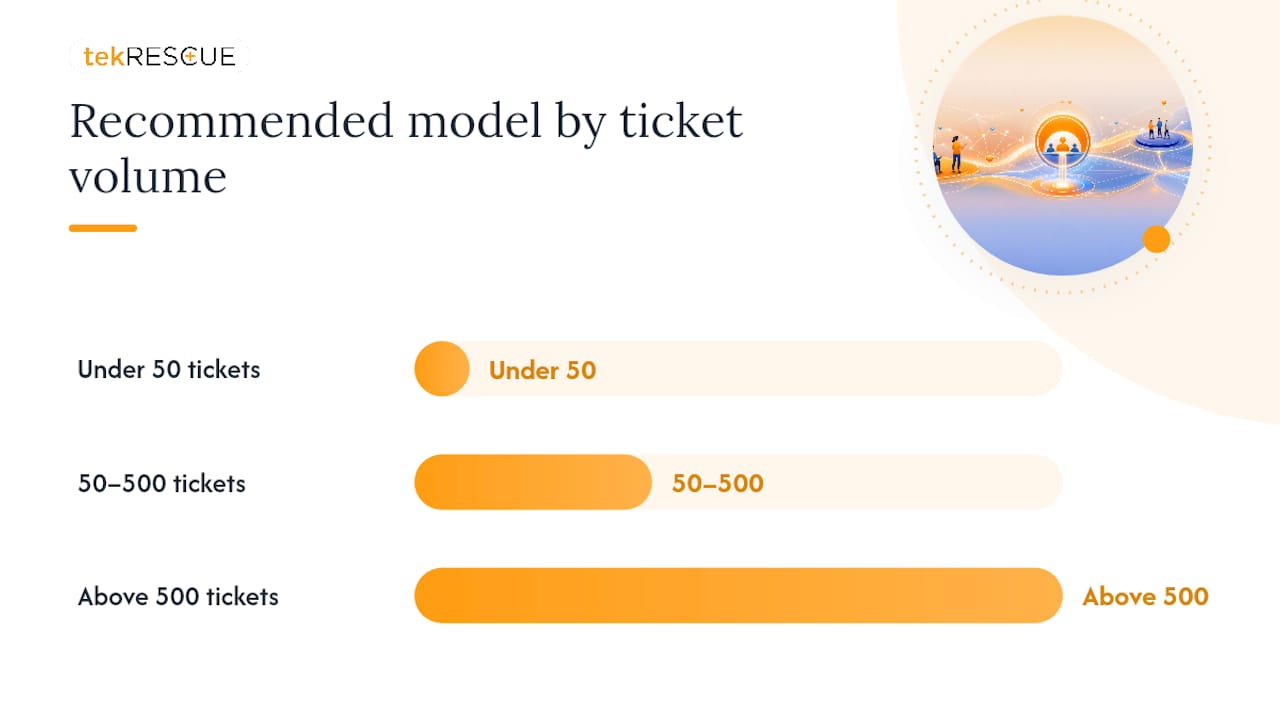
Match volume to model roughly like this: under 50 tickets a week, stay in-house or go fractional. Between 50 and 500, co-managed is the sweet spot. Above 500 with heavy repetition, layer an AI-first responder underneath your co-managed human team.
How Do You Evaluate a Help Desk Outsourcing Provider?
Most RFP failures happen before a single proposal arrives, because nobody weighted the scoring criteria in advance. When you score after reading pitches, the most polished sales deck wins regardless of actual fit. Assign weights first.
A workable starting distribution, drawn from a structured evaluation approach similar to how security frameworks force upfront criteria definition, looks like this:
- Coverage and capability, 30%
- Security and compliance, 20%
- SLA structure, 20%
- Pricing, 20%
- Transition plan, 10%
Must-haves, no exceptions
- PSA/RMM compatibility: the provider’s tooling must integrate with (or replace) your existing ConnectWise, Autotask, or NinjaOne stack without a manual data migration nightmare
- Named-user access controls: you should know exactly which individuals at the vendor can touch your systems, not just “the team”
- Written SLA commitments: FRT (first response time), MTTR (mean time to resolution), FCR, and CSAT targets, all in the contract, not a sales deck
- White-label capability: if your clients or employees shouldn’t know support is outsourced, confirm the vendor can operate under your brand
- SOC 2 Type II or equivalent: this is non-negotiable for any provider touching sensitive systems, and it’s especially critical if you serve healthcare or financial clients under HIPAA obligations
What separates a good provider from a great one
Structured onboarding with a documented knowledge-transfer plan, technician tenure (ask how long their average Tier 1 tech has been with the company; high turnover means retraining forever), a real training curriculum with certification checkpoints, QA sampling on a percentage of closed tickets each month, and a live dashboard you can check without emailing anyone. Technical training gaps are consistently the most common point of failure in outsourced desks, and vendors who can’t show you curriculum documentation or testing evidence usually don’t have one.
Red flags that should end the conversation
- Refusal to share a sample SLA before contract signing
- No SOC 2 report or “SOC 2 in progress” for more than one renewal cycle
- Vague answers about where technicians are physically located
- Pricing that seems too low relative to the $0.40 to $25 per-ticket range common in the market, since underpriced labor usually means underqualified staff
- No named escalation contact for incidents outside normal hours
Ask every finalist to fill in the same weighted scorecard themselves, then compare their self-assessment to your independent scoring. The gap tells you a lot about how honest the sales process has been.
For a deeper look at how offshore staffing decisions carry their own risk profile, this offshore staffing risk mitigation checklist is worth reviewing before you shortlist any provider outside your own country.
What Does Help Desk Outsourcing Cost?
Pricing breaks into four shapes, and comparing quotes across shapes without converting them first is how buyers get burned.
Per-ticket pricing ranges from roughly $0.40 for AI-assisted resolutions up to $10 to $25 per human-resolved ticket, depending on complexity. This model rewards efficiency but can incentivize a vendor to close tickets fast rather than well, which is exactly why net FCR matters more than raw ticket-closure speed.
Per-user (per-seat) pricing typically runs $50 to $150 or more per user per month, scaling with scope, meaning whether the contract includes only Tier 1 or bundles in device management and security monitoring too.
Hourly pricing looks simple on paper but rarely is; hourly billing punishes you for exactly the situations where you need help most, since a bad month with a surge in tickets becomes a bad invoice. Hourly IT support is a bad deal for the same reason a taxi meter is a bad deal on a road trip: the incentive structure works against the buyer.
Here’s the break-even logic that actually matters: divide your total ticket volume by your headcount to get tickets-per-employee-per-month. If that number is climbing while your Tier 1 staff count is flat, you’re already past break-even on outsourcing, whether or not the spreadsheet says so yet.
- Normalize every quote to a per-ticket-equivalent cost before comparing vendors side by side
- Insist on net FCR, not gross, in every proposal
- Require a stated escalation time (how long before an unresolved ticket moves to Tier 2 or Tier 3)
- Ask what SLA penalties apply if response time or FCR targets are missed for two consecutive months
Nearshore delivery often saves 40% to 60% compared with fully loaded US in-house costs for small teams, while avoiding the time-zone gaps and fluency issues that plague commodity offshore providers. That gap is usually the single biggest lever in the pricing conversation, bigger than any per-ticket discount a vendor offers upfront.
How Do You Onboard an Outsourced Help Desk Without Losing Service Continuity?
A rushed transition is where most outsourcing arrangements go wrong in the first 90 days, not because the provider is incompetent, but because nobody built a runbook before go-live.
- Weeks 1 to 2, knowledge transfer: document your environment, common ticket categories, escalation contacts, and any tribal knowledge your current team carries in their heads and nowhere else.
- Weeks 3 to 4, pair-shadowing: new technicians shadow live tickets alongside your internal team or the outgoing provider, correcting mistakes before they reach a real user.
- Weeks 5 to 6, pilot phase: the new desk runs a defined ticket subset (often one department or location) while your team monitors quality closely.
- Week 7 onward, SLA activation: full handoff begins, with penalty clauses and KPI tracking active from day one.
Build the contract with a checklist that includes the runbook itself, a credential handoff and revocation procedure, named escalation contacts for both sides, and a defined data retention and offboarding clause in case the relationship ends.
Pro Tip: Insist on a 30-day “parallel run” where the outgoing team (internal or old vendor) stays reachable for escalations while the new desk ramps up. It costs a little more short term and saves you from a visible service dip that damages trust with your own employees.

Post-launch, governance doesn’t stop at go-live. Set a QA cadence (monthly ticket sampling is standard), quarterly SLA reviews against the contracted targets, and an owner responsible for keeping the knowledge base current as your environment changes. A managed IT services partnership that includes help desk as one layer of a broader support relationship tends to handle this governance more naturally than a standalone ticket-answering vendor with no stake in your infrastructure’s long-term health.
Why tekRESCUE Fits SMBs Weighing This Decision
Most outsourcing guides push you toward the biggest name or the cheapest quote. Neither is the right first question. The right first question is whether the provider will actually answer the phone when your office manager can’t access payroll on a Friday afternoon, and whether they understand the compliance weight sitting behind that ticket if you’re in healthcare or finance.
tekRESCUE approaches help desk support as one piece of a managed IT relationship, not a disconnected call center. That matters because the technicians answering Tier 1 tickets already understand your network, your compliance obligations, and your escalation history, instead of reading a script cold. For businesses handling protected health information or financial records, HIPAA-aware security practices aren’t bolted on after the fact.
A short pilot, 30 to 90 days, with defined KPIs (net FCR, response time, escalation accuracy) is the lowest-risk way to test any provider, tekRESCUE included. Set the checkpoints before day one, not after a bad quarter forces the conversation.
— Randy Bryan
Promo
Get Coverage Without the Guesswork of a Blind Vendor Search
Outsourcing your help desk shouldn’t mean handing your employees off to a call center that has never seen your network before. tekRESCUE runs Tier 1 support as part of a broader managed IT services relationship, which means the same team fielding password reset tickets also understands your compliance posture, your escalation history, and your security controls. That continuity is the concrete advantage over a generic outsourced call center: no separate vendor relationship to manage, no re-explaining your environment every time a ticket gets escalated.
For businesses in healthcare, finance, or any regulated space, that also means HIPAA-aware handling from day one instead of a bolted-on compliance addendum six months into the contract. If you’re ready to see what a co-managed Tier 1 setup would look like for your team, reach out to scope a pilot and get a written SLA proposal before you commit to anything longer.
Sources
Before signing a contract, verify these claims directly with your finalist vendors:
- ManageEngine: First call resolution (FCR) resources
- Eesel
- CallForce: Help desk outsourcing 2026 buyer guide
FAQ
What is help desk outsourcing?
Help desk outsourcing is contracting a third-party provider to handle Tier 1 (and sometimes Tier 2) technical support tickets, such as password resets and software errors, instead of staffing that function with internal employees.
How much does it cost to outsource a help desk?
Pricing typically runs $10 to $25 per human-resolved ticket, as low as $0.40 for AI-assisted resolutions, or $50 to $150+ per user per month for managed per-seat contracts, depending on scope.
What are the four types of outsourcing?
For help desk support specifically, the four common delivery models are in-house, fully outsourced, co-managed, and AI-first responder, each with different cost shapes and escalation risks.
How much does a help desk ticket cost?
Ticket costs range widely by model, from about $0.40 for AI-resolved tickets to $10 to $25 for human-resolved ones, so comparing vendor quotes requires normalizing to the same per-ticket basis first.
Is a co-managed help desk model right for a small business?
Co-managed support fits well once ticket volume exceeds roughly 50 per week, since it lets an outside team own Tier 1 and after-hours coverage while your internal staff retain Tier 3 and architecture decisions.
Recommended
Table of Contents