

VPN for Remote Employees: Practical Guide for IT Leaders
For most small and midsize businesses, the right answer is a managed VPN with Zero Trust controls layered on top, not a bare VPN appliance sitting on your firewall. If your team is cloud-first, a ZTNA or SASE approach that grants per-application access will beat a traditional VPN on security grounds alone. Either way, MFA, endpoint posture checks, and single sign-on integration are not optional add-ons. They are the difference between a control that actually works and one that just feels secure.
Here’s the shortlist we recommend evaluating first:
- Managed VPN with Zero Trust controls — a traditional encrypted tunnel wrapped with identity verification, device checks, and segmentation. Best for teams with legacy on-prem applications that don’t speak modern authentication protocols.
- ZTNA or SASE for app-level access — grants access to specific applications instead of the whole network, with continuous verification instead of a one-time login. Best for cloud-first teams running SaaS and cloud-hosted infrastructure.
- Traditional full-network VPN — still the right call when employees need broad access to legacy, on-prem systems that can’t be segmented easily.
- A managed service partner like tekrescue — handles the design, deployment, monitoring, and patching so your internal team isn’t reverse-engineering VPN architecture on top of its day job.
Which one fits depends on what your employees actually need to reach. Vendors and privileged users touching sensitive systems need tighter, session-audited access, not a wide-open tunnel. Cloud-native teams need app-level access, not a virtual cable running into your entire subnet. Legacy shops running an on-prem ERP or file server still need a real VPN, at least until those systems get modernized or retired.
Table of Contents
Key Takeaways
The most secure remote-access strategy pairs a managed VPN or ZTNA architecture with MFA, endpoint posture checks, and SSO integration, never one of those alone.
| Point | Details |
|---|---|
| Match architecture to workload | Use ZTNA/SASE for cloud apps, VPN for legacy on-prem systems that can’t be segmented yet. |
| MFA and SSO are mandatory | Require both from day one; don’t treat them as phase-two additions to a VPN rollout. |
| Pilot before full rollout | Test with 10 to 20 users, gather telemetry, and fix issues before company-wide deployment. |
| Plan for outages | Document a fallback access method and escalation contact before you need one. |
| Consider a managed partner | tekrescue configures, monitors, and patches VPN and Zero Trust deployments so SMB IT teams aren’t doing it alone. |
Where to go for deeper technical guidance
- CISA’s VPN and remote access tips — the clearest source for configuration and hardening practices administrators should apply before going live.
- Cisco’s secure remote access overview — explains how VPN, ZTNA, and SASE relate to each other and when each makes sense architecturally.
- PCMag’s VPN service reviews — useful for understanding how independent testers benchmark speed, compatibility, and privacy claims.
- BeyondTrust’s secure remote access resources — a strong reference for vendor and privileged-access scenarios where VPN-less, session-audited access outperforms broad tunnel access.
- tekrescue’s Zero Trust implementation guide — a stepwise resource for SMBs planning a phased move toward least-privilege access.
A quick note before you go: this article covers general technical guidance, not a substitute for a tailored security assessment. Confirm current configuration recommendations with CISA or a qualified IT security professional before finalizing your deployment.
Table of Contents
- What Is a VPN for Remote Employees, Exactly?
- What Types of VPNs Work Best for Remote Teams?
- Why Do Remote Teams Need a VPN in the First Place?
- What Features Should a Business VPN Actually Have?
- How Do You Choose the Right VPN for Your Remote Workforce?
- Which VPN or Zero Trust Solution Fits Your Business?
- How Do You Roll Out a VPN for Remote Employees?
- What Ongoing Risks Come With Running a VPN in Production?
- Is a VPN Enough on Its Own, or Do You Need More?
- Get a VPN and Zero Trust Setup That Runs Itself
- Frequently Asked Questions
- Sources
What Is a VPN for Remote Employees, Exactly?
A VPN for remote employees is an encrypted tunnel that carries traffic between a remote device and your company’s network or a specific cloud service, hiding that traffic from anyone intercepting it in transit. That’s the whole job. It encrypts data in motion so a compromised coffee-shop Wi-Fi network or a nosy ISP can’t read what’s passing through.
Here’s what a VPN does not do, and this is where a lot of IT leaders get burned: it does not check whether the device connecting is infected, patched, or compliant with your policies. It does not stop lateral movement once a login succeeds. And it does not, by itself, verify that the person typing the password is actually who they claim to be.
CISA’s guidance on VPN and remote access security lays out configuration and hardening practices administrators should follow, because a misconfigured VPN is often worse than no VPN at all. Industry practice, echoed across vendor documentation and network engineering standards, treats VPN encryption as table stakes, not a finish line.
- Protects data confidentiality and integrity while it travels across public networks.
- Masks the remote employee’s real IP address from external observers.
- Does not evaluate device health, patch status, or malware presence.
- Does not prevent an attacker from moving sideways once inside the tunnel.
Quick fact: according to Cisco, traditional VPNs typically grant broad network access once a user authenticates, which is precisely the design trade-off that modern Zero Trust approaches were built to fix.
What Types of VPNs Work Best for Remote Teams?
Five architectures cover almost every remote-access scenario a growing business will face, and picking the wrong one is the single most common mistake we see in VPN rollouts.
- Remote-access VPN — the classic setup. A remote employee’s device connects to a VPN gateway, then gets access to the internal network as if they were sitting in the office.
- Site-to-site VPN — connects two networks (say, a branch office and headquarters) rather than individual users, and isn’t really built for individual remote workers.
- Cloud VPN (VPN-as-a-service) — a vendor-hosted VPN gateway, so you’re not managing your own hardware appliance. Faster to deploy, easier to scale.
- SASE (Secure Access Service Edge) — bundles networking and security functions, including VPN-like access, firewall, and threat inspection, into one cloud-delivered service.
- ZTNA (Zero Trust Network Access) — grants access to individual applications rather than the whole network, and continuously re-verifies the user and device rather than trusting a single login.
The practical difference between traditional VPN and ZTNA comes down to scope. A traditional VPN is like handing someone a building key that opens every door once they’re inside. ZTNA is closer to a key card that only opens the specific rooms they’re cleared for, and it checks their badge again at every door.
Legacy on-prem systems, like an old accounting package or a file server that’s never moving to the cloud, are still a solid reason to keep a real VPN. Vendors and contractors who need occasional, narrow access to one application are a much better fit for ZTNA or session-based privileged access tools. Cloud-first teams running Microsoft 365, Salesforce, or a SaaS stack rarely need broad network access at all.

Pro Tip: Don’t force a single architecture across your whole company. Most SMBs end up running a hybrid: ZTNA for cloud apps and day-to-day SaaS access, plus a scoped-down VPN for the handful of legacy systems that haven’t been modernized yet.
Why Do Remote Teams Need a VPN in the First Place?
The business case is straightforward: encrypted transit, access to internal resources that aren’t exposed to the public internet, support for legacy applications that predate modern cloud authentication, and predictable IP addresses for any system that relies on IP whitelisting. Remote work isn’t a temporary phase companies are waiting out, either. Reporting from Forbes points to remote and hybrid arrangements as a structural shift, not a pandemic-era blip, which means the underlying access architecture needs to be built for the long haul, not patched together as a stopgap.
But a VPN has real limits that deserve honest treatment instead of marketing gloss.
- Once authenticated, most VPNs grant broad access to the network, not just the app the employee actually needs.
- Device posture (patch level, antivirus status, disk encryption) usually isn’t checked by default.
- Performance can suffer under load, especially with older hardware appliances or oversubscribed bandwidth.
- A single compromised credential can open the door to the entire internal network.
That last point is the one that keeps security teams up at night, and it’s fixable. Pro Tip: Segment your network and apply per-application access rules on top of the VPN. If a remote employee’s laptop gets compromised, the attacker should land in one small, contained segment, not your entire internal network. This single change shrinks what security teams call the “blast radius” of a breach more than almost any other adjustment you can make to an existing VPN.
What Features Should a Business VPN Actually Have?
Vendor pitch decks all sound similar. The features that actually separate a secure deployment from a liability are specific, and most of them are non-negotiable for any business handling sensitive data.
Must-haves:
- AES-256 encryption or an equivalent modern cipher, paired with a current protocol like WireGuard, OpenVPN, or IKEv2.
- MFA integration that works with your existing identity provider, not a bolted-on app that employees route around.
- SSO support so provisioning and deprovisioning happen automatically when an employee joins or leaves.
- Device posture checks before granting access, not just a username and password.
- Centralized provisioning with role-based access control (RBAC), so permissions map to job function.
- Audit logging and compliance support, including SOC 2 reporting and HIPAA-aligned controls where patient data is involved.
Operational features worth prioritizing:
- Split tunneling, so only traffic bound for company resources goes through the VPN and everything else uses the employee’s normal internet connection.
- A kill switch that cuts internet access entirely if the VPN connection drops, preventing unencrypted leaks.
- Per-application tunnels for tighter scoping than a blanket network connection.
- Dedicated or static IPs, useful when internal systems rely on IP whitelisting.
- Server distribution and SLA commitments that hold up under real-world concurrent usage, not just a marketing benchmark. Feature comparisons across business VPN vendors consistently flag split tunneling and simultaneous device support as differentiators for distributed teams.
| Feature Category | What to Require | Why It Matters |
|---|---|---|
| Encryption & protocols | AES-256, WireGuard/OpenVPN/IKEv2 | Weak or outdated ciphers are the easiest thing for attackers to exploit |
| Identity integration | SSO, MFA, IdP support | Manual account management doesn’t scale and creates orphaned accounts |
| Device posture | Health checks before connection | Stops an infected or unpatched device from ever reaching the tunnel |
| Management | Centralized admin console, RBAC | Lets IT enforce policy instead of trusting individual configuration |
| Compliance | SOC 2, HIPAA support, audit logs | Required for healthcare, finance, and most cyber insurance policies |
| Performance | Split tunneling, SLA, server distribution | Determines whether employees tolerate or bypass the VPN |
How Do You Choose the Right VPN for Your Remote Workforce?
Start with your infrastructure, not the vendor’s feature list. If most of your applications live in the cloud, a ZTNA-first approach will serve you better long-term than forcing cloud-native traffic through a legacy VPN gateway. If you’re still running on-prem systems that can’t be modernized in the next 12 months, a properly segmented VPN remains the pragmatic choice.
- Map your applications. List what’s on-prem, what’s cloud-hosted, and what needs broad network access versus single-app access.
- Count your concurrent users. A tool that handles 20 simultaneous connections gracefully might buckle at 200. Ask vendors for real concurrency numbers, not marketing ceilings.
- Identify regulatory requirements. HIPAA, PCI DSS, and similar frameworks often dictate specific logging, encryption, and access-control standards.
- Confirm identity integration. Your VPN or ZTNA solution needs to plug into your existing SSO and IdP, not run as an island with its own user directory.
- Test the vendor’s support and SLA commitments against your actual uptime tolerance, not a generic industry average.
Before signing anything, ask vendors these questions directly:
- Do you support SSO and MFA out of the box, or does that require a separate add-on?
- Have you completed a third-party security audit or SOC 2 report, and can you share it?
- What’s your breach disclosure policy, and how fast do you notify customers?
- Do you offer dedicated or static IPs for whitelisting scenarios?
- What does your management API look like, and can it integrate with our existing tools?
Watch for these red flags, because they show up more often than they should in vendor sales conversations:
- Opaque or vague logging policies that dodge specifics about what’s retained and for how long.
- No independent, third-party security audit, only self-reported claims.
- No support for device posture checks or endpoint health verification.
- No enterprise-grade SSO or centralized management, forcing manual account provisioning.
Which VPN or Zero Trust Solution Fits Your Business?
Here’s how the major players stack up across the dimensions that actually matter for an SMB deployment. This isn’t an endorsement of any single vendor over another. It’s a map to help you match capabilities to your environment.
| Solution | Best For | Security Architecture | Identity Integration | Device Posture | Deployment Complexity |
|---|---|---|---|---|---|
| Tailscale | Small, distributed teams needing simple mesh connectivity | Zero Trust mesh VPN (WireGuard-based) | SSO via major IdPs | Basic device checks | Low, fast to pilot |
| Perimeter 81 | Cloud-first SMBs wanting SASE-style consolidation | SASE / ZTNA | SSO, SAML | Yes, built-in | Moderate |
| NordLayer | Small businesses wanting business-grade VPN with simple management | Remote-access VPN with Zero Trust add-ons | SSO support | Limited posture checks | Low to moderate |
| Cisco AnyConnect | Enterprises with existing Cisco network infrastructure | Traditional VPN, expandable to ZTNA via add-ons | SSO, SAML, RADIUS | Yes, with additional modules | High |
| Palo Alto Prisma Access | Larger or compliance-heavy organizations | SASE / ZTNA | Deep IdP integration | Yes, advanced posture checks | High |
| OpenVPN Cloud | Teams wanting flexible, protocol-standard deployment | Cloud VPN-as-a-service | SSO support | Basic checks | Moderate |
| ExpressVPN | Very small teams or individual remote workers | Consumer-grade VPN with business features | Limited enterprise IdP support | Minimal | Low |
| NordVPN — (business tier) | Small teams needing straightforward encrypted access | Consumer-grade VPN with business tier | Limited enterprise IdP support | Minimal | Low |
| tekrescue (managed deployment) | SMBs wanting a fully managed VPN or Zero Trust rollout without hiring dedicated network security staff | Managed VPN with Zero Trust controls, tailored to your environment | Full SSO/IdP integration, handled during onboarding | Full posture checks, configured and monitored | Low burden on your team, tekrescue handles complexity |
Consumer-grade tools like ExpressVPN and NordVPN, as ExpressVPN’s own remote-work materials describe, use strong AES-256 encryption and are genuinely useful for individual employees or very small teams. But they weren’t built for centralized provisioning, RBAC, or compliance logging at scale. PCMag’s testing methodology for VPN services relies on speed benchmarks, platform compatibility, and privacy policy scrutiny, criteria worth applying to any shortlist before you commit budget.
The pattern to notice: solutions further to the right of the ZTNA/SASE spectrum (Perimeter 81, Palo Alto Prisma Access) tend to offer stronger device posture and identity integration, but at higher deployment complexity. Lighter tools (Tailscale, NordLayer) trade some of that depth for a faster path to production. Where your business lands on that spectrum should follow your app inventory and compliance requirements, not vendor marketing.
How Do You Roll Out a VPN for Remote Employees?
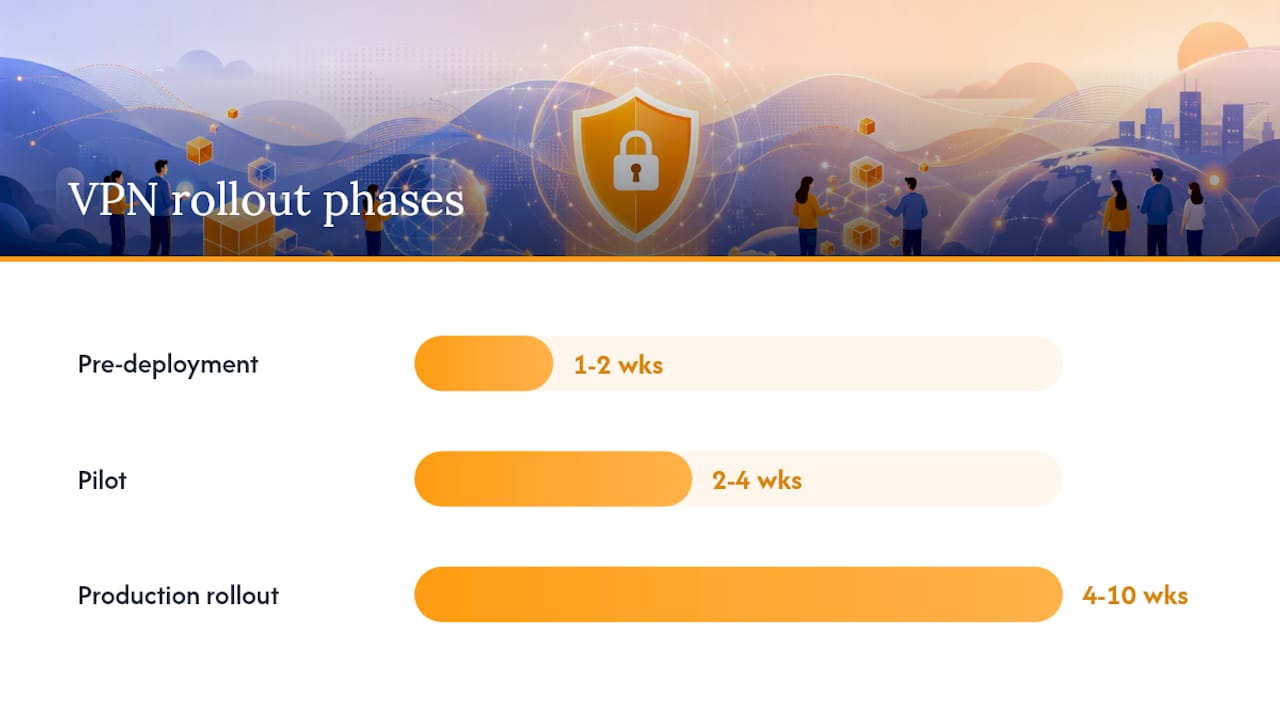
A rushed VPN deployment is how businesses end up with shadow IT, frustrated employees routing around slow connections, and security gaps nobody catches until an incident forces the issue. A phased rollout avoids most of that.
Pre-deployment (weeks 1 to 2):
- Inventory every application employees need remote access to, and classify each as on-prem/legacy or cloud-hosted.
- Decide which use cases need full-network access versus app-level access.
- Define success criteria and KPIs upfront (connection reliability, latency thresholds, help desk ticket volume).
Pilot (weeks 2 to 4):
4. Select a small group of 10 to 20 users spanning different roles and technical comfort levels.
5. Configure SSO and MFA before granting any access, not as a phase two addition.
6. Enable device posture checks and test split tunneling under realistic working conditions.
7. Gather telemetry and direct user feedback on connection speed and reliability.
Production rollout (weeks 4 to 10, depending on headcount):
8. Onboard users in phases by department or location, not all at once.
9. Provide short, role-specific training and a clear support escalation path.
10. Establish a performance monitoring baseline before full rollout, and plan capacity for peak concurrent usage.
11. Budget realistically: licensing costs typically scale per user or per device, and managed deployment adds a service fee but removes most of the internal engineering burden.
12. Build a contingency plan for VPN outages, including a documented fallback access method for critical systems.
Data point worth internalizing: Spectrum Business’s guidance for VPN deployments specifically warns against permitting VPN access from personal devices and stresses that both the company network and the remote employee’s home connection need adequate bandwidth, since a slow home connection undermines even a well-configured VPN. Businesses standardizing this across multiple locations often lean on a documented playbook rather than improvising site by site, something tekrescue’s work standardizing VPN and SD-WAN across multi-state operations illustrates in practice.
What Ongoing Risks Come With Running a VPN in Production?
A VPN isn’t a install-it-and-forget-it control. The risks that matter most after deployment are different from the ones you worried about during the sales process.
- Credential theft remains the most common entry point. A stolen password with no MFA is an open door.
- Compromised endpoints can carry malware straight through an authenticated tunnel if device posture isn’t checked.
- VPN appliance vulnerabilities get discovered regularly, and unpatched gateways are a favorite target for attackers scanning the internet for known flaws.
- Bandwidth and latency issues degrade the user experience, which pushes frustrated employees toward unsanctioned workarounds.
- Logging and privacy tensions arise when employees use personal devices, raising legitimate questions about what the company can see.
- BYOD exposure multiplies every other risk on this list, since personal devices are rarely patched or managed to the same standard as company hardware.
Mitigation isn’t complicated, but it does require discipline:
- Enforce MFA and SSO without exception, including for contractors and vendors.
- Require endpoint management and health checks before granting any connection.
- Segment the network so a single compromised account can’t reach everything.
- Patch VPN appliances and client software on a fixed schedule, not an ad hoc one.
- Monitor connection logs and set alerts for unusual login patterns or geographic anomalies.
- Plan capacity ahead of major hiring pushes or seasonal spikes in remote work.
Pro Tip: Write your VPN incident response plan before you need it. At minimum, document a fallback access method for business-critical systems, a clear escalation contact, and a communication plan for employees if the primary VPN goes down. A ten-minute outage feels very different when everyone already knows what to do.
Good network security practices extend well past the VPN gateway itself, covering patch cadence, segmentation, and monitoring as one connected system rather than isolated checkboxes.
Is a VPN Enough on Its Own, or Do You Need More?
No single control, VPN included, closes every gap in a remote-access strategy. The businesses that get burned are almost always the ones that treated the VPN as the entire security plan instead of one layer in a stack.
A layered approach combines transport encryption (the VPN itself) with MFA, endpoint posture checks, endpoint protection, continuous monitoring, and least-privilege access rules that limit what any single compromised account can reach. Cisco’s framing of modern secure remote access treats VPN, ZTNA, and SASE as complementary tools rather than competing options, and that’s the right mental model for most SMBs to adopt.
A compromised device can still move laterally once a VPN tunnel is established, unless device posture and network segmentation are actively enforced. Treating the VPN tunnel as the finish line, rather than the starting point, is one of the most common and costly misreadings of what this control actually does.
That distinction shows up constantly in real deployments. A company assumes that because traffic is encrypted, the job is done, and then a single phished credential turns into a network-wide incident because nothing else was checked at the door. tekrescue’s engagements with small and midsize businesses across cybersecurity, compliance, and managed IT consistently start from that layered premise: VPN or ZTNA access paired with MFA, endpoint management, and ongoing monitoring, not a standalone appliance left to run itself.
A consultant’s take on where VPN projects actually go wrong
The technical part of a VPN rollout is rarely the hard part. The hard part is the human behavior around it: employees connecting from personal laptops because the company one is “in for repairs,” reused passwords that make MFA feel like an inconvenience instead of a safeguard, and SSO integration getting skipped because it takes an extra sprint nobody budgeted for.
Most of the incidents I’ve seen trace back to one of those three gaps, not a flaw in the VPN protocol itself. WireGuard and OpenVPN are both solid, well-vetted protocols. The failure point is almost always a policy gap, not a cryptography gap.
For resource-constrained teams choosing between vendors, the trade-off isn’t really about which brand has the flashiest feature list. It’s about who will actually enforce the policy day after day, patch the appliance on schedule, and notice when a login pattern looks wrong at 2 a.m. That’s an operational commitment, not a checkbox on a spec sheet, and it’s exactly why so many SMBs end up handing the whole thing to a managed partner instead of running it in-house with a stretched IT team.
Get a VPN and Zero Trust Setup That Runs Itself
tekrescue is the alternative to hiring a dedicated network security engineer just to keep your VPN patched, monitored, and properly configured. Instead of choosing between a self-managed appliance that competes for your IT team’s attention and an enterprise platform priced for a much bigger company, you get a managed VPN and Zero Trust deployment sized for an SMB budget, with someone actually watching it after the rollout is done.
That means integration with your existing identity provider for SSO, endpoint management so device posture checks actually happen, and 24/7 monitoring so a credential compromise gets caught before it becomes a network-wide incident. tekrescue’s managed IT services for small business cover exactly this kind of deployment, from initial architecture decisions through ongoing patching and support, alongside the broader cybersecurity controls most remote workforces need in place. If you’re ready to see what a managed rollout would cost for your team size, reach out to tekrescue and get a straightforward quote before your next lease renewal or budget cycle forces the decision anyway.
Frequently Asked Questions
What is the best VPN for remote employees at a small business?
There isn’t one universal answer. Cloud-first teams tend to do better with ZTNA or SASE solutions like Perimeter 81 or Palo Alto Prisma Access, while teams with legacy on-prem systems still benefit from a properly configured, segmented VPN. A managed deployment through a partner like tekrescue removes the guesswork by matching the architecture to your actual application inventory.
How do I set up secure VPN access for remote workers?
Start by inventorying which applications employees need to reach and classifying them as legacy/on-prem or cloud-hosted. Configure SSO and MFA before granting any access, pilot with a small user group, then roll out in phases with device posture checks enabled from the start.
Is a VPN enough to secure remote employee access?
No. A VPN encrypts traffic in transit but doesn’t check device health or stop lateral movement after a login succeeds. Pairing it with MFA, endpoint posture checks, and network segmentation closes the gaps a VPN alone leaves open.
How much does a business VPN or Zero Trust deployment typically cost?
Costs generally scale per user or per device, with licensing fees varying by vendor and feature tier. A managed deployment adds a service fee but usually reduces the internal engineering time needed to configure, monitor, and patch the system over its lifetime.
What happens if the VPN goes down while employees are working remotely?
That’s why a documented fallback plan matters. At minimum, identify which business-critical systems need an alternate access method, assign a clear escalation contact, and communicate the outage plan to employees before an outage actually happens, not during one.
Sources
- What is secure remote access? Explained – Cisco
- CISA – Tips for VPN and Remote Access Security (ST04-014)
- The best VPN services | PCMag
Recommended
Table of Contents