
SMBs: 4 Quick Wins for Your Website Security Audit
A website security audit is a systematic check of your site’s encryption, code, plugins, access controls, and backups designed to find weaknesses before an attacker does. If you do nothing else this week, run an authenticated vulnerability scan, turn on multi-factor authentication for every login tied to your site, and confirm your backups actually restore. Frameworks from OWASP and NIST give you the standards; a qualified provider can handle the legwork.
TL;DR:
- Automated vulnerability scans detect 60 to 70% of common issues, but manual review is necessary to identify chained flaws and logic errors.
- Quarterly security audits and regular testing of backups and access controls are crucial to address common SMB vulnerabilities like outdated plugins and weak admin protections.
- Prioritize fixing critical, easily exploitable vulnerabilities and quick wins such as missing headers or disabled MFA to close most attack paths.
- Maintaining a continuous monitoring cycle, including automated monthly scans and annual pen tests, is essential for compliance and effective security.
- Relying solely on a one-time audit leaves months of potential exposure; recurring assessments and proper remediation processes are vital for ongoing protection.
Table of Contents
Table of Contents
- What Does a Website Security Audit Actually Cover?
- Why Do Regular Security Audits Matter?
- Step-by-Step Website Security Audit Checklist
- Which Tools Handle Automated Scans vs. Manual Testing?
- How Do You Prioritize What the Audit Finds?
- What Happens After the Audit Ends?
- What Do SMBs Consistently Get Wrong in Audits?
- Editorial Take: Website Security Audit Practical Checklist and Next Steps
- Get a Website Security Audit From tekrescue
- Sources
- FAQ
What Does a Website Security Audit Actually Cover?
A real audit examines six layers, not just the website. Skip one and you have a blind spot an attacker will eventually find.
- Transport encryption (TLS/HTTPS): certificate validity, protocol versions, cipher strength.
- HTTP security headers: Content Security Policy, HSTS, X-Frame-Options, and related directives.
- Software and dependencies: CMS core, plugins, themes, libraries, and their patch status.
- Access control: admin logins, password policy, multi-factor authentication, role permissions.
- Data protection: how customer and payment data is stored, encrypted, and transmitted.
- Monitoring and backups: logging, alerting, and whether backups actually restore.
A thorough audit checks all six of these layers together, because a vulnerability rarely lives in just one. These three terms get used interchangeably, and they shouldn’t be. A vulnerability scan is automated and fast. A security audit is broader: it includes scanning plus a review of configuration, policy, and access controls. A penetration test goes further still, with a human actively trying to exploit what the audit found. The audit’s job is discovery, prioritization, remediation, and verification, in that order. Skipping straight to remediation without prioritization is how teams waste a week patching low-risk issues while a critical one sits open.
Why Do Regular Security Audits Matter?
Most attacks against small business websites aren’t sophisticated. They’re automated bots crawling the internet for known CVEs and outdated plugin versions, hitting thousands of sites a day looking for one that hasn’t patched. Your site doesn’t need to be a target. It just needs to be findable and unpatched.
Statistic Callout: Automated vulnerability scanners typically find 60 to 70% of common vulnerabilities on their own, which means nearly a third of real risk requires manual review to catch. That gap is exactly where chained flaws and business-logic errors hide.
The threats that show up in audit after audit are predictable: credential stuffing against admin logins, phishing emails targeting the same admins, outdated plugins nobody remembered to update, and misconfigured servers exposing files that should be private. None of these require a sophisticated adversary. They require an unpatched CMS and a few months of neglect. That’s the entire threat model for most SMB breaches, and it’s also why a quarterly cadence beats a one-time audit every time.
Step-by-Step Website Security Audit Checklist
This is the sequence tekrescue follows on client engagements, adapted for a technical lead running it solo or handing pieces to a vendor.
-
Scope and OSINT. Before touching a scanner, map what’s actually exposed. Pull public DNS records, check certificate transparency logs, and run your domain through breach-lookup databases to see if employee credentials have already leaked. Reconnaissance at this stage routinely surfaces more exposure than a rushed scan does, because it catches subdomains and forgotten staging environments nobody remembers exist.
-
Fingerprint and inventory. Identify the CMS, its version, every plugin and theme, and the underlying framework. Build a simple spreadsheet: component, version, last update date, known CVEs. This inventory becomes your reference point for every future audit.
-
Automated scanning, unauthenticated first. Run an external scan the way an anonymous attacker would see your site: no login, no special access. This catches exposed admin panels, missing headers, and outdated software signatures.
-
Authenticated scanning. Log the scanner in with a low-privilege test account and rerun it against pages behind the login wall. This step matters more than most teams assume; a scanner that never authenticates never sees your customer portal, checkout flow, or admin dashboard.
-
Manual verification and business-logic testing. Scanners are pattern matchers. They miss chained flaws, like a password reset endpoint that leaks whether an email address exists, combined with a rate limit that doesn’t actually limit anything. This is where a human tester, not a tool, earns their fee.
-
TLS and header analysis. Run your domain through an SSL/TLS testing tool and a header analyzer. Prioritize HSTS (forces HTTPS, blocks downgrade attacks) and Content Security Policy (blocks unauthorized script execution) above the rest; these two headers alone close off entire attack categories.
-
Access control review. Confirm MFA is enforced, not just available, on every admin account. Test the password reset flow yourself. Verify old employee and contractor accounts have been removed, not just disabled.
-
Backup and restore testing. A backup nobody has restored isn’t a backup, it’s an assumption. Actually pull a recent backup and restore it to a staging environment to confirm it works.
-
Reporting and remediation roadmap. Every finding gets a severity rating, an owner, and a deadline. A report that lists forty issues with no prioritization is worse than useless. It’s a to-do list nobody will finish.
Pro Tip: Run your authenticated scans during off-peak traffic hours and throttle the request rate. An aggressive scan against a live production site can behave like a denial-of-service attack against your own server, and your host may flag it as one.
Which Tools Handle Automated Scans vs. Manual Testing?
Automated tools cover the categories below, and each has a distinct job:
- DAST (Dynamic Application Security Testing): probes the running site for injection flaws, misconfigurations, and exposed endpoints.
- SCA (Software Composition Analysis): checks every library and dependency version against known vulnerability databases.
- SSL/TLS testers: grade your certificate chain, protocol support, and cipher configuration.
- CMS-specific scanners: built for WordPress, Drupal, or similar platforms, checking plugin versions against disclosed CVEs.
Free online scanners are a useful first pass, but they stop at the login wall by design. Authenticated scans go further: set up a dedicated low-privilege test account, configure session handling carefully, and you dramatically expand what the scan actually sees, from checkout flows to customer account pages.
Hiring a professional penetration tester makes sense once your site handles payment data, health records, or any regulated information, or once an automated scan turns up findings you don’t fully understand. A real penetration test includes manual exploitation attempts, social engineering scenarios against staff, and a written report mapping each finding to business risk, not just a CVE number. If you’re running a scan yourself, follow a few non-negotiable rules: get written permission before scanning anything you don’t own outright, schedule scans during low-traffic windows, and throttle request rates so you don’t accidentally take your own site down. A vulnerability assessment done right distinguishes clearly between what a scanner caught and what still needs a person to verify.
How Do You Prioritize What the Audit Finds?
A scan report with forty findings and no ranking is a wall of noise. Sort every finding through three questions: how severe is it, how easily could it be exploited, and what happens to the business if it is?
- Critical and easy to exploit: fix immediately, same day if possible. Think SQL injection or an exposed admin panel with no MFA.
- High severity but hard to exploit: schedule within the week. These need real attacker skill or specific conditions to trigger.
- Low severity, low exploitability: batch into the next regular maintenance cycle.
- Quick wins regardless of severity: missing security headers, disabled MFA, and untested backups. These take an afternoon and close real gaps, so do them first even if they rank lower on a pure severity score.
Once a fix ships, re-scan the specific finding, not the whole site, to confirm it actually closed. Skipping validation is how teams end up “fixing” the same vulnerability three audits in a row because the patch never actually deployed correctly. Consult NVD’s CVE database when a finding references a specific vulnerability ID; it tells you whether public exploit code already exists, which should push that item straight to the top of the queue regardless of what the scanner’s default severity score says.
What Happens After the Audit Ends?
Findings without owners and deadlines don’t get fixed. Assign each remediation item to a specific person, give it a real due date, and put it somewhere other than a forgotten spreadsheet tab.
- Remediation plan: owner, deadline, and a defined “done” state for every finding.
- Continuous monitoring: automated scans running on a schedule, not just once a year.
- WAF and CDN protection: filters malicious traffic before it reaches your server.
- Logging and alerting: so unusual activity gets flagged in hours, not discovered months later.
- Tested backups: restored and verified on a recurring schedule, not just taken and forgotten.
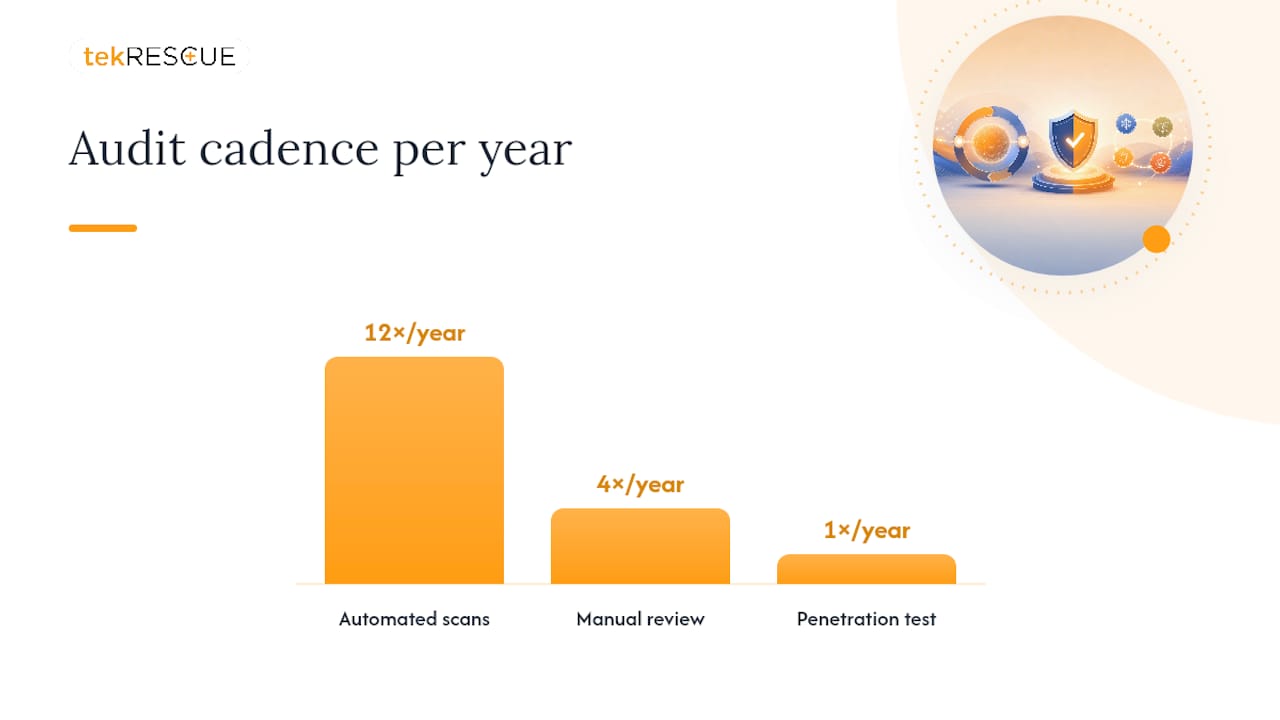
Operational controls like these convert most breach attempts into non-events rather than disasters, and none of them require a full redevelopment. A workable cadence: automated scans monthly, a manual review quarterly, and a full penetration test annually for any site handling payment or health data. If your business falls under HIPAA or handles card payments under PCI-DSS, that cadence isn’t optional. It’s a compliance expectation, and auditors will ask for documentation proving you actually followed it.
Pro Tip: Keep a simple audit log, dated entries of what was scanned, what was found, and when it was fixed. When a compliance auditor or cyber insurance carrier asks for proof of due diligence, this log is worth more than any single clean scan report.
What Do SMBs Consistently Get Wrong in Audits?
The same three mistakes show up in nearly every small business audit. Plugins get installed and then forgotten, quietly aging past their support window until one of them becomes the entry point. MFA gets enabled on the primary admin account and nowhere else, leaving contractor and secondary logins wide open. And backups get scheduled but never tested, so nobody discovers the restore is broken until the moment they actually need it.
When we hand a client a remediation plan, it’s ranked by real business impact, not just scanner severity scores. A missing header on a marketing page and a missing header on a checkout flow are not the same risk, even if the scanner flags them identically.
Every audit should be structured around that distinction: full-layer scanning, manual verification of anything the scanner flags as ambiguous, and a prioritized handoff document your team can execute against. The goal isn’t a longer report. It’s a shorter list of things that still need fixing next week.
Editorial Take: Website Security Audit Practical Checklist and Next Steps
The conventional advice on website security audits treats every finding as equally urgent, and that’s backwards. A missing HSTS header on your blog and an exposed admin panel with no MFA are not the same emergency, yet most scanner output ranks them by a generic severity score that ignores business context entirely.
What the research actually supports is a much narrower priority list than most guides suggest: patch known CVEs, enforce MFA everywhere, set your headers correctly, and test your backups. Those four moves close the overwhelming majority of real-world attack paths, because most breaches exploit unpatched software or weak admin controls, not zero-day exploits nobody could have predicted.
Where I’d push back hardest is on the one-time audit mentality. A single clean scan report is a snapshot, not a guarantee, and it decays the moment a new plugin update ships or a new CVE gets disclosed. Treat the audit as a cadence, not an event, and you’ll spend far less time in crisis mode explaining to a client or a board why a known, patchable vulnerability sat open for eight months.
— Randy Bryan
Get a Website Security Audit From tekrescue
Running through this checklist yourself gets you real visibility. Handing it to tekrescue gets you that same visibility plus someone accountable for fixing what turns up. tekrescue runs the full six-layer audit, TLS, headers, dependencies, access control, data handling, and monitoring, then delivers a prioritized remediation plan your team can execute or hand straight to us. Clients get a written report ranked by actual business impact, not raw scanner severity, along with optional managed monitoring so new vulnerabilities get caught promptly. If credential attacks and account takeover attempts are part of what worries you most, tools built for detecting account takeover pair well with the access control fixes an audit surfaces. Start with a cybersecurity risk assessment to see where your site stands, or explore managed IT services if ongoing monitoring is what you need after the report lands.
Sources
- NVD / National Vulnerability Database
- Website Security Audit Checklist 2025 | SiteGrade
- Website Security Audit: A Plain-English Guide for 2026 | Kritano
FAQ
How Do I Audit My Own Website’s Security?
Start with an unauthenticated scan against your live site, then run an authenticated scan through a low-privilege test account, and manually check MFA, headers, and backup restores. Follow the six-layer structure covered above rather than checking things at random.
How Can I Test if My Website Is Secure?
Run it through an SSL/TLS analysis tool, a header checker, and a vulnerability scanner, then compare findings against the NVD database to see which issues have known public exploits. That combination catches most common exposure points.
Can I Check My Website’s Security Myself?
Yes, for the automated scanning layer, free and low-cost tools can catch a large share of common issues. But automated scanners typically find only 60 to 70% of vulnerabilities on their own, so pair self-scanning with a professional review before you handle payment or health data.
How Often Should a Website Security Audit Happen?
Run automated scans monthly, a manual review quarterly, and a full penetration test annually if you handle payment or health information. Anything less leaves months of exposure between checks.
What’s the Difference Between a Scan and a Full Audit?
A scan is automated and checks for known signatures; a full audit adds manual testing, configuration review, and access control checks that scanners routinely miss. tekrescue combines both in a single engagement so nothing falls through that gap.
Recommended
Table of Contents