
Contact Form Spam: How to Stop It Without Losing Real Leads
Contact form spam is junk, scam offers and malicious links sent through the form on your website, by bots or by people. You stop it with layers, not a single fix: a hidden honeypot field, server-side validation, rate limits, a spam filter and, if the noise continues, a CAPTCHA. The goal is a form that shuts out machines and stays easy for the customer who actually wants to hire you.
If you run a small business, here is the uncomfortable truth. That form is an open door to your inbox, and anything that can find it can knock. Most of what comes through is a nuisance. Some of it is the first move in a phishing or malware campaign.
Table of Contents
TL;DR
- Contact form spam comes from bots that crawl for forms and from people pasting in junk by hand, and the two need different defenses.
- Layer your controls: honeypot, time check, server-side validation, rate limits, a content filter, then CAPTCHA only if needed.
- reCAPTCHA and hCaptcha both have free tiers. Paid hCaptcha Pro is $99 a month billed annually, and Google’s free tier covers up to 10,000 assessments a month.
- Test every change by watching your spam folder and your real lead count together, so protection never quietly blocks customers.
Table of Contents
- What contact form spam actually is
- Why it costs more than a few deleted emails
- The layers that work, and where each one fails
- reCAPTCHA vs hCaptcha: choosing a CAPTCHA
- Keeping the form accessible and safe
- How to know your protection is working
- Our perspective
- When to hand it to a professional
- FAQ
- Sources
What contact form spam actually is
Spam through a form is the misuse of that form to deliver junk, malicious links or false offers. Gravity Forms describes it as unwanted messages that may be meant for phishing, hacking, scams or abusive communication.
It arrives two ways.
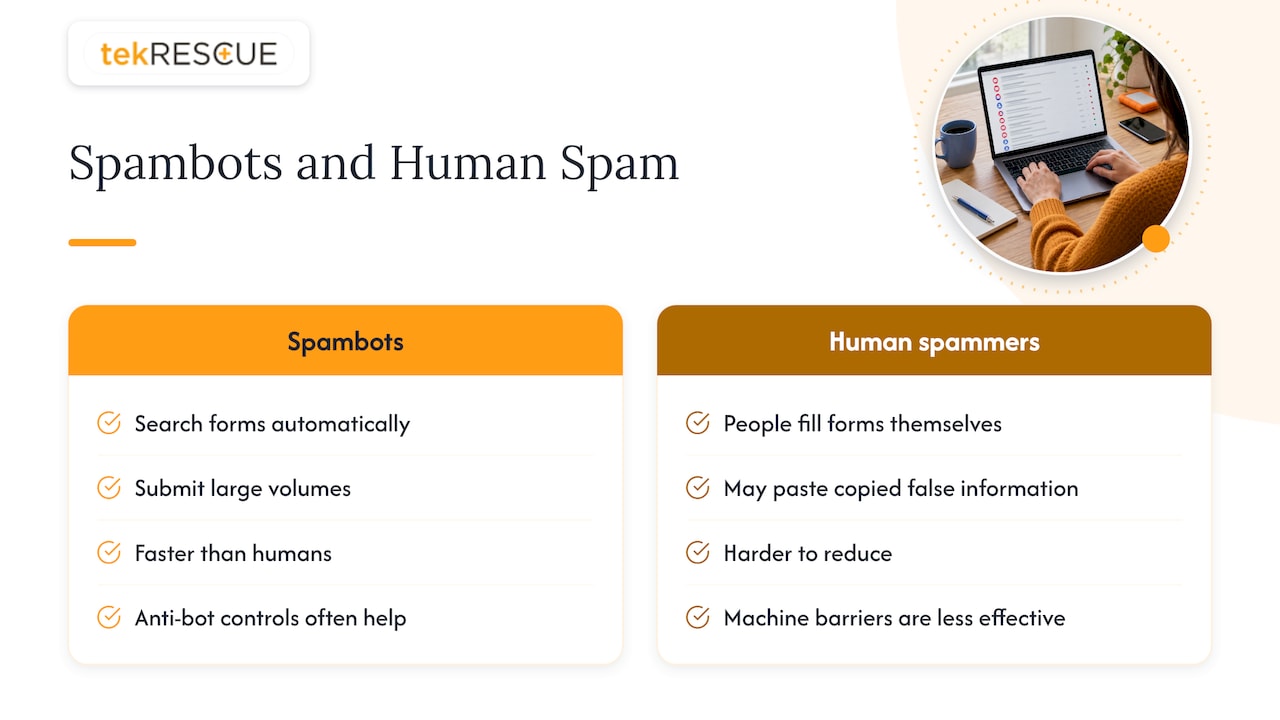
Spambots search the internet for forms automatically and can leave large numbers of junk submissions. Manual spammers are real people who fill out forms themselves, often pasting in false information they copied from elsewhere, according to Akismet’s overview. Gravity Forms adds that bots work faster than humans, hit contact, payment and application forms alike, and can reach millions of sites per day.
That difference matters for how you fight back. Gravity Forms makes the practical point that automated spam is usually easier to reduce with anti-bot controls, while human spam is harder because those barriers are built for machines.
How bots get past a form you can see
Many owners assume a bot has to load the page, see the form and click Submit. It does not. One technical write-up explains that software can crawl pages, collect the form’s address and field names, and then send data straight to the processing endpoint without ever displaying the form in a browser. The same source notes that these tools may guess what belongs in each field, generate email addresses and messages, and spoof referrer or cookie details to look legitimate.
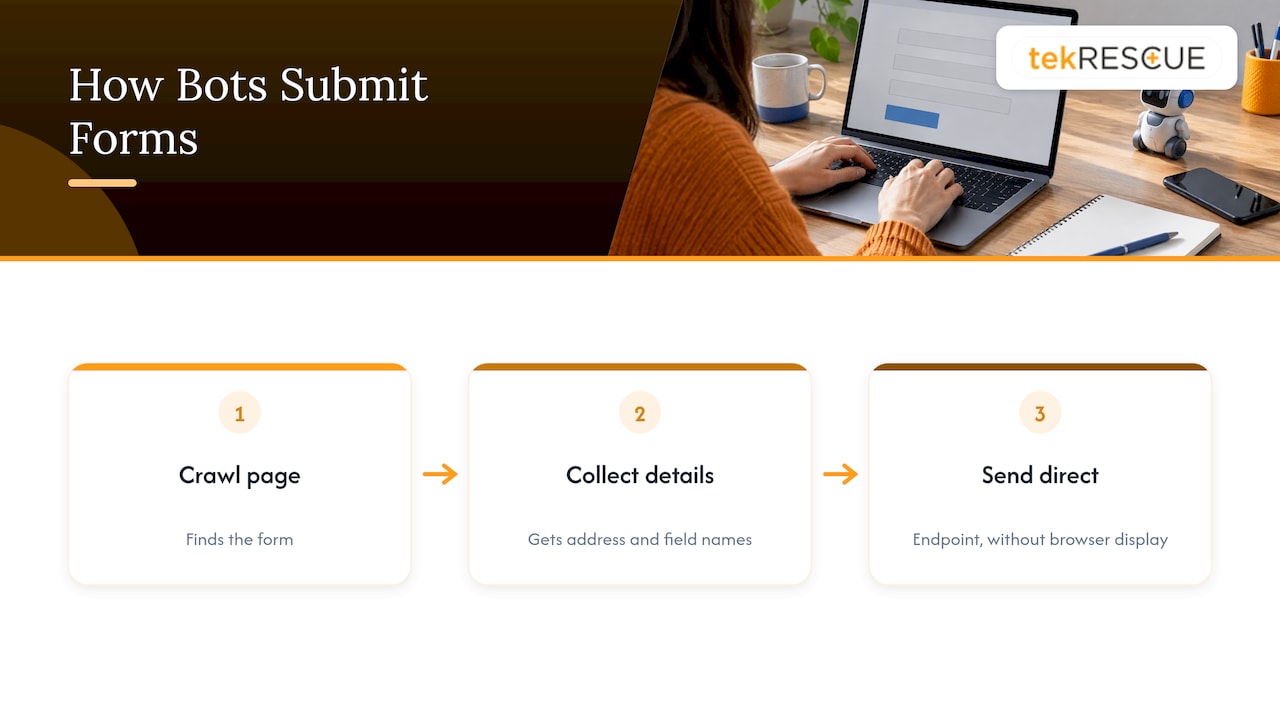
The lesson is blunt. Protection that lives only in the visible page, such as a JavaScript check, can be skipped. If the server accepts the data, the bot wins.
Why it costs more than a few deleted emails
The obvious cost is time. Staff open fake leads, sort them and wonder whether the odd strange message is real. The Nutshell guide lists wasted time on fake leads, inaccurate data and security risk from malicious links. A Stytch analysis adds skewed reporting and wasted ad spend, since junk submissions count as conversions in your numbers.
There are two quieter costs.
- Security. Malicious submissions can support phishing or malware delivery. If your team opens links from a form entry, you have handed an attacker a way in. Our guide on how phishing and social engineering scams work explains why one careless click is enough.
- Email deliverability. If your form sends an auto-reply to whatever address was typed in, spammers can use it to mail scraped or invalid addresses. SendLayer notes that this can produce complaints and bounces that damage your domain reputation, which then pushes your genuine email toward spam folders.
If you want to see how your domain looks from the outside, run our free email security check.
The layers that work, and where each one fails
Brevo’s help center summarizes the standard toolkit: CAPTCHA, a hidden honeypot, rate limits, an anti-spam tool, custom questions and a web application firewall. No one of them is enough alone. Here is how they compare.
| Layer | What it does | Strength | Weakness |
|---|---|---|---|
| Honeypot | Hidden field people never see; bots fill it in | Zero friction for visitors | Sophisticated bots can detect or bypass it |
| Time check | Rejects forms submitted faster than a human could type | Invisible, cheap | Fast autofill can look suspicious |
| Server-side validation | Re-checks every field on the backend | Cannot be skipped by a bot | Does not judge intent |
| Rate limit | Caps submissions per IP or account over time | Stops floods | Shared offices and networks can trip it |
| Spam filter | Scores content against lists and learned patterns | Catches human spam and bot spam | Needs tuning and review |
| CAPTCHA | Challenges the visitor to prove they are human | Strong against basic bots | Adds friction, privacy questions |
| WAF | Filters bad traffic before it reaches the site | Protects the whole site | Needs setup and monitoring |
Start with the free, invisible defenses
A honeypot is a hidden field that trips simple bots. Pair it with a time check, then add a CAPTCHA only if spam continues. That order protects conversions, because every visible challenge you add is a hurdle for a real customer on a phone.
A few build details save headaches:
- Hide the honeypot with CSS and give it a believable name, not “honeypot”.
- Mark it so password managers and autofill leave it alone.
- Reject the submission on the server and log it, rather than showing the bot an error it can learn from.
Validate on the server, always
Liquid Interactive makes the key point that frontend validation can be bypassed, so everything must be validated again on the backend. Check required fields, length limits, email format and allowed characters in code the visitor cannot touch. Also consider disallowing links in the message field. A genuine inquiry rarely needs three URLs, and that single rule removes a lot of junk.
Add a content filter for what slips through
Akismet compares submissions with blocklists of words, names, IP addresses and email addresses and uses global and local learning to flag spam. That helps with manual spammers, whom a honeypot never catches. Be aware that text written by AI can pass simple scoring. Formspring suggests AI moderation as a further layer for that case.
reCAPTCHA vs hCaptcha: choosing a CAPTCHA
If the free layers are not enough, a CAPTCHA service is the next step. The two names you will meet most are Google reCAPTCHA and hCaptcha. Here is what the official pages state.
Google reCAPTCHA
Google describes reCAPTCHA as a free service that uses risk analysis to tell humans from bots. Its documentation lists three versions: v2, which uses checkbox and challenge experiences; v3, which detects abusive traffic without user interaction and returns a score so your site decides what to do; and Enterprise.
On cost, Google’s billing page says the Essentials tier is free for up to 10,000 assessments per calendar month per organization. Google Cloud’s product page lists Premium as free for the first 10,000 assessments, then an $8 flat fee for 10,001 to 100,000, and $1 per 1,000 above that. Premium requires a valid Google Cloud billing instrument. For a typical small business form, the free tier is more than enough.
hCaptcha
hCaptcha positions itself as a privacy-focused service for real-time bot detection. Its materials describe behavioral analysis, risk scoring, passive modes, server-side API protection and a Zero-PII approach. Basic is free. Pro includes 100,000 monthly evaluations and, per the pricing page, costs $139 per month on month-to-month billing or $99 per month billed annually, with additional evaluations at $0.99 per 1,000.
Side by side
| Factor | reCAPTCHA | hCaptcha |
|---|---|---|
| Free option | Essentials, up to 10,000 assessments a month | Basic |
| Paid entry point | Premium, $8 flat fee for 10,001 to 100,000 assessments | Pro, $99 a month annual or $139 month-to-month |
| Friction | v3 is invisible and scores; v2 shows challenges | Passive modes available |
| Privacy stance | Google service | Marketed as privacy-first |
| Setup | Widely supported by form plugins | Integrations for major platforms |
How to choose: if your site already runs on Google tools and you want the lowest cost, start with reCAPTCHA. If privacy disclosures matter to your customers, as they do for a medical or legal practice, hCaptcha’s privacy positioning may fit better. Either way, read your own privacy policy afterward and make sure it matches what the widget actually does. Our article on privacy-first website analytics setup covers the same thinking for tracking tools.
Keeping the form accessible and safe
Every defense has a cost to real people. Visual puzzles can frustrate users with low vision, and Google notes that visual bot challenges are included across its Essentials, Premium and Enterprise tiers. Prefer invisible methods first, and test whatever you add with a keyboard and a screen reader.
If your form collects anything sensitive, the rules tighten. Healthcare practices should not invite patients to type symptoms or account details into a plain contact form that emails the text unencrypted. Point them to a secure channel instead. Our guide to HIPAA compliant email explains what small practices must do.
For wider protection, Brevo also recommends double opt-in and disposable-email blocking where they fit. Double opt-in suits newsletter signups more than a contact form, but blocking throwaway email domains can help on both.
How to know your protection is working
The danger of a heavy defense is silent loss. You stop the spam and also the customer, and nobody tells you. Use this routine.
- Record a baseline. Count submissions per week and how many are junk before you change anything.
- Change one layer at a time. If you add three controls at once, you cannot tell which one hurt.
- Keep a quarantine. Do not delete blocked entries. HubSpot, for example, lists detected junk on a spam submissions index where your team can review it without affecting contacts. Any form tool you use should offer something similar.
- Send test submissions. Fill in the form yourself from a phone and a desktop, and ask a colleague to do the same from another network.
- Compare real leads. If spam falls and genuine inquiries fall with it, loosen the last control you added.
Security monitoring helps here too. Our piece on website security monitoring covers what to watch and who should act when something looks wrong.
Our perspective
We see form spam as a symptom, not the disease. A form that floods with junk tells us the site was found by automation and nobody is watching what it does. The same neglect usually shows up elsewhere: old plugins, weak hosting, no monitoring.
We do not treat a CAPTCHA as a finish line. Bots that run through a form are often the first layer of a larger pattern, and a business that ignores it is more likely to be recruited into the kind of attack we describe in our piece on botnets. Our advice to owners is simple. Fix the cheap layers first, validate on the server, review what gets blocked, and have someone accountable for the site after launch.
And be honest about the human side. Spam that a person types by hand will beat any bot barrier. The answer there is filtering and review, not a harder puzzle for your customers.
— Randy Bryan
When to hand it to a professional
If spam keeps returning after you have added the layers above, or if you suspect a form was used to deliver malicious links, it is time for someone to look at the whole site. tekRESCUE builds and maintains business websites, with web development, maintenance and hosting that includes properly validated forms, and our cybersecurity services cover risk assessments and monitoring for small and mid-sized businesses in Austin, San Marcos, Kyle and across Central Texas. If a suspicious submission has already been opened and clicked, call us about incident response before you do anything else.
FAQ
What is the best way to stop contact form spam?
Use layers. Start with a hidden honeypot, a time check and server-side validation, then add rate limits and a content filter. Add a CAPTCHA only if junk still gets through, since it adds friction for real visitors.
Is a CAPTCHA enough on its own?
No. CAPTCHAs help against basic bots, but people who submit by hand can solve them, and bots that post directly to your form’s processing address never see the challenge. Combine it with server-side checks and filtering.
Should I choose reCAPTCHA or hCaptcha?
Both have free tiers, so cost rarely decides it for a small form. reCAPTCHA is free up to 10,000 assessments a month on Google’s Essentials tier, while hCaptcha Pro starts at $99 a month billed annually. Pick based on friction, your privacy policy and what your form plugin supports.
Can spam submissions be dangerous?
Yes. Some entries carry malicious links meant for phishing or malware, so staff should not click links in form messages from unknown senders. Spam can also trigger auto-replies to invalid addresses, which can hurt your domain’s email reputation.
How do I make sure I am not blocking real customers?
Keep blocked entries in a quarantine instead of deleting them, change one control at a time, and compare real lead counts before and after. Test the form yourself on a phone and a computer after each change.
Sources
- 8 Expert Tactics for Contact Form Spam Prevention, Nutshell
- How to Stop Contact Form Spam on WordPress, Akismet
- How to Prevent Spam Form Entries, Gravity Forms
- How They Spam Your Forms, Willmaster
- Preventing contact spam form submissions, Stytch
- How To Stop Contact Form Spam (CAPTCHA and Alternatives), SendLayer
- Protect your forms from bots and spam signups, Brevo
- How to Stop Contact Form Spam: Honeypot, Time Trap, CAPTCHA
- Form Spam Protection: Fight Back Without Losing Leads, Liquid Interactive
- Honeypot vs reCAPTCHA vs hCaptcha, Formspring
- reCAPTCHA, Google for Developers
- Billing information, Google Cloud Fraud Defense
- Compare features between Google Cloud Fraud Defense tiers
- reCAPTCHA website security and fraud protection, Google Cloud
- hCaptcha: Real-Time Bot Detection and Fraud Prevention
- hCaptcha Pricing
- Prevent and filter spam in form submissions, HubSpot
Recommended
Table of Contents