
Patch Management Policy: What to Write and How to Enforce It
A patch management policy is a short, formal document that says how your business finds, tests, approves, installs and verifies software updates, and who is responsible at each step. Without one, patching depends on whoever happens to notice a prompt. Attackers do not wait for that person to get around to it.
This guide shows what to put in the policy, how to set deadlines you can actually meet, and how to handle the awkward cases: emergency fixes, failed patches, and systems that cannot be updated. It is written for owners and administrators of small and mid-sized businesses, including healthcare practices.
Table of Contents
TL;DR
- A patch management policy defines scope, roles, patch sources, testing, deadlines, exceptions and documentation. If any of those is missing, patching becomes a habit instead of a control.
- Use NIST SP 800-40 Rev. 4 as your backbone: put every asset in a maintenance group, and plan for routine patching, emergency patching, emergency mitigation and isolation.
- Prioritize by real-world risk, not by raw severity. Vulnerabilities already being exploited come first.
- Patching alone is not enough. Attackers who use valid credentials never touch a vulnerability, so pair the policy with hardening and phishing-resistant multi-factor authentication.
- Prove it works. Verify installs, keep logs, and review the policy on a schedule.
Table of Contents
- What a patch management policy is
- Why a written policy matters for a small business
- What the policy should contain
- Prioritize by real risk, not by volume
- Testing and deployment in rings
- Emergency, failed and deferred patches
- Patching is necessary, not sufficient
- Document it and review it
- Extra considerations for healthcare practices
- Our perspective
- Need help running it?
- FAQ
- Sources
What a patch management policy is
A patch management policy outlines the processes and methodology for regularly maintaining corporate network hardware and software. It also helps you organize patching, address security and operational problems, and document results for later reference.
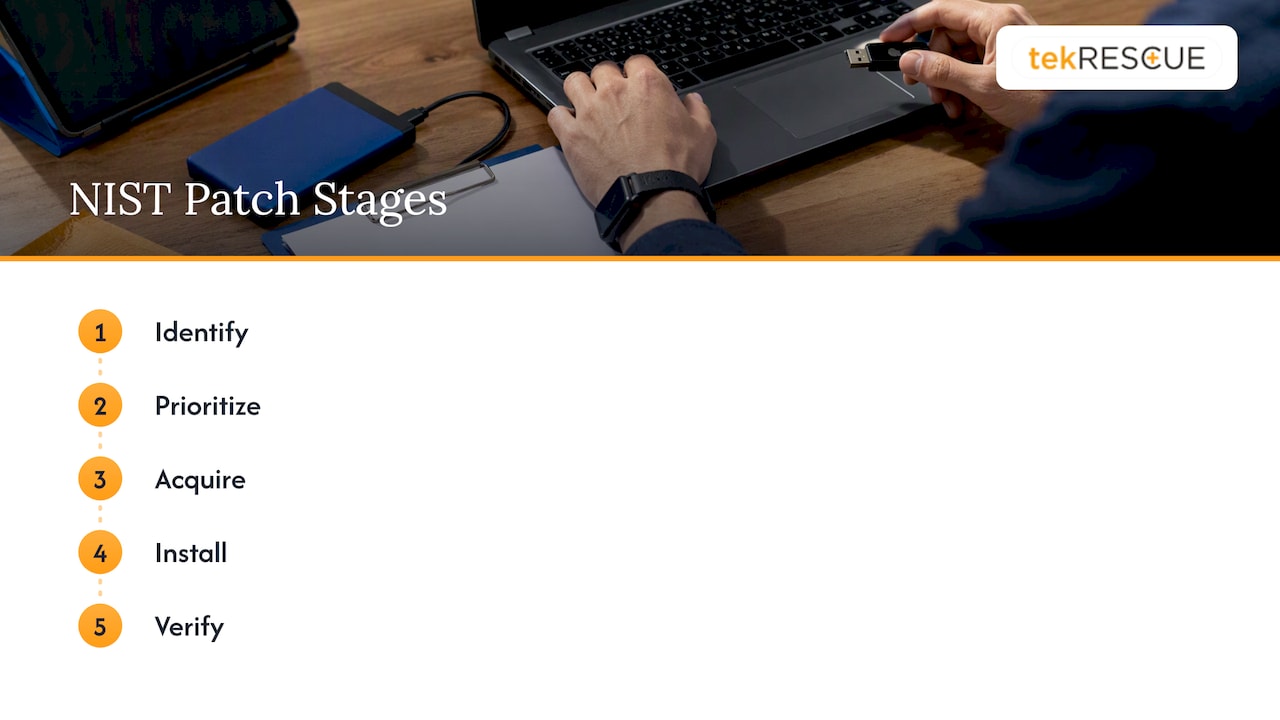
NIST defines enterprise patch management as the process of identifying, prioritizing, acquiring, installing and verifying patches, updates and upgrades. It characterizes this as a critical part of preventive maintenance for technology, in NIST SP 800-40 Rev. 4. That framing matters. Patching is not a cleanup chore after something breaks. It is maintenance, like servicing a vehicle before the brakes fail.
The policy is not the same as the procedure. The policy states the rules and the accountability. The procedure is the step-by-step work your IT team or provider follows. Keep the policy to a few pages so people read it, and keep the procedures in a separate document that can change more often.
Why a written policy matters for a small business
Most small businesses patch something. Workstations update themselves, a router gets a firmware bump when someone remembers. The trouble is the gaps: the server nobody owns, the line-of-business application that breaks if updated, the laptop of the employee who works from home and never restarts.
A written policy closes those gaps in three ways.
- It assigns ownership. Someone is named responsible for every class of system.
- It sets expectations the business can measure. “As soon as possible” cannot be audited. A defined timeline can.
- It creates a record. If an insurer, a client or a regulator asks how you manage vulnerabilities, you hand over a document and logs instead of an explanation.
The NCCoE points to a persistent divide between business or mission owners and security or technology management as a major patching challenge, one that leadership has to bridge. In a small company, that divide looks familiar: the owner does not want downtime during business hours, and IT knows an unpatched system is a risk. The policy is where you settle that argument once, in writing, instead of every month.
What the policy should contain
Purpose and scope
State in two or three sentences why the policy exists, then say exactly what it covers. Scope should include operating systems, applications, browsers, firmware, network devices such as firewalls and switches, servers, cloud-hosted systems you administer, and employee devices that access company data. If personal phones or laptops connect to company email, say whether they are in scope and what you require of them.
NIST recommends avoiding the label “exception” for hard-to-patch assets. Instead, assign every system, including difficult ones, to a maintenance group with defined, appropriate and documented maintenance needs. A legacy machine that runs a lab instrument or an old billing application does not sit outside the policy. It sits in a group with its own rules.
Asset inventory
You cannot patch what you do not know you own. The policy should require a current inventory of hardware and software, with an owner for each item, and say who updates it and how often. If your inventory is a spreadsheet last touched two years ago, fix that first. Our SMB IT asset management roadmap walks through building one that stays accurate.
Maintenance groups
NIST says maintenance groups should be defined by shared characteristics such as outage restrictions, existing mitigations and the potential impact of a compromise. That lets you treat different assets differently without writing a hundred rules. A small business might use groups like these:
| Group | Examples | Typical handling |
|---|---|---|
| Standard endpoints | Office laptops and desktops | Automatic updates, short test group first |
| Servers | File, application, domain servers | Scheduled maintenance window, backup before patching |
| Network devices | Firewalls, switches, wireless | Planned window, configuration backup, rollback plan |
| Business-critical or fragile | Systems tied to a vendor application | Vendor-approved patches, tested copy first |
| Unpatchable | End-of-life devices, specialty equipment | Isolation and compensating controls, replacement plan |
The table is a starting structure, not a standard. Adjust the groups to the way your business actually runs.
Roles and responsibilities
Name roles, not just people, so the policy survives turnover. At minimum:
- Policy owner: usually the owner, practice administrator or whoever carries accountability for IT risk.
- Patch administrator: your internal IT person or managed IT provider, who tests and deploys.
- System owners: the people who can approve downtime for a given system.
- Users: responsible for restarting when asked and reporting devices that fail to update.
Patch sources
Specify where patches come from. CISA guidance for remote work says managed roaming devices should receive updates from an authorized patch management solution rather than directly from individual software vendors. That guidance is written for federal agencies, but the principle scales down well: one controlled channel means you know what was deployed and when.
Prioritize by real risk, not by volume
Treating every vulnerability as equally urgent burns out the people doing the work and delays the ones that matter. CISA’s approach, reflected in Binding Operational Directive 26-04, moves away from treating all vulnerabilities as equal and toward prioritizing those with the highest real-world risk, such as those in the Known Exploited Vulnerabilities (KEV) Catalog. In that framework, only the highest-risk vulnerabilities, those with public exposure and evidence of real-world exploitation, must be patched within three days.
That directive binds federal agencies, not private businesses. But the logic transfers. Your policy should rank patches using at least these questions:
- Is the vulnerability known to be exploited in the wild?
- Is the affected system exposed to the internet?
- How much damage follows if this system is compromised?
- Does a mitigation already exist, such as a firewall rule or disabled feature?
Example deadline structure
The timelines below are an illustration of how a small business might set them, not a regulatory requirement. Choose numbers your team can meet, then meet them.
| Risk tier | Description | Example target |
|---|---|---|
| Emergency | Actively exploited, internet-facing or high-impact systems | Within days, outside the normal cycle |
| High | Serious flaw, not known exploited | Within the next monthly cycle |
| Routine | Everything else | Within your regular maintenance schedule |
An honest deadline you hit beats an aggressive one you routinely miss. Missed deadlines are what auditors and insurers notice.
Testing and deployment in rings
NIST recommends phased, ring-based deployment so you test patches before broad installation. For a ten-person office, that can be simple: a pilot ring of one or two machines, including the least critical user and someone from IT, then everyone else after a set waiting period with no reported problems. Servers and critical systems come last, after backups are confirmed.
Your policy should state:
- How long a patch stays in the pilot ring before wider release.
- What counts as a failure and who can halt the rollout.
- That a verified backup or snapshot exists before server and network patching.
- Which maintenance windows apply, so patching does not collide with patient appointments, payroll or month-end close.
Emergency, failed and deferred patches
This is the section most templates skimp on, and the one you will need on a bad day.
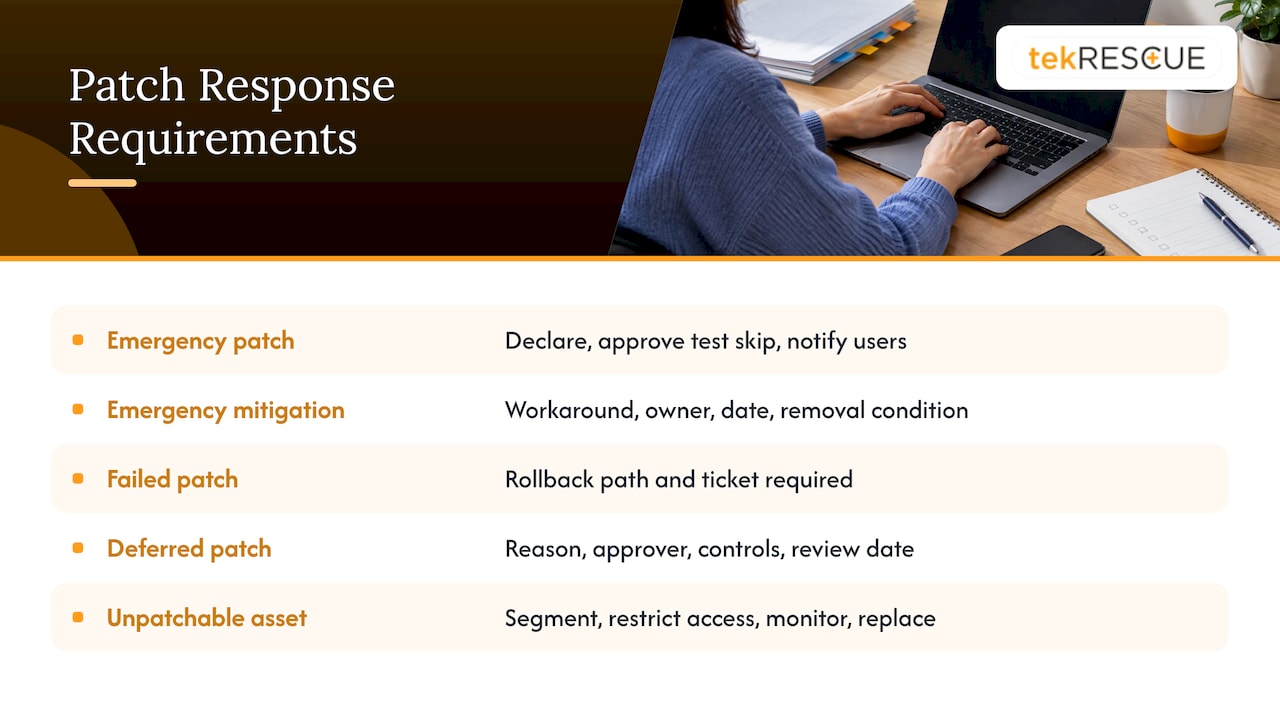
NIST suggests being prepared for four risk response scenarios: routine patching, emergency patching, emergency mitigation when no patch is available, and isolation of assets that cannot be patched. NIST also recommends schedules and strict procedures for deploying emergency patches and for eventually removing temporary emergency mitigations. That last part is easy to forget. A firewall rule added in a panic and never removed becomes its own problem.
Emergency patching. Define who can declare an emergency, who approves skipping the normal test cycle, and how users are notified.
Emergency mitigation. When a vendor has no fix yet, document the workaround: disable a service, block a port, restrict access. Record the date, the owner and the condition for removal.
Failed patches. Require a rollback path and a ticket. A patch that fails to install on three machines is a signal, not noise.
Deferred patches. Allow deferral only with a written reason, a named approver, compensating controls and a review date. Deferral with no expiration date is how “temporary” becomes permanent.
Unpatchable assets. Isolate them on a segmented network, restrict who can reach them, monitor them, and set a replacement target.
Patching is necessary, not sufficient
Here is the uncomfortable truth: some of the most damaging intrusions never exploit a missing patch. CISA advises that organizations address “living off the land” techniques, where attackers use valid credentials and existing configurations, through hardening, network segmentation and phishing-resistant multi-factor authentication rather than relying exclusively on patching product vulnerabilities.
In plain terms, an attacker who steals a password and logs in like an employee blends into normal activity. A fully patched server will not stop them. Your patch policy should therefore cross-reference your access control, MFA and network segmentation standards. If you want an outside view of where your gaps are, a cybersecurity risk assessment covers patch status alongside the controls around it.
Document it and review it
A policy that cannot be demonstrated is only a statement of intent. NIST’s guidance calls for organizations to verify patch deployment, monitor to confirm patches stay installed, update documentation and audit logs, and produce actionable reports.
Build these into your policy:
- Verification: a scan or console report confirming each patch installed, not just that it was sent.
- Monitoring: a periodic check that patched systems have not reverted.
- Records: deployment dates, approvals, exceptions and rollbacks, kept for a period you define.
- Metrics: percentage of systems current per group, count of overdue patches, average time to patch for emergency items.
- Review: a scheduled policy review at least annually, and after any incident or major change to your systems.
For a deeper look at why routine updates matter day to day, see our overview of why regular IT updates matter.
Extra considerations for healthcare practices
If you handle electronic protected health information (ePHI), patching is part of your HIPAA risk management. Under the Security Rule, covered entities and business associates must accurately assess risks and vulnerabilities to ePHI and implement reasonable and appropriate measures to reduce them, including patching or other remedial actions. The same HHS newsletter notes that an up-to-date IT asset inventory helps identify systems to be hardened.
HHS has also proposed changes. A December 2024 notice of proposed rulemaking would strengthen the Security Rule by requiring, among other things, a technology asset inventory and network map reviewed and updated at least every 12 months. It is a proposal, so check HHS for its current status before you treat it as binding. Keeping a current inventory is good practice either way.
Practical steps for a practice:
- Tie your patch policy to your HIPAA risk assessment, so patch gaps show up as documented risks with owners.
- Include medical devices and imaging systems in maintenance groups, even when the vendor controls updates. Document who owns the follow-up.
- Pair patching with PHI encryption and a tested incident response plan, because patching reduces risk but never eliminates it.
- Keep patch records with the rest of your compliance evidence. Our HIPAA compliance checklist lists the areas practices should document.
Our perspective
We see the same pattern in small businesses around Austin, San Marcos and the surrounding Hays County area. The company has a patching habit but no patching policy. Updates happen, mostly, until the one that did not happen becomes the way in.
The fix is rarely a bigger tool. It is clarity: every device in a group, every group with an owner, every deadline realistic, every exception written down with an expiration date. We build policies around NIST guidance because it gives a small business a defensible structure without inventing one from scratch, and because the same documentation supports HIPAA and other compliance work.
We also push clients to remember that machines now move at speeds people cannot match. Attackers automate their search for exposed systems. A monthly patch cycle with no emergency path is a bet that nobody will be fast enough. Plan for the emergency before it arrives, and pair patching with the access controls that stop an attacker who never needed an exploit.
— Randy Bryan
Need help running it?
Writing the policy is the easy part. Running it every month, with testing, verification and records, is where small teams stall. tekRESCUE’s managed IT services cover patching and maintenance for businesses in the Austin and San Marcos area, and our cybersecurity team can assess where your current patching leaves gaps. Healthcare practices can start from our HIPAA compliance services.
FAQ
What are the NIST guidelines for patch management?
The main reference is NIST SP 800-40 Rev. 4, which treats patching as preventive maintenance. It recommends putting all assets into maintenance groups, planning for routine and emergency scenarios, and deploying in phases. It also calls for verifying installs and keeping documentation current.
How often should we patch?
Set this by risk tier, not by one calendar rule. Many small businesses run a monthly routine cycle and keep a separate fast path for actively exploited vulnerabilities. CISA’s directive BOD 26-04 requires only the highest-risk vulnerabilities, those publicly exposed and exploited, to be patched within three days, and it applies to federal agencies. Choose deadlines your team can meet and record.
What should we do about systems that cannot be patched?
Do not leave them as unmanaged exceptions. Put them in their own maintenance group, isolate them from the rest of the network, limit who can access them, and set a replacement plan. NIST specifically lists isolation of unpatchable assets as a risk response scenario.
Does HIPAA require a patch management policy?
The Security Rule does not use that exact phrase in the guidance we cite, but it does require you to assess risks and vulnerabilities to ePHI and take reasonable and appropriate steps to reduce them, which can include patching. A written policy is the clearest way to show you did.
Is patching enough to stop attacks?
No. Attackers who use stolen valid credentials never need an unpatched flaw. CISA recommends hardening, network segmentation and phishing-resistant multi-factor authentication alongside patching.
Sources
- Guide to Enterprise Patch Management Planning: Preventive Maintenance for Technology (NIST SP 800-40 Rev. 4)
- Patch Smarter, Not Harder (CISA)
- NCCoE Releases Enterprise Patch Management Guidance
- Capacity Enhancement Guide: Remote Patch and Vulnerability Management (CISA)
- January 2026 OCR Cybersecurity Newsletter (HHS)
- HIPAA Security Rule Notice of Proposed Rulemaking fact sheet (HHS)
- Creating a patch management policy: Step-by-step guide (TechTarget)
Recommended
Table of Contents