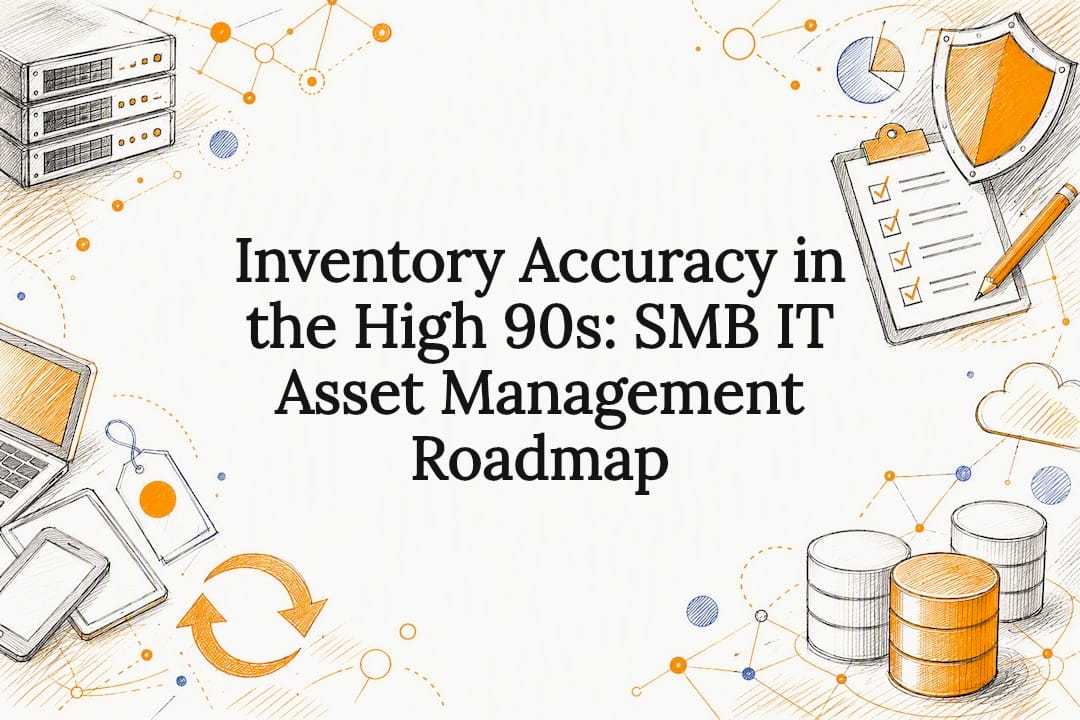

Inventory Accuracy in the High 90s: SMB IT Asset Management Roadmap
IT asset management tracks every piece of hardware, software, and cloud subscription your business owns across its entire life, from purchase to disposal. Done right, it gives you visibility to control spending, close security gaps, and produce audit-ready records on demand. This guide walks through the lifecycle stages, the fields worth tracking, the tools that make sense, and a practical rollout plan for small and midsize teams.
TL;DR:
- Asset discovery methods should be combined, with cloud API queries being especially crucial for identifying orphaned cloud resources.
- Reconciliation should be performed weekly for laptops and SaaS accounts, with discrepancies investigated within five business days to prevent record drift.
- Ownership must be clearly assigned at every lifecycle stage, especially for asset retirement, to ensure sanitization documentation and prevent security risks.
- Maintaining separate entitlement and deployment data for software, and regional plus billing details for cloud assets, is essential to avoid costly audit surprises.
- Implementing a simple, disciplined governance process with a designated owner and regular checks can often outperform complex enterprise systems for small and midsize businesses.
Table of Contents
Table of Contents
- What IT Asset Management Actually Covers
- IT Asset Lifecycle: Stages, Owners, and Evidence to Retain
- What to Track for Hardware, Software, Cloud, and SaaS
- How Do You Discover and Reconcile IT Assets?
- Integrating ITAM With Security, Compliance, and Finance
- Which ITAM Metrics Actually Signal Program Health?
- A Practical ITAM Roadmap for Small and Midsize Businesses
- Common ITAM Pitfalls and How to Fix Them
- Change Management and Governance in ITAM Programs
- Publisher Perspective: How tekRESCUE Approaches ITAM for SMBs
- How tekRESCUE Can Help With IT Asset Management
- Sources
- FAQ
What IT Asset Management Actually Covers
IT asset management, often shortened to ITAM, is the discipline of tracking financial, contractual, and inventory details for every device, application, and cloud service a business relies on. That sounds close to plain inventory management, but the two are not the same thing.
Inventory management answers “what do we have and where is it.” ITAM answers a bigger question: “what do we have, what does it cost, who owns it, when does it expire, and what risk does it carry.” A configuration management database, or CMDB, sits one layer deeper still. It maps how assets relate to each other, like which server hosts which application, so IT teams can trace the blast radius of an outage or a breach. ITAM feeds the CMDB with clean asset data; the CMDB uses that data to model relationships.
Asset visibility is not a nice-to-have for security teams. You cannot patch a server you do not know exists, and you cannot revoke access for a laptop that never made it into the register when an employee left. Auditors ask for the same thing: a defensible inventory of every device that touches regulated data.
Most organizations track four asset categories:
- Hardware: laptops, desktops, servers, network gear, mobile devices, and peripherals.
- Software: licensed applications, operating systems, and internal tools, tracked separately from where they are installed.
- Cloud infrastructure: virtual machines, storage buckets, containers, and managed database instances.
- SaaS subscriptions: per-seat or per-usage services purchased outside the traditional IT procurement chain.
For every asset, regardless of category, a usable record needs at minimum: a unique identifier, an assigned owner or custodian, a location, a cost center, a status (active, in storage, retired), and a renewal or warranty date. Skip any one of these fields and the register turns into a spreadsheet nobody trusts.
IT Asset Lifecycle: Stages, Owners, and Evidence to Retain
A workable lifecycle model does not need fifteen stages. Eight practical stages, each with a clear exit condition and a named owner, cover what most organizations actually need to operationalize without record drift.
- Request and approval. Someone asks for a device or license; a manager or procurement lead approves the spend. Evidence to keep: the approval record and budget code.
- Procurement. Purchasing buys the asset from an approved vendor. Evidence to keep: purchase order, invoice, and vendor contract terms.
- Receiving and tagging. IT logs the asset into the register with a serial number or asset tag before it leaves the stockroom. Evidence to keep: intake checklist and photo or barcode scan.
- Deployment. The asset gets configured, security-hardened, and handed to the assigned user. Evidence to keep: configuration baseline and custodian sign-off.
- Operation. The asset is in active use. This is the longest stage and the one most registers neglect, since nothing “happens” during it. Evidence to keep: patch and update logs, periodic reconciliation results.
- Maintenance and repair. Hardware gets serviced, software gets upgraded or re-licensed. Evidence to keep: service tickets and updated warranty status.
- Reassignment or transfer. The asset moves to a new custodian, department, or location. Evidence to keep: transfer form with old and new owner acknowledgment.
- Retirement and disposal. The asset is decommissioned, wiped, and either resold, recycled, or destroyed. Evidence to keep: sanitization certificate with date, method, and verifier.
Ownership matters more than most rollout plans admit. When transitions have no named owner, one department assumes IT handled the paperwork while IT assumes the department did. That gap is exactly where record drift starts, and it is the most common reason an asset register stops matching reality within six months of launch.
The exit condition at retirement deserves special attention. NIST’s reference architecture for asset management calls for documented evidence of sanitization and disposal, including who performed the wipe, when, and how it was verified. Skipping that step is how a decommissioned laptop full of patient records ends up on a resale site.
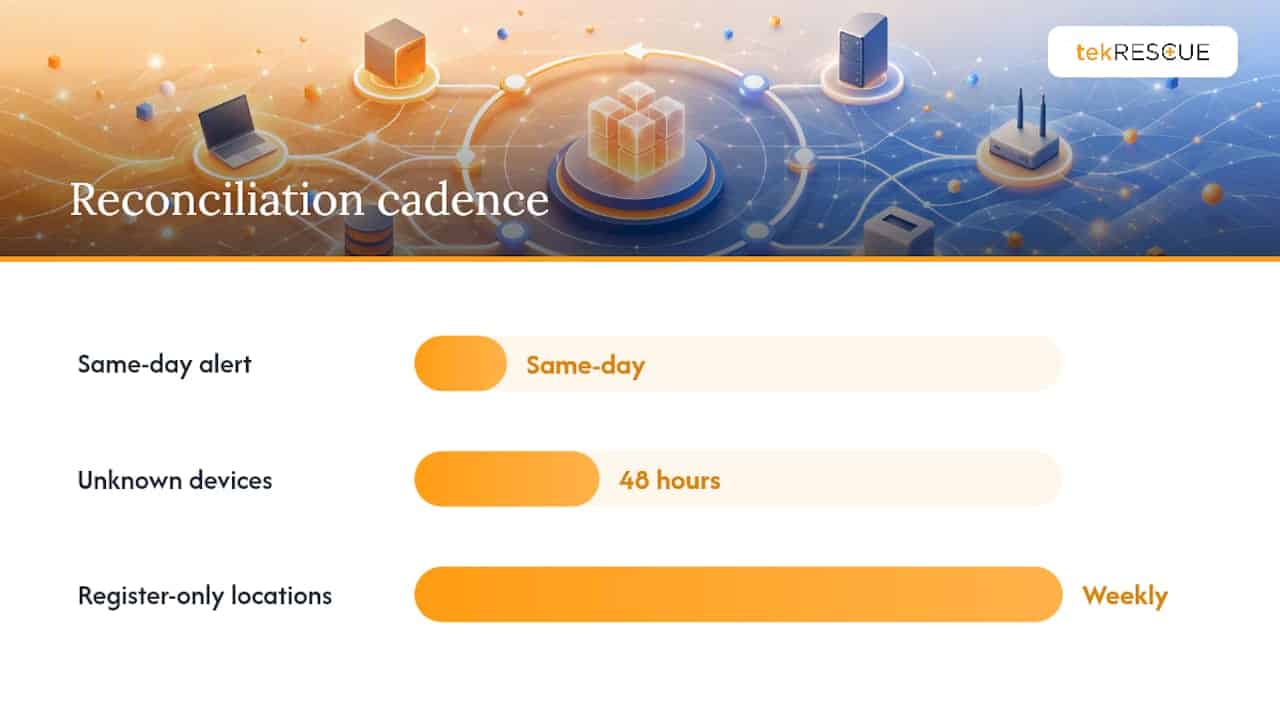
On cadence: unknown devices discovered on the network should get investigated within 48 hours, locations that exist only in the register but never show up in a scan deserve a weekly review, and any critical configuration item that drifts from its expected state should trigger a same-day alert. That reconciliation rhythm keeps a register honest without turning IT staff into full-time auditors.
For most SMBs, a typical refresh cycle for laptops balances purchase cost against support burden and resale value. Whatever cycle you pick, document the sanitization step every time and keep that proof on file, because it is the first thing an auditor or a cyber insurance adjuster will ask for after a loss event.
What to Track for Hardware, Software, Cloud, and SaaS
Different asset types need different fields, and treating them all the same is how registers end up half-empty. Here is the minimum dataset worth capturing for each category.
Hardware needs a serial number, model, purchase date, warranty expiration, assigned custodian, physical location, and current status. Warranty dates matter more than people assume: a repair request on hardware that quietly fell out of warranty six months earlier turns a free fix into an unplanned expense.
Software requires separating two things that constantly get conflated: entitlement and deployment. Entitlement is what you are legally allowed to install, based on your license agreement, seat count, or subscription tier. Deployment is what is actually installed, on which machines, right now. Track them separately. Software asset management programs that only log deployments have no way to catch over-installation until a vendor audit finds it for them, and that is a far more expensive way to find out.
Cloud infrastructure assets need the subscription or account ID, the resource type, the billing owner, the region, and any tags tying the resource to a project or cost center. Orphaned cloud resources, spun up for a project that ended months ago, are one of the most common sources of quiet budget waste.
SaaS subscriptions need the subscription ID, the billing owner, the renewal date, the per-seat cost, and the identity and access management, or IAM, bindings showing who has active access. That last field matters for security as much as for cost. A former employee’s SaaS access left active for months is a liability whether or not anyone remembers the subscription exists.
Keeping entitlement data separate from deployment and access data across all four categories is what prevents the worst kind of audit surprise: finding out during a compliance review, rather than during routine reconciliation, that you are paying for licenses nobody uses or granting access nobody needs.
How Do You Discover and Reconcile IT Assets?
Discovery is how you find out what actually exists on your network versus what your register claims exists, and the gap between those two lists is usually larger than IT leaders expect.
Four discovery methods cover most environments, each with real trade-offs:
- Agent-based discovery installs a lightweight client on each device that reports back configuration and status data. It gives the richest detail but requires deployment and maintenance on every endpoint, which is a problem for bring-your-own-device environments.
- Agentless network scanning probes the network for responsive devices without installing anything locally. It is faster to roll out but tends to miss devices that are powered off or intentionally hidden from scans.
- Cloud API discovery queries cloud provider consoles directly for a live list of running resources. This is the only reliable method for catching orphaned cloud instances, since they will not show up on a traditional network scan at all.
- SSO and identity log review pulls a list of active SaaS logins from your single sign-on provider. It is one of the fastest ways to spot subscriptions nobody uses anymore, though it only catches services actually routed through SSO.
None of these methods works alone. NIST’s reference design for IT asset management demonstrates how combining discovery tools with an analytics layer and a central asset index produces the kind of dashboard security teams can actually act on, rather than four disconnected data dumps nobody reconciles.
Reconciliation is the workflow that turns discovery data into a trustworthy register. Assign one owner per asset category, set a resolution service level agreement, and follow a consistent process: flag the discrepancy, investigate ownership, update the register or escalate, and close the ticket with a timestamp. Unresolved discrepancies older than five business days should automatically generate a ticket rather than sit in someone’s inbox.
Cadence should track how fast your environment changes. High-volatility categories like laptops and SaaS logins benefit from weekly automated scans. Lower-volatility categories like server racks or network switches can tolerate a monthly manual check. Critical configuration items, the ones tied to compliance-scoped systems, deserve daily attention regardless of category.
Pro Tip: Do not try to automate reconciliation for everything on day one. Automate discovery first, then automate the ticket creation for unresolved discrepancies. Manual review of the exceptions list is still faster and more accurate than a fully automated reconciliation pipeline nobody has tuned yet.
Integrating ITAM With Security, Compliance, and Finance
An asset register that lives in isolation from the rest of your IT stack is only half as useful as one that feeds directly into the tools your teams already use every day.
On the security side, ITAM data should link directly to vulnerability management. A scanner that finds a critical flaw is far less useful if nobody can tell you which department owns the affected device, so the asset register needs to be the source of truth vulnerability tools query against. The same link matters during incident response: knowing exactly what an affected asset does, who uses it, and what it connects to shortens containment time dramatically. If you have not mapped that connection yet, a cybersecurity risk assessment is the fastest way to find the gaps.
Auditors expect specific evidence, and the requirements are not vague suggestions. PCI DSS 4.0 Requirement 12.5.1 calls for a documented inventory of every system component in scope for cardholder data, and the HIPAA Security Rule’s device and media accountability provision requires tracking the movement of hardware and media that touch protected health information. If your organization handles either category of data, your asset register is not optional documentation. It is the evidence.
Finance teams pull from the same register for entirely different reasons: depreciation schedules, total cost of ownership calculations, and renewal budgeting all depend on accurate purchase dates, costs, and lifecycle status.
Worth connecting your ITAM data to:
- The CMDB, so relationships between assets stay current.
- Security information and event management (SIEM) tooling, so alerts carry asset context.
- The IT service desk, so tickets reference the correct asset record automatically.
- Procurement systems, so new purchases populate the register without manual re-entry.
Which ITAM Metrics Actually Signal Program Health?
Inventory accuracy is the single number that tells you whether the rest of your program means anything. Calculate it as the percentage of discovered assets that match the register exactly, and treat anything below the high 90s as a signal that reconciliation is falling behind.
A handful of other metrics round out a useful dashboard:
- Discrepancy aging: how long unresolved mismatches sit open before someone fixes them.
- License reclaim rate: the percentage of unused or over-provisioned licenses recovered during a review cycle.
- Shadow spend identified: the dollar value of previously unmanaged subscriptions found through card or SSO audits.
- Time-to-assign: how long a new asset sits between receiving and deployment.
- Post-lifecycle update time: how quickly the register reflects a transfer, retirement, or repair after it actually happens.
Statistic Callout: One of the highest-leverage, lowest-effort discovery practices for smaller organizations is auditing recurring card charges under a set threshold, since shadow SaaS subscriptions routinely hide there instead of in any formal procurement record.
When a metric lags, the fix is rarely more software. It is almost always a missing owner or a reconciliation step nobody actually performs on schedule.
A Practical ITAM Roadmap for Small and Midsize Businesses
You do not need an enterprise platform to get control of your IT assets. You need a scoped starting point and a named owner who actually checks the register.
- **Scope small and start with what carries the most risk. Do not try to inventory every peripheral cable in the building. Start with devices and accounts that touch financial data, patient records, or customer information, since that is where a gap costs the most.
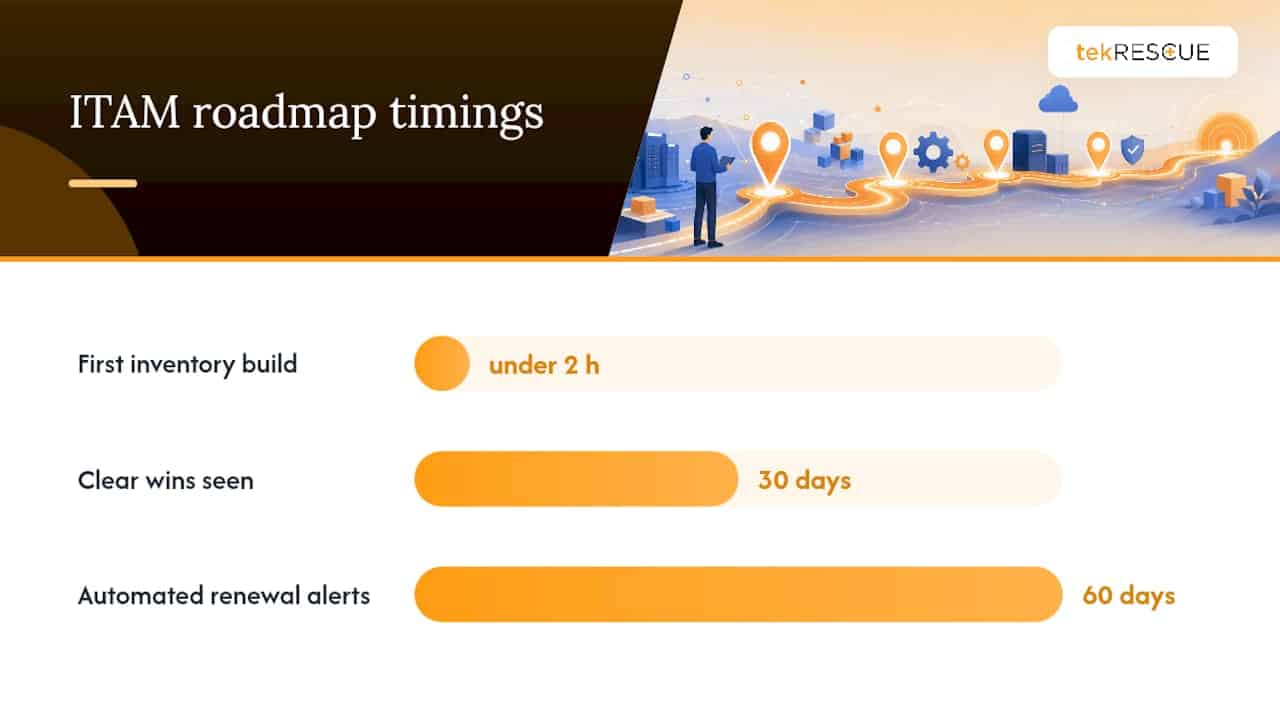
- Name one owner and build the first inventory in an afternoon. Export existing hardware and software records from finance and procurement systems as a starting CSV, then reconcile it against a quick network scan. Most SMBs can get a usable first draft built in under two hours using tools they already have.
- Pick a tool that matches your size, not your ambitions. A spreadsheet with disciplined governance beats an underused enterprise platform. Only move to dedicated software once manual tracking becomes the bottleneck, not before.
- Set governance basics immediately: a named owner per asset category, a monthly reconciliation check, and automated renewal alerts 60 days before any major license or warranty expires.
- Layer in automation once the manual process is stable. Discovery scans and SSO audits are worth automating; the reconciliation decisions on flagged exceptions are worth keeping manual until you trust the data feeding them.
Pro Tip: *Import your existing finance records before you buy any new software.
tekRESCUE typically phases ITAM engagements the same way: a scoped discovery pass on the highest-risk systems first, a governance layer with named owners and reconciliation cadence second, and integration with existing security and compliance tooling last. Clients tend to see the clearest wins in the first 30 days, when shadow subscriptions and orphaned access get identified and cut. For businesses managing regulated data, that same process ties directly into HIPAA compliance requirements that already demand device accountability.
Common ITAM Pitfalls and How to Fix Them
The same four failure modes show up in nearly every organization that lets asset management slide.
- No lifecycle ownership. When purchasing decisions happen in five different departments with no central approval step, the register never catches up. Fix it by requiring one approval gate before any purchase, regardless of budget size.
- Shadow IT and unmanaged SaaS. Employees sign up for tools with a company card and nobody in IT ever hears about it. Fix it with a quarterly card-charge audit against your subscription list.
- Stale records at retirement. Devices get pulled from service but never marked retired, and sanitization never gets documented. Fix it by making the disposal checklist, including a signed sanitization record, a mandatory step before an asset tag gets closed out.
- No reconciliation cadence. The register was accurate on launch day and has drifted ever since. Fix it with a standing monthly reconciliation meeting, even if it is fifteen minutes long.
Change Management and Governance in ITAM Programs
ITAM programs fail more often from governance neglect than from bad tooling. A platform can only be as accurate as the process feeding it, and that process needs rules about who can change what, and when.
Every meaningful change to an asset, a reassignment, a decommission, a license tier change, should go through a lightweight approval step rather than a direct database edit. This does not need to be bureaucratic. A single approver per asset category who reviews changes weekly catches most of the errors that would otherwise sit unnoticed for months.
Governance also means defining who owns the register itself. Without a named data owner, accountability for accuracy diffuses across the whole IT team, and diffused accountability is functionally the same as no accountability. The owner does not need to perform every reconciliation personally, but they do need to be the person who answers for the numbers when finance or an auditor asks a hard question.
Version control matters too, even in a modest ITAM setup. Keeping a change log, who updated a record, when, and why, turns “the register looks wrong” into a two-minute investigation instead of a guessing game. Aligning this structure with the ISO/IEC 19770 family of standards gives smaller programs a recognized framework to grow into rather than reinventing governance rules from scratch.
Change management is not the exciting part of ITAM. It is the part that determines whether the register anyone built six months ago is still worth trusting today.
Publisher Perspective: How tekRESCUE Approaches ITAM for SMBs
Most ITAM failures we see at tekRESCUE trace back to governance, not technology. A business buys a decent tracking tool, populates it once, and never assigns anyone to keep it honest. The tool was never the problem.
Our approach starts with the same discovery and reconciliation practices outlined here, scoped to whatever carries the most compliance or security risk first. That mirrors how tekRESCUE structures managed IT and HIPAA compliance engagements for clients across industries that cannot afford a bad audit. If your register has not been checked in six months, that is worth fixing before you buy anything new.
— Randy Bryan
How tekRESCUE Can Help With IT Asset Management
tekRESCUE gives SMBs a faster path to an accurate asset register than building the governance structure alone, especially for businesses juggling HIPAA or PCI DSS obligations on top of day-to-day IT demands. Our managed IT services cover the discovery, reconciliation, and compliance documentation this guide walks through, without requiring you to hire a dedicated asset manager or learn a new platform from scratch. We also handle the compliance side directly, mapping device accountability requirements to your existing environment rather than bolting on generic checklists that do not fit your business.
If your current inventory has not been reconciled in months, or you are not sure your sanitization records would hold up under an audit, that is exactly the kind of gap a short discovery review can catch quickly. Reach out to scope a starting inventory pass and find out what a governed ITAM program would actually look like for your team.
Sources
- NIST SP 1800-5C: IT Asset Management How-To Guide (NCCoE)
- HIPAA device and media accountability / PCI DSS inventory note
- IT Asset Management for Small Businesses — IT Trackr
- Streamlining ITAM for SMBs: checklist (Syncritech)
FAQ
What Is the Difference Between ITAM and Inventory Management?
Inventory management tracks what assets exist and where they are located. ITAM adds ownership, cost, contract, compliance, and lifecycle status on top of that basic inventory.
How Often Should You Reconcile Your Asset Register?
High-volatility assets like laptops and SaaS accounts need weekly reconciliation, while stable infrastructure can tolerate monthly checks, with unresolved discrepancies escalated after five business days.
What Fields Should Every Hardware Asset Record Include?
At minimum: serial number, purchase and warranty dates, assigned custodian, physical location, and current lifecycle status.
Do Small Businesses Need Dedicated ITAM Software?
Not necessarily. A well-governed spreadsheet with a named owner and a monthly reconciliation habit often outperforms an underused enterprise platform for smaller teams.
How Does ITAM Support HIPAA and PCI DSS Compliance?
Both frameworks require documented device inventories and accountability records, and tekRESCUE’s compliance-focused managed IT services build that evidence directly into ongoing asset tracking.
Recommended
Table of Contents