
Dark Web Monitoring Alerts: 7 Steps Small Businesses Must Take
Dark web monitoring continuously scans underground sources for your leaked credentials, employee logins, and sensitive business data, then alerts you the moment something surfaces so you can act before criminals do. It cannot remove stolen data or undo a breach. For individuals and small businesses, the smart first move is a free domain check, followed by paid continuous monitoring if you handle regulated data or have employees reusing passwords across accounts.
TL;DR:
- Dark web monitoring detects exposed credentials in real-time but cannot delete data once it is circulating among criminals.
- Alerts should include specific details like which employee or customer account, when the breach occurred, and whether the credentials are still active.
- It is most critical for businesses handling regulated data, using vendor portals, or with employees reusing passwords across accounts.
- Starting with free checks like Have I Been Pwned helps assess risk before investing in paid continuous monitoring with analyst support.
- An effective incident response involves immediate password changes, session invalidation, multi-factor authentication, and detailed logging after receiving an alert.
Table of Contents
Table of Contents
- What Dark Web Monitoring Is and Why It Matters
- How Dark Web Monitoring Works: Collection, Matching, Alerting
- Who Needs Dark Web Monitoring and When to Prioritize It
- Free Checks vs Paid Continuous Monitoring: Where to Start
- What to Do When You Get a Dark Web Alert: The Incident Checklist
- How to Choose a Dark Web Monitoring Vendor: Criteria and Red Flags
- Legal and Privacy Considerations When Using Dark Web Monitoring Services
- An Editorial Take on What Small Businesses Get Wrong Here
- Where tekrescue Fits Into Your Monitoring and Security Plan
- Sources
- FAQ
What Dark Web Monitoring Is and Why It Matters
Dark web monitoring is an early-warning system, not a cleanup crew. It scans criminal marketplaces, breach dumps, and stolen-data forums for evidence that your credentials, customer records, or company domain have been exposed, then sends an alert. Small-business guides are consistent on this point: monitoring finds leaked credentials fast so you can act, but it does not and cannot remove leaked data once it’s already circulating among criminals.
That distinction matters because most business owners assume the opposite. They picture a service that scrubs their information off the internet. It doesn’t work that way. What it does instead is buy you time, the one resource you don’t have once an attacker already has a working password.
Consider two common scenarios. A vendor you use for payroll processing gets breached, and your employees’ work emails and passwords end up in that dump six months before you’d otherwise find out. Or an employee’s home computer gets infected with malware that silently harvests every password saved in their browser, including the one they reused for your accounting software. In both cases, the leak happens somewhere you have zero visibility. Monitoring is how you find out anyway.
Speed and context are what separate a useful alert from noise. Knowing that “an employee credential appeared on a dark web forum” is far less actionable than knowing which employee, which platform, when it appeared, and whether the password is still active. That context is what turns a monitoring subscription from a checkbox into a real defense layer.
- Alerts you to leaked employee or customer credentials before they’re used
- Flags exposure from third-party breaches you had no control over
- Surfaces stolen session data, API keys, and payment card numbers tied to your business
- Gives you a window to reset passwords before an account takeover happens
How Dark Web Monitoring Works: Collection, Matching, Alerting
The process runs on three stages, and understanding them helps you judge whether a vendor’s claims hold up.
- Collection. Automated crawlers and human analysts pull data from breach dumps, infostealer logs, criminal marketplaces, and paste sites where stolen data gets dumped or sold. Some vendors also monitor closed forums that require reputation or invitation to access, which is where the freshest, highest-value data tends to circulate.
- Matching. Collected data gets checked against your monitored assets, typically your domain, employee emails, and any credentials you’ve registered. Matching relies on techniques like hashed credential comparison (so the service isn’t storing your actual passwords), metadata analysis, and domain-wide scanning that flags any address ending in your company’s domain, even ones you didn’t know existed.
- Alerting. A match doesn’t automatically become an alert. Reputable services run it through confidence scoring and often a human analyst review before flagging it, because raw dark web data is messy, duplicated, and frequently recycled from years-old breaches. Microsoft Defender’s monitoring documentation describes this workflow, including how alerts present the exposed asset type and offer restoration guidance once a match is confirmed.
Pro Tip: Ask any vendor you’re evaluating whether their alerts include a timestamp for when the data was actually collected, not just when it was matched to your account. A “new” alert about a breach from four years ago is very different from one about last week’s infostealer log.
The gap between raw data collection and a useful alert is where the real value lives. Anyone can scrape a paste site. Turning that scrape into “this specific employee’s password was compromised, here’s when, act now” takes matching logic and, usually, a human in the loop.
Who Needs Dark Web Monitoring and When to Prioritize It
Not every business needs the same level of monitoring, but a few risk indicators should push it up your priority list immediately.
- Employees reuse passwords across personal and work accounts (this is the single biggest driver of account takeover)
- You use vendor or client portals that store login credentials externally
- You handle regulated data: health records, financial account numbers, Social Security numbers, or legal case files
- You’ve never run a credential exposure check on your company domain
Certain industries carry structurally higher risk. Healthcare providers handling protected health information, financial firms and CPA offices managing account access, legal practices holding privileged client data, and ecommerce operations processing payment cards all sit higher on the target list simply because a single stolen credential can expose regulated or high-value data.
Before you spend a dollar on monitoring, get your baseline controls in place. Multi-factor authentication and a password manager stop the majority of account takeovers even after a credential leaks, because a stolen password alone isn’t enough to get in. Monitoring without those baseline controls is like installing a smoke detector in a house with no fire extinguisher.
Free Checks vs Paid Continuous Monitoring: Where to Start
Start free. Services like Have I Been Pwned let you run a one-off check on any email address at no cost, and several vendors offer free domain-level monitoring that alerts you when a new breach involving your company domain surfaces. Guides on this topic consistently recommend running that free check first, then deciding whether your risk profile justifies a paid upgrade.
Paid continuous monitoring adds three things a free check can’t:
- Fresher data, particularly from infostealer logs that update daily rather than breach databases that update in batches
- Analyst context and confidence scoring instead of raw unfiltered matches
- Remediation support, meaning guidance or direct help when an alert requires a password reset, account lockdown, or deeper investigation
Consumer identity theft products often bundle basic dark web scanning as one feature among many, but business-grade services differ meaningfully in source freshness and the level of analyst support behind each alert. If you’re a solo operator with minimal exposure, the free tier probably covers you. If you manage employee accounts, vendor access, or regulated client data, the cost of paid monitoring is small next to the cost of a single undetected account takeover.
What to Do When You Get a Dark Web Alert: The Incident Checklist
An alert is only useful if you act on it in the right order. Here’s the sequence practitioner guides consistently recommend:
- Identify the exact account. Confirm which email, username, or system the alert refers to before touching anything else.
- Change the password immediately, using a unique, strong password, not a variation of the old one.
- Force sign-out of all active sessions tied to that account so a stolen session token gets invalidated along with the password.
- Enable or verify multi-factor authentication on the account if it isn’t already active.
- Check access logs for the account covering the period since the credential was likely exposed, looking for logins from unfamiliar locations or devices.
- Search for lateral movement. If the compromised account had access to shared drives, admin panels, or other systems, check whether those were touched.
- Review admin-level access specifically. A compromised admin credential is a different order of severity than a standard employee login.
Pro Tip: Keep a written incident log every time you work through this checklist, even for what looks like a minor, contained exposure. If a pattern of repeated exposures shows up later, that log is what tells you whether you’re dealing with bad luck or a systemic problem, like an employee reusing the same weak password everywhere.
Escalate immediately if you see unexplained access from unfamiliar IP addresses, any sign of financial fraud tied to the account, or evidence that regulated data (health records, financial account numbers, client PII) was exposed. At that point you’re likely in formal incident response territory, and walking through what a real cyber incident looks like can help you understand what steps come next and when to bring in outside help.
How to Choose a Dark Web Monitoring Vendor: Criteria and Red Flags
Vendor claims in this space are notoriously inflated, so evaluate against concrete criteria rather than marketing copy. Practitioner guidance on implementing monitoring points to five factors that actually separate a useful service from an expensive alert firehose.
| Evaluation criterion | What to ask during a proof of concept |
|---|---|
| Source coverage | Which forums, marketplaces, and log types does the service actually crawl, and how often is that list updated? |
| Timeliness | What’s the average lag between data appearing on a source and an alert reaching you? |
| True-positive rate | Of the alerts generated in a test period, how many represent genuinely new, actionable exposure? |
| Analyst support | Is there a human reviewing matches before they become alerts, or is it fully automated? |
| Integration | Does it plug into your existing identity or security tooling, or does it require a separate dashboard nobody checks? |
Run a short proof of concept before signing anything longer than a month. Vendor volume of alerts means nothing without a high true-positive rate attached to it, since a service that floods you with recycled old-breach noise trains your team to ignore every alert, including the real ones.
Watch for two specific red flags. First, any vendor that claims it can “remove” your data from the dark web is overstating what’s technically possible. Second, be wary of vendors that won’t explain their sourcing in concrete terms. If a sales rep can’t tell you whether they’re pulling from infostealer logs, static breach databases, or both, you have no way to judge how fresh or relevant their alerts actually are.
Legal and Privacy Considerations When Using Dark Web Monitoring Services
Using a dark web monitoring service is legal, and so is accessing the dark web itself. Legal guidance is clear that merely accessing Tor or dark web sites isn’t a crime in the United States; prosecution targets specific illegal acts committed there, not the act of browsing or scanning it. Monitoring vendors and their crawlers operate within that same principle, observing and cataloging exposed data rather than participating in criminal transactions.
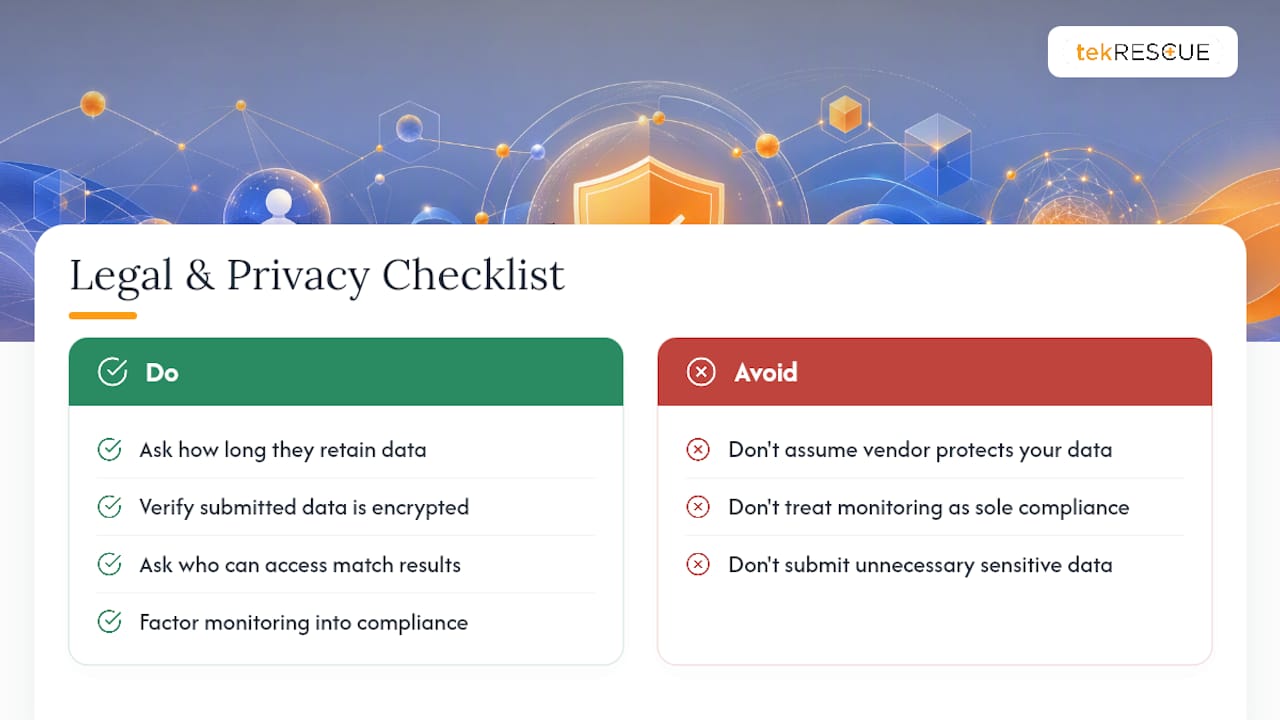
Privacy considerations sit on your side of the relationship, not the vendor’s legal exposure. When you sign up for a monitoring service, you’re typically handing over a list of email addresses, employee names, and sometimes partial credential data so the service can match against what it collects. Ask any vendor how long they retain that submitted data, whether they encrypt it, and who at the company can access match results. A service that’s careless with the data you give it to protect the data you’re worried about losing is a contradiction worth flagging.
If your business handles regulated data, HIPAA-covered health records or client financial information, for instance, factor monitoring into your broader compliance posture rather than treating it as a standalone tool. A breach involving that data can carry separate regulatory notification obligations regardless of whether monitoring caught it early or not.
An Editorial Take on What Small Businesses Get Wrong Here
Most small business owners treat dark web monitoring as a silver bullet, and that’s the wrong mental model entirely. It’s a smoke detector, not a fire suppression system. The businesses that get real value from it are the ones that already have multi-factor authentication and password managers in place, because for them, an alert triggers a fast, contained response instead of a scramble.
The businesses that get burned are the ones that buy monitoring, get an alert, and then discover they have no incident process, no idea who owns the response, and admin accounts with no MFA enabled. The alert did its job. The business didn’t have the infrastructure to act on it.
If you’re evaluating monitoring as your first cybersecurity investment, reconsider the order. A risk assessment that identifies where your actual exposure sits, followed by baseline controls, then monitoring layered on top, will protect you far more than monitoring purchased in isolation. tekRESCUE builds that sequence into how we approach cybersecurity engagements with small business clients, because an alert without a response plan behind it is just an anxious email.
— Randy Bryan
Where tekrescue Fits Into Your Monitoring and Security Plan
tekrescue is the alternative to piecing together security tools on your own: instead of subscribing to a monitoring service, hoping you interpret the alerts correctly, and improvising a response when one comes in, you get a team that builds monitoring into a full cybersecurity and compliance strategy from the start. That matters most for healthcare practices needing HIPAA-aligned protection, CPA firms handling client financial data, and any small business that can’t afford a guessing game when an alert says an employee credential just surfaced on a criminal forum.
tekrescue’s cybersecurity and managed IT services cover the pieces that make monitoring actually useful: baseline controls like MFA and password management, a documented incident response process, and ongoing support so a 2 AM alert doesn’t sit unread until Monday morning. Organizations serious about protecting executive identities and brand exposure online can also benefit from outreach and identity protection tools like Deeplead, which pair well with a monitoring strategy.
If you’re ready to move past a free scan and build a real security posture, contact a qualified cybersecurity provider for a scoped risk assessment and find out exactly where your business stands.
Sources
Dark web monitoring services typically track a mix of the following:
- Dark web monitoring in Microsoft Defender FAQ
- Dark Web Monitoring for Small Business: What It Is and Do You Need It?
- What Is Dark Web Monitoring? A Small Business Guide
Sources include Tor hidden services, paste sites like those used to dump stolen credential lists, combolists (large compiled files of username and password pairs), closed criminal forums, and public breach databases. Vendor guidance on implementing monitoring points out that source coverage varies enormously between providers, which is why two services can scan the “same” dark web and produce very different results.
No vendor covers everything. The dark web is fragmented across thousands of forums and marketplaces, many short-lived or invitation-only, and coverage gaps are the norm rather than the exception. Small businesses commonly discover that exposed credentials sitting in infostealer logs go undetected for months if a vendor’s crawlers simply never touched that particular forum. False positives are the other recurring headache: old breach databases resurface, get repackaged, and trigger alerts for credentials that were already reset years ago.
FAQ
Is It Illegal to Access the Dark Web in the US?
No. Accessing the dark web through Tor or similar tools is legal in the United States; law enforcement prosecutes specific illegal activity conducted there, not the act of access itself.
Can the Dark Web Be Monitored?
Yes. Monitoring services and enterprise security platforms like Microsoft Defender scan breach dumps, infostealer logs, forums, and marketplaces to detect exposed credentials and data, though no service covers every corner of the dark web.
Should I Turn On Dark Web Monitoring?
If you handle regulated data, manage employee credentials, or use vendor portals, yes, since monitoring gives you an early warning that lets you reset compromised credentials before they’re used. Pair it with multi-factor authentication and a password manager for it to matter.
Is Dark Web Monitoring Free?
Basic checks are free, including one-off email lookups and some domain-level monitoring, but paid continuous monitoring adds fresher infostealer data, analyst review, and remediation support that free tools don’t include.
Recommended
Table of Contents