
AI Change Management: A Practical Plan for Small Businesses
AI change management is the work of getting your people, your processes and your data ready for a new AI tool before you switch it on, then keeping all three aligned after launch. The software is the easy part. If you run a business, here is the uncomfortable truth: most failed AI projects do not fail because the model was weak. They fail because nobody defined the problem, nobody trained the staff, and nobody asked where the company’s data was going.
This guide is written for owners and administrators of small and mid-sized businesses. It covers the steps that matter, the security and compliance risks that most change plans skip, and how to measure whether any of it is working.
Table of Contents
TL;DR
- Start with one narrow, measurable business problem, not a tool. Buyer’s remorse comes from committing before the problem is defined.
- Treat staff as participants. Tell them what the AI will and will not do, train them by role, and write down the rules.
- Vet every AI tool for security and data privacy before rollout. Many third-party AI apps have never been security evaluated.
- Be skeptical of vendor claims. Ask for evidence, and pilot before you buy at scale.
- Measure outcomes such as hours saved or errors avoided, then review on a schedule, because AI tools can drift.
Table of Contents
- What AI change management actually is
- Where small businesses stand
- A five-step plan that fits a small team
- The security step most change plans skip
- Judging vendor claims
- Measuring whether it worked
- Our perspective
- Getting help with the rollout
- Common mistakes to avoid
- FAQ
- Sources
What AI change management actually is
Traditional change management helps people move from one way of working to another. AI adds three complications.
First, the tool changes over time. NIST notes that AI tools can improve as they ingest new data, but can also perform poorly if conditions change too quickly. A rollout is never finished the way a new accounting package is finished.
Second, the tool touches data. Every prompt, uploaded file and connected inbox is a potential exposure. That makes AI change management a security project as much as a people project.
Third, employees have real questions about their jobs. Ignoring those questions does not make them go away. It pushes AI use underground, where staff paste client data into personal accounts with no oversight.
Where small businesses stand
The gap between hype and daily use is wide. According to the U.S. Small Business Administration’s Office of Advocacy, about 8.8 percent of small businesses used AI as of September 2025, up from 6.3 percent earlier that year. Nearly 82 percent of businesses with fewer than five employees said AI was not applicable to their operations.
The same research shows where small firms lag larger ones most: training staff, hiring vendors or consultants to integrate AI, and changing data collection and management practices. Those are all change management activities. The tool purchase is not where small businesses fall behind. The preparation is.
That is also an opening. A small company can move faster than a large one, because fewer people have to agree and the owner can see the whole workflow.
A five-step plan that fits a small team
Big consulting frameworks run to five phases or more, from strategy through value realization. For a company with 5 to 100 employees, the same logic compresses into five practical steps.
Step 1: Define one problem in plain numbers
NIST’s implementation guidance describes a common trap: businesses commit to an AI solution before defining the problem, then regret it. Successful implementers start with a focused problem, such as reducing downtime, and confirm they have the data and network to support it first.
Write one sentence: “We want to cut [task] from [current time] to [target time] without increasing errors.” Good candidates are first-draft customer replies, invoice and document intake, scheduling, or internal knowledge lookups. If you want ideas, our guide to five workflows small businesses can automate walks through examples, and AI document processing covers one of the most common starting points.
Step 2: Tell people the truth early
NIST’s guidance calls for a culture of trust that includes everyone from management to line workers, with positive but realistic expectations about how AI tools will augment their work. Realistic is the key word. Do not promise that nobody’s role will change. Do not hint at layoffs you have not planned either.
Say three things in the first meeting:
- What problem you are solving and why now.
- What the tool will do and what stays with a human.
- How staff can raise concerns, and who answers them.
Then ask for volunteers. The people closest to the work know which steps are tedious and which are risky. They make your best pilot group.
Step 3: Set the rules before the tool arrives
An AI policy does not need to be long. It needs to be specific and enforceable: which tools are approved, which data classes are never entered, who reviews output before it reaches a client. We lay out a short format in our piece on an enforceable AI policy for employees, aligned with NIST and EEOC guidance.
Pair the policy with training. The HHS 405(d) program recommends educating the team that makes AI plans on the types of AI technology, their advantages and their risks, and training all staff, and vendors where needed. Role-based sessions work better than one all-hands lecture: front-desk staff need different examples than bookkeepers.
Step 4: Pilot small, with a stop condition
Run the pilot with a handful of people for a fixed window. Our own write-up on AI pilots for small business uses a 90-day frame. Decide in advance what result counts as success and what result means you stop. A pilot with no exit criteria is just a purchase with extra steps.
Keep a simple log during the pilot: time per task before and after, errors caught by reviewers, questions staff asked, and any case where the tool produced something wrong or sensitive. That log becomes your evidence for scaling or walking away.
Step 5: Monitor, retrain and revisit
Because AI tools can degrade when conditions change, schedule a review every quarter. Check output quality, re-confirm what data the tool can reach, and refresh training when features change. Vendors add capabilities constantly, and a feature that was off at launch may be on after an update.
The security step most change plans skip
Most change management content talks about communication and training, and stops there. For a business that holds client records, financial data or patient information, that leaves the largest risk unmanaged.
The HHS 405(d) program warns that neglecting cybersecurity while adopting AI creates ethical problems and substantial financial risk, because unauthorized access or poisoned data can damage the trust between providers and patients. It also points out that many third-party AI applications have never undergone a security evaluation, so privacy and security should be assessed when you select a tool, not afterward.
Before any rollout, answer these questions in writing:
- Where does the data go? Is it stored, logged or used to train the vendor’s models?
- Who can see it? Which accounts, integrations and vendor staff have access?
- What can the tool reach? An assistant connected to your whole mailbox or file share can expose far more than the task requires.
- What happens in an incident? Who is called, and how fast can access be cut off?
For a deeper walk-through, read our guide on implementing workplace AI without exposing confidential business data and our overview of managing the cybersecurity vulnerabilities of AI.
Government guidance points the same way. A joint CISA guidance document updated in January 2026 on AI in operational technology emphasizes four principles: understand AI risks, assess the business case for using AI, establish governance and assurance frameworks, and embed safety and security practices into AI-enabled systems. It was written for operational technology, but those four principles translate well to an office environment: know the risk, justify the use, assign ownership, build in security.
If you handle protected health information, HIPAA obligations apply to AI tools exactly as they apply to any other system that touches patient data. Do not let a pilot become a compliance violation.
Judging vendor claims
Change fatigue sets in fast when a tool promises a lot and delivers little. Two public sources are worth knowing.
The U.S. Government Accountability Office reviewed AI agents and found their efficacy is often overstated. In its September 2025 spotlight, even high-performing agents could autonomously complete only about 30 percent of software development tasks. That figure is about coding, not every business task, but it is a useful reminder to test claims in your own workflow.
The Federal Trade Commission also acts against inflated AI marketing. In a January 2025 order, a company was required to pay $193,000 over claims that its AI service could perform legal services like a human lawyer. If you advertise your own use of AI to customers, the same standard applies to you: do not claim what you cannot substantiate.
A short vendor checklist helps:
| Question | Why it matters |
|---|---|
| Can you show results from a business like ours? | Demos are not outcomes. |
| What data do you retain, and for how long? | Retention drives your exposure. |
| Has the product had a security review? | Many third-party AI apps have not. |
| Can we export our data and leave? | Lock-in turns a pilot into a commitment. |
| What does a human still need to check? | Defines your review step. |
Measuring whether it worked
Count outcomes, not logins. Four measures cover most small business pilots:
- Time saved per task, measured against a baseline you recorded before the pilot.
- Error or rework rate, because faster and wrong is a net loss.
- Staff confidence, from a two-question survey before and after.
- Incidents, meaning any case of sensitive data entered into an unapproved tool or output sent without review.
If you are automating customer service, our list of five KPIs to set before automating support gives specific numbers to track.
Our perspective
We work with small and mid-sized businesses on IT management, cybersecurity and compliance, and that shapes how we see AI adoption. We do not see it as a software decision. We see it as a change to your attack surface.
Every AI tool you add is a new place where company data can leak, and every employee experimenting on their own is a new account you cannot see. That is why we put security review at the start of the change plan, not at the end. Compliance obligations such as HIPAA and the FTC Safeguards Rule do not pause because a tool is new and exciting.
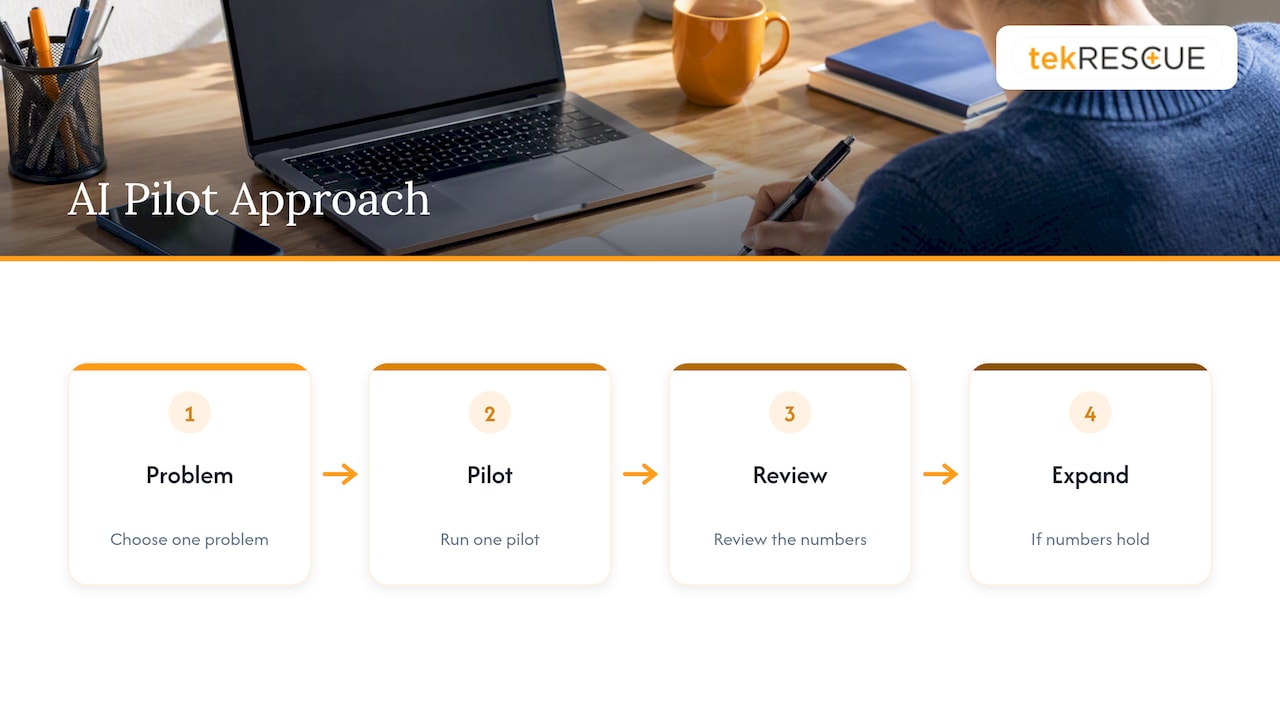
We also think owners should resist the pressure to move everywhere at once. One problem, one pilot, one review. If the numbers hold, expand. If they do not, you spent a quarter and learned something, not a year and a budget line.
AI can level the field for small companies, and our view on that is in AI and competitive advantage. It only does so for the businesses that adopt it with their eyes open.
— Randy Bryan
Getting help with the rollout
If you would rather not build the plan alone, our Strategic AI Consulting helps small and mid-sized businesses choose use cases, set guardrails and move from idea to pilot. Because we also run cybersecurity and risk assessment services and managed IT for businesses across the Austin, San Marcos, New Braunfels and Kyle area, the security review and the rollout can happen together.
Common mistakes to avoid
- Buying first, defining later. The tool becomes a solution in search of a problem.
- Skipping training for non-technical staff. The people who handle the most client data often get the least guidance.
- Banning AI outright. Staff keep using it, just out of sight. A clear approved path beats a ban nobody follows.
- Letting one enthusiast run everything. Assign an owner, but keep a second person responsible for security and review.
- Never revisiting. Tools, features and risks change. A quarterly review is cheap.
One more point on timing. NIST says its AI Risk Management Framework version 1.0 is being revised as part of the White House AI Action Plan, so check for updates when you refresh your policy.
FAQ
What is AI change management?
It is the structured process of preparing people, workflows, data and policies for AI so a new tool is adopted safely and used well. It covers communication, training, security review, piloting and ongoing monitoring. The goal is a measurable business result, not simply a deployed tool.
How do I build an AI adoption strategy for a small business?
Pick one specific problem, write down your baseline numbers, choose a tool after a security and privacy review, and pilot it with a small group for a fixed period. Set success and stop criteria in advance. Expand only when the pilot log supports it.
How do I get employees on board with AI?
Explain the problem and what the tool will and will not do, be honest about how roles may change, and train by role. Invite volunteers into the pilot, and give people a clear way to raise concerns. Trust built early costs far less than resistance later.
Is AI adoption a security risk?
It can be. The HHS 405(d) program notes that many third-party AI applications have not been security evaluated, and that unauthorized access or poisoned data can undermine trust. If you handle patient or financial data, speak with your IT or compliance provider before any rollout.
Sources
- SBA Office of Advocacy: AI in Business, Small Firms Closing In
- NIST: Artificial Intelligence, Key Considerations and Effective Implementation Strategies
- HHS 405(d) Post, July 2024
- CISA: Principles for the Secure Integration of AI in Operational Technology
- GAO: Science & Tech Spotlight, AI Agents
- FTC: DoNotPay final consent letters
- NIST: AI Risk Management Framework
Recommended
Table of Contents