
Data Retention Policy: What to Keep, How Long, and How
A data retention policy is a written rule set that says what data your business keeps, how long it keeps it, where it lives, and how it is destroyed when the clock runs out. If you run a small business, it does two jobs at once. It keeps you compliant with the laws that require certain records. It also shrinks the pile of sensitive data an attacker can steal.
Here is the uncomfortable truth: most small businesses keep everything forever, and nobody decided that. Old client files, scanned IDs, former employee records and retired laptops sit around because deleting feels risky. In practice, the data you do not need is the data that hurts you most after a breach.
Table of Contents
TL;DR
- A retention policy lists each type of data, the period you keep it, the reason, and the destruction method.
- Periods come from law and contracts, not preference. The IRS, HIPAA, state medical boards and the SEC each set different clocks.
- Keep only what you need. Data you no longer hold cannot be stolen or pulled into a lawsuit.
- Deleting is not destroying. Use overwriting, purging or physical destruction, and document it.
- A policy nobody follows is worse than none. Assign an owner, train staff, and review it every year.
Table of Contents
- What a data retention policy actually contains
- How long to keep business data: the clocks that apply to you
- Why keeping everything is a liability
- Build your retention schedule in five steps
- Make people follow it
- Perspective: where we see retention policies fail
- Get help turning the policy into practice
- FAQ
- Sources
What a data retention policy actually contains
Strip away the templates and a working policy has six parts.
- Scope. Which systems, devices, paper files and cloud accounts are covered.
- A data inventory. Where each type of information lives. The FTC’s guide for business starts with this step: take stock of the personal information in your files and on your computers.
- A retention schedule. Each record type, its retention period, and the legal or business reason.
- Storage and access rules. Who can see retained data, and how it is protected while you hold it.
- Destruction procedures. The exact method for each medium, and who signs off.
- Ownership and review. A named person, a yearly review, and an employee acknowledgment.
The FTC’s second principle is to scale down: keep only what you need for your business. That single idea should shape every line of your schedule.
Retention, backup and archiving are different things
Owners often blur these. Retention is the rule about how long. A backup is a copy you can restore after an outage or ransomware attack. An archive is older data moved to cheaper storage for later reference. Your backups obey your retention policy too. If a backup tape holds customer records from 2014, those records are still in your possession.
And test your restores. The IRS small-practice security guide, Publication 5708, makes the point that if you cannot reliably restore data in a mock disaster scenario, your backup strategy has failed.
How long to keep business data: the clocks that apply to you
There is no single US retention law. Federal agencies, states and contracts each set their own periods, and your policy has to follow the longest one that applies to a given record. Below are the ones small businesses ask about most. Confirm the details for your situation with your attorney or CPA before you finalize a schedule.
| Record type | Typical minimum | Source of the rule |
|---|---|---|
| Records supporting a tax return | Three years from filing in most cases | IRS |
| Employment tax records | At least four years | IRS |
| HIPAA policies, procedures and required documentation | Six years from creation or last effective date | HHS |
| Patient medical records (Texas physicians) | At least seven years from last treatment | Texas Medical Board |
| Audit workpapers for SEC-registered issuers | Seven years after the audit or review | SEC |
That table is a starting point, not a legal opinion. Each row deserves a closer look.
Tax and payroll records
The IRS says how long to keep a document depends on the action, expense or event it records, and it generally suggests three years. Employment tax records should be kept for at least four years. Some records run longer, such as those tied to property you still own. Ask your CPA to confirm the periods for your entity type before you write them in.
Health records and HIPAA documentation
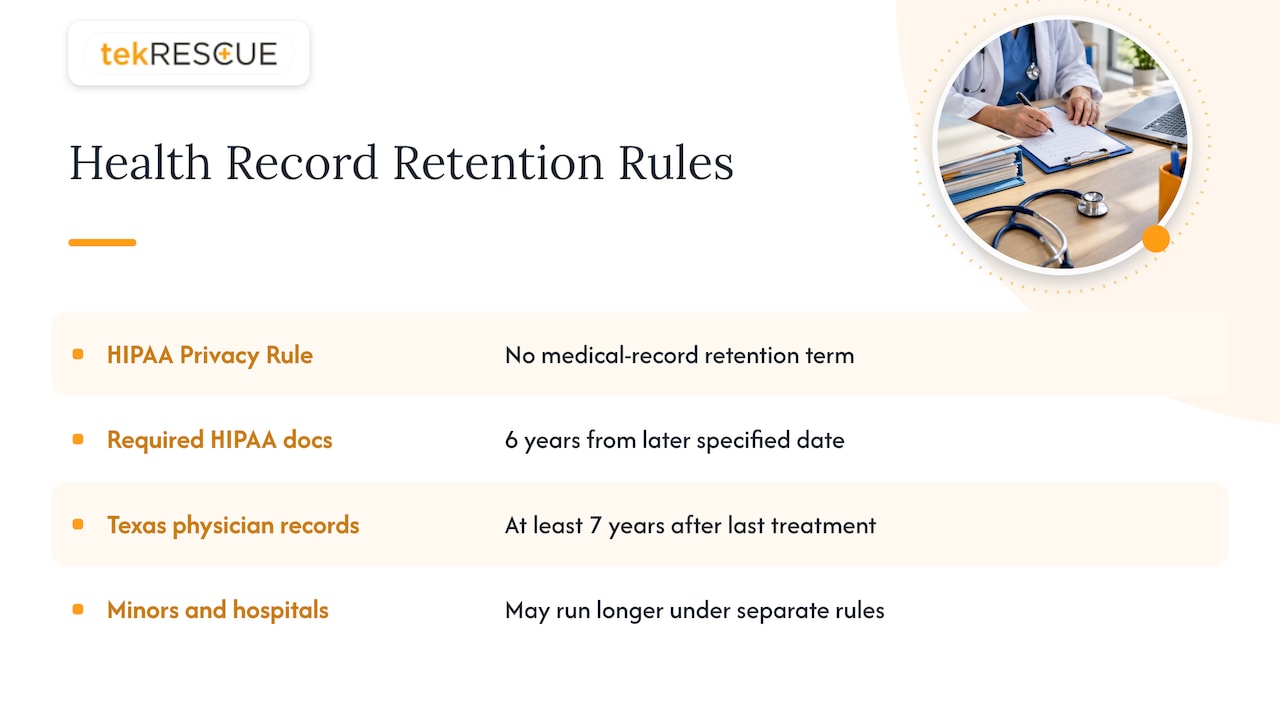
This is where the most confusion lives. HHS says plainly that the HIPAA Privacy Rule does not include medical record retention requirements. State law governs how long you keep the chart itself.
What HIPAA does require is that covered entities keep their required documentation, such as privacy policies, procedures and notices, for six years from creation or from the date last in effect, whichever is later. The Security Rule’s documentation standard, 45 CFR 164.316, sits alongside it. For Texas physicians, the Texas Medical Board says records must be kept at least seven years from the last treatment. Records for minors and for hospitals can run longer under separate rules, so check with your licensing board or healthcare attorney.
While you hold any of this, it must stay protected with administrative, technical and physical safeguards. Our guide to PHI encryption for small practices covers the technical side, and our piece on becoming a HIPAA compliant facility covers the broader program.
Accounting firms and SEC-related records
Firms that audit or review issuers face a longer clock. Under Section 802 of the Sarbanes-Oxley Act, the SEC adopted a rule that accounting firms retain certain audit and review records for seven years. That covers workpapers and electronic records that support the auditor’s conclusions. If you handle electronic records at that level, it helps to understand which audit trail fields compliance teams must capture, because retained data is only useful if you can show who touched it and when.
If your firm is a CPA practice that handles customer financial data, retention also ties into the FTC Safeguards Rule. We explain that in The FTC Safeguards Rule: Is Your CPA Firm Compliant?
What about the seven-year rule?
People search for “the 7 year retention policy” because seven years shows up in several places: Texas physician records and SEC audit records, for example. It is not a universal US rule. Some records need three years, some four, some six, some far longer. Applying seven years to everything is a lazy default that keeps more data than you need.
Why keeping everything is a liability
Many owners fear that destroying old records will bring penalties. The risk usually runs the other way. Data held past its useful life adds storage cost, expands the scope of any audit, and becomes discoverable if you are ever sued. In a breach, every extra record is another person you may have to notify.
The FTC puts it simply: if you have no legitimate business need for sensitive information, do not keep it. Information that no longer exists on your systems cannot be stolen from them.
We see this pattern in the field. A business gets hit, and the painful discovery is not the attack itself. It is learning that the attacker walked off with ten years of customer data nobody had touched in eight. Our incident response work often starts with the question “what did they reach?”, and an honest retention schedule shrinks that answer.
Build your retention schedule in five steps
1. Inventory your data
List every place information lives: file servers, cloud storage, email, your accounting platform, your CRM, paper cabinets, employee laptops, phones and backups. Do not forget the odd spots. The FTC’s guidance flags printers, copiers with internal drives and USB sticks as places personal information hides and later walks out the door.
2. Classify what you find
Sort data into a few simple tiers: regulated (health, financial, payment), confidential (contracts, HR, customer lists) and general business records. Three tiers are enough for a small company. More than that and nobody follows it.
3. Assign a period and a reason to each record type
Write the period next to the legal or contractual source. A sample entry reads: “Payroll registers: four years after the tax due date, per IRS guidance.” If you cannot name a reason, the default should be shorter, not longer. Check client contracts too, since some require you to return or delete data when an engagement ends.
4. Choose a destruction method per medium
This step decides whether the policy protects you or only looks good in a binder.
- Paper: cross-cut shredding or a certified shredding vendor.
- Hard drives and SSDs: clearing, purging or physical destruction, following the categories in NIST SP 800-88 media sanitization guidance as summarized in NIST’s small business guide.
- Printers, copiers and phones: wipe or destroy the storage before resale, return or recycling.
- Cloud data: delete it in the platform, then confirm it is gone from backups and from any synced devices.
Clicking delete or emptying the trash does not destroy anything. Forensic tools can recover that data. NIST’s small business guide also notes that businesses often replace equipment without ever clearing the storage inside, and suggests using certified contractors and, where possible, verifying the destruction yourself.
For businesses subject to the FTC’s disposal requirements for consumer report information, there is a specific rule on proper disposal. The FTC explains it in Disposing of Consumer Report Information? Rule Tells How.
5. Assign an owner and a calendar
Pick one person who runs the policy, whether that is an office manager, an owner or your IT provider. Set a recurring date, once a year at minimum, to purge expired records and update the schedule. Log each destruction: what, when, how, who approved.
Make people follow it
A policy that lives in a folder protects nobody. NIST’s small business guidance says written policies and procedures set expectations and help train new employees. The IRS guide adds that security is a human practice: regular staff meetings on real risks like phishing and safe data destruction keep it alive.
Three habits make the difference:
- Employee acknowledgment. Every person signs that they have read the policy, and you re-collect signatures when it changes.
- Owners follow it too. Staff watch what leadership does. An owner who keeps a personal USB drive of client files undermines every rule.
- Ongoing training. One annual slideshow fades fast. See our approach to continuous security awareness training for SMBs.
Retention also sits inside a wider security plan. If you are drafting that plan now, this overview on why your business needs a cybersecurity plan is a good companion, and our own list of five cybersecurity controls every small business needs shows what should sit around your retained data: access limits, encryption, backups and monitoring.
Perspective: where we see retention policies fail
We work with small and mid-sized businesses across Austin, San Marcos, Kyle and the surrounding Hays County area, including healthcare practices and CPA firms where compliance is not optional. The same failures repeat.
First, the policy is treated as a one-time project. Someone writes it during a compliance push, and it is never opened again. A retention policy is a lifecycle, and the lifecycle needs a calendar.
Second, destruction is assumed rather than verified. A retired server goes to storage, a copier goes back to the leasing company, and nobody asks what is still on the disk. That is the real weak link: your own infrastructure, not an exotic exploit.
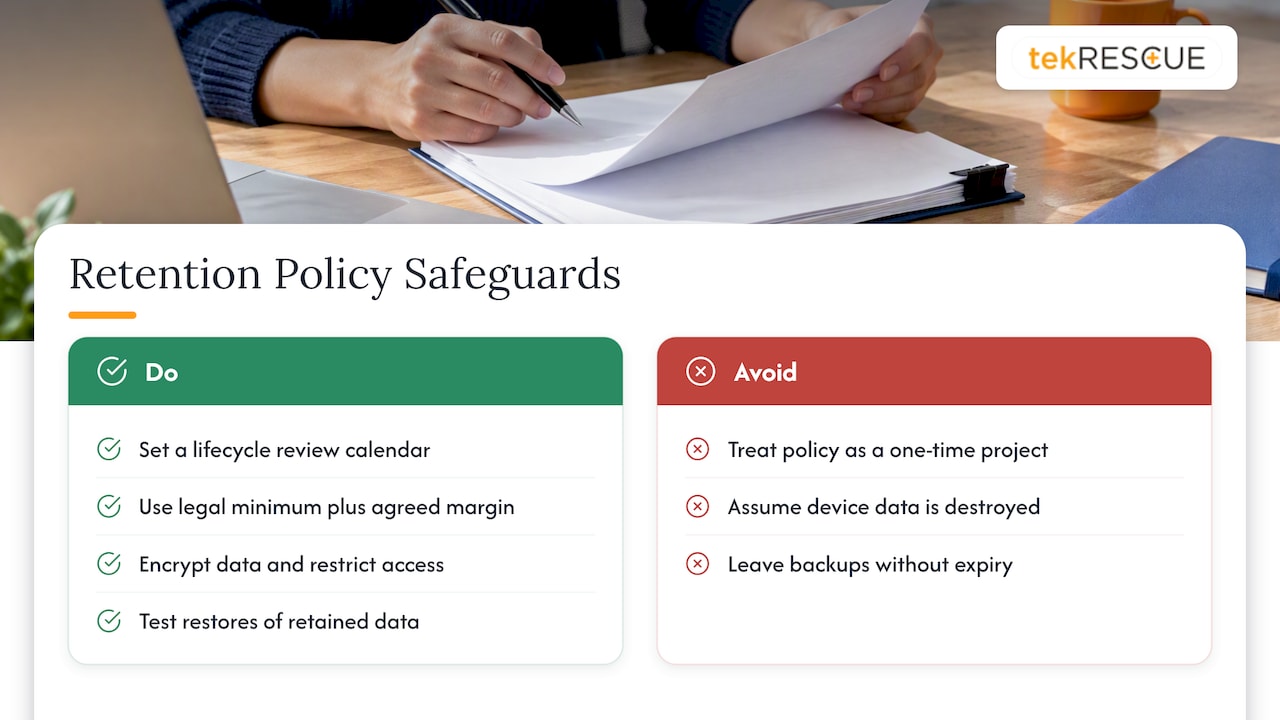
Third, backups are forgotten. A business purges its file server and leaves seven years of copies on a backup that never expires.
Our advice is blunt. Shorten your periods to the legal minimum plus a sensible margin your attorney or CPA agrees with. Inventory before you write. Pair the policy with encryption and access control so the data you must keep is hard to reach. And test that you can restore what you intend to keep.
— Randy Bryan
Get help turning the policy into practice
Writing the schedule is the easy part. Finding every copy of the data, wiping the old equipment and proving it was done is where owners lose time. tekRESCUE provides managed IT services and cybersecurity and risk assessment for small and mid-sized businesses, plus HIPAA compliance support for healthcare providers. If you want a second set of eyes on where your data lives and what should be destroyed, talk to us.
FAQ
What is a good data retention policy?
A good policy is short enough that your staff will read it and specific enough to act on. It lists each record type, a retention period tied to a legal or business reason, a destruction method, and a named owner. It is reviewed at least yearly and acknowledged in writing by every employee.
Does the US have data retention laws?
The US has no single national retention law. Requirements come from many sources: the IRS for tax and payroll records, HIPAA for health privacy documentation, state boards for medical charts, and the SEC for certain audit records. Your policy should follow the longest period that applies to each record type.
How long should I keep business data?
It depends on the record. The IRS generally suggests three years for tax-supporting records and at least four for employment tax records, while HIPAA documentation requires six years. Texas physicians must keep patient records at least seven years from last treatment. Confirm your periods with your CPA or attorney.
Is deleting a file the same as destroying it?
No. Emptying the trash leaves data recoverable with forensic tools. Real destruction means overwriting or purging the media following NIST guidance, or physically destroying the drive, and keeping a record that you did it.
Sources
- Protecting Personal Information: A Guide for Business (FTC)
- Disposing of Consumer Report Information? Rule Tells How (FTC)
- Publication 5708 (IRS)
- Taking care of business: recordkeeping for small businesses (IRS)
- Summary of the HIPAA Privacy Rule (HHS)
- Does the HIPAA Privacy Rule require covered entities to keep medical records? (HHS)
- 45 CFR 164.316 (Legal Information Institute)
- Patient Information and Medical Records (Texas Medical Board)
- Retention of Records Relevant to Audits and Reviews (SEC)
- Small Business Information Security: the Fundamentals (NIST)
Recommended
Table of Contents