
IT Business Continuity: A Practical Plan for Small Business
IT business continuity is the part of your continuity plan that keeps email, files, line-of-business software, phones and your website working, or gets them back fast, when something breaks. If you run a small or midsize business, the uncomfortable truth is that your systems will fail at some point. The only open question is whether you decided in advance what happens next.
This guide covers what IT continuity includes, how it differs from disaster recovery, what HIPAA and the FTC require, and a plan you can build in a few weeks.
Table of Contents
TL;DR
- IT business continuity is the technical half of keeping the whole business running. Disaster recovery is one piece of it.
- Ransomware goes after backups first. Keep at least one copy offline, encrypted and tested.
- HIPAA covered entities must maintain a data backup plan, a disaster recovery plan and an emergency mode operation plan. Financial firms under the FTC Safeguards Rule need a written incident response plan.
- A plan nobody has tested is a guess. Run a restore drill at least once a year and after any major change.
- Start with a one-page list of critical systems, how long each can be down, and who owns each.
Table of Contents
- What IT business continuity actually covers
- Why the stakes are high for small firms
- Business continuity vs. disaster recovery
- Two numbers that shape every decision
- What regulators expect
- Build the plan in seven steps
- Keep it alive
- Perspective: the real weak link is usually the plan, not the tool
- Where we can help
- FAQ
- Sources
What IT business continuity actually covers
Business continuity is an organization’s ability to keep critical operations running during and after a disruption. The IT side asks a narrower question: which systems do those operations depend on, and what is our plan when one disappears?
For a typical small business in Central Texas, that list looks like this:
- Identity and access: your email accounts, single sign-on and multi-factor authentication (MFA).
- Data: file shares, cloud storage, databases, patient or client records.
- Applications: practice management, accounting, CRM, point of sale.
- Network: the firewall, switches, Wi-Fi and your internet connection.
- Communications: phones, email and the website customers use to find you.
- People and process: who decides, who calls the vendor, who tells customers.
That last item matters more than most owners expect. CISA and FEMA guidance for small businesses treats continuity as part of core operations, not a separate IT task. Technical backups are necessary. Staff training, documented communication plans and supply chain thinking finish the job.
Why the stakes are high for small firms
Small businesses rarely have a second office, a spare team or a large cash cushion. A FEMA-published study on small business continuity planning cites an estimate that 75% of small businesses without a formal continuity plan fail within three years of a significant disaster. The same document notes that a computer outage lasting more than 10 days often means a business never fully recovers financially, with 50% of such firms out of business within five years.
Treat those as estimates drawn from older reports, not as a forecast for your company. The direction is still clear: the longer your systems are down, the harder it is to come back.
The causes are mixed. Ransomware, a failed server, an accidental deletion, a flooded office, a power failure during a Texas storm. CISA’s small business backup guidance lists cyberattacks, system failures, accidental deletion and natural disasters as ways data loss can halt operations. Your plan has to work whichever one shows up.
Business continuity vs. disaster recovery
People use the two terms interchangeably. They are not the same thing.
| Business continuity (BC) | Disaster recovery (DR) | |
|---|---|---|
| Goal | Keep critical operations running through a disruption | Restore IT systems and data after an outage |
| Timing | Proactive, before and during | Reactive, after the failure |
| Scope | Whole organization: people, process, technology | Infrastructure, applications and data |
| Typical output | Continuity plan, communication plan, roles | Backup schedule, recovery procedures, restore tests |
That split follows the AT&T business continuity white paper: BC maintains critical operations and limits risk, while DR restores specific systems after something has already gone wrong.
A practical way to remember it: disaster recovery gets your server back. Business continuity decides how your front desk checks in patients, takes payments and answers the phone while the server is down.
Two numbers that shape every decision
Before you buy a tool or write a procedure, set two targets for each critical system.
- Recovery time objective (RTO): how long the system can be down before the business is hurt.
- Recovery point objective (RPO): how much recent data you can afford to lose, measured in time.
An appointment scheduler might need an RTO of a few hours and an RPO of one hour. An archive of closed projects might tolerate days. Writing these down is how you stop spending the same money on everything. These are planning concepts rather than regulatory requirements, so set them from your own revenue and obligations.
What regulators expect
If you handle regulated data, continuity is not optional.
Healthcare and HIPAA
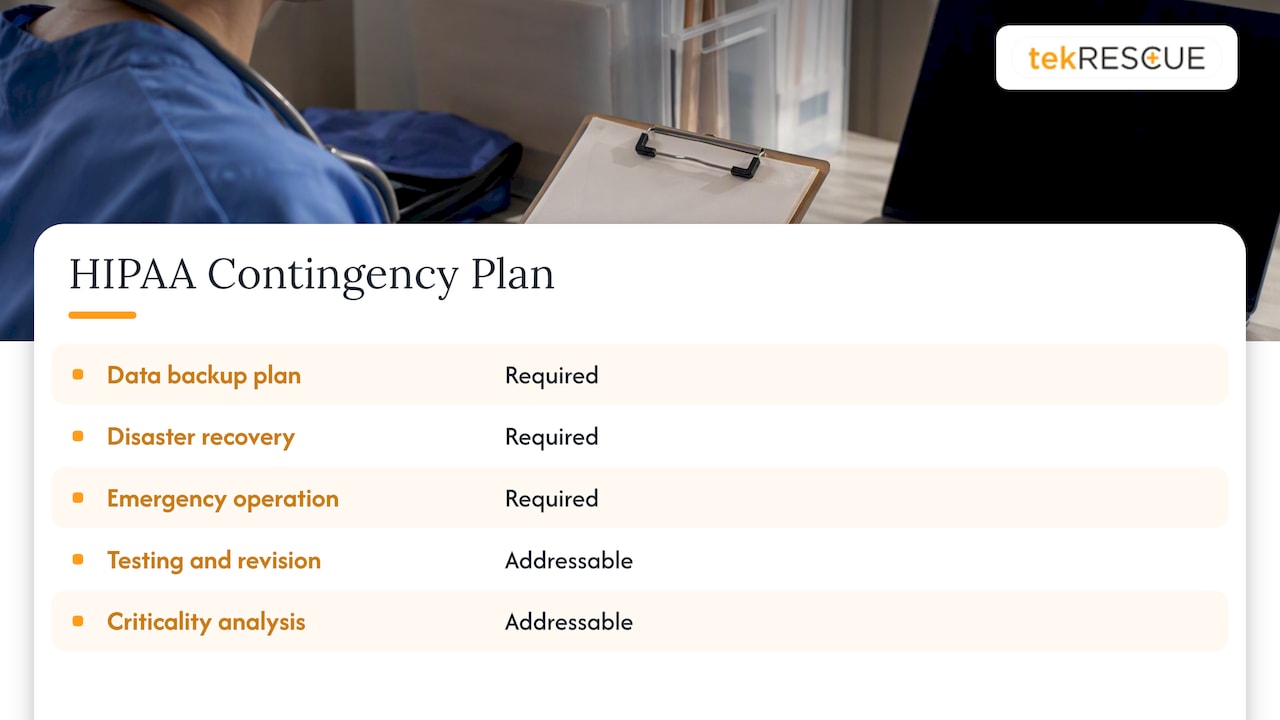
The HIPAA Security Rule requires covered entities to maintain a contingency plan. According to the HHS administrative safeguards guidance, that means a data backup plan, a disaster recovery plan and an emergency mode operation plan. Testing and revision procedures and a data criticality analysis are listed as addressable specifications.
HHS is also direct about ransomware. In its ransomware and HIPAA fact sheet, it says the Security Rule requires covered entities and business associates to have policies and procedures that help them respond to and recover from an attack. If you run a clinic or a dental office, a tested recovery plan is a compliance item, not a nice extra. For a closer look at the first hours of an incident, see our HIPAA incident response plan guide for small providers.
Financial and tax firms
The FTC’s Safeguards Rule guidance says covered financial institutions must keep a written incident response plan with clear roles, responsibilities and decision-making authority, plus a process to revise the plan after an event. CPA firms and other tax preparers should read it closely. Whether the rule applies to you depends on your business, so confirm with your attorney or compliance advisor.
Build the plan in seven steps
1. Inventory what you depend on
List every system, who uses it and where its data lives. Include the ones people forget: the cloud accounts someone set up years ago, the domain registrar login, the vendor that hosts your website. If only one person knows the password, write that down as a risk.
2. Rank by business impact
For each system, ask what stops if it is gone for an hour, a day, a week. Assign an RTO and RPO. Most small businesses end up with three tiers: must run today, can wait a few days, can wait longer.
3. Fix the backups first
Backups are the base of recovery, and attackers know it. CISA’s guidance notes that many ransomware victims had no backups or incomplete ones. Its #StopRansomware guide recommends maintaining offline, encrypted backups of critical data. Ransomware often hunts for online backups so the victim has no path back, which is why one copy should be offline or otherwise unreachable from your main network.
A workable pattern:
- Keep three copies of important data on two kinds of storage, with one off-site.
- Make at least one copy immutable or air-gapped.
- Back up configurations too: firewall settings, server builds, email routing.
- Scheduling a system is not enough. Confirm each backup finishes and can be restored.
4. Lock down access
Outages caused by stolen credentials are continuity failures too. MFA helps, but CISA notes that gaps tend to appear for new hires and people moving to new devices. Audit MFA status on a schedule rather than trusting the original rollout. Our guide to five cybersecurity controls every small business needs covers the basics.
5. Write the response runbook
When something fails at 6:40 on a Monday morning, nobody should be improvising. The runbook names who declares an incident, who calls the IT provider, who talks to customers, who contacts your insurer and your attorney, and how the team communicates if email is down. A good incident response checklist helps you keep roles, logging and follow-up actions in one place. We also publish an incident response plan template you can adapt.
6. Plan for workarounds
Decide what the business does by hand. Paper intake forms, a mobile hotspot for payments, a call-forwarding rule, a shared emergency contact sheet printed and kept off the network. These small things keep revenue moving while IT works.
7. Test, then test again
Run a tabletop exercise where the team talks through a ransomware scenario. Then do a real restore of a file, a database and a full system to a clean machine. Time it. If it takes nine hours and your RTO is four, you found a gap before an attacker did. Our piece on regular backup and continuity drills walks through how to structure them.
Keep it alive
The FTC guidance stresses that security programs must change as technology, threats and organizations change. The same applies to continuity. Review your plan when you:
- Hire or lose key staff.
- Change a vendor, cloud platform or core application.
- Move offices or add a location.
- Finish a drill and learn something.
- Experience any real incident, however small.
After each event, hold a short post-mortem and update the document. That is also what the Safeguards Rule expects of covered firms.
Perspective: the real weak link is usually the plan, not the tool
We see the same pattern again and again. A business buys backup software, checks the box and assumes it is covered. Then ransomware encrypts the connected backup, or the one person who knew the restore procedure is on vacation, or nobody ever tried a restore.
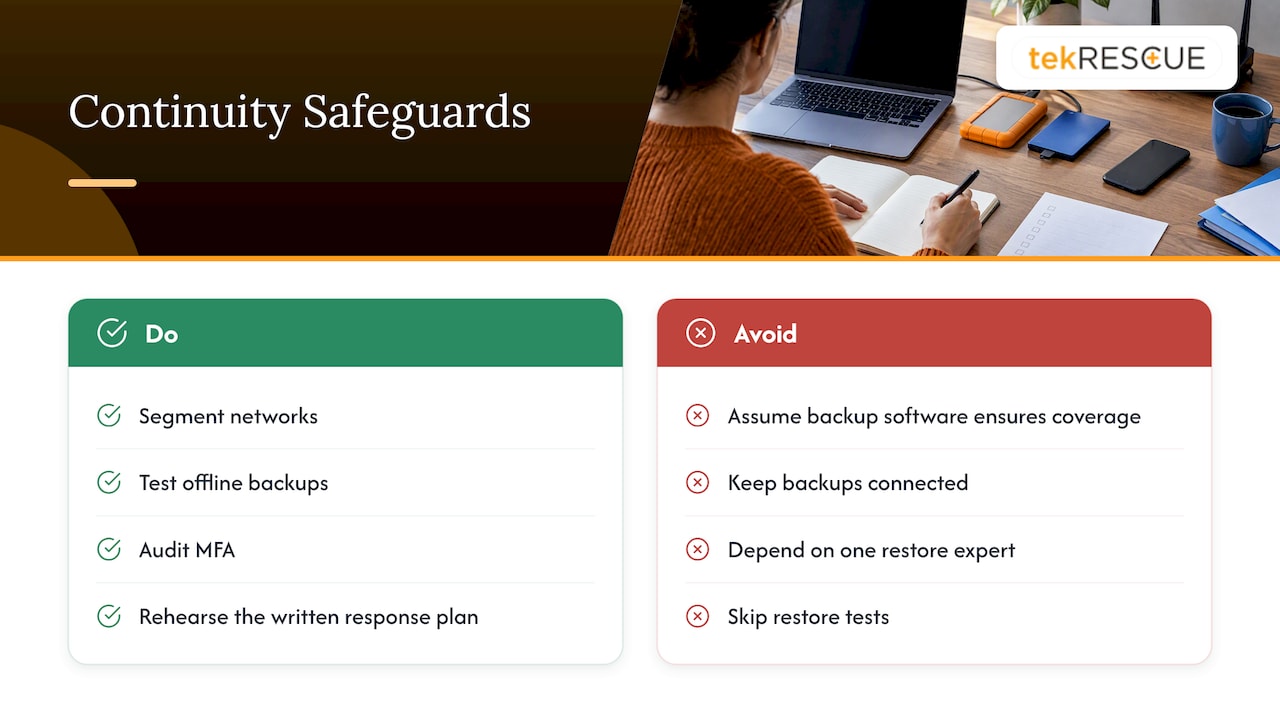
Threats now move at machine speed, and attackers increasingly blend into normal activity and move laterally through a network before anyone notices. That is why we push clients toward layered controls: segmented networks, tested offline backups, audited MFA and a written response plan that people have actually rehearsed. Tools are one layer. Rehearsal is another.
Our work with small and midsize businesses and healthcare providers, including HIPAA and NIST-aligned security and compliance management, taught us that continuity has to be tied to how the business earns money. Start with the revenue-critical systems, protect those well, and expand from there. Do not wait for a perfect plan. A one-page plan you have tested beats a forty-page binder nobody has opened.
— Randy Bryan
Where we can help
If you would rather not carry this alone, our managed IT services cover monitoring, support and cloud-hosted infrastructure for businesses around Austin, San Marcos, Kyle and nearby communities. Our cybersecurity services include risk assessment, and when an attack does land, our incident response team can help you contain it and recover. Not sure where your gaps are? Start with a risk assessment and a restore test.
FAQ
What is the difference between a business continuity plan and a disaster recovery plan?
A business continuity plan covers how the whole organization keeps operating through a disruption, including people, process and technology. A disaster recovery plan is the technical piece that restores systems and data after an outage. You need both, and the recovery plan should be written to support the continuity targets.
Does a small business really need a business continuity plan?
Yes, and often more than a large one, since there is less slack to absorb a long outage. If you handle patient records or financial customer data, specific rules also apply: HIPAA requires contingency planning for covered entities, and the FTC Safeguards Rule requires a written incident response plan for covered financial institutions. Ask your attorney which rules cover you.
How often should we test our backups and continuity plan?
Test restores regularly and run a full exercise at least once a year, plus after major changes such as a new application, vendor or office move. The exact schedule should reflect how much downtime you can tolerate. Document every test and fix what it reveals.
What should be in an IT continuity plan for a small business?
A system inventory, recovery time and recovery point targets, backup and restore procedures, an access and MFA audit routine, a named response team with contact details, communication templates for staff and customers, and manual workarounds. Add a schedule for review and testing so it does not go stale.
Sources
- Small Business Continuity Planning Integrated with Fire Department Pre-Plans (FEMA/USFA)
- Cyber Guidance for Small Businesses (CISA)
- Back Up Business Data (CISA)
- #StopRansomware Guide (CISA)
- HIPAA Security Series #2: Administrative Safeguards (HHS)
- Fact Sheet: Ransomware and HIPAA (HHS)
- FTC Safeguards Rule: What Your Business Needs to Know (FTC)
- Business Continuity white paper (AT&T)
Recommended
Table of Contents