
Google Business Posts: What to Publish and What to Avoid
Google business posts are short updates you publish on your Business Profile. They appear in Search and Maps when someone looks up your business, and Google describes them as a way to share announcements, offers, updates, and event details directly with customers. They are free, they take about ten minutes, and most small businesses either ignore them or use them badly. This guide covers what posts can and cannot do, how to create one, which posts get rejected, and examples you can adapt today.
Table of Contents
TL;DR
- Posts are customer-facing updates on your profile. Treat them as a conversion tool, not a ranking trick.
- Google’s own help documentation frames posts as engagement tools, and an independent audit found limited direct ranking impact. Post for the person deciding whether to call you.
- Skip phone numbers in the post text and use the built-in call button. Regulated industries need extra care.
- Track results in your profile’s performance data: calls, direction requests, website clicks.
- Keep it steady and specific. One useful post beats five filler posts.
Table of Contents
- What Google business posts are, and where people see them
- Do Google business posts help you rank?
- The kinds of posts you can publish
- How to create a Google business post
- Why posts get rejected
- Google business post examples you can adapt
- Writing posts that people act on
- How to tell whether your posts work
- Our perspective
- Get help with your local presence
- FAQ
- Sources
What Google business posts are, and where people see them
A Google business post is a mini announcement attached to your verified Business Profile. When a customer searches your business name or finds you on Maps, your latest posts can show up alongside your hours, reviews, and photos. Google’s help page says that when customers find your business on Search and Maps, they can see your latest posts.
You can see your own posts the same way a customer does. Search your business name on Google, or open your listing in Maps, and look for the updates section on the profile.
One point about vocabulary: you will see “Google My Business posts,” “Google posts,” and “Google Business Profile posts” used interchangeably. They are the same feature under the product’s current name, Google Business Profile. Google describes the profile as a tool for managing your presence across Google, and you need to be verified to get the most from it.
Are posts free? Yes. You do not pay Google to publish them. The cost is your time, or the fee of whoever writes them for you.
Do Google business posts help you rank?
Here is the honest answer, and it is less exciting than what many vendors will tell you.
Google’s documentation treats posts as a way to talk to customers. It does not list them as a ranking lever. An analysis of 50 small business audits found that although posts are widely recommended, their direct effect on local rankings looked limited compared with core profile data such as categories, reviews, and accurate information. That is a small manual audit, not proof either way, but it matches what Google says.
So why bother? Because of what happens after someone finds you. A Google community best-practices guide calls posts a bottom-of-funnel tool, since the people viewing your profile are already looking for you and close to a decision. A clear offer, an upcoming event, or a seasonal notice can be the nudge that turns a look into a call.
There is also a visibility angle that is changing. Search Engine Land’s coverage of local search points to Google showing recent posts from linked social accounts more prominently on mobile, and the same piece cites 2025 research indicating that businesses in the top three of the local pack had a 25.9% chance of being mentioned by Gemini. Treat that as an early signal, not a settled rule. The practical takeaway: a complete, active, accurate profile is the foundation, and posts are one visible part of it.
If your profile fundamentals are not in place yet, start there. Our guide on mapping every Google Business Profile field to Google’s three pillars walks through them, and the local SEO checklist shows what to tackle first.
The kinds of posts you can publish
Google’s help page groups posts around four jobs: announcements, offers, updates, and events. In practice, that gives you a few formats to rotate through.
| Format | Best for | What to include |
|---|---|---|
| Update | News, new hours, new services, project highlights | One photo, two or three sentences, one button |
| Offer | Seasonal discounts, first-visit deals | Clear terms, a start and end, a button to claim it |
| Event | Workshops, open houses, community days | Title, date and time, what to expect |
| Product or service highlight | A single thing you want more people to ask about | A real photo, plain description, a link to the page |
The exact options Google shows can differ by business category and change over time, so open your own dashboard and see what is offered to you rather than trusting any third-party list, including this one.
How to create a Google business post
The steps below follow Google’s own instructions. The interface shifts from time to time, so match the idea rather than the exact button label.
- Sign in to the Google account that manages your profile. Search your business name while signed in and look for the option to add an update, or open the Business Profile manager.
- Choose the post type. Pick update, offer, or event depending on what you are announcing.
- Add a photo or video. Use something real from your business. A stock image reads as stock.
- Write the text. Lead with the most useful sentence. Most readers see only the opening line before deciding to keep going.
- Add a button. Choose the action that matches your goal, such as learning more, calling, or booking.
- Review and publish. Then check the post status. Google reviews posts, and a post can be rejected for policy reasons.
You can edit or delete a post before or after you publish it. If something goes wrong, such as a wrong date on an event, fix it right away.
Some owners now manage their profile conversationally. Google has documented that you can manage your Business Profile with the Gemini web app and view business insights there. That is useful for speed, but you still need to read what goes live under your name.
Why posts get rejected
This is where small businesses lose time. A post vanishes into review, comes back rejected, and nobody explains why.
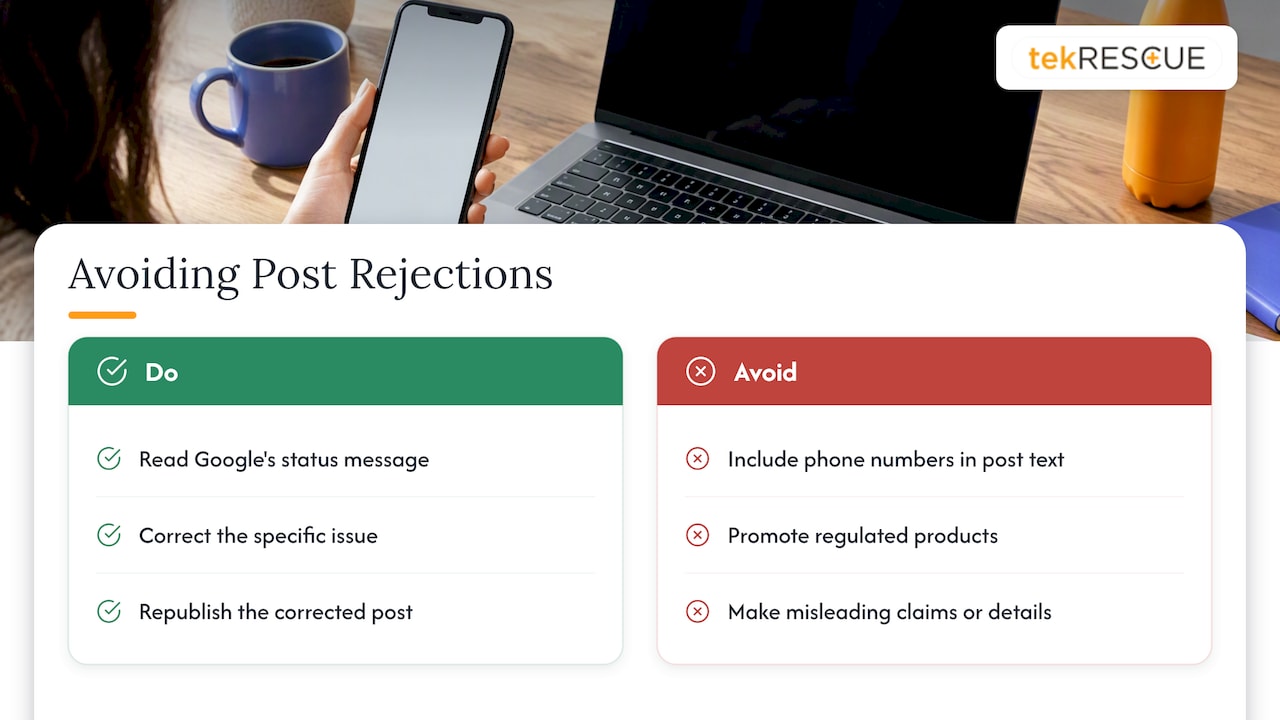
Phone numbers in the text. Google’s posting policies flag them. Instead of typing a number into the description, use the built-in call button, which pulls from your verified profile. If you have been pasting your number into every post, stop.
Regulated content. Google lists regulated categories including financial services, health and medical devices, pharmaceuticals, alcohol, tobacco, gambling, and others. Businesses in those categories can still post, but they should avoid content about the regulated products themselves, which can trigger automatic rejection. If you run a medical practice, write about your office hours, a new provider, or a community event rather than promoting a treatment or device.
Anything misleading. An offer with no real terms, an event with the wrong date, or a claim you cannot back up is a rejection waiting to happen and a trust problem even when it slips through.
If a post is rejected, read Google’s status message, change the specific thing it objects to, and republish. Do not resubmit the same text five times.
A note for healthcare and professional practices
If you handle patient or client information, remember that a public post is public. Never include names, photos of identifiable patients, or details of a case, even with good intentions. For HIPAA-covered practices, marketing content should be reviewed with your compliance process, not after the fact. See our overview of HIPAA compliance for how we approach the wider picture.
Google business post examples you can adapt
These are templates, not real client results. Swap in your details.
A service business announcing capacity
We have two openings for new projects starting next month. Send us a description of what you need and we will reply with next steps. [Button: Learn more]
A seasonal reminder
Heat season is here. If your system has not been serviced this year, book a visit before the busy weeks fill up. [Button: Book]
An event
Free small business workshop: how to get found on Google. Thursday, 6 p.m., at our office. Seats are limited. [Button: Sign up]
A before-and-after project highlight
Finished this week: a full kitchen refresh in Kyle. Here is what changed and how long it took. [Button: See more projects]
A policy or hours notice
Our office closes at noon on Friday. We reopen Monday at 8 a.m. [Button: Get directions]
Notice what these share. Each has one idea, one image, and one button. None stuffs keywords, and none includes a phone number in the body.
Writing posts that people act on
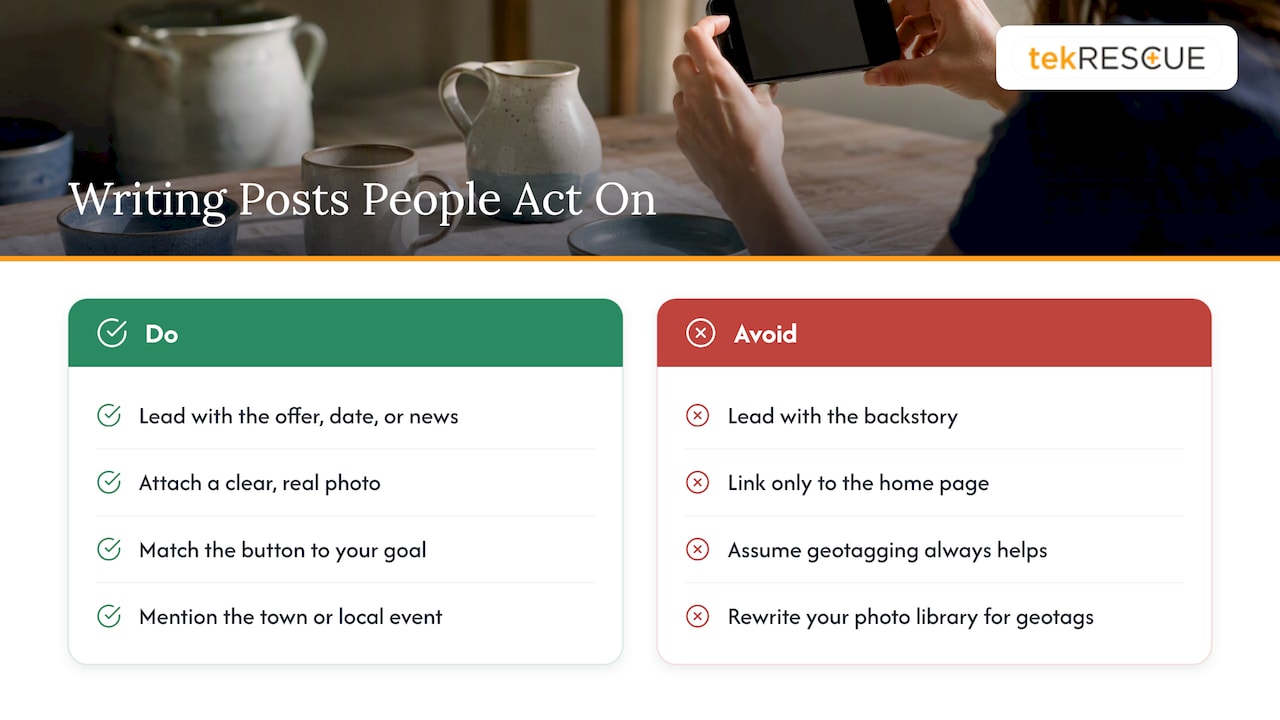
Lead with the useful part. Open with the offer, the date, or the news. Save the backstory for your website.
Use real photos. Google reports that businesses adding photos to their profiles get 42% more direction requests and 35% more website clicks than those without. That statistic concerns photos on the profile in general, not posts specifically, but it is a strong reason to attach a clear image to every post.
Match the button to the goal. If you want calls, use the call button. If you want people to read something, send them to a specific page on your site, not just the home page.
Write for your area. Mention the town, the neighborhood, or the local event when it is true. A post that could belong to any business anywhere is easy to scroll past. If you serve several cities without a storefront, our service area business SEO system covers how to present that on your profile.
Be careful with geotagged images. Some practitioners embed location coordinates in photos to push local rank. A 10-week study found that geotagging seemed to help in proximity-style searches while coinciding with a dip for searches that name a specific town. It is a trade-off, not a free win, so do not rewrite your whole photo library on the strength of a trick.
Keep a rhythm you can sustain. Google does not publish a required posting frequency. Pick something you can keep up, whether that is weekly or twice a month, and stick to it. A profile with a few honest, current posts looks more trustworthy than a burst followed by silence.
How to tell whether your posts work
Do not guess. Google’s performance reporting is available for verified profiles and shows interactions such as calls, direction requests, website clicks, and booking completions. Search query data updates monthly and can take up to five days to appear.
A simple routine:
- Before you start a posting schedule, note your monthly calls, direction requests, and website clicks.
- Post consistently for two to three months.
- Compare. Look at which posts coincided with spikes, but be cautious about cause and effect. Seasonality, reviews, and ads all move those numbers too.
- Keep the formats that drew action and drop the ones that did not.
For website clicks, add tracking parameters to your links so your analytics shows which posts sent visitors. Then look at what those visitors did next. If they land on a slow or confusing page, the post did its job and the website did not. That is a design problem, and our guide to building a site that converts visitors addresses it.
Our perspective
We work with small and mid-sized businesses around Austin, San Marcos, Kyle, and New Braunfels, and the pattern with Google business posts is consistent: owners either think posts are a magic ranking lever or write them off as a waste. Both are wrong.
We look at posts as part of the whole local presence. Your profile data has to be accurate. Your website has to load fast, say what you do, and make the next step obvious. Your reviews need attention. Posts then add a fresh, human signal on top, and they give a person looking at your profile a reason to pick you.
The security side matters too, and it is the part most marketing guides skip. Your Business Profile is an asset tied to a Google account. If that login is weak, shared across staff, or lacks multi-factor authentication, someone else can change your hours, your phone number, or your posts. We treat account hygiene as part of local SEO, because a hijacked profile costs real customers. Review who has access, remove former employees and old agencies, and turn on stronger sign-in protection.
And when you publish, think about what you are exposing. A post that names a client, shows a screen, or hints at a patient is a compliance problem, not a marketing win.
— Randy Bryan
Get help with your local presence
If you would rather not manage your profile, your posts, and the website behind them on your own, our search engine optimization services cover local visibility for businesses in Central Texas. If your concern is account security or protecting sensitive data, see our cybersecurity services. Prices are scoped to each business, so reach out through the site and tell us what you need.
FAQ
Where can I see Google business posts?
Search for the business by name on Google, or open its listing in Maps. The latest posts appear on the Business Profile, alongside photos, reviews, and hours. As the owner, you can also view and manage them from your profile while signed in.
Are Google business posts free?
Yes. Publishing posts through your verified Business Profile costs nothing. Your only expense is the time to write them or the fee of anyone you hire to do it.
Why was my Google business post rejected?
The most common triggers are phone numbers typed into the text and content about regulated products or services. Misleading offers can also cause problems. Check the status message in your profile, fix the specific issue, and republish rather than resubmitting unchanged text.
Do Google business posts improve my ranking?
Google presents posts as a way to engage customers, and an audit of 50 small business profiles found limited direct ranking impact. Their value lies in persuading people who already see your profile to call, visit, or click. Focus first on accurate profile data, reviews, and photos.
Can I edit a post after publishing it?
Yes. Google lets you edit or delete a post before or after it goes live. Fix wrong dates or details as soon as you spot them so customers are not misled.
Sources
- Create & manage posts on your Business Profile, Google Business Profile Help
- Edit or delete your Business Profile posts, Google Business Profile Help
- About Google Business Profile, Google Business Profile Help
- Understand your Business Profile performance & insights, Google Business Profile Help
- Manage your Business Profile with the Gemini web app, Google Business Profile Help
- Google Business Profile Posts Best Practices, Google Business Profile Community
- Do Google Business Profile Posts Drive Local Rankings? Analysis of 50 Small Business Audits, Map Observer
- Google Social Posts, Local Pack & AIO Results, Street Fight
- How geotagging photos affects Google Business Profile rank, Search Engine Land
Recommended
Table of Contents